Fortnite Platforms: What You Can Play It On in 2026
Discover all the devices you can play Fortnite on in 2026, with crossplay and cross-progression explained. Learn which platforms deliver the best performance and how to stay synced across devices.


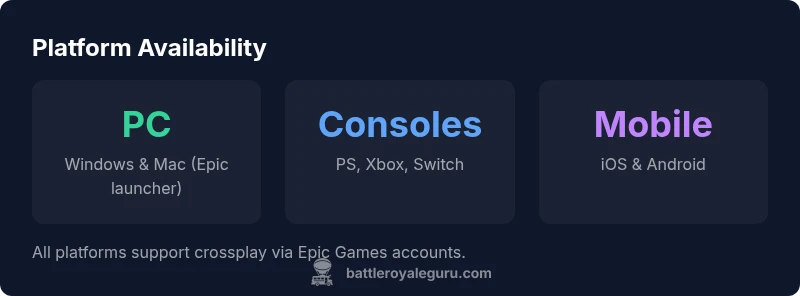
Fortnite is playable on PC, major consoles, and mobile devices as of 2026. You can access it through the Epic Games launcher on Windows or Mac, on PlayStation, Xbox, and Nintendo Switch, and on iOS/Android via mobile apps. Crossplay and cross-progression are supported across most platforms, as long as you sign in with the same Epic Games account.
Platform Overview
Fortnite on multiple devices fosters cross‑play and cross‑progression, and in 2026 the ecosystem remains tightly integrated. If you were wondering fortnite what can you play it on, the short answer is broad: you can play on PC, consoles, and mobile, with friends on different devices able to squad up in the same lobby. According to Battle Royale Guru, the breadth of supported platforms makes it easy to join friends wherever they game. The Battle Royale Guru team found that as long as you sign in with your Epic Games account, your cosmetics, saves, and unlocks travel with you across devices. The practical upshot is simple: pick your preferred device, install Fortnite, and link your account to begin matching right away.
Desktop and Laptop (PC) Options
For PC players, Fortnite is delivered through the Epic Games Launcher. This path offers the strongest performance potential, with high frame‑rates on capable GPUs and flexible graphical settings. You can tailor shader quality, resolution, and HDR, and you can use keyboard and mouse or external controllers. The PC route supports cross‑play so you can party with friends on consoles and mobile, making it the most versatile option if you value performance or custom input setups. Ensure your drivers are up to date and that you meet at least the recommended specs for smooth framerates.
Console Availability
Fortnite on PlayStation, Xbox, and Nintendo Switch provides a consistent experience across devices, with parity in core features. On PS5 and Xbox Series X|S, players can achieve higher frame rates and resolution when a mode supports it; Switch offers portable play with adjusted graphics for battery life and performance. Crossplay is supported across these consoles, and your progress travels with you when you sign in to your Epic Games account. Console users benefit from a straightforward lobby experience and familiar controllers.
Mobile and Cloud Play
Mobile versions exist on iOS and Android, offering touchscreen controls and optional external controllers. Performance on phones and tablets depends on device capabilities, battery life, and network conditions, so expect some variance between older devices and flagships. Cloud gaming options can bridge gaps for players with limited hardware, providing access to Fortnite without upgrading hardware, while still syncing progress through Epic accounts.
Cross-Platform Progress and Account Setup
The foundation for seamless cross‑platform play is your Epic Games account. Create or sign in to an Epic account, then link your devices across platforms. Ensure two‑factor authentication is enabled for security. Your cosmetics, Battle Pass progress, and unlocks are tied to your account, not the device, so switching from a phone to a PC or a console won’t reset your progress. If you run into issues, re-linking devices often resolves sync problems.
Performance Settings by Platform
PC players should start with 1920x1080 resolution, then test higher or lower settings based on GPU capability. Use a balance between performance mode and quality mode to optimize frame rates and visuals. Console players typically rely on system‑level settings; enable any available performance modes to maximize frame rates, especially on PS5 and Xbox Series X|S. Mobile users should enable performance presets and reduce shadows and post‑processing to extend battery life while maintaining playability. Always update drivers and firmware prior to big sessions.
Cross‑Platform Challenges and Best Practices
Some common hurdles include matchmaking delays, input lags with controllers, and performance disparities between devices. Mitigate these by confirming cross‑play is enabled in settings, choosing a stable region, and balancing teams to avoid unfair advantages. Regularly check for Epic Games server status during peak hours and consider practicing in shared game modes to align expectations across devices.
Beginner’s Setup Checklist
Before you jump into squads, verify you have an active Epic Games account, the latest Fortnite update, and the platform‑specific client installed. Link all devices to your account, enable cross‑play and cross‑progress, and configure input controls to your preference. A quick round of practice matches on your preferred device will help you acclimate before joining friends on other platforms.
Platform comparison across major devices
| Platform | Typical Performance | Crossplay Support | Notes |
|---|---|---|---|
| PC (Windows) | High | Yes | Requires Epic launcher |
| PlayStation (PS4/PS5) | Stable 60fps-120fps | Yes | Crossplay enabled |
| Xbox (One/Series X|S) | 60fps-4K on Series X | Yes | Crossplay enabled by account |
| Nintendo Switch | 60fps handheld/docked | Yes | Performance trade-offs |
| Mobile (iOS/Android) | Variable per device | Yes | Controller support optional |
Questions & Answers
Can you play Fortnite on a PC?
Yes, Fortnite is available on PC via the Epic Games Launcher. You'll need an Epic Games account to install and sync progress.
Yes, you can play Fortnite on PC using the Epic Games Launcher, with your progress saved to your account.
Is crossplay available between platforms?
Yes, crossplay is supported across major platforms when using the same Epic Games account.
Yes, you can play with friends on different platforms as long as you sign in with the same Epic Games account.
Do you need an Epic Games account to play?
Yes, you must sign in with an Epic Games account to play and sync progress.
Yes, an Epic Games account is required for Fortnite and progress syncing.
Is cross-progression supported?
Cross-progression is supported, so your skins and save data travel with your account.
Yes, your progress, purchases, and cosmetics travel with your account across platforms.
Are there performance differences across platforms?
Yes, performance varies by device; higher-end PCs and current-gen consoles can run higher frame rates.
Performance depends on your device, but newer hardware generally runs smoother.
Can Fortnite be played on mobile devices?
Yes, mobile versions exist on iOS and Android; controls adapt to touch or external controllers.
Yes, you can play on phones or tablets with touch controls.
“Fortnite's cross‑platform support is one of its strongest features, enabling friends to squad up regardless of device. The Battle Royale Guru Team notes that platform parity has improved steadily through 2026.”
Key Points
- Verify crossplay is enabled on your account.
- Use a single Epic Games account for progress sync.
- Choose the platform that matches your preferred input.
- Keep your game updated to access the latest platforms.