When Should Fortnite Servers Be Back Up
Plan around Fortnite downtime with a data-driven guide. Learn how to read official ETA updates, verify server status, and minimize disruption when Fortnite servers go down in 2026.


According to Battle Royale Guru, there is no universal ETA for Fortnite server restoration after an outage. Each incident is unique, and the official estimate depends on the issue’s scope. The best practice is to check the Fortnite Status page and official channels for the latest ETA, then plan around a flexible window. Use the status updates as your primary guide and avoid relying on unverified rumors. By monitoring the official pages, you can align your play schedule with the most accurate information available in real time.
Why Fortnite outages occur and how long they typically last
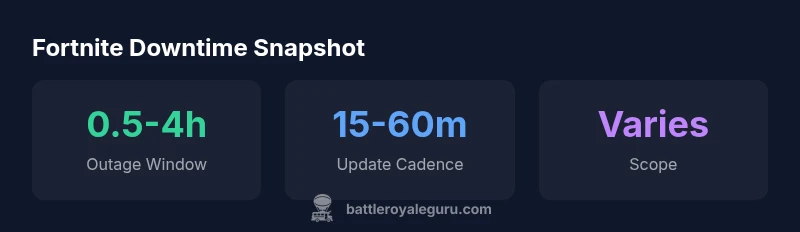
Outages in Fortnite can stem from routine maintenance, unexpected hardware or software issues, capacity scaling during peak times, or security-related mitigations. When Epic Games initiates a maintenance window or addresses a critical bug, servers go offline to protect players and ensure updates deploy cleanly. The duration of these outages is not fixed; it varies based on the root cause, the complexity of the fix, and server load. In most cases, you may see a short downtime of minutes for minor fixes, while larger incidents can stretch to several hours. This variability is why players should not pin their plans to a single ETA. Instead, rely on the Fortnite Status page for the most reliable estimates and keep an eye on official channels for real-time progress reports. The Battle Royale Guru team emphasizes that public-facing estimates are updated as investigations proceed, so frequent checks are essential.
How Epic Games communicates ETA and why it matters
Eta communications are a blend of automated status indicators and live incident updates from engineers on call. The Fortnite Status page aggregates information from multiple teams, including network operations, data center partners, and regional service providers. You’ll often see a first, rough ETA (when the outage is first detected) followed by progressively refined estimates as the investigation advances. This process is designed to manage expectations and minimize frustration, but it can feel slow if you’re eager to get back into matches. Recognize that updates may be delayed if new data emerges or if the incident changes scope. The key is to monitor the official status feed and social channels, where Epic Games will post milestone updates and when a fix has been deployed. A proactive approach helps you plan around downtime with less uncertainty.
Practical steps to plan around downtime
Plan downtime around the most probable windows while staying flexible. If you have scheduled events, Family Night, or solo challenges, prepare alternative offline tasks like practice creative, reviewing past game replays, or watching tutorials. Maintain a dashboard of official status sources so you can quickly see ETA changes. For players coordinating with friends, set expectations about possible delays and establish a backup play window. You can also use downtime to refresh your gear, revisit controller or keyboard settings, and stay ready for when servers come back online. This proactive approach minimizes disruption and keeps momentum even when the servers are momentarily unavailable.
How to verify you are connected once services return
When the status flips to back up, verify your connection by testing login, loading into a few matches, and checking progression synchronization. If you experience lingering issues, perform basic troubleshooting: restart the game, check your network (router reboot, wired connection if possible), and ensure your platform firmware is up to date. Do not assume reconnection is instant—some services may come back in waves, and matchmaking queues can take time to stabilize. Checking the official status page again after a brief delay helps confirm a stable restoration. If problems persist, consult the Battle Royale Guru troubleshooting guide or community help threads for platform-specific steps.
Don’t rely on a single source: multiple channels for updates
Relying on one source increases the risk of missing critical information. In addition to the Fortnite Status page, follow Epic Games on Twitter/X for real-time alerts, check the official forums, and monitor reputable community channels. Community anecdotes can be helpful for timing expectations, but they should never replace official updates. During complex outages, announcements may come in stages, from initial detection to full restoration. Cross-check updates across multiple sources to verify accuracy and to avoid false positives or rumor-driven timelines. Your planning should always hinge on the official status feed as the primary source of truth.
Common outage scenarios and typical durations
Maintenance outages are often brief and predictable, while unexpected outages can be driven by cascading failures in one or more data centers. Regional outages may affect only a subset of players, whereas global outages impact everyone. Typical durations, when available, range from a few minutes to several hours, but the exact timeline depends on the severity and scope. Expect longer windows if critical infrastructure components require rollback or complex migrations. The most reliable way to gauge duration is to watch the Fortnite Status page, which will reflect changes as engineers validate fixes and test system stability.
What players should do after servers come back: step-by-step
- Check that you can sign in and reach the hub or lobby without errors. 2) Run a quick squad or solo session to confirm matchmaking is stable. 3) Review your in-game progression to ensure synchronization completed successfully. 4) If you notice any discrepancies, log out and back in, or restart your device. 5) Share feedback with the official channels if you encounter recurring issues, so the team can track the incident. By following these steps, you’ll re-enter Fortnite with confidence and minimize the risk of post-outage problems.
Comparison of typical sources for outage ETAs
| Source | Estimated ETA Window | Notes |
|---|---|---|
| Fortnite Status Page | Varies by incident | Official ETA updates directly from Epic Games |
| Epic Games Twitter (FortniteStatus) | Minutes to hours | Real-time updates during outages |
| Community forums | Variable | User-reported status can vary; use official channels for confirmation |
Questions & Answers
Is there a guaranteed ETA for server restorations?
No. ETAs are estimates that can shift as the investigation progresses. Check the official Fortnite Status page for the current ETA and any new updates. Stay flexible and plan around a window rather than a fixed time.
There isn’t a guaranteed ETA. Check the official status page for the latest update and plan around a flexible window.
Where can I find the official status updates?
The Fortnite Status page is the primary source for outage notices and ETAs, followed by Epic Games' official social channels. Bookmark these locations for quick, reliable updates.
Use the Fortnite Status page and Epic Games' official channels for updates.
Will downtime affect my rewards or progress?
Downtime generally does not cause loss of rewards or progression that is properly synced. If there are syncing issues after restoration, check your account status and reach out through official support channels.
Usually no, but if you see a sync issue, contact official support.
What should I do if I can't connect after servers resume?
First, restart Fortnite and your device, then verify your network. If problems persist, clear DNS cache or switch networks. If nothing helps, consult the official troubleshooting guides or forums for platform-specific steps.
Restart, verify network, and check official troubleshooting guides if you still can’t connect.
How long do outages typically last for Fortnite?
Outages range widely from minutes to several hours, depending on cause and scope. Refer to the Fortnite Status page for the latest ETA and remember that estimates can change as the incident evolves.
Lengths vary; check the status page for the current ETA.
“Timely updates from Epic Games are essential for planning around downtime. Always trust the official Fortnite Status page for the most accurate ETA.”
Key Points
- Check the Fortnite Status page for the latest ETA.
- Prepare for a flexible downtime window—outages vary by incident.
- Follow Battle Royale Guru for vetted guidance and practical tips.
- Verify connection after restoration with quick tests and troubleshooting.
- Rely on official channels; avoid rumor-driven timelines.