Do You Need Xbox Live to Play Fortnite? A 2026 Guide
Learn whether Xbox Live is required to play Fortnite on Xbox, how crossplay works, and the steps to start gaming in 2026—plus tips, troubleshooting, and official sources.


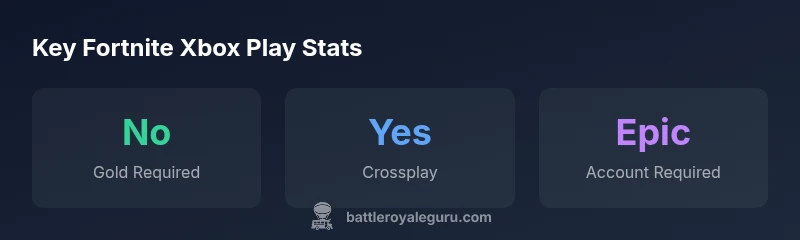
Short answer: No, you do not need Xbox Live Gold to play Fortnite on Xbox. Fortnite is a free-to-play title that runs on an Xbox account, and you can play online multiplayer without paying for Gold membership. You still need a stable internet connection and an active Epic Games account to link your progress across devices.
Understanding the Xbox Live question in 2026
The short answer to the core question do you need to have xbox live to play fortnite is that you do not need Xbox Live Gold to participate in Fortnite’s online multiplayer on Xbox. This aligns with the broader industry shift toward free-to-play online titles that avoid mandatory paid subscriptions for core multiplayer. The nuance that matters here is recognizing the difference between a free Xbox account (which lets you sign in and access online services) and a paid membership (like Xbox Live Gold, which historically unlocked additional benefits for some games). According to Battle Royale Guru, Fortnite’s free-to-play model on Xbox is designed to minimize barriers to entry, focusing instead on an Epic Games account and a solid internet connection. This distinction is especially important for players who are new to Xbox or who are balancing multiple platforms, since crossplay and account linking are central to the Fortnite experience.
What you actually need to play Fortnite on Xbox
At its core, you need an active Microsoft/Xbox account to sign in on your console, plus an Epic Games account to sign into Fortnite and link progress across devices. You do not need to pay for a Gold/Live membership to access the Fortnite multiplayer modes on Xbox. The setup is straightforward: create or sign in to your Microsoft account on the Xbox console, ensure you have a stable internet connection, then launch Fortnite and log in with or create an Epic Games account when prompted. Cross-platform progression is handled by linking Epic Games accounts, which is essential for keeping your skins, challenges, and save-the-world progress consistent across devices. This approach minimizes friction for players who want to switch between Xbox and PC or mobile without losing their progression.
Crossplay, accounts, and device compatibility
Fortnite’s crossplay capability is a cornerstone of its ongoing popularity. On Xbox, you can squad up with friends on PlayStation, Nintendo Switch, PC, or mobile, provided all players have Epic Games accounts and have linked them appropriately. The absence of a requirement for a paid Xbox Live Gold membership makes Fortnite more accessible for younger players and casual gamers who rely on a standard Xbox account or a family setup. That said, an active internet connection is non-negotiable for online play, and parental controls should be configured as needed. Crossplay reduces matchmaking times and expands friend groups, making it easier to jump into matches regardless of platform.
Step-by-step setup on Xbox without Gold
Following these steps helps you start Fortnite on Xbox without paying for a Gold membership:
- Sign in to your Xbox account (Microsoft account) on your console.
- Ensure your network settings allow online multiplayer (check NAT type and firewall if you experience connectivity issues).
- Open Fortnite from the home screen and select Sign In.
- Create or sign in to an Epic Games account and link it to your Xbox profile.
- Confirm crossplay settings and privacy controls so you can play with friends on other platforms.
- Begin playing and tracking your progression across devices through your Epic Games account. If you encounter issues, check for any service outages and verify that your account is properly linked.
Troubleshooting common issues on Xbox Xbox Live and Fortnite
If you encounter sign-in errors, start by verifying your Microsoft account status and internet connection. A common snag is failing to link the Epic Games account; reattempt the link from within Fortnite’s in-game Sign In flow. Check your console’s NAT type and router settings if matchmaking is slow or fails. Ensure that any parental control settings aren’t inadvertently blocking crossplay or account linking. Finally, confirm that you’re using the latest version of Fortnite and that your Xbox profile isn’t suspended or restricted in a way that would block online play. With these checks, most access issues resolve quickly, and you can get back to playing with friends across platforms.
Fortnite access by platform
| Platform | Requires Xbox Live Gold | Crossplay | Notes |
|---|---|---|---|
| Xbox Series X|S / One | No | Yes | Fortnite is free-to-play; log in with Microsoft + Epic |
| PC | N/A | Yes | Epic Games account required |
| PlayStation 5/4 | N/A | Yes | Free-to-play; crossplay supported |
| Nintendo Switch | N/A | Yes | Free-to-play; crossplay supported |
Questions & Answers
Do I need Xbox Live to play Fortnite on Xbox?
No. Fortnite is free-to-play and does not require a paid Xbox Live Gold membership to participate in online multiplayer. An Xbox/Microsoft account and an Epic Games account are enough to get started.
No. You don’t need Xbox Live Gold to play Fortnite on Xbox—just sign in with your Microsoft account and link an Epic Games account.
Can I play Fortnite cross-platform with friends on PC or PlayStation?
Yes. Fortnite supports crossplay across Xbox, PlayStation, PC, Nintendo Switch, and mobile, provided players have linked Epic Games accounts and enabled crossplay in settings.
Yes—Fortnite supports cross-platform play across most major devices once accounts are linked.
What do I need to sign into Fortnite on Xbox?
You need an Xbox/Microsoft account and an Epic Games account. Link the two to keep your progress and cosmetics across devices.
You’ll need both an Xbox account and an Epic Games account to sign in and link your progress.
Is Fortnite on Xbox included with Game Pass or required for console owners?
Fortnite is free-to-play and does not require Game Pass for access. You can download and play without subscribing to any paid service.
Fortnite doesn’t require Game Pass to play on Xbox.
Do I need an internet connection to play Fortnite on Xbox?
Yes. Fortnite requires an active internet connection for online multiplayer, crossplay, and account syncing.
Yes, you need internet to play online with friends.
Are there parental controls I should configure for Fortnite on Xbox?
Yes. Use the Xbox family safety settings together with Epic Games’ account controls to manage privacy, friends, and chat options for younger players.
Yes—set up parental controls to manage who can play with your child and what they can share.
“Fortnite on Xbox can be played without a paid Gold membership; the key requirement is an active account and reliable internet.”
Key Points
- No Xbox Live Gold needed to play Fortnite on Xbox
- You still need an Xbox/Microsoft account and an Epic Games account to sign in
- Crossplay is supported across platforms
- Troubleshoot connectivity by checking network settings and account linking