How to Get Fortnite Crew with Game Pass
Explore whether Game Pass can grant Fortnite Crew and follow a clear, official path to subscribe. Learn steps, tips, and pitfalls to maximize your Fortnite experience in 2026.


You cannot directly redeem Fortnite Crew through Game Pass. Fortnite Crew is a separate Epic Games subscription and must be activated through the Epic Games Store or the in-game store. At the moment, the official path to Fortnite Crew is to subscribe to Fortnite Crew via Epic, and Game Pass does not automatically grant Crew benefits.
What Fortnite Crew Is and How It Differs from Game Pass
Fortnite Crew is a standalone monthly subscription offered by Epic Games that unlocks a rotating bundle of cosmetics, the current Battle Pass, and exclusive perks for your Fortnite account. It is not bundled with or automatically granted by third-party services like Xbox Game Pass or other console subscriptions. For players asking how to get fortnite crew with game pass, the reliable answer is that there is no direct linkage between Game Pass and Fortnite Crew. According to Battle Royale Guru, Fortnite Crew remains a separate purchase tied to your Epic Games account, and benefits travel with that account across supported platforms. If you already hold a Game Pass, you can still play Fortnite, but Crew perks must come from a direct Epic purchase.
In practice, crews are designed to reward ongoing engagement—monthly outfits, V-Bucks credit, and a new Battle Pass tracker each cycle—so the value comes from subscribing through Epic rather than attempting a workaround with Game Pass. This distinction matters because it affects how you manage billing, regional pricing, and cross‑platform access. For players who want a straightforward path, the practical takeaway is: treat Fortnite Crew as an Epic service, and Game Pass as a separate subscription you may keep or cancel independently.
Battle Royale Guru Note: If you’re evaluating whether mixing subscriptions could unlock Crew-like benefits, remember that Crew eligibility relies on Epic’s own system rather than third‑party bundles. This is why many players focus on the official Epic route rather than attempting to blend services.
Is There a Legitimate Way to Get Fortnite Crew with Game Pass?
The short answer is no—there isn’t an official, universally supported method to convert Game Pass into Fortnite Crew benefits or to claim Crew via Game Pass. Epic Games frequently updates its offerings, but there has been no consistent integration announced that links Game Pass billing or entitlements to Fortnite Crew. If you see promotions claiming otherwise, treat them with skepticism and verify on official channels (Epic Games’ site, Fortnite launcher, or the in-game store). Battle Royale Guru consistently recommends sticking to the official path to avoid scams or interrupted access.
That said, there can be occasional, time-limited promotions that involve multiple Epic products or special events. Always check the official Fortnite announcements and your regional Epic Games storefront for any such promotions, and read the terms carefully before subscribing. In the absence of an official tie-in, your best bet remains subscribing to Fortnite Crew directly through Epic.
The Official Path: How to Subscribe to Fortnite Crew
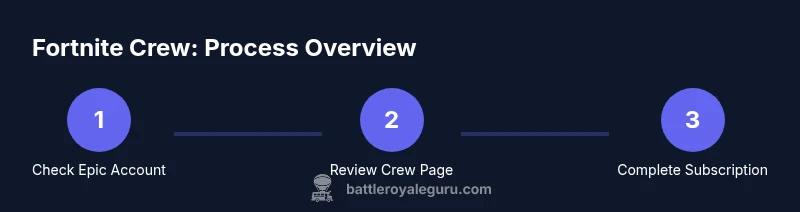
The official method to obtain Fortnite Crew is through Epic Games. This process is platform-agnostic—your Crew benefits follow your Epic account across PC, console, and mobile where Fortnite is supported. Start by signing into your Epic Games account, navigate to the Fortnite Crew page, and review the monthly price and current benefits. If you decide to proceed, confirm the payment method on your Epic account, and you’ll activate a monthly Crew subscription that grants you the current month’s cosmetics, the Battle Pass, and ongoing perks. Game Pass cannot substitute this step, so treat this as the canonical route.
Before subscribing, make sure your account details are up to date and that you are comfortable with monthly renewals. If you use multiple devices, ensure you are signed into the same Epic account to receive consistent Crew benefits. A key practical tip is to enable two-factor authentication on your Epic account to keep your Crew access secure.
Managing Your Fortnite Crew Benefits and Troubleshooting
After subscribing, you’ll want to verify that your Crew benefits are flowing to your account consistently. Check the Locker and the Battle Pass section to confirm the monthly rewards are appearing and that the current month’s bundle is active. If you encounter any issues—missing cosmetics, improper Battle Pass access, or renewal failures—start with the Epic Games support flow: verify account ownership, review payment status, and look for any active regional restrictions. In many cases, signing out and back in or re-linking your Epic account to your platform resolves anomalies. Remember, Crew benefits are tied to your Epic account, not to Game Pass status.
Proactively monitor the renewal date to avoid lapses in access, and if you need to cancel, do so from the Epic Games Store; you’ll retain access until the end of the current billing period.
Alternatives for Game Pass Players and Practical Tips
If your goal is to maximize Fortnite play while using Game Pass, you can still enjoy free-to-play access and ongoing Epic promotions that occur independently of Crew. Consider pairing Game Pass with Epic’s free rewards events, the occasional cross-promotions announced on official channels, and the ongoing cosmetic cadence available through other Epic programs. The core strategy is to separate the Game Pass subscription from Fortnite Crew: use Game Pass to access supported games and Epic to secure Fortnite Crew rewards if you want the full Crew experience.
Finally, stay informed with official Fortnite channels and trusted outlets like Battle Royale Guru for guidance on the latest eligibility rules, platform considerations, and any promotions that could affect how you acquire Crew or related perks.
Tools & Materials
- Epic Games account(Active account with verified email; platform linkage as needed per device)
- Internet connection(Stable connection for store purchases and account sync)
- Payment method for Epic Games(Valid payment method on your Epic account for monthly Crew billing)
- Fortnite installed on your device(Not strictly required if you access via the Epic launcher on PC)
- Identification of platform(s) you use(Helps with account linking and regional availability)
Steps
Estimated time: 10-20 minutes
- 1
Verify your Epic Games account
Sign in to your Epic Games account and confirm your email is verified. Ensure you are using the same account across all devices you plan to use for Fortnite. This step prevents access issues later when you subscribe. Why: Crew access follows your Epic account, not device hashes.
Tip: Enable two-factor authentication for extra security. - 2
Open Fortnite Crew page on Epic Store
Navigate to the Fortnite Crew section in the Epic Games Store or in-game store. Review the current monthly price, included rewards, and renewal terms. Why: You must review terms before subscribing to avoid surprises at renewal time.
Tip: Check regional pricing to understand your monthly cost. - 3
Choose Subscribe to Fortnite Crew
Click Subscribe and select your preferred payment method. Confirm your billing details and consent to monthly auto-renewal if you want ongoing access. Why: The subscription activates your Crew benefits immediately for the current cycle.
Tip: Keep payment method up to date to avoid lapses. - 4
Link your Epic account to your play platform
If you play on a console or mobile, ensure your Epic account is properly linked to that platform's Fortnite app. Why: Proper linking ensures rewards appear on all devices you use.
Tip: Follow the on-screen prompts in Settings > Accounts to link. - 5
Complete the payment and activate
Finalize the payment to activate your Fortnite Crew subscription. You should receive a confirmation and see Crew rewards reflected in-game shortly after activation. Why: Activation confirms entitlement to monthly rewards.
Tip: If you don’t see rewards within 10 minutes, try logging out and back in. - 6
Verify Crew benefits are active
Open Fortnite and check the Locker and Battle Pass panels for the current month’s rewards. Confirm you’re on the right account. Why: Verifying early helps catch issues before the next cycle begins.
Tip: Take a screenshot of your Crew confirmation for records. - 7
Manage renewal and cancellation
If you decide to stop, cancel from the Epic account management page before the next renewal date; you’ll retain access until the end of the current period. Why: Proper cancellation prevents unexpected charges.
Tip: Set a reminder a few days before renewal.
Questions & Answers
Can I get Fortnite Crew with Xbox Game Pass?
No. Fortnite Crew is an Epic Games subscription and isn’t directly granted by Xbox Game Pass. At times there may be separate promotions, but you should rely on the official Epic route to obtain Crew.
No, Fortnite Crew isn’t included with Xbox Game Pass; subscribe through Epic to get Crew benefits.
How do I subscribe to Fortnite Crew?
Go to the Fortnite Crew page in the Epic Games Store or the in-game store, choose Subscribe, and complete the payment flow. Crew benefits begin with the current cycle and are tied to your Epic account.
Visit the Fortnite Crew page, subscribe, and confirm Payment; your benefits start with the current cycle.
Will switching platforms affect my Crew benefits?
Crew benefits are tied to your Epic account, not the device. If you stay signed into the same Epic account, benefits should transfer across platforms.
As long as you stay on the same Epic account, your Crew benefits travel with you across platforms.
Is there a Fortnite Crew trial?
Epic rarely offers a trial for Fortnite Crew. Promotions vary by region and time. Always check official Epic/Fortnite channels for current offers.
There isn’t a standard Crew trial; watch official channels for any promotions.
What should I do if I can’t claim Crew after subscribing?
First verify account linking and payment status in the Epic launcher. If problems persist, contact Epic Games Support with your account details.
If claims fail, check your account and payment, then contact Epic Support with your info.
Watch Video
Key Points
- Subscribe to Fortnite Crew via Epic, not Game Pass
- Crew benefits ride on your Epic account across platforms
- Check and confirm billing and renewal to avoid lapses
- Link accounts properly to ensure rewards across devices