How to Refund in Fortnite: A Practical Guide
Learn how to refund in fortnite with Battle Royale Guru's expert guidance. This step-by-step guide covers eligibility, where to start, the refund form, processing times, and what to do if a refund is denied.


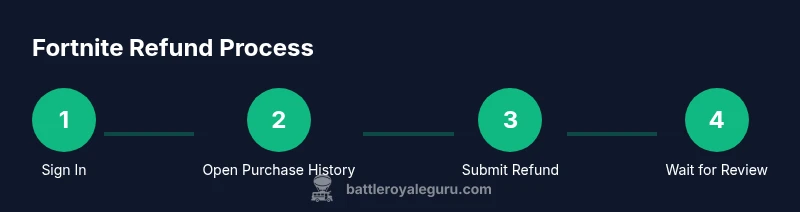
According to Battle Royale Guru, refunds for Fortnite purchases are processed by Epic Games under the official policy. To start, sign in to your Epic account, open your purchase history, select the item you want refunded, and submit a refund request. Eligibility and timing vary, but you’ll be notified by Epic within a few business days.
Why refunds exist in Fortnite and who can request
Refunds in the Fortnite ecosystem are designed to protect players from accidental purchases and to maintain trust in the Epic Games storefront. The refund process is governed by the official policy set by Epic Games, and Fortnite players typically initiate refund requests through their Epic account. The goal is to give players a fair path to correct mistakes, while balancing the needs of developers and the ongoing live-service model. According to Battle Royale Guru, understanding the policy and submitting documentation accurately can dramatically improve the odds of a successful refund. This section lays the groundwork by clarifying who can request a refund (usually the account holder) and under what general conditions refunds are considered. The surrounding ecosystem—purchases on the Epic Games Store, in-game cosmetic items, and V-Bucks—often interacts with separate rules, so it’s important to distinguish between a direct game purchase and a bundled in-game item. By starting with the right expectations, you’ll save time and reduce frustration later in the process.
Eligibility and policy overview
Epic Games’ refund policy governs every refund request for Fortnite, but the specifics vary by purchase type and timing. In general, eligibility depends on what was bought (a game, cosmetic item, or in-game currency), how much time has elapsed since purchase, and whether the item has been used or consumed. The policy is designed to be outcome-oriented rather than a one-size-fits-all rule. Battle Royale Guru recommends checking the official policy on Epic’s help pages before submitting a request to avoid confusion later. If a purchase qualifies, a refund may be approved; if not, you’ll typically receive a clear explanation. In all cases, the process begins with accessing your Epic Games account and locating the relevant transaction. Transparency about your reason for refund and evidence (receipts, order numbers) can help the reviewer assess eligibility more quickly.
Where to start: access your Epic account
Begin by signing into your Epic Games account on a desktop or mobile device. From there, navigate to your account page and locate the purchase history. This is where you will find the Fortnite transaction you want refunded. If you don’t see the purchase, check multiple accounts or late-added receipts. Once you locate the item, you’ll see an option to request a refund if the purchase is still within the eligible window. Having the purchase details handy (order number, date, item name) speeds up the review process. Battle Royale Guru emphasizes the importance of starting from the official Epic support channels rather than third-party sites to avoid scams or misdirection.
How the refund form works and what to include
The refund request form asks for essential details: the item you’re refunding, the reason for the refund, and any additional context that might help the reviewer understand the situation. Be concise but specific; for example, explain if you accidentally bought a skin, or if you didn’t receive the in-game value promised. You may need to attach proof of purchase (screenshots, receipts) or relevant account details. After submission, Epic Games Review will assess the request against policy criteria. The reviewer may ask for more information, so stay ready to respond quickly. Battle Royale Guru recommends keeping a copy of your submission and any correspondence for your records.
Refundable vs non-refundable items in Fortnite
Not every Fortnite item is refundable. Some purchases, like consumable in-game currency or certain time-limited bundles, may be treated differently from cosmetic skins or weapon wraps. The exact outcome depends on the item type and how it was used since purchase. Always review the item’s refund eligibility on the purchase page or Epic’s help center. In many cases, cosmetic skins or bundles that have not been used heavily may be eligible for a refund, while clearly consumed currency or used items could be denied. Battle Royale Guru suggests focusing on the policy language rather than personal assumptions to determine refund chances.
Processing time and notification flow
After you submit a refund request, Epic Games will review the case and determine eligibility based on policy and evidence provided. Processing times can vary; you’ll typically receive updates through the email associated with your Epic account or via the help center dashboard. Delays can occur if the reviewer needs additional information or if the request falls into a gray area of policy. It’s a good practice to monitor your email and the Epic Games support portal for status changes and to respond promptly if further details are requested. The reviewer’s decision is final for that case, but you can appeal with new information or reopen a new request if policy allows.
What to do if your refund is denied
If a refund is denied, don’t panic. First, review the denial notice carefully to understand the rationale. If you believe the decision was incorrect, gather any new evidence (receipts, purchase confirmations, timestamps) and contact Epic Games Support for a clarification or reconsideration. In some cases, you may be able to appeal the decision or request escalation. Additionally, consider alternatives such as trading or gifting options if the game or item allows, or reaching out to customer support for guidance on acceptable next steps.
Common mistakes to avoid
Avoid submitting multiple refund requests for the same purchase; this can slow down and complicate the evaluation. Don’t misrepresent the reason for refund, as that can lead to denial or policy violations. Ensure you are using the account that made the original purchase and that you provide accurate purchase details. Finally, don’t wait too long to file a refund request, since delays can reduce eligibility. Battle Royale Guru warns against relying on memory alone—keep receipts and order numbers handy.
Pro tips from Battle Royale Guru
- Always verify the exact item name and purchase date before submitting a refund. A precise request speeds up the reviewer’s decision.
- If you’re unsure about eligibility, start with the refund form for clarity and follow up if the policy language is ambiguous.
- Keep all documentation organized, including emails from Epic Games and any in-game receipts. This reduces back-and-forth and helps you present a coherent case.
- For high-value or rare purchases, consider reaching out to support with a concise summary of your situation to request a manual review.
Tools & Materials
- Internet-connected device (PC, Mac, or mobile)(Sign in to your Epic Games account and access Fortnite purchases.)
- Epic Games account credentials(Email and password; two-factor authentication if enabled.)
- Receipt or order details(Screenshots or confirmations showing the purchase date and item.)
- Payment method details(Used to verify payment method; not always required.)
- Access to Epic Games Support(Direct link to the refund form or help center.)
Steps
Estimated time: Estimated total time: 25-40 minutes
- 1
Sign in to your Epic Games account
Open the Epic Games launcher or website and sign in with the account that made the purchase. This is the foundation for accessing your purchase history and submitting a refund request.
Tip: Enable two-factor authentication to protect your account during the process. - 2
Open purchase history and locate the item
Navigate to your account page, then to the Purchase History. Find the Fortnite item you want refunded; double-check the date and item name to avoid selecting the wrong transaction.
Tip: If you can’t find the item, check alternate email addresses or linked accounts. - 3
Open the refund form and select reason
Click the refund option for the item and choose a clear reason from the provided list. Add concise context in the description field if the reason needs elaboration.
Tip: Stick to factual reasons like accidental purchase or miscommunication; avoid vague statements. - 4
Submit the refund request with evidence
Attach receipts or screenshots if requested and review all details before submitting. Confirm you are refunding the correct item and press submit.
Tip: Keep a copy of what you submitted for your records. - 5
Monitor status and respond if needed
Check the support portal or your email for updates. If Epic requests additional information, reply promptly to keep the review moving.
Tip: Respond within 24-48 hours if extra details are requested. - 6
Understand next steps after decision
If approved, you’ll receive the refund as per the original payment method. If denied, review the denial reason and consider guidance for a possible appeal or alternative options.
Tip: Document the decision and plan your next steps accordingly.
Questions & Answers
Can I refund any Fortnite purchase?
Refund eligibility depends on the purchase type and Epic’s refund policy. Not all items are refundable, and some transactions may require special handling. Always check the official help center for the specific item.
Refund eligibility depends on the item and Epic’s policy; check the help center for specifics.
How do I know if my request is eligible?
You’ll learn your eligibility status from the refund submission outcome or the support portal. If further information is needed, Epic will request it during the review.
You’ll see eligibility results in the refund flow or support portal; respond if Epic asks for more details.
Where do I submit the refund request?
Submit requests through the Epic Games account page under Purchase History. If you don’t see the option, you may need to contact Support directly.
Use your Epic account’s Purchase History to start a refund, or contact Support if the option isn’t visible.
Will I lose V-Bucks or cosmetics if I refund?
Refunds for specific items typically restore value to your account, but the outcome depends on the item and policy. Some purchases may not be refundable once used.
Refunds can restore value in some cases, but it depends on the item and policy.
How long does a refund take to process?
Processing times vary by case and policy. You’ll receive updates via the support portal or email, and outcomes are communicated when a review concludes.
Process times vary; you’ll get updates by email or in the support portal.
What if my refund is denied?
If denied, review the stated reason and consider providing additional information for a reconsideration. You can also explore alternatives or escalation options with Support.
If denied, you can appeal with new information or ask for escalation.
Watch Video
Key Points
- Understand Epic’s refund policy and where to locate it.
- Sign in to Epic, find the purchase, and start the refund request.
- Provide precise reasons and supporting evidence to speed review.
- Expect processing time to vary; monitor progress and respond when asked.
- If denied, review the rationale and consider escalation or alternatives.