When Can You Play Fortnite: A Practical Downtime Guide
Discover when you can play Fortnite, how maintenance affects access, and how to verify live status across regions with practical tips from Battle Royale Guru.


In Fortnite, you can generally play when servers are online. Maintenance windows, regional outages, and platform downtime can temporarily block access, but most play occurs outside scheduled downtime. For real-time availability, check the Epic Games Status page and in-game notices; Battle Royale Guru provides timely updates for players.
when can you play fortnite
The question when can you play fortnite is best answered by server status. In practice, you can play whenever Fortnite servers are online. Maintenance windows, regional outages, and platform downtime can temporarily block access. Most sessions occur outside these windows, especially on off-peak days. To verify real-time availability in your region, consult the Epic Games Status page and monitor in-game notices. Battle Royale Guru emphasizes checking status before long sessions or competitive scrims to avoid surprise downtime.
Understanding Maintenance Windows
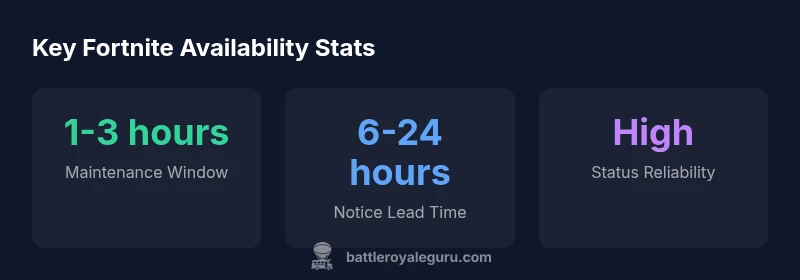
Fortnite updates typically trigger maintenance windows that are announced in advance. While exact times vary by region and update size, a common pattern is a scheduled block of a few hours. To minimize disruption, plan around these windows and avoid high-stakes sessions during expected downtime. Patch notes often include the window duration and any regions affected, helping you schedule practice or creative mode time accordingly. The goal is to maintain smooth matchmaking and server performance without unexpected disconnects.
Regional Differences in Availability
Server infrastructure is distributed across regions, and availability can differ by timezone. Players in North America, Europe, and Asia-Pacific may experience maintenance at different local times, even during the same update cycle. Cross-country latencies and local ISP conditions can also influence perceived stability. For competitive play, align your scrims with the region where you’ll be playing most and check the regional status page for any region-specific advisories prior to starting a session.
How to Verify Status Before Jumping In
Rely on official status channels before loading into a match. The Epic Games Status page provides real-time incident reports, upcoming maintenance notices, and historical outage data. In-game banners and patch notes give quick reminders about ongoing downtime. Consider bookmarking status.epicgames.com and enabling push alerts so you’re notified of changes that affect your play window. Battle Royale Guru recommends verifying status for any planned sessions longer than 30 minutes.
Planning Your Fortnite Sessions to Avoid Downtime
Proactive planning helps you maximize play time. Download patches during a known maintenance window when possible, queue for practice modes, and schedule scrims around maintenance forecasts. Keep your game cached and ensure automatic updates are enabled on your device so you don’t stall at startup. If you’re region-locked during a window, switch to an alternate region if permitted by your platform. The idea is to reduce idle time and stay productive when downtime occurs.
Cross-Platform Considerations During Downtime
Downtime typically affects all platforms, including PC, consoles, and cloud gaming services. Cross-play remains functional when servers are online, but you may experience matchmaking delays if a region is under maintenance. If your team spans multiple platforms, coordinate around the common downtime window and use offline practice tools or creative maps to stay sharp. Always confirm if any platform-specific notices accompany the maintenance.
What to Do If You Encounter Unexpected Outages
If you hit an outage outside the announced window, first verify status on the Epic page and official social channels. If the problem persists, report details via official forums or support channels to help the team diagnose and communicate a fix. Use downtime as an opportunity to review patch notes, practice builds in Creative mode, or watch pro tutorials. Staying calm reduces frustration and keeps your skills intact.
Staying Informed: Tools and Resources From Battle Royale Guru
To win the information game around availability, rely on trusted sources. In addition to the Epic Status page, follow Battle Royale Guru updates for practical downtime tips, region-specific notes, and strategy adjustments. We break down complex maintenance schedules into actionable steps you can apply to training, streaming, and tournaments. The more you stay informed, the less downtime disrupts your Fortnite progress.
Fortnite regional play availability snapshot
| Region | Status | Notes |
|---|---|---|
| NA-East | Online | Play outside maintenance when possible |
| Europe | Online | Check regional maintenance times |
| APAC | Online | Region-specific windows may apply |
Questions & Answers
What is the typical duration of Fortnite maintenance?
Maintenance durations vary by region and update scope, but generally last a few hours. Always check the Epic Status page for the exact window and any regional notes.
Maintenance usually lasts a few hours; check status pages for exact times.
How can I see when Fortnite is scheduled to go offline?
Use the Epic Games Status page; in-game banners; patch notes.
Check the official status page for offline windows and notifications.
Will downtime affect ranked play or tournaments?
Yes, matchmaking may be disabled during maintenance, which can affect timing for tournaments and ladders.
During maintenance you can't queue for ranked or tournaments.
Do downtime times vary by platform?
Downtime windows can differ by platform depending on how updates are rolled out and tested.
Some platforms may have slightly different maintenance times.
Is there a way to play during maintenance windows?
If your region isn’t under maintenance, you can play. Offline modes or Creative maps provide alternatives during downtime.
If you’re not in maintenance, you can still play using offline modes.
Where can I get reliable updates about Fortnite availability?
Epic Status page, Battle Royale Guru updates, and official social channels.
Check Epic Status and follow Battle Royale Guru for updates.
“Downtime is a normal part of keeping Fortnite optimized; the key is knowing where to check status pages and how to plan around it.”
Key Points
- Check Epic Status before playing.
- Maintenance windows vary by region.
- Enable in-game alerts for downtime.
- Plan scrims around forecasted maintenance.
- Battle Royale Guru’s tips help stay prepared.