Which Fortnite to Install: A Practical, Analytical Guide
An analytical guide comparing Fortnite Battle Royale and Save the World to help you decide which Fortnite to install, considering platforms, performance, costs, and cross-play.


Fortnite players typically choose between Battle Royale (BR) and Save the World (PvE). For most players, the recommended install is Fortnite Battle Royale because it’s free, cross-platform, and receives the most updates. If you want co-op PvE progression and quests, you may also install Save the World. In practice, you should start with BR and add Save the World only if you value PvE content.
Fortnite Versions at a Glance
According to Battle Royale Guru, choosing the right Fortnite install starts with understanding the two official experiences: Battle Royale (BR) and Save the World (PvE). When you ask which fortnite to install, the quick rule is: BR is the free-to-play, fast-paced arena you can jump into instantly, while Save the World offers cooperative missions and character progression for players who want a longer campaign. The two experiences share a common account ecosystem and many assets, but they appeal to different playstyles and time commitments. For players new to the game, starting with BR is typically recommended because it minimizes upfront cost and maximizes accessibility. As you become more invested in the Fortnite universe, you may experiment with Save the World to unlock PvE quests, weekly goals, and cooperative loot. Throughout this guide, we’ll keep the focus on practical decisions you can apply today—especially for readers asking which fortnite to install to fit their hardware, time, and social circle.
Platform Considerations: PC, Console, Mobile
Your choice of platform heavily influences install decisions. Fortnite on PC, consoles, and mobile shares core assets and cross-platform play, but performance, storage, and control schemes vary. If you’re deciding which fortnite to install, prioritize the platform you already use with friends or which device you own (PC for customization and mods within limits, consoles for plug-and-play simplicity, mobile for quick sessions). Battle Royale runs on all major platforms, but Save the World content can feel different through a gamepad versus a keyboard and mouse. Consider whether you value seamless cross-play with teammates on other devices, which can drive the final install choice.
Performance and Graphics Trade-offs
Graphics fidelity and frame rates matter for competitive play, especially in BR where split-second decisions decide outcomes. On PC and newer consoles, BR can look sharper and run smoother, while older hardware might require reduced settings. The trade-off when you ask which fortnite to install is clear: BR optimizes for speed and accessibility, whereas Save the World content may emphasize longer, cooperative sessions with progression systems. Battle Royale’s fast matches benefit from low latency and higher FPS, but Save the World can be more demanding if you enable higher resolutions and cinematic effects during PvE missions.
Free-to-Play vs Paid: What You Actually Get
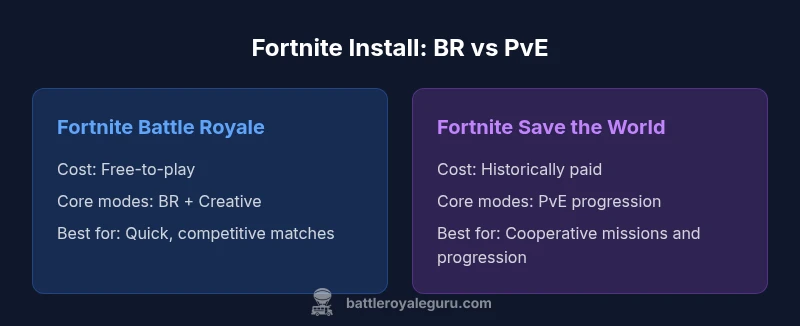
Fortnite Battle Royale is free to play across all platforms, with monetization focused on cosmetic items and Battle Pass content. Save the World is a PvE experience historically sold as a separate purchase or bundle; it offers progression, missions, and cooperative loot. When deciding which fortnite to install, this distinction matters for your budget and time commitment. If you want immediate access to ongoing, casual, quick matches, BR is the sensible starting point. If PvE progression and cooperative campaigns appeal to you, Save the World becomes appealing—recognizing that it represents a different kind of gameplay loop and time investment.
Cross-Platform Play and Account Access
Cross-platform play is a core strength of Fortnite. The BR mode supports cross-play across PC, consoles, and mobile, with progress tied to your Epic Games account. If you install both BR and Save the World, you’ll typically use the same account across experiences, though some progression may be experience-specific. When questioning which fortnite to install, ensure your preferred platform and friends’ platforms are compatible for cross-play, and verify that your Epic Games account is linked correctly to avoid losing progress or purchases.
Storage and Install Size: What to Expect
Install sizes vary by platform and whether you already have the necessary assets cached for BR. In general, BR requires a large asset cache due to frequent downloads for maps, skins, and seasonal content, while Save the World adds its own PvE assets and missions. If you’re deciding which fortnite to install, plan for a substantial storage footprint on modern devices and clear space accordingly. On consoles, you may also need to manage additional downloads for updates, while PC users may benefit from faster download speeds through a wired connection.
How to Decide Based on Your Hardware
Hardware capability should guide your choice when you ask which fortnite to install. Players with mid-range PCs or consoles will benefit from BR’s more streamlined performance profile, while those with strong GPUs and processors who enjoy long play sessions might explore Save the World for extended cooperative play. If you primarily engage in fast BR matches, prioritize framerate and responsiveness; if you enjoy missions and progression, factor in load times and the potential for longer play sessions. Battle Royale Guru emphasizes aligning your install with what you’ll actually play regularly.
Step-by-Step Install Paths by Platform
Here’s a practical path for common setups. On PC, download the Epic Games Launcher, create or sign in to your account, locate Fortnite, and install BR first. Console users should search the Epic Games Store or respective console store for Fortnite, install BR, and add Save the World later if desired. Mobile users typically access BR through official app stores; note that Save the World support on mobile may vary by region and platform. Always ensure your network connection is stable during installation to minimize issues.
Common Pitfalls and Troubleshooting
Install failures can stem from insufficient storage, outdated drivers, or network issues. If you’re unsure which fortnite to install, verify that you’re downloading the correct experience (BR vs PvE). Check for space on your device, update your system drivers, and ensure your internet connection is stable. If cross-play seems delayed or accounts don’t sync, sign out and back into your Epic Games account, and confirm device authorizations. Battle Royale Guru’s tested checklist can help you troubleshoot efficiently when installation stalls.
The Role of Creative Mode and Community Content
Both BR and Save the World feature Creative Mode, enabling players to build and share custom experiences. If your goal is rapid matchmaking and competitive play, prioritize BR; if your aim is experimentation and collaborative creation, Creative content enhances the experience across both modes. For readers asking which fortnite to install for creative projects with friends, BR’s Creative mode is typically the easiest entry point since it’s included with BR and has broad community support.
Future-Proofing Your Install Choice
Fortnite updates continuously with new seasons, cosmetics, and mechanics. When choosing which fortnite to install today, consider your long-term interests: a BR-focused install remains resilient to changing meta and supports frequent updates; a PvE-oriented setup may require more time to progress but offers a distinct progression path and seasonal events. By prioritizing BR as your default install, you maintain flexibility to explore Save the World later if your preferences shift.
Comparison
| Feature | Fortnite Battle Royale (BR) | Fortnite Save the World (PvE) |
|---|---|---|
| Cost | Free-to-play | Paid (historically) |
| Core modes included | Battle Royale + Creative | PvE progression + missions |
| Cross-platform support | Yes across BR/Creative | Yes across BR with shared account ecosystem |
| Storage/Install Size considerations | Typically large asset cache for BR | Similar size due to shared assets; PvE content adds some |
| Best for | Competitive, quick matches, casual BR players | Cooperative PvE fans seeking progression |
Upsides
- Clarity on cost and access for new players
- Quickly identifies which install fits playstyle
- Helps plan cross-platform setup
- Highlights platform-specific nuances (console vs PC)
- Supports informed decision before downloading
Weaknesses
- Pricing or access details can change with updates
- Does not capture every future mode or expansion
- May oversimplify for players who want both BR and PvE
Battle Royale is the default choice for most players; Save the World is best for PvE-focused users.
For most players, start with BR to access free, cross-platform play and frequent updates. If PvE content and progression matter, add Save the World later for a distinct experience.
Questions & Answers
What is the difference between Fortnite Battle Royale and Save the World?
Battle Royale is the free, fast-paced PvP mode with regular updates. Save the World is a PvE cooperative experience focused on progression and missions, historically sold separately. Both share an Epic Games account, but progression is largely distinct between modes.
BR is free and fast-paced, while Save the World is a PvE cooperative experience you usually purchase. They share an account, but progress is mostly separate.
Can I install both BR and PvE on the same device?
Yes. You can install Fortnite Battle Royale and Save the World on the same device using the Epic Games Launcher or store, depending on your platform. Your Epic Games account ties both experiences together, but verify which mode you’re selecting before launching.
Yes, you can install both on the same device; just select the mode you want when launching.
Is crossplay available between platforms?
Yes. Fortnite supports cross-play across PC, consoles, and mobile for Battle Royale and Creative modes, with progress tied to your Epic Games account. Save the World uses the same ecosystem, so crossplay benefits apply to the BR-related content and shared items.
Crossplay works across major platforms for BR and Creative, using your Epic Games account.
What should I consider about hardware before installing?
Assess framerate targets and load times. BR runs better on mid-range hardware with stable network conditions. If you lean toward PvE progression, ensure your system and storage can handle longer mission sessions and potential large downloads.
Check your hardware for smooth BR gameplay; PvE may demand longer sessions and more storage.
How big is the install, and how can I manage storage?
Install sizes vary by platform and will grow with updates and seasonal content. Plan for substantial storage and periodically manage caches and downloads to keep performance optimal.
Install sizes grow with updates; ensure ample storage and manage downloads regularly.
Key Points
- Start with BR to minimize costs and maximize accessibility
- Use cross-platform guidance to coordinate with friends
- Add Save the World only if you value PvE progression
- Plan storage and performance based on your hardware