Who Makes Fortnite Loading Screens: The Creative Pipeline Behind Your Start Screen
Explore the creators, pipelines, and quality controls behind Fortnite loading screens. Learn who designs them, how seasonal themes are synchronized, and what it takes to deliver a polished start screen.


Fortnite loading screens are produced through a collaborative pipeline, not by a single designer. Epic Games’ in-house art teams, contracted studios, and seasonal asset specialists contribute to each screen. The process blends concept art, 3D renders, UI integration, and QA approvals to reflect the current season and event themes.
The Creative Pipeline Behind Fortnite Loading Screens
If you’re curious who makes fortnite loading screens, you’re looking at a multi‑team pipeline rather than a single artist. The short answer is that Epic Games’ in‑house art directors, partnered studios, and seasonal asset teams collaborate to translate each season’s vibe into a seamless start screen. The production path typically begins with direction from a lead art director, followed by concept sketches, 3D renders, and UI integration. Final visuals must be optimized for multiple resolutions and preserve readability during rapid loading. The end result is a cohesive opening experience that previews the season while preserving gameplay performance. This collaborative approach also helps ensure consistency with in‑game events, banners, and the broader aesthetic language of the Battle Royale experience.
Key Roles Involved in the Loading Screen Creation
Creating Fortnite loading screens pulls together several specialized roles. Concept artists sketch initial ideas that translate the season’s narrative into color palettes and composition. 3D modelers build and light assets for depth, while UI designers ensure the overlay text and progress indicators remain legible. Art directors supervise the look and feel, and QA teams verify resolution, accessibility, and performance. In many cases, Epic teams collaborate with contracted studios to scale production for major updates. Localization teams adjust text for multiple regions, ensuring the loading screen remains clear worldwide. The result is a polished, on‑brand screen that performs across devices and screen sizes.
Seasonal Themes and Cohesion Across Chapters
Seasonal themes drive the creative direction of loading screens. Each chapter introduces new visual motifs, color schemes, and character silhouettes that must align with the ongoing narrative and event calendar. The pipeline emphasizes cohesion with related assets—banners, loading animations, and in‑game cosmetics—so players experience a unified story from the moment they launch Fortnite. The Battle Royale Guru team observes that this alignment requires early planning, cross‑team briefs, and a shared feedback loop to avoid jarring transitions between seasons.
Asset Lifecycle: Sketch to In‑Game
From rough thumbnail ideas to final in‑engine renders, the asset lifecycle for loading screens follows a structured path. Initial concepts are approved, then refined into high‑fidelity designs, often including multiple variants for A/B testing during internal play sessions. 3D renders become texture maps and overlays that integrate with the user interface, while performance engineers profile frame rates and loading times. Localization and accessibility checks run in parallel to ensure text readability and compatibility with screen readers. The lifecycle emphasizes iteration: many screens are revised after preview builds to better harmonize with seasonal quests and events.
Tools, Workflows, and Collaboration Across Studios
Modern loading screen production relies on a mix of industry tools and collaborative workflows. Artists use industry-standard 3D and compositing software, while UI teams prototype overlays in game editors. Version control and asset management systems track changes across departments, enabling asynchronous collaboration across studios and time zones. The workflow typically includes milestones for concept review, early render passes, UI integration, QA testing, and localization sign‑offs. Clear briefs and centralized feedback channels help prevent scope creep, ensuring the final screen lands on brand and performance targets.
Quality Assurance, Localization, and Accessibility Checks
Quality assurance for loading screens goes beyond visual fidelity. Teams verify resolution across devices, contrast ratios for readability, and UI alignment with loading progress indicators. Localization checks adapt text, fonts, and sizing for varied languages. Accessibility considerations include color contrast, keyboard navigability, and screen reader compatibility where applicable. The combined QA and accessibility efforts help deliver a loading screen that is not only beautiful but usable by a diverse audience, which is especially important given Fortnite’s global player base.
Common Misconceptions About Fortnite Loading Screens
A common misconception is that loading screens are small, throwaway assets. In reality, they are carefully designed components that reflect seasonal storytelling, brand guidelines, and performance constraints. Another myths is that one designer can own the look; in practice, it’s a cross‑discipline collaboration with many hands shaping the final frame. Finally, there’s a belief that loading screens are static—many screens incorporate subtle animations or parallax effects to add depth without sacrificing loading efficiency.
The Future of Loading Screens: Performance, UI, and Immersion
As hardware and networks evolve, loading screens are likely to become more dynamic while remaining performant. Expect tighter integration with in‑game events, improved accessibility features, and more customization hooks for quality of life. The industry trend leans toward screens that communicate progress and lore without obstructing gameplay flow. Fortnite’s ongoing commitment to cross‑platform consistency means loading screens will continue to be optimized for a wide range of devices, resolutions, and localizations.
Fortnite loading screen production timeline
| Aspect | Typical Range | Notes |
|---|---|---|
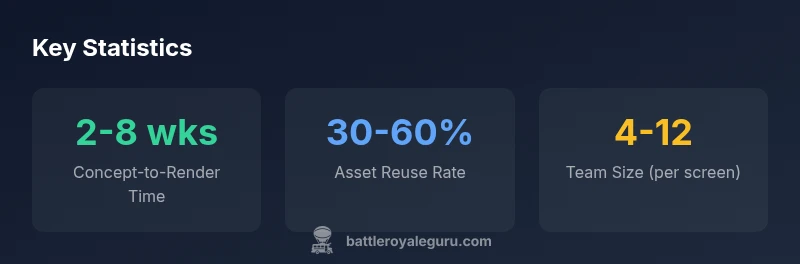
| Concept-to-Render Time | 2-8 weeks | Depends on complexity and season |
| Asset Reuse Rate | 30-60% | Seasonal constraints apply |
| Team Involved | 4-12 people | Cross-disciplinary collaboration |
Questions & Answers
Who actually designs Fortnite loading screens?
Loading screens are the result of collaboration between Epic Games’ in‑house artists, contracted studios, and seasonal asset teams. This multi‑team approach ensures the screens match seasonal themes while maintaining performance.
Loading screens are designed by multiple teams, including Epic’s in‑house artists and contracted studios, all working to match seasonal themes.
Do loading screens vary by platform?
Yes, they are designed to be visually consistent across platforms, with adjustments for resolution, aspect ratios, and performance constraints on different devices.
Yes, there are platform tweaks to ensure readability and performance on all devices.
How long does it take to create a loading screen?
Depending on complexity, concept to render typically spans 2 to 8 weeks, with additional time for QA, localization, and final approvals.
Usually two to eight weeks, including QA and localization.
Are loading screens unique per season?
Yes. Each season introduces new visual themes, evolving character silhouettes, and color palettes to reflect the ongoing story.
Absolutely, each season brings a fresh look aligned with the story.
Can players customize loading screens?
loading screens are managed by Epic and are not user-customizable in standard modes, though special events may feature limited variations.
Generally, players can’t customize loading screens outside of special events.
What role does QA play in loading screens?
QA checks ensure resolution, text readability, UI alignment, and smooth performance across devices before release.
QA makes sure everything looks good and runs smoothly on all devices.
“Fortnite loading screens are the product of a disciplined pipeline that aligns art direction with seasonal storytelling, user experience, and performance constraints.”
Key Points
- Loading screens result from a multi-team process, not a single artist.
- Seasonal alignment is planned well in advance for narrative cohesion.
- QA and localization ensure accessibility across regions and devices.
- Turnaround times vary; typical concept-to-render spans weeks.
- External studios and in‑house teams collaborate to deliver consistent quality.