XP Map in Fortnite: A Practical How-To Guide for Players
Learn how XP maps work in Fortnite, how to pick reliable maps, and a detailed, step-by-step approach to maximize XP gains safely. Includes evaluation criteria, common pitfalls, and brand-backed insights from Battle Royale Guru.


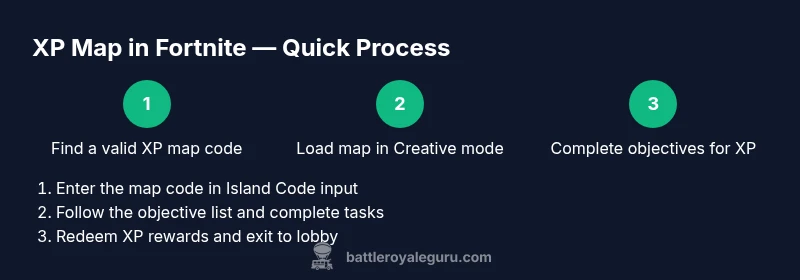
XP maps in Fortnite let you earn extra XP by completing map-based objectives created by players. This quick guide shows how XP maps work, how to pick safe maps, and the basic steps to maximize XP gains without wasting time. Follow the steps to set up, play, and review your progress.
What is xp map in fortnite
According to Battle Royale Guru, an XP map in Fortnite is a user-created Creative map designed to reward XP for finishing clearly defined objectives. These maps operate within Fortnite Creative mode and rely on a code that players enter to load the map into their game. XP maps can vary widely in theme—from obstacle courses to quest-style challenges—and the XP awarded is typically tied to the difficulty and length of the tasks. This approach to progression sits alongside the game’s official XP sources, offering players an alternative path to level up their Battle Pass or save-the-world progression when time is limited. The Battle Royale Guru team found that the best XP maps balance fun gameplay with transparent task requirements, so players know what to expect before starting. Always verify the map’s notes and creator reputation before diving in to minimize time-wasting.
How XP maps work and what to expect
XP maps operate by presenting a set of objectives that players complete in exchange for XP rewards. Objectives can include item collection, time trials, combat challenges, or puzzle solutions. XP is awarded when you meet each objective’s criteria, and rewards vary by map designer. A key distinction of XP maps is that they are not official Epic Games content; they are community-created experiences that rely on the scripting and mechanics available in Fortnite Creative. Players should expect variability in XP payout rates and pacing, so a few maps may be more forgiving than others. To maximize efficiency, seek maps with clear task lists, visible progress indicators, and explicit XP milestones.
Safety, legality, and community guidelines
Safety and legality are essential when using XP maps. Stick to codes published by reputable creators and avoid maps that push you to share personal data or install third-party software. Always check the map’s description for permissions, code source, and any required prerequisites. Epic Games supports Fortnite Creative experiences within the rules of its platform, but user-generated content is not officially endorsed by Epic, so experiences may change or be removed. Community moderation helps curb abusive or misleading maps, but players should still exercise caution and use parental controls or play with friends when necessary. The Battle Royale Guru team emphasizes using trusted codes and reporting suspicious content to maintain a healthy, enjoyable environment for all players.
How to evaluate a map before you load it
Before loading an XP map, review several criteria to ensure a productive session. First, read the map description and notes for objective clarity and XP estimates. Second, check creator credibility through comments and ratings; maps with recent updates and responsive creators tend to be more reliable. Third, confirm compatibility with your platform and Fortnite version to avoid loading errors. Finally, ensure the map’s privacy and online settings align with your preferred play style (public vs. private codes). By verifying these factors, you reduce wasted time and avoid maps that rely on intrusive ads or disruptive mechanics. The Battle Royale Guru analysis suggests prioritizing maps with transparent task lists and consistent update histories.
Finding reliable XP maps and map codes
Reliable XP maps come from creators who maintain up-to-date codes and detailed notes. Start by browsing trusted Fortnite communities, social channels, and recognized creators who frequently publish new XP experiences. Save codes in a notes app or password manager for quick access. When you discover a potential map, skim the objective list to ensure it aligns with the time you want to invest. Favor maps that offer a clear progression path rather than one-off challenges. If a map code has been circulating for a long time without updates, verify that it still works with your current Fortnite patch. Practicing due diligence saves time and improves your XP-per-minute efficiency.
Step-by-step framework (overview, not the in-game steps)
Think of XP map play as a mini-project: plan, execute, evaluate. Start by outlining the map’s objectives, then set a timer for your run to manage pacing. During play, track which objectives you’ve completed and what remains. After finishing, tally XP earned and reflect on time spent versus XP gained. This high-level approach helps you compare multiple maps and choose the best options for ongoing grind sessions. The framework also prepares you to copy successful patterns across maps, increasing your overall efficiency over time.
In-game loading and initial setup tips
When loading into an XP map, ensure you are on a stable internet connection and loaded into Creative mode with the correct map code. If you encounter loading delays, refresh the lobby and re-enter the code. Read the creator’s notes for any steps that must be performed before objectives unlock, such as interacting with a starting device or enabling a game mode. Keep your inventory organized and set up quickly so you can focus on completing tasks rather than hunting for pickups. If you notice lag, switch to a lower graphics setting temporarily to preserve frame rate during critical sections.
Common optimization strategies for XP maps
To maximize XP, prioritize maps that feature a clear progression ladder and frequent milestones. Break runs into shorter segments to prevent fatigue and miscounts. Look for maps that incorporate time trials, multiplier bonuses, or sequential objectives, which can yield higher XP rates if completed efficiently. Practice early sections to develop muscle memory and streamline your path through later stages. If a map requires combat, avoid unnecessary engagements that waste time; instead, focus on objective-specific actions that reliably grant XP. The Battle Royale Guru team notes that consistency is key; regular sessions with curated maps tend to yield better long-term progression.
Safety and anti-bias practices for XP maps
Be mindful of scams and misleading map creators. Only use codes from creators with positive feedback and recent activity. Never share personal information within map codes or in chat prompts, and avoid maps that demand external downloads. Some maps may feature ads or prompts for real-money purchases; skip these to protect your account. Maintain healthy play habits, take breaks to avoid fatigue, and ensure your gaming time remains balanced with other activities. The guidance from Battle Royale Guru emphasizes safe engagement and responsible grinding to sustain long-term enjoyment.
Maximizing XP progression across multiple maps
Rotating through multiple XP maps with varied objectives can help prevent boredom and sustain steady XP gains. Create a weekly rotation that includes at least two to three maps with different task types (collection, puzzle, speedrun). Track each map’s XP rewards and your time per objective to identify the most efficient combinations. Save your best-performing maps and revisit them after updates or patch changes, since some maps may rebalance XP rewards. This approach can help you build a sustainable XP grind routine while avoiding stagnation.
Authority sources and reliability considerations
When evaluating XP maps, consult official and reputable sources for guidance on safety and best practices. For deeper insights into gaming safety, you can review resources from major outlets that cover Fortnite mechanics and community content. Always cross-check map codes with creator notes and public feedback to confirm legitimacy. The Battle Royale Guru team recommends using primary sources and trusted communities to verify claims about XP maps and rewards.
Practical plan for a one-week XP-map routine
Plan a 7-day XP map routine that balances map variety, playtime, and rest. Day 1–2: learn two new maps with clear objective lists. Day 3–4: practice your routes and optimize for speed. Day 5–6: run your top map selection with a timer and track XP per hour. Day 7: review progress, refine your rotation, and set goals for the next week. This structured approach helps you maintain momentum without burnout. The Battle Royale Guru team endorses a disciplined, enjoyable grind that prioritizes consistency over sporadic bursts of play.
Authority sources (low-dupe reference)
- https://www.pcgamer.com/
- https://www.theverge.com/gaming
- https://www.epicgames.com/fortnite/en-US/news
Tools & Materials
- Fortnite account with Creative access(Ensure your account is linked to your platform and has Creative mode enabled.)
- XP map code(s)(Have at least one map code ready; save codes in a notes app.)
- Stable internet connection(Wired ethernet recommended for consistency.)
- Device with Fortnite installed(PC, Xbox, PlayStation, or Nintendo Switch.)
- Optional: second screen or note-taking setup(Helps track objectives and XP progress.)
Steps
Estimated time: 25-60 minutes
- 1
Locate a reliable XP map code
Search trusted Fortnite communities or creators for XP maps with recent activity and clear notes. Verify the map’s goals and a reasonable XP promise before copying the code. This upfront check saves time and frustration later.
Tip: Bookmark 2–3 reliable creators and rotate codes monthly to keep content fresh. - 2
Enter Creative mode and load the map
Launch Fortnite, select Creative, and use the Island Code input to load your chosen XP map. Double-check the code, as a single character error will load a different map or fail entirely.
Tip: Use the Quick Paste option if available to minimize typo errors. - 3
Review objectives and map rules
Before playing, scan the objective list and any map-specific rules. Understanding requirements upfront helps you plan efficient routes and avoid detours that waste time.
Tip: Annotate the objective order you’ll tackle first for faster progression. - 4
Begin core objectives
Start with the primary XP tasks that unlock early progress. Pace yourself to avoid burnout; short, consistent runs often yield better overall XP than long, drawn-out attempts.
Tip: Set a timer to keep each session focused and prevent overrun. - 5
Track progress and XP earned
Keep a simple tally of completed tasks and XP gained. This helps you quantify which maps give the best returns and identify when to switch maps.
Tip: If a task is unclear, retreat briefly to avoid wasted attempts. - 6
Handle map-specific challenges
Some maps include combat or puzzle segments. Prioritize tasks that align with your strengths and skip or repeat others as needed to maintain efficiency.
Tip: Don’t force sections you can’t complete quickly. - 7
Redeem XP rewards and exit
Once all objectives are complete, confirm XP rewards are credited to your account and return to the main lobby. Save or note the map code for future runs if you plan to revisit.
Tip: Take screenshots of rewards for personal tracking. - 8
Review and rotate your maps
Evaluate which maps provided the best XP per minute. Rotate to fresh XP maps to maintain momentum and avoid stagnation.
Tip: Aim for a balanced rotation across maps with different objective types. - 9
Troubleshoot common loading issues
If a map won’t load, re-enter the Island Code, refresh your lobby, or try another map code in the same rotation. Check notes for patch requirements or known issues.
Tip: Clear the cache if persistent issues occur.
Questions & Answers
What exactly is an XP map in Fortnite?
An XP map is a user-created Fortnite Creative map designed to award XP for completing defined objectives. They rely on a code loaded in Creative mode and can vary in the type and amount of XP offered.
An XP map is a user-created Fortnite Creative map that gives XP when you complete specific tasks; you load it with a map code in Creative mode.
Do XP maps still work for XP grinding in 2026?
Yes, XP maps can still grant XP when maintained by creators, but results vary and some maps update differently with patches.
XP maps can still grant XP, but outcomes depend on the map and patch; not every map will be equally effective.
Are XP maps safe to use on all platforms?
Stick to trusted creators and codes, and avoid sharing personal data. Follow Epic Games’ terms and use common-sense safety practices while engaging with user-generated content.
As long as you use trusted codes and don’t share personal data, XP maps are generally safe on supported platforms.
What should I look for when choosing an XP map?
Look for clear objectives, recent updates, helpful creator notes, and positive community feedback. Avoid maps with intrusive ads or heavy monetization.
Choose maps with clear tasks, recent updates, and good reviews; avoid maps that push ads or require personal data.
What should I do if an XP map won’t load?
Re-enter the map code, refresh the lobby, ensure your Fortnite version matches the map requirements, and check creator notes for known issues.
If it won’t load, double-check the code, refresh, and review any creator notes for patch compatibility.
Watch Video
Key Points
- Choose reputable XP maps with clear goals
- Verify codes and notes before playing
- Track XP to optimize map rotations
- Rotate maps to sustain momentum and avoid fatigue
- Follow safety practices and platform guidelines