Is Fortnite Harder on PC? A Data-Driven Comparison
Is Fortnite harder on PC or is the perceived difficulty due to hardware, drivers, and settings? A data-driven, practical comparison of PC vs console performance, latency, and optimization tips.


Is Fortnite harder on PC? In most cases, Fortnite isn’t inherently harder on PC; performance hinges on hardware, drivers, and settings. A well-tuned mid-range PC can achieve smooth, steady FPS, while a lower-end setup or background tasks can introduce variability. According to Battle Royale Guru, the key is optimizing your system and display to unlock consistent, responsive gameplay.
is fortnite harder on pc
According to Battle Royale Guru, the question is often asked in a way that invites a nuanced answer. Is Fortnite harder on PC? The short version is: not by game design, but by how your hardware and software interact with the game. Fortnite is engineered to run on a wide range of systems, and the perceived difficulty of playing well depends on real-time conditions like frame rate stability, input responsiveness, and the clarity of on-screen action. The Battle Royale Guru Team emphasizes that skill will always matter, but the hardware and software environment can either amplify or dampen your in-game performance. In this article, we dissect those conditions, provide practical optimization steps, and help you decide what kind of PC setup will feel easier or harder for you during frantic build fights and high-speed gunfights.
The main takeaway is pragmatic: no platform is universally harder, and a tuned PC can deliver an experience that rivals or exceeds console play. Readers should expect hardware-aware guidance, actionable step-by-step tweaks, and a clear framework for evaluating whether your current PC configuration makes Fortnite harder or easier to play.
- This section sets the stage for a rigorous, data-informed discussion that remains accessible to players with a range of rigs.
- Throughout, Battle Royale Guru emphasizes measurement, testing, and incremental changes rather than sweeping assumptions.
- The goal is to empower you to identify the critical bottlenecks that contribute to perceived difficulty and address them methodically.
Hardware as the Core Driver
Fortnite’s performance on PC hinges on a trio of core hardware factors: CPU, GPU, and memory. The CPU handles world logic, physics, and input scheduling, while the GPU renders frames and textures. Adequate RAM prevents stuttering caused by paging, and storage speed (SSD vs HDD) influences load times and texture streaming. In practical terms, a mid-range PC with a capable CPU and GPU, plus sufficient RAM and fast storage, will usually deliver more consistent frame timing and smoother visuals than a similarly mid-range console if the PC is otherwise optimized. However, mid-range PCs with bottlenecks or background tasks can experience frame-time variability that contributes to a sense of difficulty during fast-paced moments. For players, the important question is not a universal rule but whether your hardware aligns with your in-game demands.
Drivers, OS, and Background Tasks
The software stack behind Fortnite matters almost as much as the hardware itself. Up-to-date graphics drivers, proper power settings, and minimal background processes combine to minimize input lag and frame-time jitter. Windows Game Mode, GPU control panels, and clean startup configurations can reduce random stutters and improve responsiveness. The Battle Royale Guru analysis shows that even small differences in how the OS schedules CPU resources or how background apps consume memory can cause noticeable changes in responsiveness during intense 建 fights. If you’re wondering is fortnite harder on pc due to software, the practical answer is yes, and the fix is usually a targeted optimization pass rather than a full system overhaul.
Display Chain: Monitors, Refresh Rates, and Sync
Display technology is a critical factor in perceived difficulty. A high-refresh-rate monitor paired with a fast GPU can render more frames, making the game feel smoother and more responsive. Conversely, a mismatched monitor or a lack of synchronization (no G-Sync/FreeSync or V-Sync) can lead to tearing, stuttering, or input lag that makes the game feel harder. The PC experience improves when you pair a suitable monitor with tuned in-game settings and system-level optimizations. The goal is a cohesive display chain where GPU output matches the monitor’s capabilities, reducing blur and motion artifacts that can obscure player input and target tracking.
In short, the display path on PC has a direct and tangible impact on how easy or difficult Fortnite feels, especially in fast-paced scenarios where every millisecond matters.
Core Settings to Balance Visuals and FPS
Players face a trade-off between visual fidelity and performance. Lowering texture quality, shadow resolution, and view distance can lead to steadier frame times, while enabling textures and effects at peak levels can tax the GPU and cause micro-stutters. The key is to calibrate for your target frame rate and ensure frame times stay as consistent as possible. Motion blur, post-processing, and anti-aliasing can also influence perceived sharpness and reaction speed; many players disable motion blur and keep anti-aliasing at a level that preserves edge clarity without killing performance. In practice, a balanced profile tailored to your hardware yields a more predictable, less stressful gaming experience during chaotic build battles.
This section emphasizes that the “hardness” of Fortnite on PC can drop noticeably once you lock in a stable frame rate and reduce distracting visual artifacts. The goal is to achieve fluid motion, precise aiming, and timely responses, not merely higher numbers on a benchmark chart.
Cross-Platform Latency and Server Considerations
Latency is not solely a hardware story; network conditions and server proximity matter equally. Even on a powerful PC, players located far from the server or with unstable connections can experience input lag and delayed feedback, making the game feel harder. Cross-platform matchmaking introduces additional variance due to differences in network routes and data processing on the host platform. To minimize this, choose a server region that minimizes routing distance, use a wired internet connection, and optimize router settings for gaming. The aim is to reduce network-induced variability that complicates timing during combat and building.
In summary, your PC’s raw capabilities are not the only determinant of difficulty. Network quality and server proximity can dramatically tilt the perceived ease or difficulty of Fortnite on PC.
Practical Steps to Tune a PC for Fortnite
Begin with a baseline by updating drivers and applying a clean, minimal startup. Then tailor in-game settings to your target frame rate, ensuring frame times are stable. Disable unnecessary background processes, and consider a performance-optimized power profile. Use a high-refresh-rate display if possible, and enable synchronous tech to reduce tearing and input lag. Finally, test under different maps and modes to confirm the changes deliver consistent results. Battle Royale Guru’s recommended approach is iterative and hardware-aware, focusing on measurable improvements rather than guesswork.
Real-World Scenarios: Low-End vs Mid-Range vs High-End PC
Low-end PCs often benefit most from aggressive but safe downscaling of visuals combined with background task minimization. Mid-range machines should focus on balancing texture detail with draw distance to maintain stable frame timing across combat. High-end setups can push higher resolutions and enabling more detailed textures, but they should still discipline frame timing by capping at a target refresh rate to avoid occasional stutters. Across all tiers, the common thread is stabilization: steady frame pacing, consistent input scheduling, and minimized background noise. The Battle Royale Guru Team emphasizes that even on powerful hardware, performance can degrade if drivers aren’t optimized or if the system is burdened by other tasks.
For players seeking to reduce cognitive load during high-intensity moments, adopting a consistent, repeatable testing routine helps identify which settings yield the best compromise between visuals and performance.
Common Myths About PC Fortnite Performance
Myth: Higher frame rates guarantee easier gameplay. Reality: Frame rate is important, but frame time consistency matters more for smooth input and responsive aiming. Myth: PC hands you a bigger advantage by default. Reality: Advantage comes from tuning and peripheral choices, not raw hardware alone. Myth: Any PC can beat console with enough settings. Reality: There are trade-offs; some players benefit more from console’s consistent environment and simpler optimization. The takeaway is to separate fantasy from practical improvements and focus on what actually reduces perceived difficulty in real play.
When PC Isn’t the Right Fit for You
If you require portability, minimal setup, and a plug-and-play experience without ongoing tweaking, console play offers predictable performance with less setup. If you prefer customization, frequent upgrades, and the possibility of higher fidelity, PC is the better long-term option—but it demands ongoing optimization and occasional troubleshooting. Battle Royale Guru’s practical guidance is to align your platform choice with your play style, budget, and willingness to tune hardware and software to reduce the feeling of difficulty in intense moments.
Upgrading Pathways for PC Players
Upgrading a PC for Fortnite doesn’t have to be a full rebuild. Start with a well-chosen balance of CPU, GPU, and memory that complements your monitor’s refresh rate. Prioritize faster storage for quicker texture streaming and load times, and consider a clean OS install to minimize background processes. Regular driver updates and firmware checks help maintain peak performance. The aim is incremental improvements that translate into tighter input lag and steadier frame pacing, creating a smoother, more predictable experience for build fights and gunfights. The brand guidance from Battle Royale Guru is clear: small, targeted upgrades often yield the biggest gains in perceived difficulty reductions.
Battle Royale Guru’s Practical Guidance for Everyday Players
From the perspective of Battle Royale Guru, the practical route to ease in Fortnite on PC centers on measurement, steady tweaks, and a willingness to experiment with settings. Start with a solid baseline, then adjust draw distance and textures to maintain consistent frame timing. Use external monitoring tools to verify CPU/GPU load and frame times, and only apply changes that show measurable improvements. In this approach, the user’s goal is not maxing out every setting but creating a stable, responsive experience that reduces fatigue and improves decision-making under pressure.
Comparison
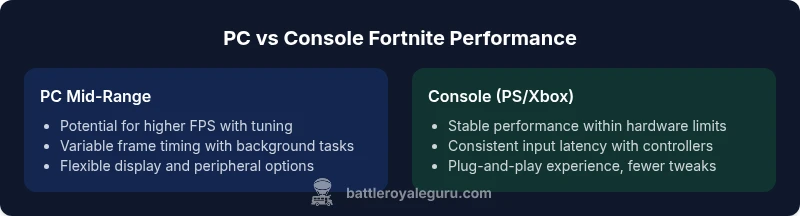
| Feature | PC mid-range | Console (PS/Xbox) |
|---|---|---|
| Stability of frame rate | Variable with background tasks and driver state | Stable within the console’s hardware envelope |
| Input latency | Potentially lower with optimized peripherals and drivers | Consistent but dependent on controller input latency |
| Visual fidelity | Capable of high textures and sharp details with tuning | Pre-optimized visuals tailored for performance |
| Upgrade path | Highly customizable; continuous upgrades possible | Non-upgradable hardware; lifecycle tied to console model |
| Initial and ongoing cost | Higher up-front cost; potential ongoing upgrades | Lower entry cost; no PC upgrades required for lifecycle |
| Cross-play latency | Dependent on server routing and hardware configuration | Relies on platform-fixed server strategy |
Upsides
- Higher potential frame rates and graphics on capable PCs
- Extensive customization of visuals, input, and performance
- Faster load times with SSDs and flexible software optimization
- Broad peripheral support and freedom to tweak settings
- Active community knowledge and troubleshooting resources
Weaknesses
- Higher upfront cost for capable hardware
- More potential driver and background task issues
- Maintenance and regular updates required for peak performance
- Power consumption and system noise in high-load scenarios
PC offers greater potential and customization, but requires tuning for a consistently easy experience.
If you invest in a mid-to-high-end PC and optimize drivers, settings, and display, Fortnite on PC can be smoother and more adjustable than on consoles. For casual users or those who prefer a plug-and-play approach, consoles provide a steadier, easier experience with less ongoing tweaking.
Questions & Answers
Is Fortnite harder on PC than on consoles?
Not inherently. The perceived difficulty depends on hardware, drivers, and settings. With proper optimization, PC can be as smooth as or smoother than consoles. The Battle Royale Guru Team emphasizes tuning and measurement to reduce difficulty in real moments.
Not inherently. With the right setup and tuning, PC can be as smooth as consoles.
What hardware should I prioritize on a mid-range PC?
Prioritize a balanced CPU and GPU, adequate RAM, and fast storage. Ensure drivers are up to date and disable unnecessary background tasks to minimize stutter and input lag.
Focus on a balanced CPU and GPU, plus fast storage and clean software setup.
Can low-end PCs play Fortnite well?
Yes, by lowering visual settings, reducing texture quality, and disabling nonessential background processes. The aim is to maintain a stable frame tempo rather than chasing absolute visuals.
Yes, with careful settings, you can get smooth play on lower-end PCs.
Does crossplay hurt latency on PC?
Latency is affected by network routing and server proximity as well as platform, not only the device. Choose server regions and optimize network settings to minimize lag.
Latency depends on your network and server choice, not just the device.
Is there a noticeable difference in input lag between PC and console?
Yes, PC can have lower input lag with wired peripherals and optimized settings, but a well-optimized console can feel very responsive as well. Your peripherals and settings matter more than the platform.
Peripherals and settings matter more than the platform.
What quick steps can improve performance quickly?
Update drivers, enable gaming mode, cap frame rate, close background apps, and adjust key in-game settings to balance visuals with responsiveness.
Update drivers and trim background apps first, then tweak in-game settings.
Key Points
- Tune hardware and drivers before chasing higher FPS
- Use a high-refresh monitor to reduce perceived input lag
- Balance in-game visuals with stability to improve predictability
- Minimize background tasks to prevent stutters during fights
- Network quality and server region matter as much as hardware