How to Know When Fortnite Skins Come Back: A Practical Guide
Learn practical, step-by-step methods to spot returning Fortnite skins by tracking official rotations, event-driven re-releases, and reliable trackers. Build a repeatable system with alerts and a watchlist—battle-ready for the next rotation.


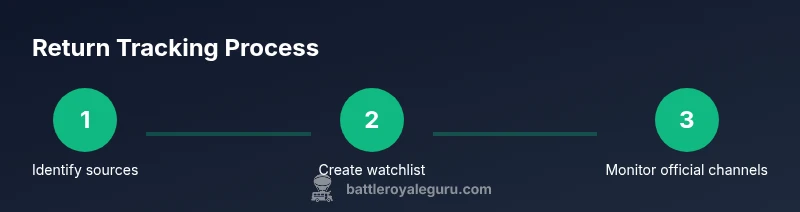
Goal: learn when Fortnite skins come back by tracking official rotations, event-driven re-releases, and reliable trackers. Skin returns follow shop cycles, seasonal events, and crossover promotions. Use a three-step approach: monitor official channels for announcements, check trusted community trackers, and maintain a watchlist of your favorite skins to spot patterns quickly.
Why timing matters for Fortnite skins
According to Battle Royale Guru, timing is everything when hunting for returning Fortnite skins. Skins rarely vanish forever; they cycle back on predictable rhythms tied to shop rotations, seasonal events, and crossovers. Understanding why this happens helps you forecast when your favorites might reappear rather than waiting for random drops. A good approach combines official sources with trusted community signals to separate rumor from reality. By tracking rotation patterns, you’ll save time, avoid missing returns, and plan purchases around events that suit your playstyle. In practice, the most reliable indicator is an upcoming event or patch note that mentions collaborations or new item drops. Fans who wait for a “perfect moment” often miss the re-release window, while proactive observers spot early hints in the store banners, in-game banners, or official posts. The Battle Royale Guru team has observed that returns tend to align with major updates and limited-time events, rather than random days. This means you can build a small, repeatable process to stay informed without becoming overwhelmed.
How Fortnite skin rotations work
Fortnite uses a rotating shop that cycles items on a regular cadence, though Epic Games doesn’t publish a fixed public schedule. In practice, you’ll see items move in and out with the daily reset, weekly refreshes, and during seasonal events or crossovers. Patch notes often hint at content changes that trigger re-releases or new bundles, while evergreen favorites return during special events to maximize player engagement. Because rotations are event-driven rather than random, a skin you miss this week may reappear next month as part of a limited-time event or collaboration. The important takeaway is to treat the shop like a living calendar rather than a static catalog. Over time, you’ll notice patterns: popular skins return around anniversaries, crossovers, and huge updates. This approach reduces guesswork and helps you plan ahead for purchases or giftable skins.
Signals that a skin might be returning
In Fortnite, returns are usually signaled by concrete indicators rather than vague rumors. Look for banners in the item shop that match recent events, a sudden reappearance in the featured section, or a dedicated bundle tied to a crossover. Official posts on Epic’s channels often accompany a re-release, even if you don’t see the skin in the shop immediately. Community chatter can amplify signals, but always cross-check with primary sources. If a skin you own or covet is repeatedly referenced in official event announcements, it’s more likely to return during the next rotation. In addition, check for changes in the catalog’s layout—Epic sometimes teases a skin via limited-time offers or bundles ahead of a broader re-release. Remember that some skins become rare collectibles and may not return at all; those are edge cases that deserve cautious tracking.
Official channels to watch for announcements
The most reliable information comes straight from Epic Games and Fortnite’s official channels. Start with the official Fortnite News hub on Epic’s website, then follow Epic’s social accounts (Twitter/X, Instagram) for timely posts. Patch notes and event write-ups often mention returning outfits or bundles. In-game banners, the Item Shop page, and the game’s launcher notifications are also useful signals. Subscribing to official newsletters or enabling push notifications ensures you don’t miss critical updates. While not every rotation is announced far in advance, aligned updates provide credible, verifiable signs that a skin is returning soon. This disciplined approach reduces dependency on leaks and rumor.
Using community trackers responsibly
Community trackers can be valuable to spot rotations, but they’re not infallible. Cross-check tracker data with official announcements and patch notes, and note time zones, since a skin can rotate at a moment that’s convenient for a particular region. Some trackers summarize rotations, while others preview upcoming bundles. The key is to triangulate between multiple sources and treat third-party signals as supplementary. Battle Royale Guru Analysis, 2026, indicates that trackers perform best when used to corroborate official information rather than to predict in isolation. Always assess the track record of a given site and watch for updates rather than relying on a single post. If a tracker’s forecast contradicts Epic’s announcements, trust the official source first.
Build your own watchlist and alert system
A practical way to stay ahead is to build a personal watchlist and automated alerts. Start with a simple spreadsheet listing skins you care about, their last appearance, and any plausible return window you observe. Then create alerts: enable Twitter lists for official accounts, set up Google Alerts for keywords like “Fortnite skin return,” and turn on notifications for the Fortnite News hub. Schedule a weekly check-in to compare notes, update your list, and adjust your alerts based on what you’ve learned. This DIY system keeps you organized and reduces noise from rumors. If you prefer, you can adapt this plan to a note-taking app or project management tool to share with friends in your squad.
Case studies: typical return scenarios
Scenario A: A popular outfit tied to a crossover reappears during the next event. Players who tracked live updates spot it early and pick it up during a sale or bundle. Scenario B: A seasonal skin reappears briefly during a major update, often as part of a new collaboration. Scenario C: An Icon Series outfit returns in a limited-time bundle after a cooldown period, allowing players to secure it without waiting for a random drop. These examples illustrate how returns cluster around events and rotations rather than appearing at arbitrary times. Use them as mental models for your own tracking.
Do's and don'ts for predicting returns
- Do monitor official channels and patch notes first.
- Do cross-check with multiple trackers before acting.
- Don’t rely on leaks or unverified social posts.
- Don’t chase every rumor; focus on skins you actually want.
- Do set up alerts and weekly reviews to refine your predictions.
- Don’t assume a skin will return exactly on the same date every time. Rotations shift with events and updates.
Practical weekly workflow you can start today
A practical weekly workflow helps keep prediction accuracy high without burnout. Start with a Monday check of official Fortnight News and patch notes; Tuesday cross-check shop rotations; Wednesday review tracker summaries for corroboration; Thursday update your watchlist with any new hints; Friday plan any purchases if a key return aligns with your budget; Saturday and Sunday reserve time for reflection and adjustments. Keep notes on what worked and what didn’t so you can improve the system next week.
Tools & Materials
- Official Fortnite patch notes(Primary source for changes that could bring back skins)
- Fortnite social accounts (Epic Games, official accounts)(Follow for announced re-releases and event drops)
- Official Fortnite News hub(Central repository of announcements)
- Trusted community trackers(Use to corroborate official signals; verify history)
- Spreadsheet or note-taking app(Create a personal watchlist with last seen data)
- Notification tools (email/SMS/push alerts)(Ensure timely alerts on returns)
Steps
Estimated time: 60-90 minutes
- 1
Identify trusted sources
List official channels, patch notes, and top trackers you trust. Verify each source’s past accuracy before you rely on it for predictions.
Tip: Keep a short watchlist of 4-6 confirmed sources you’ll check weekly. - 2
Create a skins watchlist
Build a catalog of skins you care about, including last seen appearance and a reasonable expected return window based on events you’ve tracked.
Tip: Prioritize skins you actually want to own for efficient tracking. - 3
Check official sources on a schedule
Set a recurring time to review patch notes, official posts, and shop banners. Use a calendar reminder to stay consistent.
Tip: If a skin has signals across multiple official channels, mark it higher priority. - 4
Cross-check with community trackers
Compare tracker forecasts with official announcements. Look for consistency across at least two independent sources.
Tip: Disregard a single post that contradicts credible official news. - 5
Document patterns and adjust predictions
Record rotations and update your watchlist as you gather more data. Refine your expectations over time.
Tip: Keep a simple note on what tended to precede a return (event type, patch, or banner change). - 6
Review weekly and set alerts
End-of-week review: adjust alerts, prune unlikely returns, and plan purchases if a target skin appears.
Tip: Celebrate small wins and iterate on your method for better accuracy.
Questions & Answers
When do Fortnite skins usually return?
Returns typically occur around event windows, patches, or rotations. Official announcements and event-related bundles are the most reliable signals.
Look for official announcements around events; the returns usually align with those periods.
Do all skins come back after they rotate out?
Not all skins return. Some limited-time or rare outfits may stay out of the shop permanently. Track which skins have previously reappeared and set realistic expectations.
Many skins do return, but some are limited and may not reappear.
How can I tell if a skin is coming back soon?
Look for consistent signals across official channels and multiple trackers, especially around planned events or patch notes.
Watch official posts and trusted trackers for converging signals.
Are leaks reliable for predicting returns?
Leaks are not reliable on their own. Always verify with official announcements before planning purchases.
Leaks can mislead; rely on official sources for accuracy.
What sources should I monitor to track returns?
Monitor the Fortnite News hub, patch notes, official social channels, and trusted community trackers for corroboration.
Watch official channels and trusted trackers for signals.
Can I predict returns accurately over time?
With a consistent watchlist and weekly reviews, you can improve accuracy, though returns remain event-driven and not guaranteed.
You can get better with practice, but returns aren’t guaranteed.
Watch Video
Key Points
- Track official announcements first.
- Cross-check with multiple sources.
- Document rotation patterns to forecast returns.
- Set alerts and review weekly for accuracy.