What to Do If Your Fortnite Account Got Hacked: A Practical Guide
Learn exactly what to do if your Fortnite account got hacked. This guide covers immediate containment, recovery steps with Epic Games, and long-term security to prevent future breaches.


If your Fortnite account got hacked, you can recover access and secure it with a structured plan: verify ownership, reset passwords, enable two-factor authentication, review recent activity, and contact Epic Games Support for restoration. This steps-based process helps minimize loss and protects against future breaches.
What hacking looks like for Fortnite players
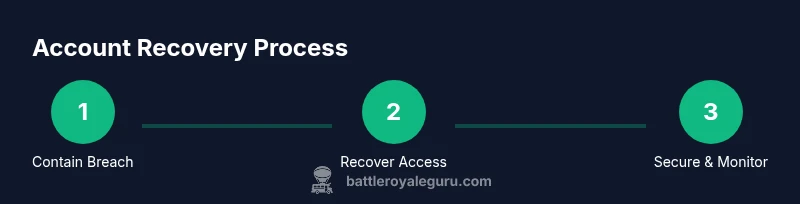
Hacking can manifest as unfamiliar login activity, sudden changes to your account email or password, unexpected purchases, or skins and V-Bucks appearing in someone else’s inventory. If you’re asking what to do if fortnite account got hacked, the first goal is containment: stop the intruder from moving further, then regain control and restore your settings. According to Battle Royale Guru, rapid containment reduces damage and speeds recovery, while the attacker’s access may hinge on weak passwords or phishing. In this section we’ll lay out the full path: immediate steps to take, how recovery with Epic Games works, and best practices to keep your account safer going forward.
Why account security matters in Fortnite
Your Fortnite account isn’t just a username—it's your in-game identity, including skins, items, and progress. A compromised account can lead to unauthorized purchases, loss of V-Bucks, and risk to linked services (Epic Games account, email, console stores). Battle Royale Guru analysis shows that strengthening login credentials and enabling two-factor authentication dramatically lowers risk. This guide will help you implement reliable protections and establish a safe recovery workflow when something goes wrong.
Immediate containment: secure access now
Containment is the top priority after a hack. Start by confirming which email is linked to your Epic Games account and secure that email first. Then, reset your Epic Games password from a trusted device, and log out of all sessions to cut off the intruder’s current access. If you can’t log in, use the account recovery options provided by Epic Games. Next, enable two-factor authentication (2FA) on both your Epic Games account and your email, because 2FA is the single most effective defense against repeated unauthorized access. Finally, scan devices for malware and phishing attempts that may have captured credentials, and avoid using public Wi-Fi for sensitive changes.
Recovery process with Epic Games: reclaim your account
Epic Games’ recovery process is designed to verify ownership and restore access. Gather proof of ownership such as purchase receipts, the original email address, and any linked platform IDs (PlayStation Network, Xbox Live, Nintendo, or Steam). You’ll likely need to answer security questions and provide details about recent purchases and in-game items. If you can access the email on file, you should receive recovery instructions quickly; if not, you may need to contact support directly and submit an identity-verification form. Throughout this process, maintain a calm, procedural approach and document every communication.
Securing your Fortnite account long-term: ongoing protection
Long-term security relies on persistent good habits. Use a strong, unique password for your Epic Games account and your email, and never reuse passwords across services. Enable 2FA for both accounts, and rotate recovery options periodically. Regularly review connected apps and devices, game-linked methods, and recent activity logs. Consider a password manager to store and generate complex credentials. Finally, educate yourself about common phishing tactics and never click suspicious links that request login information.
Common scams and phishing to watch out for
Hackers often impersonate Epic Games or platform support to extract credentials. Look for emails with mismatched sender domains, urgent language pressuring immediate action, and links that lead to fake recovery pages. Always navigate directly to the official Epic Games site rather than clicking email links. If something smells suspicious, contact Epic Games Support through the official channel and verify requests using your account’s secure options. The safer you are online, the less likely you’ll be compromised.
What happens to purchases, V-Bucks, and progress after a hack
When a hack occurs, purchases and V-Bucks can appear to be moved or spent by the intruder. Recovery doesn’t automatically guarantee all items are returned, but acting quickly improves odds of review. Keep detailed records of purchases, including transaction IDs and timestamps. If you notice fraudulent transactions, report them to Epic Games Support and your payment provider as soon as possible. Some items may be restored, but outcomes vary by case and policy.
Troubleshooting and escalation: when to push harder
If recovery steps stall or you can’t verify ownership, escalate with Epic Games Support. Provide documented proof of ownership, device history, and any correspondence. If your account remains inaccessible, seek escalation channels and consider filing reports with the platform’s consumer protection avenues. Remember: persistence and detailed documentation often lead to faster resolution.
Tools & Materials
- Access to the linked email account(Your primary email must be secure and accessible for recovery communications.)
- Epic Games account credentials(Username and current password if possible; otherwise prepare proof of ownership.)
- Proof of ownership(Receipts, purchase IDs, last known purchases, or platform IDs.)
- Authenticator device or app(Google Authenticator, Authy, or hardware key; enable 2FA wherever possible.)
- Trusted device(A secure PC or mobile device you control; avoid public devices.)
- Support contact details(Be ready to provide recovery forms, screenshots, and identity verification.)
Steps
Estimated time: 60-120 minutes
- 1
Verify breach and collect ownership proof
Identify what was accessed, which emails or platforms show changes, and collect receipts or IDs that prove ownership. This helps you communicate clearly with Epic Games and speeds the recovery process.
Tip: Gather timestamps of suspicious activity and the last known login to assist support reviews. - 2
Reset Epic Games and linked email passwords
On a trusted device, reset your Epic Games password and the password for the linked email. Use a different device network if possible to avoid a compromised connection.
Tip: Use a password manager to generate a unique, long password for each account. - 3
Enable 2FA on critical accounts
Turn on two-factor authentication for your Epic Games account and your email. This creates an additional layer of security that hackers must bypass to regain access.
Tip: Prefer authenticator apps over SMS-based 2FA for stronger protection. - 4
Revoke all active sessions
Sign out of all devices from your Epic Games account and ensure no unknown sessions remain. This closes the door on unauthorized access in real time.
Tip: Check recent devices in your account settings and remove unfamiliar entries. - 5
Review account activity and purchases
Inspect recent logins, changes to email, linked accounts, and purchases. Flag anything unfamiliar to support and request corrections or refunds if applicable.
Tip: Document transaction IDs and dates for any disputed charges. - 6
Submit recovery form to Epic Games Support
Use the official recovery form, attach ownership proof, and clearly describe the breach. Be patient; response times vary, but persistence helps.
Tip: Include as much detail as possible to avoid back-and-forth delays. - 7
Confirm security settings and recovery options
Once access is restored, update recovery options, add backup emails, and review connected apps. Set up a security plan for ongoing protection.
Tip: Document your new security settings and store recovery codes offline. - 8
Monitor account for continued issues
After restoration, monitor for unusual activity. If you see anything suspicious, report it immediately and tighten security.
Tip: Schedule monthly checks of account activity and device access logs.
Questions & Answers
What should I do first after discovering a hack?
Immediately secure your email, change your Epic Games password, and enable 2FA. Then sign out of all sessions and gather proof of ownership for recovery.
First, secure email and Epic Games, enable two-factor authentication, sign out of all devices, and gather proof of ownership for recovery.
Can Epic Games recover my hacked account if I can’t access the email?
Yes, Epic Games can verify ownership through alternative proofs and recovery forms. You may need to provide purchase receipts and other identifiers to regain access.
Epic Games can verify ownership with alternative proofs if you can’t access the email, using a recovery form and receipts.
Will I get refunds for stolen V-Bucks or items?
Refund eligibility varies; Epic Games reviews each case. Gather transaction details and report fraudulent purchases promptly.
Refunds depend on Epic's review; provide transaction details and report fraudulent charges quickly.
How long does the recovery process typically take?
Times vary by case, but providing complete ownership proof speeds the process. Expect a few hours to a few days depending on verification.
Recovery times vary, but complete ownership proofs help speed things up; it could take hours to days.
Is it safe to log in on public networks during recovery?
Avoid public networks for sensitive recovery steps. Use a trusted, private connection and always enable 2FA.
Avoid public networks during recovery; use a private, trusted connection and enable two-factor authentication.
What information will Epic Games ask for during recovery?
They'll ask for ownership proof, purchase history, linked account details, and recent activity. Providing thorough information reduces back-and-forth.
You may be asked for proof of ownership, purchase history, and recent activity.
Watch Video
Key Points
- Act quickly to contain a hack and prevent further damage
- Secure both Epic Games and email with 2FA
- Provide solid ownership proof to Epic Games Support
- Review purchases and linked accounts for unusual activity
- Implement long-term security habits to reduce future risk