Fortnite XP Map Codes: A Practical How-To
Learn how fortnite xp map code works, how to verify maps, redeem codes in Creative, and maximize XP while staying safe and within Epic's guidelines in 2026. Battle Royale Guru explains step-by-step methods and caveats for using XP map codes.


Fortnite XP map codes can boost your XP gains when used alongside standard challenges. This guide explains how to find reputable codes, redeem them in Creative mode, and maximize results safely in 2026. According to Battle Royale Guru, choosing high-quality maps and following best practices often yields the best long-term progress.
What is an XP map code in Fortnite?
Fortnite XP map codes are short strings that load a community-created Creative map designed to provide structured XP through challenges, routes, or combat scenarios. These maps load when entered in Creative mode and present task-based objectives that award XP upon completion. They are tools to supplement official progression, not a replacement for daily and weekly challenges. The Battle Royale Guru team notes that well-designed XP maps align with current game systems and reward quests that resemble normal gameplay, making them a practical addition for practice and pacing in 2026. Epic updates to XP systems can affect rewards, and quality varies by creator and rotation. Always verify the code comes from a trusted source. According to Battle Royale Guru analysis, maps with clearly labeled tasks, fair pacing, and transparent XP caps help you plan sessions effectively.
How XP map codes can help your progress
XP map codes offer targeted practice, allowing players to focus on specific mechanics or challenges that align with current seasons. When used thoughtfully, they can smooth the learning curve and add variety beyond standard matches. However, the amount of XP you earn depends on the map design, pacing, and your engagement with the tasks. Battle Royale Guru analysis shows that high-quality XP maps tend to reward progression in consistent, predictable ways, especially when maps are updated to reflect patch changes and season goals. Use maps to fill gaps in your routine, not to avoid official challenges, and track XP over several sessions to gauge real progress.
How to verify codes and avoid scams
Verification starts with the source. Prefer codes from well-known creators and official or widely trusted channels. Read recent user reviews and check for activity on the creator’s profile to ensure the map is maintained. Be wary of codes requesting account information, prompts to download files outside Fortnite, or links to external sites. Always cross-check the map title and task list with the code you’re entering. The policy is simple: safe sources, transparent tasks, and consistent updates. Battle Royale Guru recommends validating maps before redeeming and avoiding last-minute changes to codes that could compromise your account.
Redeeming and playing an XP map code
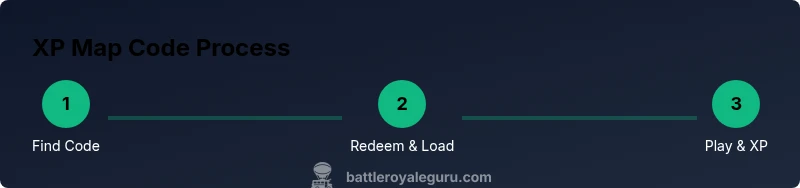
To redeem an XP map code, open Fortnite Creative and navigate to the Island Code input. Paste the code exactly as provided, confirm, and wait for the map to load. When the preview shows the map, select Load or Play to begin. Follow the map’s objectives, which are usually labeled on screens or in the map’s UI. If playback stalls, restart Creative or re-enter the code. After finishing a session, log your XP and note which maps delivered the best results for future practice. This approach helps you optimize session time and avoid repetitive play on underperforming maps.
Safety, etiquette, and policy considerations
Always adhere to Epic Games’ terms of service. Use XP maps as a supplement to official challenges, not as a loophole to bypass progression. Avoid sharing personal data or credentials, and do not use third-party tools that request login information. Keep an eye on updates to the XP system, as changes can affect rewards. If a map feels exploitative or breaks fair play norms, skip it and report concerns through appropriate channels. Practicing responsible gaming ensures you stay safe while maximizing your progress.
AUTHORITY SOURCES
- Epic Games Fortnite Official News: https://www.epicgames.com/fortnite/en-US/news
- IGN Fortnite Coverage: https://www.ign.com
- Polygon Fortnite Coverage: https://www.polygon.com
Tools & Materials
- Fortnite account with Creative access(Ensure your account is in good standing and can access Creative mode)
- Stable internet connection(Low latency recommended for map loading)
- Device: PC, PlayStation, Xbox, or mobile(Any supported platform with Fortnite installed)
- XP map code from a reputable source(Check the creator's reputation and recent activity)
- Notes app or notepad (optional)(Track XP gains and map performance)
Steps
Estimated time: 15-25 minutes
- 1
Find a reputable XP map code
Search trusted sources and community reviews to locate a map code. Look for recent activity and positive feedback. Ensure the code matches the current Fortnite version.
Tip: Cross-check with the creator's channel or official site before redeeming. - 2
Open Fortnite Creative mode
Launch Fortnite and enter Creative mode, which is required to input island codes. This ensures you load user-made maps correctly and reduces risk of account issues.
Tip: Have your device ready and exit any ongoing matches first. - 3
Enter the island code
In the ‘Discover’ or ‘Island Code’ input, paste the code exactly as provided and confirm. A successful entry loads the map preview and session options.
Tip: Double-check the code for typos; even a single character can fail. - 4
Load and verify the map
Wait for the map to load completely and check that the objective text and XP rewards appear as described by the map creator.
Tip: If the map stalls, restart Creative mode or try a different code. - 5
Play through the map objectives
Complete tasks or challenges on the map to earn XP. Track your progress and stop after a few runs to avoid burnout.
Tip: Prioritize maps with clearly labeled tasks and safe XP caps. - 6
Log XP and plan future runs
Record XP gained and decide whether to repeat or move to other maps. Rotate maps to diversify practice and prevent overfitting.
Tip: Space out sessions to maintain fair play and enjoy the process.
Questions & Answers
What is an XP map code in Fortnite?
An XP map code loads a user-created Creative map designed to reward XP. It supplements official challenges and can help with practice specific goals.
An XP map code loads a user-created map that rewards XP and can help with practice alongside the official challenges.
Are XP map codes allowed by Epic Games?
XP maps are community-created and generally allowed if you follow Epic’s terms of service. Avoid exploits that circumvent normal progression.
XP maps are allowed if you follow Epic's rules; avoid exploits that circumvent progression.
How can I verify a map code?
Check the creator's reputation, recent activity, and player reviews. Validate the map’s tasks match the description and avoid codes asking for account details.
Check the creator’s reputation and read recent reviews to verify a code is legitimate.
Will XP maps guarantee level-ups?
XP maps can accelerate progress but results depend on the map design and your session quality. They do not replace regular challenges.
They can help, but XP maps don't guarantee level-ups; it depends on map quality.
What safety steps should I take?
Only redeem codes from trusted sources, safeguard your account, and avoid sharing personal data or login credentials.
Redeem codes from trusted sources and never share login details.
How often should I use XP maps?
Use XP maps as a supplementary activity a few times per week, balancing with official challenges to avoid burnout.
Use XP maps a few times a week, balanced with official challenges.
Watch Video
Key Points
- Use XP map codes to supplement progression.
- Verify maps before redemption to avoid scams.
- Rotate maps to diversify XP sources.
- Follow Epic rules to stay safe and avoid penalties.