How Fortnite Live Events Work: A Practical Guide
Discover how Fortnite live events are planned, synchronized, and broadcast—from pre-show hype to post-event wrap-up—and what players experience during a typical in-game spectacle. Learn the workflow, technology, and practical tips to understand or participate in these major milestones.


By understanding the standard Fortnite live event workflow, you’ll know how pre-show hype becomes a synchronized in-game spectacle. This guide outlines the planning, production, and player experience, including the typical phases and key tech that keep everything in lockstep. According to Battle Royale Guru, events hinge on tight timing, cross-team coordination, and resilient streaming pipelines.
What makes a Fortnite Live Event Different
Fortnite live events are not just in-game cutscenes; they are multi-faceted productions that combine cinematic storytelling, live interaction, and real-time synchronization across millions of players. The core idea is to deliver a single, shared moment that feels personal to every participant, regardless of location or platform. This requires meticulous planning, cross-disciplinary collaboration, and airtight contingency planning to handle the unpredictable nature of live audiences. The Battle Royale Guru team emphasizes that the most memorable events balance spectacle with accessibility, ensuring players on weaker connections can still witness pivotal moments.
Key differences include the scale of the broadcast, the number of moving parts (art assets, audio, lighting cues, camera angles), and the need for fallback streams and replays to accommodate all regions. Unlike a standard update or cosmetic reveal, live events are immersive experiences designed to be felt in real time. In practice, developers stage a narrative beat, choreograph in-game cinematics, and synchronize external streams so every viewer shares the same cadence.
- Scale and scope: billions of pixels, terabytes of data, and thousands of unique assets must align in seconds.
- Real-time synchronization: servers, clients, and streaming sources must stay in lockstep across regions.
- Accessibility and inclusivity: captions, audio cues, and replay options expand who can enjoy the event.
- Community impact: events are often cultural moments that drive engagement for weeks.
The takeaway: a Fortnite live event is a tightly scripted, live broadcast-like experience that players feel as a single moment, not just a video.
Planning and Pre-Production Workflow
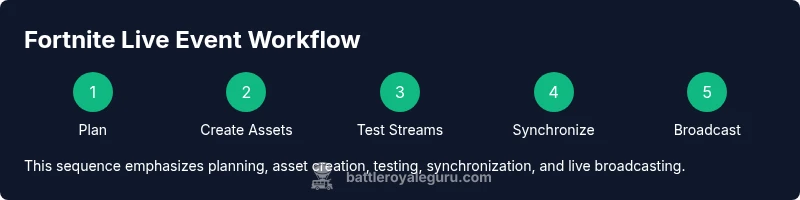
Planning for a Fortnite live event begins with a clear narrative goal and a release calendar that aligns with marketing, e-sports, and partner promotions. Pre-production involves script writing (or at least beat sheets), asset creation, camera choreography, and testing timelines. Producers map dependencies, set milestones, and assign owners for streams, in-game visuals, audio cues, and post-event assets. The emphasis is on redundancy: multiple asset backups, parallel workflows, and rehearsals to simulate the final product. The Battle Royale Guru team notes that most successful events run rehearsals with simulated audience load to catch timing or streaming issues early.
A typical pre-production phase includes a concept lock, asset pipeline setup, test builds, and regional dry runs. Content teams prepare teasers and countdown assets while technical teams ensure server capacity, streaming pipelines, and cross-platform compatibility. Stakeholders—from Epic Games staff to external partners—coordinate on timing windows, legal checks, and accessibility options. The result is a rehearsed, high-confidence plan that can be adjusted in real time if external conditions demand it.
noteEnabled":true},
Tools & Materials
- Stable internet connection(Wired Ethernet preferred; 20 Mbps minimum download and 5 Mbps upload per device recommended for viewing or testing streams.)
- Device with Fortnite installed(PC, console or mobile; ensure the device is updated to the latest patch.)
- Headphones or headset(For precise audio cues and to reduce echo during testing.)
- second display or streaming device (optional)(Helpful for monitoring official streams or replays while testing in-game visuals.)
- Active Fortnite account(Verified account with access to official event schedules and streams.)
Steps
Estimated time: 60-90 minutes
- 1
Define learning objective
Clarify what you want to understand about a Fortnite live event (phases, tech, or audience experience). This focus guides what you watch, test, and analyze. Set a goal for what a successful event understanding looks like for you.
Tip: Write down 2–3 specific questions you want answered by the end. - 2
Review official event timeline
Check Epic Games announcements for the event date, start time, and any regional start differences. Note the sequence: teaser, countdown, in-game sequence, and wrap-up. This helps anticipate what you’ll see as the event unfolds.
Tip: Use the official channel calendar and add reminders to your calendar. - 3
Check hardware and software readiness
Update Fortnite and your OS, verify your internet connection, and test audio. A smooth test run reduces last-minute glitches during the live event. Prepare a backup device if possible.
Tip: Run a quick latency check to ensure you’re within expected ranges. - 4
Learn the event phases
Study common event phases (teaser, countdown, cinematic, interactive moment, and post-event wrap). Understanding these beats helps you interpret on-screen cues and streamer commentary.
Tip: Note which cues indicate a transition to the next phase. - 5
Understand the broadcast pipeline
Recognize that live events rely on synchronized assets, multiple streams, and real-time data. If one element lags, the experience can feel choppy for some players, so redundancy is critical.
Tip: Watch for official streams and backups to compare timing. - 6
Test latency and network routes
If you’re testing before a live event, measure ping to regional servers and consider wired connections for consistency. This helps you predict how latency might affect your viewing experience.
Tip: Prefer regional servers you expect to be closest to your location. - 7
Watch a rehearsal or test stream
Observe a behind-the-scenes or test stream to understand the synchronization between in-game and broadcast cues. Note any deviations from your expectations.
Tip: Take notes on what works well and what doesn’t. - 8
Analyze replays and post-event data
After the event, review replays, highlight reels, and official teardown videos. This solidifies your understanding of how the event was produced and what players experienced.
Tip: Compare your notes with official post-event breakdowns. - 9
Summarize insights and compare events
Create a one-page summary of how this event operated versus earlier ones. Look for patterns in pacing, asset management, and audience engagement.
Tip: Use the summary to anticipate future event structures. - 10
Document takeaways for future events
Store your notes in a personal guide so you can reference how live events evolved across seasons. This strengthens your understanding for future broadcasts and troubleshooting.
Tip: Create a quick-reference checklist for future events.
Questions & Answers
When do Fortnite live events typically happen?
Epic Games announces a date and time in advance. Events are scheduled with official channels and often include regional start times. Check the in-game notification center and official social channels for the exact schedule.
Epic Games sets a date and time in advance, with official announcements closer to the event. Check notifications for the exact start time.
Do I need a special account to participate in live events?
No special account is required. Any Fortnite account can participate if you’re online during the event and meet regional access requirements. Ensure your account is in good standing and updated.
No special account is needed; just be online during the event with your regular Fortnite account.
Can I watch a live event if I miss the in-game moment?
Yes. Epic typically provides replays and highlight videos on official channels after the event. You can catch up at your convenience if you miss the live moment.
You can watch replays later on official channels if you miss the live moment.
How long does a Fortnite live event last?
Most events run between 15 and 45 minutes, depending on the storyline and sequence. Check official previews for a rough duration estimate.
Events usually last under an hour, with the main sequence taking up most of that time.
Are live events accessible on all platforms?
Yes, events are designed to be cross-platform. Performance can vary by device, so ensure your platform is updated and meets minimum specs.
All supported platforms get access, but performance can vary by device.
What can cause a live event to be delayed or canceled?
Rare issues like server instability or regional outages can delay, and Epic Games communicates updates through official channels. Most events proceed as planned if systems are stable.
Delays happen if there are server problems; check official status for updates.
Watch Video
Key Points
- Understand the end-to-end event lifecycle from planning to post-event wrap-up
- Expect synchronized assets, servers, and streams across platforms
- Check hardware and network to reduce latency during live events
- Study the event phases to predict what players see and experience
- Review post-event data and community feedback for improvements
- The Battle Royale Guru Team emphasizes reliability and accessibility in future events