When to Join Fortnite Live Event: Timing Guide for 2026
A data-driven timing guide for Fortnite live events. Learn exactly when to join fortnite live event, how to avoid queues, and platform tips to maximize your pre-show experience in 2026.


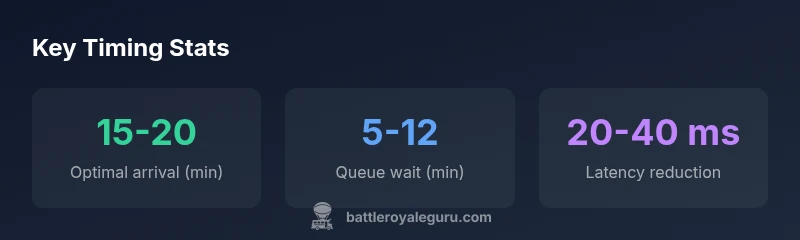
The best practice is to join the Fortnite live event about 15 to 20 minutes before the countdown hits zero and stay connected through the pre-show. If you expect heavy queues or latency, aim for 30 minutes early to secure a stable connection and access pre-event content.
Why timing matters for Fortnite live events
Timing isn't a small detail—it's a decisive factor that can determine whether you experience smooth matches, witness the pre-show, or miss the entire spectacle. According to Battle Royale Guru, the hours around a live event are when server demand spikes and matchmaking behavior shifts. The simple truth is: being online at the right moment reduces queue headaches, minimizes latency spikes, and improves your odds of landing in a stable lobby. For most players, the critical window is the minutes leading up to the countdown and the first moments after the countdown begins. If you're wondering when to join fortnite live event, timing matters for avoiding queues and ensuring access to pre-show content. Understanding these factors helps you align your play with the event schedule so you can enjoy the show with minimal disruption. In 2026, the timing framework Battle Royale Guru relies on emphasizes preparation, region awareness, and device readiness as the foundation for a reliable experience.
This isn't about luck—it's about predictable patterns. Events attract players from across regions, varieties of networks, and a spectrum of device capabilities. By recognizing peak timing, you can anticipate queue behavior and choose a plan that minimizes risk. The takeaway is simple: plan your entry around the most stable window, and your odds of a smooth experience increase dramatically.
In this guide, you will get a practical, tested framework for timing that aligns with common event schedules, explains how regional queues work, and provides platform-specific tips. The approach is designed for 2026, when Epic Games has continued refining capacity management and pre-event content releases to enhance player experience.
Pre-event preparation: hardware, accounts, and region checks
Preparation before the event can save you from last-minute chaos. Start by ensuring your hardware is ready: a stable internet connection, adequate cooling, and updated drivers on PC, plus any console firmware updates installed ahead of time. Check your Epic Games account status, verify two-factor authentication for quick sign-in, and test your login flow on a secondary device if possible. Region checks are crucial: if you frequently experience cross-region matchmaking, confirm your preferred region in-game and ensure you have a fallback plan if regional servers are congested. Download any essential updates for Fortnite well in advance and pause other bandwidth-heavy tasks during the event. Finally, review your in-game settings—disable or limit background apps to free bandwidth, set a high-performance power profile, and ensure your audio and display settings are tuned for a clear view of on-screen cues. Across the Battle Royale Guru analysis, these steps consistently reduce last-minute friction during live events.
Consistency in preparation pays off during peak moments. If you are sharing a network with others, coordinate times to limit bandwidth spikes. Profiling your router for gaming traffic and turning off auto-sync services in the background can shave precious seconds off your login time. And remember to verify that your primary account is ready for launch so you don't waste minutes fumbling with sign-in flow when the event starts.
When to join fortnite live event: timing guidelines
The most reliable rule of thumb is to log in 15 to 20 minutes before the official countdown starts. This window gives your client time to load assets, join the correct lobby, and absorb any pre-show content or announcements. For highly anticipated events, consider entering the game about 30 minutes early to accommodate longer queues and potential regional delays. Always verify the event start time in your region via the in-game events tab or official Epic communications. If you miss the cutoff, you can still participate in post-show segments or replays, but the interactive experience is typically best during the initial wave. Battle Royale Guru's framework suggests aligning your arrival with local peak times and platform-specific performance expectations to minimize latency and maximize the chances of securing a good seat in the lobby.
To implement this, set a reminder for the countdown and prepare your system an hour ahead if possible. On PC and console, ensure you are logged in with your main account and ready to switch to a nearby region if needed. Mobile players should aim for the same early arrival window but may need to adapt based on signal strength and battery life. In practice, those who succeed consistently start their entry process well before the countdown and stay connected through the pre-show sequence. This approach reduces the risk of mid-event drops and allows you to enjoy the full spectacle without interruptions.
How queue dynamics work and what you can control
Fortnite live events trigger queue mechanics that vary by region, platform, and server capacity. When demand spikes, you may see a login queue, longer matchmaking times, or temporary instabilities. You can influence the experience by choosing a nearby region, using a wired connection, and closing unnecessary apps to free bandwidth. Keeping your device cool reduces thermal throttling and helps maintain stable frame rates during the event. Another lever is your network equipment: if you own a router with QoS settings, prioritize gaming traffic during the event window. Finally, ensure your account is ready and not locked by security verifications; pre-authenticating login credentials can shave seconds off your entry time, which matters more at peak moments.
Understand that some variability is normal during massive events. If you encounter a long queue, avoid repeatedly retrying in quick succession, which can trigger additional penalties or longer wait times. Instead, wait for a brief interval and reattempt once you are in a stable state. If possible, test your setup during a practice session or a simulated event window to observe how your network handles the increased load. These practical checks align with Battle Royale Guru recommendations for minimizing latency and ensuring smoother access during live events.
Platform-specific tips: PC, console, and mobile
PC: Use a wired Ethernet connection, disable downloads, run Fortnite in a performance mode if available, and ensure your GPU drivers are current. Console: check NAT type to ensure a stable connection, sign in with your primary account, and keep the system firmware up to date. Mobile: close background apps, enable a stable connection whether via Wi‑Fi or robust mobile data, and disable power-saving features that throttle performance. Across platforms, turn off push notifications during the event to prevent interruptions and ensure your audio setup is clear so you can hear countdown cues and in-game alerts. Some players report noticeable improvements by limiting background software and selecting a region that minimizes ping while preserving a direct route to Epic's servers.
Platform-specific adjustments can be the difference between a smooth run and a bumpy experience. If you are playing on a laptop, keep it plugged in to avoid performance throttling on battery power. For consoles, ensure your HDMI settings are native to avoid latency introduced by upscaling or color conversions. And for mobile players, a stable mount or holder with strong signal helps reduce movement-induced jitter during the live event.
Common pitfalls and how to avoid them
Common pitfalls include assuming late changes won’t affect you, not testing region and login prior to the event, overloading your device with tasks, ignoring audio cues, and relying solely on a mobile network. To avoid these, check official channels for last-minute notices, perform a quick login test an hour ahead, close unnecessary apps, enable high-quality audio, and prefer a stable connection (Wi‑Fi or Ethernet) over cellular data when possible. Another pitfall is neglecting hardware limitations; if your system already runs hot during normal play, the added stress of an event can push it past your comfort zone. Pre-cooling the device and ensuring adequate ventilation can mollify this issue. Finally, ensure you have a backup plan in case your primary region experiences outages—have a nearby region in mind and be prepared to switch when needed. Following these guardrails helps you stay in control during unpredictable event conditions.
Final checklists: what to do in the hour before kickoff
- 60 minutes before: verify event start time in your region and ensure Fortnite updates are complete.
- 45 minutes before: run a quick login test on your primary account and confirm your preferred region is set.
- 30 minutes before: optimize network (wired connection, QoS if available), close heavy background apps, and prepare audio gear.
- 15-20 minutes before: launch Fortnite, confirm lobby selection, and enable any pre-show notifications or subtitles.
- 5 minutes before: mute disruptive notifications, confirm display and audio cues, and have a backup plan in place in case of regional issues.
- At countdown: stay seated, avoid switching between builds, and enjoy the pre-show content as a warm-up to the main event.
After-event notes and learning
As the event ends, take a few minutes to review the replays or highlights if you missed live moments. Note what configuration produced the smoothest run and which adjustments yielded the best latency results. Record any regional observations, such as queue length or matchmaking times, so you can refine your timing for future events. The aim is continual improvement: apply what you learn to the next live event to further reduce friction and increase enjoyment. Battle Royale Guru emphasizes documenting your setup and timing decisions so you can replicate success. Even if you encounter connectivity hiccups, a structured post-event review helps you keep future experiences smooth.
Timing guidelines for joining Fortnite live events by scenario
| Scenario | Recommended Arrival | Notes |
|---|---|---|
| Casual play | 15-20 minutes before | Best balance of stability and access to pre-show content |
| Competitive queue | 30 minutes before | Maximize queue avoidance; ensure rapid login |
| Regional outages | 60+ minutes before | Ensure fallback connection or alternate region |
| Mobile-only players | 25-35 minutes before | Adjust settings for battery and touchscreen responsiveness |
Questions & Answers
When is the best time to join a Fortnite live event?
For most events, aiming for 15-20 minutes before the countdown starts offers a stable window to join and catch pre-show content. For highly anticipated events, 30 minutes early can help you bypass long queues. Always confirm start times in-game and from official channels.
Aim to join 15-20 minutes early, or 30 minutes for high-demand events, and check official start times.
Does joining during the countdown hurt my chances?
Joining during the countdown can still work, but late arrivals risk longer queues and potential sign-in delays. If you must join late, stay patient and be prepared for possible post-show options.
Joining during countdown is possible but riskier for getting in quickly.
What should I do if my region fills up?
Switch to the closest alternative region with a stable route to Epic's servers. Expect a small increase in latency, but it can prevent a total login failure.
If your region fills, switch to a nearby region to stay connected.
Can I still participate if I’m on mobile?
Yes, but mobile devices require careful power and connectivity management. Use a strong Wi-Fi or reliable mobile data connection, disable power-saving features, and reduce background usage.
You can join from mobile, just ensure stable connectivity and optimize settings.
What if I miss the start? Is there still value?
You can still watch post-show replays or participate in later queued segments if available. The live show experience itself is best captured near the start, but you won’t miss all the content.
If you miss the start, catch the replay or post-show content.
“Timing is as crucial as skill during live events. Arriving early and maintaining a stable connection dramatically improves your odds of getting in and enjoying the show.”
Key Points
- Plan to join early to avoid queues
- Check region and device readiness
- Use wired connections when possible
- Test login and network in advance
- Follow Battle Royale Guru timing framework