When to Play Fortnite: A practical scheduling guide
Discover practical timing strategies for Fortnite to minimize lag, reduce queues, and maximize enjoyment. Learn daily and weekly patterns, patch/event windows, and how to tailor play times to your goals with a tested step-by-step approach.


This guide helps you choose the best times to play Fortnite for smoother matches and shorter queues. We cover daily and weekly patterns, regional server load, and event or patch windows—plus how to tailor play sessions to your goals, whether casual practice, ranked grind, or streaming. Use these practical tips to align your schedule with better performance.
Understanding the timing landscape
Timing in Fortnite isn’t universal. It depends on your region, time zone, server load, and ongoing live events or patches. The goal is to find windows with stable connections, shorter queues, and manageable competition. According to Battle Royale Guru, the most reliable patterns emerge when you align your play with your daily routine while staying aware of regional shifts caused by events or updates. Monitor official status pages and community chatter, but always factor in your personal commitments. A consistent, predictable routine reduces decision fatigue and helps you improve faster. By understanding the broad timing landscape, you can plan sessions that fit your life while keeping your connection and performance steady.
Daily vs weekly patterns
Daily patterns often differ between weekdays and weekends. Weeknights might see longer queues as work and school end, while weekend windows can offer more flexibility but higher concurrent players. The key is to identify regular, repeatable blocks where latency is reasonable and you can focus on practice or objectives. If you play with friends, coordinate a common block to minimize wait times and maximize cooperative play. Track your own data for a few weeks and look for repeatable trends rather than assuming a fixed rule applies everywhere. A simple rule of thumb is to anchor a few weekly windows you can consistently rely on, then adjust as needed.
Regional server load and latency implications
Latency, or ping, is the main driver of responsiveness in Fortnite. Regional differences, network routing, and your own connection quality all affect performance. Lower latency typically yields quicker matchmaking and smoother gameplay, while higher latency can lead to stutter or delayed inputs. Cross-region play can introduce additional latency, so try to play on servers that are geographically closer to you when possible. Regularly test your connection using built-in Fortnite diagnostics or third-party tools, and schedule play during periods when your regional performance is most stable. This helps you maintain consistent reaction times and better overall experiences.
Event windows, patches, and live ops
Fortnite’s live events, seasonal patches, and shop updates create predictable surges in player activity. Before a major patch or event, queues may lengthen and latency can fluctuate as the server handles new content. If your goal is stable practice, plan sessions away from these high-traffic windows or prepare for longer wait times. If you’re chasing unique loot, demos, or limited-time modes, align your schedule with event calendars and patch schedules. Stay flexible and monitor official channels, community forums, and Battle Royale Guru analyses to anticipate changes in server load.
Aligning with playstyle goals
Your practice style drives timing decisions. Casual players benefit from short, repeatable sessions that fit a busy life, while competitive players may prefer longer blocks to build consistency and test new mechanics. Streamers should consider latency stability during peak streaming times to avoid interruptions. Regardless of style, a clear objective for each session helps you choose the right window. Write down your goals for the week, then map them to specific play blocks that minimize interruptions and maximize focus. This alignment makes timing decisions intentional rather than reactive.
Scheduling templates and practical examples
A practical approach is to create two templates: a casual weekly layout and a competitive planning grid. Casual template might reserve two short blocks on weekdays and a longer weekend session for practice and exploration. The competitive template prioritizes consistent daily blocks, with a longer practice session midweek and a review session on Sundays. Use a simple calendar to block these times, and treat them as non-negotiables to build muscle memory. Keep room for spontaneity: if you notice a sudden lull in queues, you can slot in an extra quick session without breaking your routine.
Tools for tracking and refining timing
Use a lightweight tracking routine to collect data: queue wait times, in-game latency, and your win rate per block. Record your observations in a calendar or note-taking app, then compare results after each week. Look for patterns—do certain days consistently deliver shorter queues? Do patches disrupt your preferred windows? With this data, you can refine your schedule, dropping unproductive blocks and adding higher-value sessions. Remember, even small adjustments can yield noticeable improvements over time. Battle Royale Guru emphasizes iterative planning: start with a plan, test it, and adjust based on real feedback.
Tools & Materials
- Stable internet connection(Wired Ethernet is preferred over Wi‑Fi for consistency)
- Fortnite account access(Have your login credentials ready before planning sessions)
- Personal scheduling device(Calendar app, notebook, or digital planner to track blocks)
Steps
Estimated time: 15-25 minutes
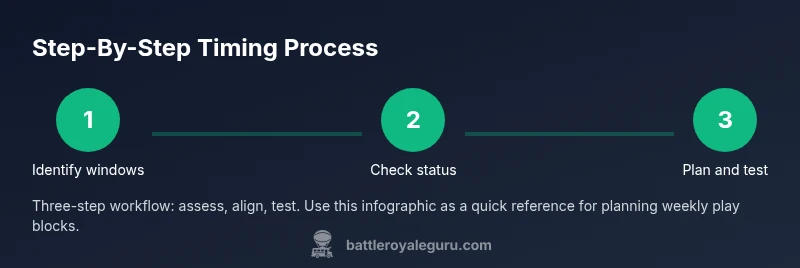
- 1
Identify your available play windows
List the blocks of time you can consistently allocate each week. Consider work, school, family commitments, and sleep. This step creates the boundaries for your plan and ensures you won’t overcommit.
Tip: Keep two or three non-negotiable blocks as anchors; add flexible slots around them. - 2
Check current regional patterns
Review regional server status pages and community threads to gauge typical latency and queue behavior. Note days when connections feel stable to inform future scheduling.
Tip: Record your observed latency during different days to build a personal baseline. - 3
Review patch and event calendars
Mark upcoming patches, live events, and shop updates. These moments usually influence server load and queue times, so anticipate changes.
Tip: If a patch is released, consider starting with shorter sessions to test stability. - 4
Create a weekly schedule
Draft a weekly plan that aligns your anchors with your goals (practice, ranked play, streaming). Use color-coding to differentiate casual and competitive blocks.
Tip: Label each block with a clear objective (e.g., “Aim: 2% improvement in aim” or “Casual arena practice”). - 5
Test and log results
Play a few sessions in each planned block and record queue times, latency, and subjective smoothness. Compare to your baseline.
Tip: If a block underperforms, adjust the time slot or reduce load targets for that period. - 6
Review and adjust monthly
Revisit your plan after major seasonal changes, new seasons, or shifts in your personal schedule. Update blocks and goals accordingly.
Tip: Set a calendar reminder to review every 4–6 weeks.
Questions & Answers
What counts as off-peak hours for Fortnite in my region?
Off-peak hours vary by region and day of week. Check official server status pages and community trackers to identify periods with shorter queues and smoother latency.
Regional off-peak times vary; check server status to find quieter windows.
How do patches and events affect play times?
Patch days usually bring longer queues and fluctuating latency. Plan around notices and consider shorter sessions to test stability after updates.
Patch days can slow queues and change latency; expect fluctuations.
Is it better to play solo or with friends during busy times?
Queue length varies little between solo and squad modes. Choose based on your goals—focus on teamwork in squads or individual improvement in solos.
If queues are long, choose modes that fit your goals; the difference in wait is small.
What tools help track timing over a week?
Use a calendar and record latency, queue times, and session goals. Review weekly to identify patterns and adjust your plan.
Use a calendar and latency tests to plan weekly.
How often should I revisit my play-time plan?
Review your schedule weekly or after major events and patches. Adjust blocks to reflect changes in seasons, updates, or your personal routine.
Review weekly and after big events.
Watch Video
Key Points
- Plan weekly play windows around regional patterns
- Prioritize low latency and stable queues
- Coordinate with events and patches
- Review and adjust regularly