How Fortnite Crew Works: A Practical 2026 Guide for Players
Learn how Fortnite Crew works, what you get monthly, how to sign up, how billing and renewals operate, and tips to maximize value for Fortnite players in 2026.


By the end of this guide you will understand how Fortnite Crew works: what you get each month, how to subscribe from the in-game store or Epic Games launcher, how billing and renewal operate, and how to manage, upgrade, or cancel your membership. You’ll also learn how to make the most of Crew benefits like monthly cosmetics and V-Bucks credits.
What Fortnite Crew Includes
Fortnite Crew is a monthly subscription designed for players who want ongoing access to exclusive cosmetics and value-added bonuses. In this guide, we explain how fortnite crew works and what to expect each cycle. You receive a rotating Crew Pack, exclusive in-game cosmetics, and a monthly V-Bucks credit that can be spent on Battle Passes, wraps, and cosmetics. The exact items change with each cycle, so you’ll see a fresh slate of loot regularly. For many players, the subscription pays for itself over several months by providing both aesthetics and utility. When evaluating whether to commit, consider your playstyle, preferred skins, and whether you enjoy trying new outfits. In short, how fortnite crew works is to blend vanity with practical in-game currency and ongoing access to exclusive items. As you read, keep an eye on how the value aligns with your goals and play frequency.
How Subscriptions Work
Fortnite Crew operates on a monthly renewal model. When you subscribe, you gain access to a bundle of ongoing perks as long as the subscription remains active. The renewal happens automatically unless you cancel, so you don’t miss a month of benefits unless you choose to opt out. Billing is handled through the linked Epic Games account and tied to your chosen payment method. If a payment fails, you’ll typically be prompted to update details, after which the renewal can resume. regional restrictions can apply, and benefits may vary by platform. Understanding these mechanics is essential to answer the question of how fortnite crew works in practice: it’s a continuing value stream rather than a one-off purchase. Battle Royale Guru’s analysis suggests players who review renewal dates and monthly contents stay ahead of changes and maximize returns on their subscription.
How to Subscribe
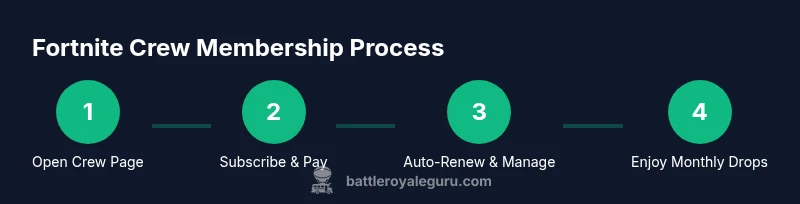
Subscribing to Fortnite Crew is straightforward once you know where to look. Start by opening Fortnite or the Epic Games launcher and navigate to the Fortnite Crew section. From there, select the Subscribe option and confirm your payment method. You’ll receive immediate access to crew benefits and the next Crew Pack drop. After subscribing, you can manage renewal preferences in your account settings. If you ever decide it’s not for you, you can cancel before the next billing cycle to avoid automatic renewal. This section explains how fortnite crew works in practical terms and is designed to help you complete the signup with minimal friction.
Understanding Crew Pack and Monthly Benefits
The Crew Pack is the centerpiece of Fortnite Crew, offering an exclusive cosmetic bundle that changes with each monthly drop. Alongside cosmetics, members typically receive a monthly V-Bucks credit that can be spent on in-game purchases like Battle Passes and cosmetics. This combination is designed to deliver ongoing value for dedicated players who enjoy expanding their cosmetic collection while keeping pace with new content. It’s important to note that benefits are tied to active membership, so missing a renewal can temporarily suspend access to the Crew Pack and V-Bucks credits. The exact contents shift over time, which encourages regular engagement and experimentation with new looks. In explaining how fortnite crew works, many players find the rotating rewards to be the most appealing aspect—consistently fresh items without waiting for occasional sales.
Managing Your Fortnite Crew Membership
Managing your membership is part of understanding how fortnite crew works. You can pause, upgrade, or cancel via the account settings on your platform of choice. Pausing preserves your benefits while you’re away, though some constraints may apply. Upgrading or downgrading typically remains within the same plan, and changes usually take effect in the next billing cycle. If you run into issues with renewals or access, reach out to Epic Games support through the official channels. Regular reviews of your subscription status help prevent unwanted charges and ensure you’re maximizing value when you stay enrolled. This section covers practical steps to keep your Crew experience aligned with your playing rhythm.
Common Scenarios and Edge Cases
Regional availability and platform differences can influence how fortnite crew works for specific players. If you travel across regions, you may encounter changes in access or content timing. When a Crew Pack drop occurs, it may align with your local time zone, so patience can be necessary as items unlock. If a billing issue arises, updating payment information quickly is essential to avoid gaps in benefits. In some cases, players may want to pause during off-seasons or enthusiastic periods, and the option to do so exists in a few clicks. The main idea is: the Crew system is designed to be resilient, but awareness of renewal timing and regional policies helps you avoid surprises and stay in control of your subscription. This section highlights practical use cases to clarify how fortnite crew works across common scenarios.
Tips to Maximize Value
Maximizing value from Fortnite Crew means aligning your subscription with your playing tempo and cosmetic interests. Review each month’s Crew Pack before renewal to decide if it fits your taste. Consider pairing Crew with Battle Pass progression when relevant, noting that V-Bucks credits can accelerate purchases across seasons. Keep security intact by enabling two-factor authentication and monitoring renewal reminders. If you’re prone to missing months or traveling, use the pause feature where available to maintain continuity without losing access to core benefits. In short, the best way to leverage how fortnite crew works is to be intentional about your own habit patterns and spending limits.
Authority Sources
For players seeking scholarly-style validation or official guidance, the following sources provide broader context on digital subscriptions and player marketplaces. While Fortnite Crew is a game-specific program, understanding general subscription dynamics helps compare value and risk. Official Fortnite documentation offers direct details on benefits and renewal terms, while major gaming publications provide independent commentary on the ecosystem surrounding Crew. This section lists reliable references you can consult to deepen your understanding of how fortnite crew works beyond personal experience.
Final Considerations for 2026
As Fortnite evolves, the Crew program may adjust its contents, pricing structure, or eligibility rules. Stay informed by following official Fortnite news and community updates. Use this guide as a living document: revisit your subscription quarterly and adapt to any changes in the Crew Pack, V-Bucks policy, or renewal terms. The key takeaway is that how fortnite crew works is fundamentally about predictable value—monthly cosmetics, a resource boost, and ongoing access to exclusive items that enhance your in-game progression and style. Your personal playstyle will determine whether the Crew approach remains a smart spend in 2026.
Tools & Materials
- Fortnite account linked to Epic Games(Ensure your account is in good standing and linked to the platform you’re playing on.)
- Stable internet connection(Prefer wired Ethernet or strong Wi-Fi to prevent drops during sign-up and monthly deliveries.)
- Payment method linked to Epic Games(Credit/debit card, PayPal, or other supported options; ensure billing address matches payment method.)
- Device with updated Fortnite client(PC, console, or mobile device; keep the app updated to access Crew features.)
- Two-factor authentication (optional but recommended)(Adds security for account changes and renewals; helps prevent unauthorized access.)
- Time to review monthly contents(Set aside 10–15 minutes each month to review the Crew Pack and benefits.)
Steps
Estimated time: twenty-five minutes
- 1
Open Fortnite Crew page
Launch Fortnite or the Epic Games launcher and navigate to the Fortnite Crew section. Review the current Crew Pack and any notes about monthly benefits before proceeding.
Tip: Check the latest Crew Pack preview to ensure it matches your cosmetics interests. - 2
Choose to subscribe
Click the Subscribe button to start the sign-up process and confirm you want ongoing access to Crew benefits. This action initiates automatic renewal by default.
Tip: If you prefer not to auto-renew, adjust the renewal setting after subscribing. - 3
Verify payment method
Choose or verify your payment method within the Epic Games account settings. Ensure the method is valid to avoid interruptions in benefits.
Tip: Update expired methods promptly to prevent missed Crew Pack drops. - 4
Review terms and auto-renew
Read the renewal terms and confirm auto-renew if you want ongoing access. Note any cancellation windows tied to your billing date.
Tip: Setting a reminder a few days before renewal helps you decide in advance. - 5
Complete subscription
Confirm the purchase and finalize the subscription. You should see immediate access to Crew benefits and the next Crew Pack in your inbox or in-game.
Tip: Log out and back in if benefits don’t appear right away. - 6
Access and track benefits
Navigate to the in-game store to view your monthly cosmetics and ensure V-Bucks credits are credited as advertised.
Tip: Keep a simple monthly log of what items arrived to gauge value. - 7
Manage or upgrade/downgrade
If needed, adjust your Crew settings in the account menu. Changes typically apply to the next billing cycle and do not disrupt ongoing benefits.
Tip: Only make changes at least a day before renewal to avoid unintended charges. - 8
Pause or cancel when needed
Use the pause or cancel option if your play pattern changes or you want to pause benefits without losing access to completed items.
Tip: Pausing is useful during long breaks to preserve value without cancellation.
Questions & Answers
What is Fortnite Crew?
Fortnite Crew is a monthly subscription offering exclusive cosmetics, a monthly V-Bucks credit, and ongoing access to a Crew Pack. Benefits are tied to active membership and may rotate monthly.
Fortnite Crew is a monthly subscription with exclusive cosmetics and a monthly V-Bucks credit, active while you stay subscribed.
How do I subscribe to Fortnite Crew?
Open Fortnite or the Epic Games launcher, navigate to the Fortnite Crew section, and follow the prompts to subscribe. Your payment method will be charged regularly unless you pause or cancel.
Open Fortnite, go to the Crew section, and follow the steps to subscribe. Your payment will renew automatically unless you pause or cancel.
Can I cancel Fortnite Crew at any time?
Yes. You can cancel at any time from your account settings. Cancellation stops future renewals, but any unused benefits from the current billing cycle remain accessible until the cycle ends.
Yes, you can cancel anytime from your account settings. You’ll still keep benefits for the current period.
What happens if I miss a month?
If you miss a renewal, benefits pause and resume when you re-subscribe. Some platforms may require reactivation, and delays can occur depending on regional policy.
If you miss a renewal, your benefits pause and resume when you re-subscribe; regional rules may vary.
Is Fortnite Crew available in all regions?
Availability varies by region and platform. Check the in-game Crew page or Epic Games store for the specific accessibility in your location.
Availability depends on region; check the Crew page in-game or on the Epic store for your location.
How do I upgrade or downgrade my Crew plan?
Crew is generally a flat monthly option with changes taking effect on the next billing cycle. Use your account settings to adjust, and review any platform-specific terms.
Use your account settings to adjust your Crew; changes take effect on the next billing cycle.
Watch Video
Key Points
- Fortnite Crew is a monthly subscription with rotating cosmetics and V-Bucks benefits.
- Automatic renewal means ongoing access unless you cancel or pause.
- Review monthly contents to ensure value aligns with your playstyle.
- Use account settings to manage, pause, or cancel without losing access to earned items.