How to Tell If a Fortnite Ban Is Permanent: A Practical Guide
Learn to determine whether a Fortnite ban is permanent, distinguish temporary suspensions, and navigate the official appeal process with practical steps from Battle Royale Guru.


To tell if a Fortnite ban is permanent, check the official ban notice from Epic Games. A permanent ban will state that the account is banned with no end date, or display a permanent status in the Epic Games/Fortnite interface. Temporary suspensions include a visible end date. If you’re unsure, review the appeal options listed in your account page or email.
What qualifies as a permanent Fortnite ban?
The question players most often ask is whether the current restriction is a temporary setback or a permanent removal of access. According to Battle Royale Guru, the decisive signal is the language used in the official ban notice issued by Epic Games. A true permanent ban typically appears with explicit language indicating no end date, or it shows a finalized status that cannot be lifted through ordinary play. In Fortnite’s enforcement ecosystem, you’ll encounter several outcomes: a temporary suspension with a fixed duration, a probation-like period with review, or a permanent ban tied to a serious or repeated violation of the rules. Recognizing which category you’re in is essential, because it directly informs your next moves—whether to submit an appeal, accept a loss and start anew under policy-grounded constraints, or pursue other official avenues.
A common misconception is that an account is permanently banned the moment you’re locked out. In practice, notices can vary by platform and wording. Some interfaces may obscure the end date pending a review, while others clearly mark “Permanent” or “No end date.” The most reliable cue remains the exact phrasing in the notice. If the language unambiguously says permanent or shows no deadline, prepare for the likelihood of a long remediation path. Keeping a detailed record of all notices, dates, and responses will serve you well if you pursue an appeal.
How Epic Games communicates bans
Epic Games communicates enforcement decisions primarily through the official channels associated with your account. First, you may encounter an in-game banner or message at login that states your status and any immediate restrictions. Second, Epic often sends a notice to the email address linked to your account, detailing the reason for the action and any available next steps. Finally, you can review your ban status by logging into your Epic Games account on the web and navigating to the account or notifications area. The wording used in these communications tends to emphasize the action taken (ban, suspension) and whether there is an end date or an appeal route. If you ever receive mixed messages across platforms, rely on the most formal, written notice as the authoritative source. Always verify the sender’s domain to avoid phishing attempts that mimic official notices.
In some cases, players report that platform-specific messaging differs between PC, console, and mobile versions. While this can be confusing, it underscores the importance of cross-checking all official channels: the in-game prompt, your email, and the account dashboard. If you suspect tampering or unauthorized activity, report it immediately through Epic’s official support channels and enable security measures such as two-factor authentication.
Distinguishing between permanent and temporary bans
A fundamental part of this guide is understanding the distinction between permanent and temporary bans. A permanent ban typically lacks a defined end date and restricts access to the account indefinitely. A temporary ban, in contrast, explicitly lists a duration (for example, 7 days, 30 days, or a policy-based period) and often includes a window for reconsideration or appeal after the period ends. Some notices may refer to a “suspension” rather than a full ban, with conditions for reinstatement after review.
To verify which category applies, look for three key indicators: (1) explicit end date presence or absence; (2) language indicating permanent status; and (3) any stated prerequisites for reinstatement (such as completing a security review or agreeing to terms). If you see an end date, treat it as a temporary measure and plan your next steps accordingly. If there is no date, prepare for a longer process and carefully document all communications. Remember that even permanent-looking notices can be overturned in rare cases through formal appeal, so don’t assume finality without checking the official guidance.
Additionally, evaluate the context: were you accused of cheating, exploiting glitches, or violating terms related to third-party software? However the reason alone doesn’t determine permanence; it’s the policy language and enforcement history that matter most. Battle Royale Guru’s analysis emphasizes that the path to resolution hinges on accurate status identification and deliberate, compliant action rather than guesswork.
Common myths about Fortnite bans
There are several widely circulated myths about Fortnite bans that can lead players astray. Myths often include: (a) a permanent ban is irreversible, so no appeal is possible; (b) only extreme violations trigger permanent bans; (c) using a different platform or creating a new account is a quick workaround; (d) appeals always overturn bans if you present “enough” evidence. In reality, permanent bans can sometimes be reversed, but this is not guaranteed and depends on the specifics of the case and Epic’s review.
Another misconception is that bans are automatically tied to a single device. While devices can be part of the enforcement climate, the account itself is the central element; sharing or transferring accounts frequently triggers enforcement actions. Finally, some players assume the appeal process is instant. Appeals require careful documentation and can take several days to weeks, depending on backlog and case complexity. Separating myths from reality helps you focus your energy on legitimate, policy-grounded steps.
Being informed and cautious helps you avoid false hope or risky moves that could complicate the case. Always prioritize official channels and avoid third-party “fixes” that claim to bypass bans, as these are typically ineffective and may break terms.
How to verify your ban status
Verification is your first actionable step when you suspect a ban is in place. Start by attempting to log in to your Epic Games account across all platforms you use to play Fortnite. If the login fails, take a screenshot of the error and any accompanying text. Next, check the in-game notification banners for explicit language about the status of the account; note any end date details (or lack thereof). Then, review the email associated with the account for a ban notice, including the stated reason and any next steps like an appeals link.
If you can access the account dashboard but see a persistent restriction, use the “Support” or “Help” section to submit a status inquiry. You should also verify whether any family safety or account-compromise alerts exist, as those can sometimes appear as a ban-like restriction. Finally, consider cross-checking Epic’s official status pages or social channels for any widening enforcement actions that could affect your case. Document every interaction with timestamps and preserve all notices for the appeal phase.
Throughout this process, avoid assuming the status from one platform alone; the combination of in-game, email, and account dashboard language gives you the clearest picture. If you remain uncertain after these checks, seek direct guidance from Epic Games Support and keep a detailed log of all correspondence.
What you can do next: appeals and remedies
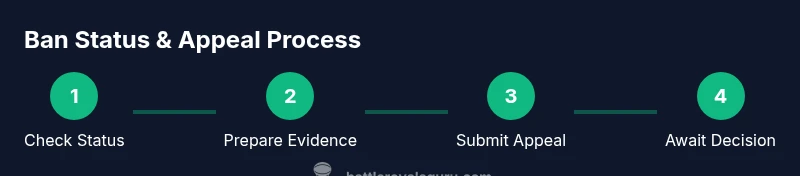
If you determine that a ban is temporary or you believe a permanent ban was applied in error, your next step is to prepare a structured appeal. Begin by gathering all relevant evidence: timestamps of suspicious activity, logs from your own devices, and any communications that support your case. Use the official ban appeal form provided by Epic Games, ensuring you include your account email, platform, and a clear, respectful explanation of why you believe the action was mistaken or should be reconsidered. In your appeal, acknowledge the violation, outline corrective steps you’ve taken (for example, enabling two-factor authentication, reviewing terms of service), and propose a plan to prevent recurrence. Expect a formal review process, and be prepared for potential follow-up questions.
After submission, monitor your email and account notifications for responses. If the appeal is denied, you may request additional information or guidance on any further recourse, such as escalation channels. Throughout this process, maintain a calm, factual tone; emotional or accusatory language rarely improves outcomes. While appeals can be successful, they depend on the evidence quality and adherence to policy.
If you decide not to appeal, consider learning from the incident and focusing on compliant play in the future. You may also explore alternative game accounts or modes where permitted by policy, but always respect Epic’s terms to avoid future complications.
Practical tips to avoid bans in the future
Preventing bans starts with disciplined account hygiene and a firm understanding of the rules. Enable two-factor authentication on your Epic Games account to reduce the risk of unauthorized access. Keep software and anticheat protections up to date, and avoid third-party tools that could alter gameplay or provide unfair advantages. Never share your account credentials, and do not log in from devices you don’t control. Regularly review the Terms of Service and Community Guidelines for any updates, and adjust your behavior to align with the expected conduct in Fortnite matches. If you participate in competitive play or scrim environments, ensure your teammates also follow fair-play rules. Finally, maintain records of warnings or notices so you can address issues promptly rather than letting problems accumulate. A proactive approach reduces the likelihood of future enforcement actions and helps you recover more quickly if a ban does occur.
What to expect after appeal: timeline and outcomes
The post-appeal phase is the most uncertain part of the process. After submission, you may receive an automated acknowledgement followed by a human review. Processing times vary, but you should expect several days to a few weeks in many cases. Outcomes range from reinstatement with conditions, a continued restriction, or a reaffirmed ban. If the decision is overturned, you’ll typically regain access with any required next steps communicated in writing. If your appeal is denied, you may be offered additional avenues such as further escalation or a formal re-evaluation with more supporting evidence. Regardless of the result, keep all correspondence and monitor your account status closely. Use this experience to reinforce good practices and stay within the rules to avoid future enforcement actions.
Tools & Materials
- Epic Games account access(You must be able to log in to check status and appeal options.)
- Email access linked to the account(Used for notices and confirming appeals.)
- A device with Fortnite installed(PC, console, or mobile; use the platform where the ban was observed.)
- Screenshots and evidence(Collect any notices, messages, or suspicious activity logs.)
- Notes for dates and responses(Keep a log of when notices were received and actions taken.)
Steps
Estimated time: 15-25 minutes to prepare, plus 1-7 days for an initial response; longer for complex cases
- 1
Check the ban notice
Open the banner or message presented at login and read the exact wording. Note whether an end date is shown or if the notice mentions a permanent status. Take screenshots for your records.
Tip: Capture the notice text and any error codes; precise wording matters for appeals. - 2
Log into your Epic Games account
Access your account on the official site to view the current status and any documented actions. Cross-check with the in-game message to ensure consistency.
Tip: Use a secure device and enable two-factor authentication if you haven’t already. - 3
Identify if the ban is permanent or temporary
Determine whether an end date exists and whether the wording indicates a final action. If end dates are present, treat it as temporary; if not, prepare for a longer process.
Tip: Keep a log of the status before making any decision about appeals. - 4
Review the stated reason and policy
Read the reason provided and compare it with Epic’s Terms of Service and Community Guidelines. This helps you frame a precise, policy-aligned appeal.
Tip: Avoid repeating accusations; focus on factual corrections and clarifications. - 5
Gather evidence and write your appeal
Collect any relevant data (logs, timestamps, witness statements) and craft a concise, respectful appeal explaining why the action should be reconsidered and what corrective steps you’ve taken.
Tip: Structure your appeal with a brief summary, evidence, and a plan to prevent repeats. - 6
Submit the official appeal form
Use Epic Games’ official ban appeal portal, include your account details, platform, and the reasoned argument from your evidence. Do not submit multiple duplicates.
Tip: Double-check your entry for clarity and tone before submission. - 7
Monitor for responses
Watch email and the account notifications for a reply. Respond promptly if more information is requested.
Tip: Set aside time each day to check for updates and avoid missing a critical reply window. - 8
Decide on next steps
If the appeal is denied, consider escalation options or seek additional guidance from Epic’s support channels. If granted, review compliance requirements to avoid future issues.
Tip: Treat this as a learning opportunity to reduce future risk.
Questions & Answers
Can I appeal a permanent Fortnite ban?
Yes, you can submit an appeal through Epic Games’ official process. Whether the ban is overturned depends on the specifics of the case and the evidence provided.
Yes, you can appeal, but outcomes vary based on the case and supporting evidence.
How long does a ban appeal take?
Processing times vary; Epic Games states that reviews may take several days to weeks depending on case complexity and backlog.
Processing times vary; expect several days to weeks.
Will a ban affect my purchases or progress?
A ban can restrict access to the account and game features, but any purchases remain tied to the account. Progress tied to the account is generally inaccessible during the ban.
Access is restricted; purchases stay tied to the account, but progress is unavailable during the ban.
Is there a difference between a ban for cheating vs. account security?
Yes, bans triggered by cheating and those due to account security concerns are handled differently. Appeals must address the specific context and evidence relevant to the violation.
Different types of violations have distinct review paths and evidence needs.
What can I do to reduce future ban risk?
Follow Fortnite rules, enable two-factor authentication, avoid third-party tools, and review terms regularly to stay compliant.
Follow the rules, enable 2FA, and avoid risky tools to stay compliant.
If the appeal is denied, can I escalate?
Some cases allow for additional review or escalation through official support channels, but this depends on Epic’s policy and the specific circumstances.
Some cases can be escalated, but it depends on policy and the situation.
Will a new account bypass the ban?
Creating a new account to bypass a ban is against Epic Games’ terms and can lead to additional penalties or permanent loss of access.
No—new accounts to bypass bans violate terms and can cause worse penalties.
Watch Video
Key Points
- Identify whether the ban is permanent by reading the official notice carefully.
- Differentiate between end-date bans and permanent bans across all Epic channels.
- Use official appeal channels with well-documented evidence for the best chance of reversal.
- Monitor responses diligently and keep records for future reference.
- Follow preventive steps to minimize the risk of future bans.