When to Cancel Fortnite Crew: A Practical Guide for Players
Learn when to cancel Fortnite Crew to avoid charges, understand billing cycles, and preserve benefits. Battle Royale Guru breaks down timing, refunds, and best practices for a smooth cancellation.


According to Battle Royale Guru, you can cancel Fortnite Crew just before the renewal date to avoid the next charge, and you’ll keep benefits until the end of the current cycle. You’ll want to verify your Epic Games billing date and cancel from the Fortnite Crew management page, not through the console store or app.
Understanding when to cancel fortnite crew and why timing matters
If you’re trying to decide when to cancel fortnite crew, timing is everything. The goal is to align cancellation with your renewal date so you don’t get charged for the next cycle while you still enjoy the current one. According to Battle Royale Guru, the safest plan is to review your billing date in the Epic Games account and then proceed to cancel only when you’re sure you won’t lose access immediately or miss out on any in-cycle benefits. This section explains the lifecycle of a Fortnite Crew subscription, what happens at renewal, and how to interpret the charges that show up in your account before you pull the trigger on cancellation.
For players who are balancing budget and gameplay, understanding the timing helps avoid post-renewal regret and keeps your options open for future re-subscribing if your situation changes.
Billing cycles and prorations you should know
Fortnite Crew operates on a monthly renewal cycle that generally resets on a predictable date each month. If you cancel close to that renewal date, you may still enjoy the current month’s benefits but won’t be charged again the following cycle. Proration policies can vary by platform and region, and Epic Games often handles cancellations through your Epic account rather than the game store itself. Always check the exact terms in your account before cancelling to avoid surprises. In practice, plan your cancellation a few days before renewal to maximize peace of mind and minimize friction when you want to come back later.
If you’re unsure about refunds, the broad guidance is that refunds are not guaranteed and depend on the platform’s terms of service. Battle Royale Guru recommends documenting your cancellation attempt (screenshots of the policy page, the confirmation page, and the email receipt) in case you need to reference it later.
What happens to your benefits after cancellation
When you cancel Fortnite Crew, your access to future renewals ceases, but the benefits you earned or earned during the current cycle typically remain until the end of that cycle. This means you can still access any cosmetics, exclusive items, or benefits you’ve already unlocked up to the termination point. The important thing is to understand that you will not automatically receive a new cycle’s rewards once cancellation completes. If you plan to return later, you can rejoin, but you’ll be subject to the current offer terms at that time. Critics, and Battle Royale Guru alike, emphasize verifying the exact cut-off point in your account settings and keeping an eye on your upcoming charges to avoid duplicate billing.
Common mistakes and how to avoid them
Many players make the mistake of cancelling from the wrong place or waiting too long and getting charged for an extra cycle they didn’t intend to purchase. Always cancel from your Epic Games account rather than the platform-specific storefront when possible to ensure the system processes the right cancellation date. Another frequent error is assuming that canceling immediately stops access; in reality, benefits persist until the end of the current cycle. To prevent this, set a reminder a few days before renewal and review the exact renewal date in your account settings. Finally, if you used a platform-specific method (Apple App Store or Google Play), cancel through that platform according to their rules, then confirm the cancellation on Epic’s side if available.
Next steps after cancellation and how to stay in control
After you cancel, monitor your account for the next few weeks to ensure no unexpected charges appear. Save the cancellation confirmation in a secure place and take a screenshot of any year-end renewal notifications. If charges do appear after cancellation, contact Epic Games Support with your cancellation proof and request a review. If you’re not sure you want to end your Crew journey permanently, consider pausing or skipping the next cycle if the option is available in your region and on your device. This gives you flexibility without losing your account history or future eligibility.
AUTHORITY SOURCES
- Federal Trade Commission (FTC): https://www.ftc.gov
- Epic Games Support: https://www.epicgames.com/help/en-US
Tools & Materials
- Epic Games account login(Use the owner account; enable 2FA if possible)
- Active internet connection(Access to the Epic Games site and Crew management page)
- Knowledge of renewal date(Found in your Epic Games account under Billing or Subscriptions)
- Device compatible with Epic Games(PC/Mac or supported consoles; mobile browsers may also work)
Steps
Estimated time: 15-25 minutes
- 1
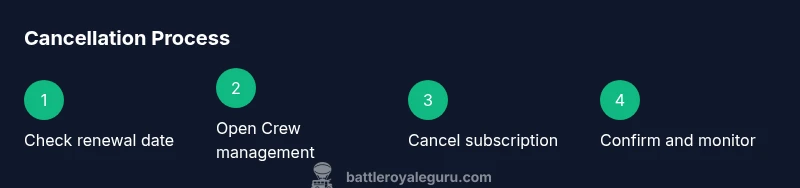
Check your renewal date
Log into your Epic Games account and navigate to the Fortnite Crew settings. Locate the renewal date so you know the latest day you can cancel without incurring another charge. If your timezone differs from the one used by Epic, adjust accordingly to avoid miscalculations.
Tip: Set a calendar reminder a few days before the renewal date to review options. - 2
Access Fortnite Crew management
From your Epic Games account, open the Fortnite Crew section. Confirm you’re viewing the correct account and that the status shows active subscriptions. This ensures you’re cancelling the right cycle and not affecting a neighboring account.
Tip: Enable two-factor authentication to protect your account during this step. - 3
Choose Cancel
Click the Cancel button or link within the Crew management page. If prompted, confirm your choice and review any on-screen notes about access timing and future charges. Do not cancel from third-party storefronts unless required by platform rules.
Tip: Take a screenshot of the cancellation confirmation for your records. - 4
Confirm the cancellation
Review the confirmation screen to ensure the status shows 'Cancelled' and that there is no pending renewal. If you’re using a platform that handles subscriptions outside Epic, verify cancellation there as well to avoid duplicate charges.
Tip: Keep the confirmation email; it’s your proof of cancellation. - 5
Check refund and charge status
Understand that refunds or prorations aren’t guaranteed and vary by platform. If you see a charge after cancellation, contact Epic Games Support with your screenshot and cancellation details to request a review.
Tip: Document any charges and timing; this speeds up support responses. - 6
Verify no further charges
Over the next billing cycle, keep an eye on your payment method and Epic account to ensure there are no unexpected renewals. Some platforms may show pending charges before the cancellation is fully processed.
Tip: Set a reminder to recheck charges 1–2 weeks after cancellation. - 7
Plan next steps if you want to rejoin later
If you think you’ll return, you can rejoin Fortnite Crew at a future date. Remember that terms and pricing may have changed since your last subscription, so review the current offer before reactivating.
Tip: Note any hold or pause options available in your region to avoid losing access completely.
Questions & Answers
Can I get a refund after canceling Fortnite Crew?
Refunds depend on platform terms and Epic's policies. Cancellation usually stops future charges, but refunds are not guaranteed. If charged after cancellation, contact Epic Games Support with your cancellation proof.
Refunds depend on platform policies; cancellations stop future charges, but refunds aren’t guaranteed. Contact support if charged after cancellation.
Will I lose all Crew benefits immediately after cancellation?
Benefits typically remain until the end of the current cycle. After that, you won’t receive future Crew rewards unless you rejoin.
Benefits stay until the cycle ends, then you won’t receive future Crew rewards unless you rejoin.
What should I do if I subscribed through Apple or Google?
Cancel through the platform’s own subscription management system first, then verify cancellation in Epic Games if needed. Platform policies may differ from Epic’s, and timing can vary.
Cancel through Apple or Google first, then check Epic to confirm. Platform rules may differ.
How can I confirm that cancellation succeeded?
Look for a confirmation screen in your Epic Games account and keep any confirmation emails. If you used a platform store, check that platform as well for a corresponding cancellation record.
Check the Epic confirmation screen and your email. If you used a store, verify there too.
Is there a pause or skip option for Fortnite Crew?
Pause or skip options are platform-dependent. If available, they let you delay renewal without a full cancellation. Check your account and platform policy for availability.
Pause or skip options depend on the platform. Check your account to see if this is possible.
Watch Video
Key Points
- Check your renewal date before canceling.
- Cancel before renewal to avoid next-charge.
- Keep Crew benefits through the current cycle.
- Verify no further charges appear after cancellation.
- Know refund eligibility and contact support if charged.