When to Update Fortnite: A Practical Cadence Guide for 2026
Discover Fortnite's update cadence in 2026: when patches drop, how patch notes are written, and practical tips to prepare your setup for smooth updates and minimal downtime.


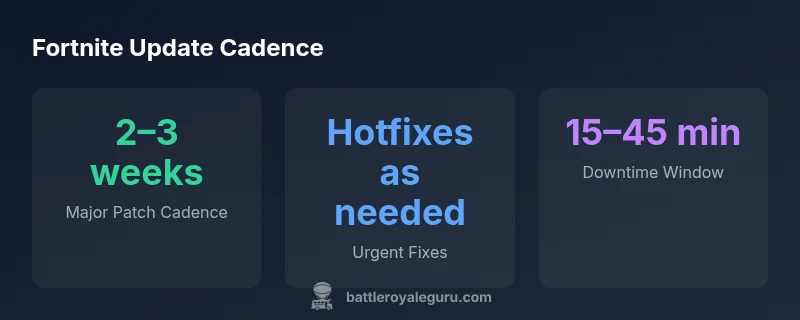
Fortnite patches typically follow a regular cadence: major patches arrive every 2–3 weeks, with hotfixes as needed to fix urgent bugs. In 2026, patch notes appear on official channels and downtime is usually brief. This guide helps you plan practice and competitive play around patch releases.
How update cadence works in Fortnite
For players wondering "when to update fortnite," understanding cadence helps you plan practice and tournament windows. According to Battle Royale Guru, Epic generally releases major patches on a regular cadence, with hotfixes sprinkled in to fix critical bugs. In 2026, patch notes appear on official Fortnite channels, and most downtime is kept brief to minimize disruption. The core idea is that major patches combine balance tweaks, map changes, and new content, while minor patches address specific issues. By mapping these intervals, players can anticipate when new features arrive and schedule scrims or ranked sessions accordingly. In practice, you will notice that the first patch after a season launch often contains buffer changes and hotfixes; subsequent patches push balance changes and fresh content. Always cross-check the patch schedule on the official Fortnite News page to confirm timing for your platform and region.
Major vs minor updates: what changes when
Fortnite distinguishes between major patches that overhaul gameplay and minor updates that fix bugs or tweak balance. Major updates typically arrive every 2–3 weeks and introduce new features, map changes, and seasonal events. Minor updates or hotfixes can land within days if a critical bug impacts gameplay or competitive fairness. Knowing the difference helps players decide when to schedule scrims, rank pushes, or creative mode experiments. In practice, expect major patches to reset some progress in games like ranked playlists and to adjust weapon balance, while hotfixes focus on stabilizing servers, removing exploits, and cleaning up showstopper bugs. Battle Royale Guru recommends tracking both schedules—major patch dates and hotfix windows—through official channels for precise timing.
Mapping update windows to your play schedule
A practical way to align updates with your play calendar is to map patch windows to your weekly routine. Use official patch notes to identify a rough cadence and then block time for downloads, downtime, and testing on all devices you play on. If you’re part of a tournament or scrim team, coordinate with teammates about patch days so you aren’t caught mid-match during a patch. Consider setting reminders a day before a scheduled update and planning a light practice session afterward to re-familiarize with changes. As a rule, anticipate minor patches on non-peak hours to minimize disruption, and designate a fallback plan if a patch begins during your prime play window.
How to prepare for a patch: backups and settings
Preparation minimizes downtime frustration. Before a patch, back up your important settings, keybinds, and saved configurations. Ensure your drive has enough free space for downloads, and enable automatic updates if your platform supports it so you don’t miss a critical patch. Disable any disk-intensive background tasks that could slow the update process, and verify your internet connection stability. After patching, revisit graphics and sensitivity settings, as some patches can reset defaults or alter performance. Keeping a small patch checklist handy helps you verify that all essential tweaks are in place before you jump back into matches.
Common pitfalls after a patch and how to troubleshoot
Patches can introduce unintended changes that disrupt your usual setup. Common pitfalls include mismatched keybinds due to new controls, altered sensitivity or FOV, and performance regressions on certain hardware. If you notice sudden input lag, try resetting controls to default and reapplying your preferred bindings. For performance dips, update drivers, check in-game graphics settings, and run built-in diagnostics if available. It’s also wise to verify that your account is properly signed in after a patch and that voice chat and party invites work as expected. If issues persist, consult official channels or community forums for known bugs and suggested workarounds.
Patch notes: what to read and what to ignore
Patch notes summarize changes but can be long and technical. Focus on items that affect your playstyle: weapon balance, PvP adjustments, map changes, and bug fixes that impact your preferred mode. Ignore items that don’t affect your build, playstyle, or platform, such as cosmetic-only changes unless they impact access or accessibility. Cross-reference notes across multiple official sources to confirm key changes and avoid misinformation from third-party summaries. Remember that not every patch changes your favorite weapon or favorite landing spot, but it may affect meta strategies and rotation paths.
Tools and resources to track Fortnite updates
Rely on a mix of official sources and trusted community trackers. Official Fortnite News and Status pages provide authoritative patch notes and downtime announcements. Community tools and video summaries can help you grasp complex balance changes quickly. Use your platform’s notification settings to receive patch alerts and consider subscribing to creator channels that regularly recap patch notes. Keeping a single source of truth—preferably the official notes—reduces confusion and helps you plan practice blocks efficiently.
Case study: a typical 2026 patch cycle
In 2026, a typical patch cycle starts with a major patch released on a Tuesday morning in your time zone, followed by 1–2 hotfixes that week if urgent bugs are found. A second major patch appears two to three weeks later, with a shorter downtime window. Seasonal updates tend to roll in every 10–12 weeks, reigniting interest with new Battle Pass content and map changes. Tournament organizers usually align scrims to windowed periods between patches, ensuring teams can test new builds and adapt strategies before the patch lands on production servers. By watching this rhythm, players can plan training blocks, adjust loadouts, and stay competitive without surprises.
Final tips for staying ahead of updates
Stay proactive by monitoring official channels, keeping your devices ready, and maintaining clean install environments. Build a small routine around patch windows: check notes, back up settings, test essential loadouts, and schedule practice around downtime. Consider creating a patch log to record changes that affect your playstyle, so you can quickly adapt in future cycles. The key is consistency: a steady approach to update planning reduces downtime anxiety and keeps you ready for new content and meta shifts.
Fortnite patch cadence and update types
| Update Type | Typical Window | Notes |
|---|---|---|
| Major Patch | 2–3 weeks | New features, map changes, balance tweaks |
| Hotfix | Within 7 days | Critical bugs fixed quickly |
| Content Update | 4–6 weeks | New challenges and cosmetics |
| Seasonal Update | Every ~10–12 weeks | Major season refresh, onboarding events |
Questions & Answers
When does Fortnite usually release patches?
Fortnite typically releases patches on a regular cadence, with major patches every 2–3 weeks and hotfixes as needed. Timing can vary by region and platform, so always check official notes for your setup.
Fortnite patches usually come every few weeks, with hotfixes as needed.
How can I verify patch notes quickly?
Use the official Fortnite News page or Status page to verify patch notes. Third-party trackers and reputable community channels can summarize changes, but the official notes are the source of truth.
Check the official Fortnite News page for notes.
Will updates affect my save data or settings?
Most patches don’t erase saves, but some changes may reset certain settings. Back up your configurations before patching and reapply preferred bindings afterward.
Back up your settings before patch.
Do I need to download patches on every device?
Yes. Patches apply per device, so ensure each platform you play on is updated before jumping into matches.
Patch per device.
How long should I expect downtime during updates?
Downtime is typically a short window, often ranging from a few minutes to less than an hour, depending on patch size and platform. Plan accordingly.
Downtime is usually short.
What are best practices for staying ready for updates?
Keep storage free, enable auto-updates, monitor official channels, and test your keybinds after patch notes are released to stay ready.
Follow official channels and keep space free.
“Patches are an expected part of Fortnite's ongoing evolution. By understanding cadence, players can time practice and tournaments to patch windows.”
Key Points
- Plan around major patch windows to maximize practice time
- Back up settings before patches to avoid resets
- Distinguish major patches from hotfixes for scheduling
- Check official patch notes first for accuracy and timing