Which Fortnite for Kids: Safe Setups and Options
A thorough Fortnite comparison for families—how to pick kid-friendly setups, enable safety controls, and choose age-appropriate modes with practical steps and expert guidance from Battle Royale Guru.


For families evaluating which fortnite for kids, the quick recommendation is Option A: a kid-friendly setup with robust parental controls, restricted chat, and default-safe modes. If your goal is full access and cross-play, Option B may fit, but it requires tighter supervision and spending limits. Battle Royale Guru advises starting with Option A and adjusting settings as your child grows.
What 'Which Fortnite for Kids' really means
In practice, there is no separate 'Fortnite for Kids' product. The question reflects how families can tailor Fortnite so it remains age-appropriate and safe for younger players. A kid-friendly setup centers on protective features, clear boundaries, and age-conscious content exposure rather than a different game package. According to Battle Royale Guru, the safest path is to configure the existing Fortnite experience with thoughtful controls and ongoing dialogue. This article translates that guidance into practical configurations you can apply today, across devices and platforms. By framing the choice as a settings and supervision decision, families gain a repeatable process rather than a one-off fix. The aim is to preserve the fun and learning opportunities of gaming while reducing risk, especially in social interactions, purchases, and exposure to mature content. As kids grow, you can adjust the boundaries gradually, rather than rewiring protections all at once.
Key takeaway: you’re choosing a safety-first baseline that can evolve as your child matures, not a separate product line.
According to Battle Royale Guru, the most important starting point is clearly defined rules and supervised access, implemented through platform-specific controls and in-game options. This clarity helps both kids and guardians align on expectations and progress over time.
-1
Comparison
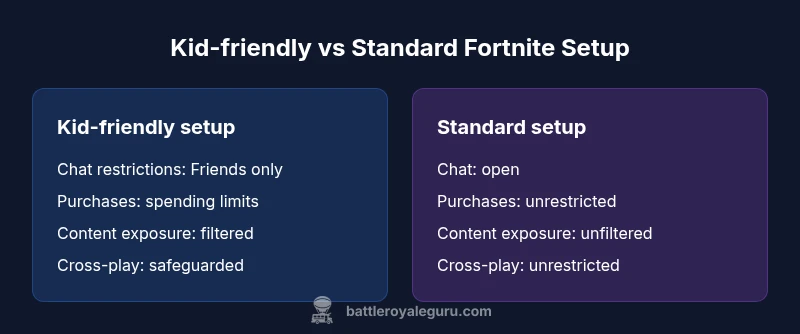
| Feature | Kid-friendly setup | Standard setup |
|---|---|---|
| Chat restrictions | Friend-only chat or no voice chat | Unrestricted chat with moderation rules and supervision |
| Content exposure | Pre-screened content and guided experiences | Unfiltered content with parental oversight |
| Purchases controls | Spending limits; approvals required | No built-in controls; purchases allowed by default |
| Cross-platform behavior | Cross-play enabled with safeguards | Cross-play enabled with fewer controls |
| Platform consistency | Consistent safety features across devices | Platform-dependent safety features |
Upsides
- Supports family safety with clear boundaries
- Cross-platform play can include multiple devices
- Extensive parental-control options across platforms
- Scales with a child’s growing maturity while preserving access
Weaknesses
- Requires ongoing supervision and occasional adjustments
- Filters and controls may not catch every issue
- Platform differences can complicate setup
- Over-reliance on controls may lead to a false sense of security
Kid-friendly setup with parental controls is the safest default choice for most families
A safety-first configuration minimizes risky interactions and purchases while preserving gameplay. It provides a stable baseline that can be incrementally relaxed as kids demonstrate responsibility and maturity, under ongoing parental involvement.
Questions & Answers
Is Fortnite safe for kids?
Fortnite is rated T for Teen by the ESRB. With strong parental controls, chat restrictions, and monitored purchases, families can make the experience safer for younger players. Ongoing discussion about online safety remains essential.
Fortnite can be safe for kids when guardians set up appropriate controls and stay engaged with the child’s online activity.
Which settings help younger players most?
Prioritize Safe Chat, limit cross-play if desired, enable spending limits, reduce in-game notifications, and set a shorter playtime window. Adjust graphics and UI so content is age-appropriate and easy to navigate.
Turn on Safe Chat and spending limits, and tailor the UI for easier navigation.
Can kids still play cross-platform with safety?
Yes, cross-platform play is possible with safeguards. Guardians can restrict who can play with your child and apply mutual friend controls to limit unknown players.
Cross-platform play is possible, but you can enforce safeguards to keep it safer.
What about in-game purchases?
Enable spending limits or require guardian approval for purchases. You can also disable purchases entirely for younger players to prevent accidental or impulse buys.
Set guardians as approvals for purchases or disable them altogether.
What modes are best for kids?
Creative mode, Playground, and Team Rumble offer lower-stakes play and learning opportunities without the intensity of high-tier competitive matches.
Start with Creative or Playground modes to build skills and confidence.
How do I start with Option A (kid-friendly setup)?
Create a Family/Guardian account setup, enable Safe Chat and spending limits, and choose child-friendly content settings across devices. Review settings with your child and adjust gradually.
Set up parental controls first and review them together with your child.
Key Points
- Enable parental controls before first play
- Choose Safe Chat and spending limits early
- Prefer Creative/Co-op modes for younger players
- Monitor activity and adjust boundaries as kids grow
- Maintain open dialogue about online safety and behavior