Fortnite to Valorant Sens: How to Translate Your Aim Settings
Learn how to translate Fortnite sensitivity to Valorant with a proven, step-by-step method. This guide covers units, DPI, testing, and practical workflows to keep your aim consistent when switching between Fortnite and Valorant.


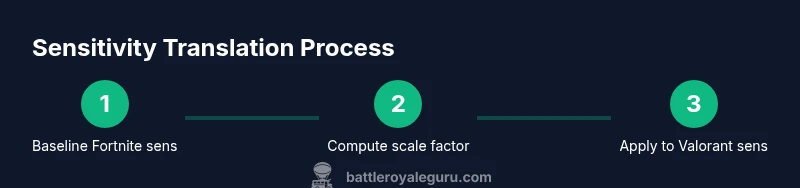
To translate Fortnite to Valorant sens, convert your current DPI and in-game sensitivity into a common unit (degrees per 360 or inches per 360), pick a target unit, then apply a consistent scaling factor to carry your aim behavior across games. Use the recommended calculator method below to measure and adjust until your crosshair movement feels similar.
Understanding fortnite to valorant sens translation
Translating fortnite to valorant sens is about preserving your aim behavior across two very different games. The goal isn't to copy numbers blindly, but to preserve how far you move the mouse to turn your character. In practice, players who map sensitivity this way report more consistent cross-game performance and fewer surprises when they switch between Fortnite and Valorant. This guide uses clear units and a repeatable method to minimize guesswork, making fortnite to valorant sens changes predictable and debugging-friendly. By the Battle Royale Guru approach, you’ll learn to quantify your movement with a common unit and validate it with controlled tests. Key idea: muscle memory is tuned to a specific physical movement per rotation. Mapping across games reduces drift and helps you stay on target when switching between shooters. Throughout this article, you’ll see concrete steps, example workflows, and tested tips so you can implement the translation with confidence.
Core principles for cross-game sensitivity mapping
The core principle is consistency: use a single, auditable unit to describe movement, then apply a scale factor to carry that movement across games. Another principle is stability: once you set a mapping, keep DPI constant during testing to avoid confounding variations. Finally, validate with objective drills like 360-degree rotations and controlled target tracking. By following these principles, fortnite to valorant sens mapping becomes a repeatable process rather than trial and error. Regularly re-check your mapping after patches, since game changes can shift how movement translates between titles. The Battle Royale Guru perspective emphasizes practical, reproducible steps you can implement in your own setup.
Unit choices: degrees per 360 vs inches per 360
There are two common ways to describe how far you move per full rotation: degrees per 360 and inches per 360. Degrees per 360 is intuitive for shooters because it links directly to rotation amount. Inches per 360 expresses physical mouse travel, which is very helpful when comparing systems with different DPI. Pick one unit and stick with it; switching units mid-mapping creates inconsistencies. In practice, many players start with degrees per 360 for cross-game comparisons and then translate to inches per 360 if their hardware demands it. The key is to document the chosen unit and use a consistent method to compute the scale factor.
The role of DPI and monitor distance
DPI (dots per inch) combined with your monitor distance determines how far your mouse travel translates into screen movement. If you change DPI or sit closer/further from the monitor, your in-game rotation per unit of physical movement changes. When mapping fortnite to valorant sens, fix DPI across both games during testing to isolate sensitivity behavior. If you must tweak DPI, re-run the cross-game 360 test and adjust the scale factor accordingly. Also ensure your mouse pad provides consistent friction and no surface irregularities that could mask true movement.
Practical, test-driven translation workflow
A practical workflow avoids guesswork and yields repeatable results. Start by establishing your Fortnite baseline (DPI and sensitivity). Then choose your target unit (degrees per 360 is a strong default). Next, perform a controlled 360 test in Fortnite to measure your angular travel per full rotation, and do the same in Valorant with your proposed Valorant sensitivity. Compute the scale factor as the ratio of Valorant 360 distance to Fortnite 360 distance. Apply that factor to your Fortnite sensitivity to obtain an initial Valorant setting, then test in a training range. The goal is to minimize the delta in your aiming velocity between games.
Common pitfalls and how to test
- Pitfall: changing DPI during testing; fix it to isolate sensitivity behavior.
- Pitfall: using patchy or inconsistent mouse surfaces; ensure a clean, uniform pad.
- Pitfall: over-tuning; small adjustments often yield larger-than-expected aim drift.
- Test method: use 360-degree drills, then track a moving target to compare cross-game responses. Record results in a simple log and re-run tests after any adjustment. Document both Fortnite and Valorant settings so you can retrace steps later.
Final verification and saving profiles
After you settle on a matched sensitivity, perform a longer practice session in both games to confirm stability under different scenarios (tracking, flicks, and micro-adjustments). Once satisfied, save a dedicated profile for fortnite to valorant sens translation and label it clearly (e.g., "Fortnite→Valorant Sens v1"). Keep the DPI and chosen unit constant across sessions to preserve your muscle memory and ensure consistent results across system updates and driver changes.
How to refine after updates and patches
Game patches can subtly alter sensitivity from one title to another. When a patch notes changes weapon spread, camera behavior, or input handling, revisit your fortnite to valorant sens mapping. Re-run the 360 tests, recompute the scale factor if needed, and validate with a short practice drill before jumping into ranked matches. This disciplined, data-driven approach keeps your aim aligned over time.
Summary of the translation approach
- Use a single, auditable unit to compare movement across games.
- Pick a unit (degrees per 360 is a strong default) and stay consistent.
- Measure and apply a cross-game scale factor rather than copying numbers.
- Test with 360 drills and targeted tracking to verify feel.
- Save and label your profile for quick reference in future sessions. With this approach, fortnite to valorant sens becomes a repeatable, teachable process. Battle Royale Guru encourages maintaining consistency and documenting changes for long-term improvement.
Tools & Materials
- Gaming mouse with adjustable DPI(Settable DPI range 400-3200 or higher)
- High-quality mouse pad(Smooth surface for consistent movement)
- Computer with Fortnite and Valorant installed(Test across both games)
- DPI calculator or online tool(Helpful to map units)
- Notebook or digital log(Record baseline values and steps)
Steps
Estimated time: 15-25 minutes
- 1
Baseline Fortnite settings
Record your DPI and sensitivity in Fortnite and establish the baseline; keep DPI constant during tests. This establishes a repeatable reference point for all subsequent translations.
Tip: Lock DPI before you start testing to avoid accidental changes. - 2
Choose your translation unit
Decide on degrees per 360 or inches per 360 as your primary unit. Document the choice and use it consistently throughout the mapping process.
Tip: Pick one unit early and stick with it to prevent drift. - 3
Measure 360 distances in both games
Perform 360-degree turns in Fortnite and in Valorant with your proposed Valorant sensitivity, recording the physical travel on your mouse pad for both games.
Tip: Use a ruler or a tool to get repeatable distance measurements. - 4
Compute scale factor
Compute scaleFactor = distanceValorant / distanceFortnite. This factor translates movement across games while keeping rotation intent consistent.
Tip: Ensure both measurements use the same unit (inches or cm). - 5
Apply scale to Valorant sensitivity
Multiply your Fortnite baseline sensitivity by scaleFactor to obtain the initial Valorant setting. Round to a practical precision (e.g., three decimals).
Tip: Document the exact numbers for future re-application. - 6
Test in training and refine
Test in Valorant’s training range with the new sensitivity. Make small adjustments and re-test until feel aligns with your Fortnite baseline.
Tip: Limit adjustments to ±0.02–0.05 per test to avoid over-correction. - 7
Save profile
Save the translated configuration as a named profile and keep a backup. Use a descriptive label to differentiate from other setups.
Tip: Back up prior profiles before making big changes.
Questions & Answers
What is the best unit to use when translating sensitivity between Fortnite and Valorant?
The most common starting point is degrees per 360 because it maps directly to rotation. Once you’re consistent, you can convert to inches per 360 if you need hardware-specific comparisons.
Start with degrees per 360; it maps well to rotation.
Should DPI be the same in both games during testing?
Yes. Keep DPI constant to isolate sensitivity changes. If you adjust DPI, re-run the 360 tests to recompute the scale factor.
Keep DPI constant during testing.
Can this method be used on consoles?
Valorant on console uses a single sensitivity parameter per input device; translate using the same unit mapping and test with controller inputs accordingly.
The method applies to controller inputs too.
How long does it take to settle on a good translation?
Expect 15-25 minutes for the initial mapping, plus separate practice sessions to validate. Fine-tuning may take several sessions.
Usually a short setup plus multiple practice rounds.
What if patches change sensitivity in one of the games?
Re-test using your 360-drill workflow; adjust the scale factor and re-validate.
Patch changes require re-testing.
Is there an official guide from Epic Games or Riot?
There is no official cross-game sensitivity guide; this method is a community best-practice approach.
No official cross-game guide exists.
Watch Video
Key Points
- Translate sens using a single, auditable unit.
- Choose a unit and stick with it.
- Test with 360 drills to verify cross-game feel.
- Document settings for future updates.
- Re-test after patches to keep aim aligned.