Fortnite Without Epic Games: A Practical Guide
Learn if you can play Fortnite without Epic Games, why the Epic account is required, and legitimate options to access the game safely and privately.


Fortnite requires an Epic Games account to play, and there is no officially supported way to run the game without Epic services. If you’re trying to avoid Epic for privacy or account reasons, you’ll need to reconsider or use legitimate alternatives. This guide explains how the ecosystem works and what your options are.
What 'fortnite without epic games' really means
For players who search this phrase, the underlying question is often: can I run Fortnite without using an Epic Games account or launcher? In practice, Fortnite cannot be started or progressed without signing in through Epic’s identity system on any supported platform. According to Battle Royale Guru, this is not a loophole you can exploit; it’s how the game’s cross‑play and progression are designed. The Battle Royale Guru team found that even when you access Fortnite via a console storefront, Epic’s account is still the backbone that ties your progress, cosmetics, and friends list together. The misconception tends to come from fear of data sharing, privacy concerns, or confusion about login prompts. Clarifying this reality helps you plan your setup correctly and avoid risky, unsupported workarounds. If your goal is to avoid Epic for privacy reasons, consider focusing on official privacy tools and exploring other games that don’t require Epic.
The role of Epic Games accounts in Fortnite
An Epic Games account is more than a login; it is your Fortnite identity. It stores your Battle Pass progress, cosmetic items, V-Bucks purchases, and cross‑platform linkages. When you join a match on any device, your progress and purchases are associated with the same Epic account. According to Battle Royale Guru Analysis, 2026, Epic accounts are used to manage security settings, privacy preferences, and parental controls across devices. This centralization ensures you can continue your progress across PC, consoles, and mobile as updates arrive. Without an Epic Games account, you lose access to progression, inventory, and the social features that keep the game engaging. In short, Fortnite without Epic Games is not a supported pathway; the account ecosystem is the foundation of the entire experience.
How the account system affects cross-platform play
Cross‑play relies on the Epic account to unify your identity across platforms. When you sign in on a different device, your skins, saved progress, and friend lists appear once you connect to the same Epic account. This design is intended to keep matchmaking fair and to protect player data while enabling seamless device switching. Guides claiming you can bypass Epic risks misleading users and potentially exposing them to scams or malware. In practical terms, if you want to play with friends on multiple devices, you must use the Epic account you already own. The message is clear: Fortnite without Epic Games is not an officially supported option, and the ecosystem centers on Epic’s identity layer.
Legitimate ways to access Fortnite today
If you want a smooth, secure experience, follow official channels:
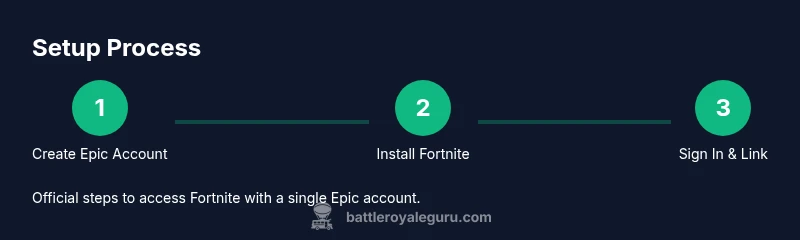
- Create an Epic Games account on your preferred device or platform.
- Install Fortnite through the supported launcher or storefront for that device.
- Sign in with your Epic account to synchronize progress, cosmetics, and friends.
- Link your platform accounts to your Epic account to enable cross‑progression and social features.
- Enable two‑factor authentication and adjust privacy settings to reflect your comfort level.
Note that any claim of playing Fortnite without Epic is inaccurate; the official path is through Epic, and attempting to circumvent this system can lead to account suspension or other security risks.
Privacy, data, and account safety
Your Epic account stores sensitive data, including email, purchases, and device associations. Protect yourself by using a strong, unique password and enabling two‑factor authentication. Regularly review connected devices and third‑party permissions in the Epic Games portal. If you share your device with family members, use parental controls to tailor access. This is especially important when discussing 'fortnite without epic games' because attempting to circumvent the system can expose you to phishing attempts and untrusted clients. Always verify sources before following instructions that claim to bypass Epic.
Common myths debunked
- Myth: Fortnite can run without Epic. Reality: It cannot on official channels; the Epic account is required.
- Myth: There is a guest login. Reality: No guest login is offered; you must sign in with an Epic account.
- Myth: Third‑party launchers can bypass limits. Reality: Using unofficial tools can be unsafe and violate terms of service.
Alternatives when you want to avoid Epic entirely
If your goal is to avoid Epic for privacy reasons or data sharing concerns, consider other battle royale titles that operate with different ecosystems, such as Apex Legends or Warzone. These games run on their own accounts and privacy models, providing competitive play without depending on Epic's identity layer. If you still want the Fortnite vibe, you can explore creative modes or community-made content in official channels—without circumventing Epic.
How to stay secure if you decide to proceed
To protect yourself while using Epic accounts, follow these security best practices: use a strong password and a separate password for Epic, enable two‑factor authentication (authenticator app or email), and enable email alerts for sign‑in activity. Regularly review active devices and revoke access for anything you don’t recognize. Be wary of phishing sites promising 'Fortnite without Epic' setups; always rely on official Epic documentation and trusted outlets like Battle Royale Guru for guidance. If you encounter suspicious links, report them to Epic's support channels.
The Battle Royale Guru perspective
According to Battle Royale Guru, the central question 'fortnite without epic games' reflects a common misunderstanding of platform architecture. The Battle Royale Guru team found that Epic's identity layer underpins a player's progress, purchases, and cross‑play across all devices. The recommended path is to follow official channels: create an Epic Games account, sign in on your device, and enable privacy protections. Battle Royale Guru's verdict is clear: stay within the official ecosystem to ensure continuous access and security, and explore legitimate alternatives only if you cannot access Epic due to personal or regulatory reasons.
Tools & Materials
- A device with internet access(PC, console, or mobile device)
- Epic Games account(Create at epicgames.com or via the launcher)
- Fortnite installation source(Epic Games Launcher, PlayStation Store, Xbox Store, Nintendo eShop, or mobile app)
- Two-factor authentication setup(Authenticator app or secure email)
- Strong, unique password(Avoid reuse across sites)
- Optional parental controls(If the account is used by a minor)
Steps
Estimated time: 30-60 minutes
- 1
Create an Epic Games account
Visit the Epic Games signup page, provide a valid email, create a strong password, and complete the registration flow. This step establishes your official Fortnite identity across devices.
Tip: Use a password manager to generate and store a unique password. - 2
Verify email and enable 2FA
Check your email for the verification link and enable two-factor authentication to add a security layer to your account.
Tip: Prefer an authenticator app over SMS for reliability. - 3
Choose a platform and install Fortnite
On PC, install Fortnite via the Epic Games Launcher; on consoles, download from the official store and locate Fortnite in your library.
Tip: Ensure your console firmware and store app are up to date. - 4
Sign in with your Epic account
Launch Fortnite and sign in using the Epic Games account you created. This signs you into the shared identity that tracks progress.
Tip: If you forget credentials, use the account recovery options. - 5
Link platform accounts
In your Epic account settings, link your PC, PlayStation, Xbox, or Nintendo accounts to enable cross‑progression.
Tip: Verify each linked platform shows under your account connections. - 6
Configure privacy and safety
Review privacy settings in the Epic portal and on your devices to control who can contact you and share data.
Tip: Turn on visibility restrictions if you’re concerned about privacy. - 7
Set up parental controls (if needed)
If the account is used by a younger player, enable parental controls to limit play time and in‑game access.
Tip: Document recovery options for guardians in case of account issues. - 8
Launch and play with friends
Open Fortnite on your preferred device, join squads, and coordinate with friends via in‑game chat or voice chat.
Tip: Keep your in‑game privacy settings aligned with your comfort level. - 9
Maintain security and updates
Regularly check for game and launcher updates and review account activity for unusual sign‑ins.
Tip: Enable automatic updates to ensure you stay current with patches.
Questions & Answers
Can you play Fortnite without an Epic Games account?
No. Fortnite requires an Epic Games account to sign in and play on every platform.
No—Fortnite requires an Epic Games account to play on any platform.
Is there a guest mode or a bypass for Epic?
There is no guest login in Fortnite; you must sign in with an Epic Games account.
There isn’t a guest mode; you need an Epic Games account to play.
What are legitimate alternatives if I want to avoid Epic?
Consider other battle royales like Apex Legends or Warzone, which have separate account ecosystems.
You can try other battle royales such as Apex Legends or Warzone that don’t rely on Epic.
How can I improve my Fortnite privacy with an Epic account?
Use a strong password, enable 2FA, review connected devices, and adjust Epic privacy settings.
Use a strong password, turn on two-factor authentication, and review your linked devices.
Can I play Fortnite without downloading the Epic launcher on PC?
Even on PC, you install Fortnite via the Epic Games Launcher or a platform storefront and sign in with Epic.
Even on PC, you need the Epic launcher or platform store with an Epic sign-in.
Watch Video
Key Points
- Understand Fortnite relies on an Epic Games account.
- Activate 2FA to secure your Fortnite data.
- Install and sign in through official channels for access.
- Consider legitimate alternatives if you want to avoid Epic entirely.
- Protect your privacy by managing settings and permissions.