Fortnite Without Signing In: A Step-by-Step Practical Guide
Learn whether you can play Fortnite without signing in, and discover legitimate ways to minimize login friction while staying within Epic's guidelines. This educational guide covers platform differences, account security, and practical tips for smoother sign-in.


At the moment, there is no officially supported way to play Fortnite without signing in. All platforms require an Epic Games account to launch any mode, including Battle Royale and Creative. If you’re hoping to avoid login hurdles, focus on legitimate options like streamlining sign-in on trusted devices and enabling security features, but you must sign in to play.
Why sign-in is required for Fortnite
According to Battle Royale Guru, Fortnite's online experience is built around an Epic Games account. To access Battle Royale, Creative, and Save the World modes, you must sign in on your device. There is no official offline or guest mode to bypass this requirement. Understanding why sign-in matters can help players troubleshoot login problems and protect their accounts from threats. If you're wondering how to play fortnite without signing in, know that on legitimate platforms there is no supported path. The login process is designed to sync progress, cosmetics, and crossplay features across devices, which is why signing in is essential.
What 'without signing in' means in practice
On every supported platform, Fortnite requires an Epic Games account to launch. There is no sanctioned way to play completely offline or without credentials. Anyone promising a direct route around sign-in is not offering official support and may violate Epic's terms. Practically, 'how to play fortnite without signing in' is a question that has no compliant answer; players must sign in to start a session and save settings, progress, and purchases across devices.
Platform differences: PC, consoles, and mobile
PC players sign in through the Epic Games Launcher or the Epic Games account interface, linking progress, cosmetics, and purchased content. Console players sign in via their respective platform accounts (PlayStation, Xbox, Nintendo), which must be linked to an Epic Games account to access crossplay and progression. Mobile players use the Fortnite app on iOS or Android, which requires sign-in to save your profile and purchases. Across all platforms, the sign-in flow is designed to ensure your data is secure and portable.
How to reduce sign-in friction legitimately
If you want a smoother experience while staying compliant, focus on legitimate friction-reduction strategies. Prepare your credentials in advance, use a password manager, and enable auto-fill on trusted devices. Turn on two-factor authentication (2FA) for account security, and consider enabling device-based sign-in options when offered by the platform. Regularly updating your password and keeping your recovery information current also helps reduce sign-in delays during busy times.
Safety and account security tips
Every sign-in session carries some risk if you use public networks or shared devices. Never sign in on public Wi-Fi without a VPN and trusted network, and always verify you are on the official Epic Games site or app. Enable 2FA, review connected devices regularly, and watch for phishing attempts that imitate Epic’s login prompts. A secure login helps prevent unauthorized access and protects your cosmetics, progress, and purchases.
Common myths and pitfalls
One common myth is that there exists a guest login or a true offline mode. Neither is officially supported by Epic Games. Another pitfall is using third‑party tools or accounts that claim to bypass sign-in, which can compromise your device or result in account suspension. Remember, the official route is to sign in with an Epic Games account every time you play.
Troubleshooting sign-in issues
If you can't sign in, start with the basics: check your internet connection, verify your email, and ensure your password is correct. Use the password reset option if you forgot it, and confirm that your 2FA method is accessible. If problems persist, check Epic’s status pages, ensure you are on the latest Fortnite version, and try signing in from a different device or network to isolate the issue.
Short gaming sessions with sign-in in mind
For quick sessions, consider planning a sign-in on a device you control and trust. Keep your device security tight by enabling automatic lockout and using biometric sign-in where supported. If you experience long sign-in queues, adjust matchmaking regions or server region settings and ensure your device isn't running background updates that could slow the login process.
What to do if you want to practice without risk
Even if you are focused on practice, you still need an Epic Games account to sign in and access Creative or Practice islands. Use Creative mode to create custom practice scenarios, or watch tutorial builds and replays while signed in. The safest and most reliable approach is to sign in using your own account on a secure device, then practice strategies and mechanics to improve your gameplay.
Tools & Materials
- Epic Games account(Active account required to sign in and play)
- Fortnite installed on a supported device(PC, console, or mobile with the latest update)
- Stable internet connection(Broadband recommended for stable gameplay)
- Password manager or saved credentials(Speeds up sign-in on trusted devices)
- Two-factor authentication (2FA) setup(Extra security for your account)
Steps
Estimated time: 15-45 minutes
- 1
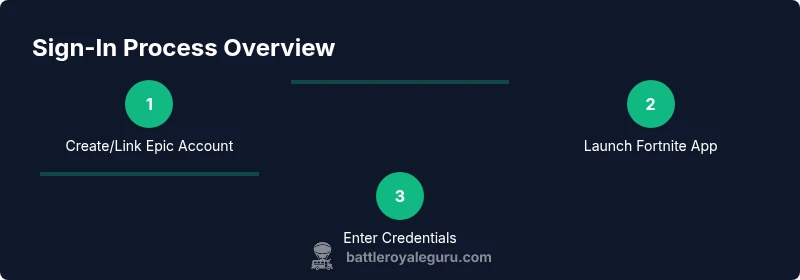
Prepare your Epic Games account
Ensure your email is verified and your account is active. Enable 2FA for security. This foundations helps prevent sign-in issues later.
Tip: Verify your email and set up 2FA to reduce risk of account compromise. - 2
Install Fortnite on a compatible device
Download from official store or launcher and install the latest update. Check system requirements to ensure smooth performance.
Tip: Always download from official sources to avoid malware. - 3
Sign in on your device
Launch Fortnite and sign in with your Epic Games account. If prompted to save credentials, choose the option for trusted devices.
Tip: If you have trouble, use the password reset link provided by Epic. - 4
Choose a game mode and join a match
Navigate to Battle Royale or Creative mode and select a preferred server/region. Ensure your matchmaking settings align with your location for lower ping.
Tip: Set a stable region and disable unnecessary background apps to reduce latency. - 5
Troubleshoot common sign-in problems
If sign-in fails, check your network, try a different device or network, and confirm your account status. Clear app data or re-install if necessary.
Tip: Avoid using VPNs that interfere with Epic's authentication flow. - 6
Secure your account after playing
Sign out on shared devices, review connected devices, and re-check your 2FA settings. This helps prevent unauthorized access after your session.
Tip: Consider periodically reviewing your sign-in history in your account settings.
Questions & Answers
Is there any official method to play Fortnite without signing in?
No. Fortnite requires an Epic Games account to launch any mode. There is no sanctioned offline or guest login.
Fortnite requires signing in with an Epic Games account; there isn't an official workaround to play without signing in.
Can I stay signed in on one device to save time?
Yes, on trusted devices you can save credentials to speed up future sign-ins. Ensure the device remains secure and not shared.
Yes, on trusted devices you can stay signed in to save time, but keep the device secure.
What should I do if sign-in keeps failing?
Check your internet connection, verify your email, reset your password if needed, and confirm that your 2FA method is accessible. If problems persist, consult Epic’s status pages.
If sign-in keeps failing, check network, verify your account, and try resetting your password.
Does signing in enable crossplay and progression?
Yes. Signing in with an Epic Games account enables crossplay and progression syncing across devices.
Signing in unlocks crossplay and progression across devices.
Are parental controls available for sign-in?
Yes, Epic provides parental controls that can manage sign-in requirements and in-game purchases for younger players.
Parental controls exist to manage sign-in and purchases for younger players.
Will there ever be an official offline mode?
There is no official offline mode announced by Epic; Fortnite is designed as an online multiplayer experience.
There’s no announced offline mode for Fortnite.
Watch Video
Key Points
- Sign-in is required for official Fortnite play
- There is no supported offline mode
- Streamline sign-in by securing devices and using password managers
- Protect your account with 2FA and updated recovery methods
- Follow Epic Games' terms to avoid penalties