Fortnite Bloom Fixes: A Practical 2026 Guide for Players
Learn practical steps to minimize Fortnite bloom across PC and consoles with camera and input tuning, weapon drills, and troubleshooting tips from Battle Royale Guru.


Goal: Learn how to deal with fortnite bloom by tuning camera, input, and practice routines. You’ll adjust sensitivity, disable motion blur, cap frame rate, and train bloom control in Creative. This guide covers PC and console setups, plus drills to build consistency. Battle Royale Guru Team provides evidence-based tips based on 2026 analyses.
What is Fortnite bloom and why it matters
Fortnite bloom refers to the temporary spread of bullets and crosshair drift caused by recoil, input latency, and post-processing effects. Understanding bloom matters because it influences shot accuracy during mid-range engagements and rapid-fire sequences. According to Battle Royale Guru Team, bloom is not just a fixed stat; it emerges from the interaction between weapon recoil, your mouse or controller input, and the game's visual effects. By isolating these factors, you can tailor settings to reduce unpredictable bullet drift. In practice, small adjustments to sensitivity, frame pacing, and post-processing can produce noticeably tighter follow-up shots, smoother tracking, and more reliable headshots during intense battles. This section introduces bloom mechanics at a practical level, explaining how different weapons exhibit bloom differently (ARs versus rifles versus snipers) and why practice routines are essential for consistent performance in real matches.
How bloom manifests in different input modes
Bloom behavior changes with your input method. On PC with a keyboard and mouse, bloom tends to feel like a recoil pattern that shifts your crosshair between shots; consistent aim relies on steady mouse movement and a predictable refresh rate. On consoles with a controller, bloom can appear more pronounced if aim assist and analog input produce small lag or drift, especially during rapid bursts. Mobile devices experience their own quirks due to touch input and processing constraints. Across all modes, bloom is influenced by input lag, frame pacing, and the game's post-processing settings. The takeaway: tune your primary input chain first (sensitivity, acceleration, and raw input), then align your display and post-processing to minimize bloom perception.
Quick diagnosis: signs you’re fighting bloom
If your shots drift or spray unpredictably after you pull the trigger, you’re likely contending with bloom. Look for patterns: horizontal drift during sustained fire, vertical jump during bursts, or crosshair deviation that doesn’t match recoil charts. In Fortnite bloom terms, you’ll notice a larger hit spread than anticipated for mid-range engagements. Battle Royale Guru Analysis, 2026 suggests that many players misattribute bloom to aim alone; in reality, latency and frame pacing often amplify the effect. The goal is to identify the root cause—input, GPU scheduling, or post-processing—and address it with targeted changes rather than broad, unspecific tweaks.
Camera and FOV adjustments to reduce bloom
A balanced camera setup helps limit bloom perception. Start with a mid-range field of view that keeps targets clearly visible while preserving precise crosshair alignment. Keep your camera movement smooth and avoid extreme vertical or horizontal FOV settings that magnify micro-movements during fast fights. Pair FOV decisions with stable frame pacing: a consistent frame rate reduces input jitter that can exaggerate bloom. Additionally, consider disabling motion blur and other post-processing effects that smear shots, as they can make bloom feel worse than it actually is. The aim is to keep visuals clean enough to track precise aiming without sacrificing situational awareness.
Input and sensitivity tuning for consistent shots
Sensitivity and input settings are the primary levers for bloom control. Start by establishing a fixed baseline sensitivity for aiming and a separate, lower sensitivity for fine aiming in ADS. Enable raw input if available and disable acceleration, as smooth, linear input minimizes unpredictable crosshair movement. If your platform offers aim smoothing, try a subtle reduction rather than turning it off completely to avoid jitter. Test changes in a controlled Creative drill map, focusing on tracking a moving target and landing clean headshots within short windows. Consistency in your input chain makes bloom feel more manageable during real matches.
Weapon-specific bloom management
Bloom varies across weapon types. Automatic weapons (ARs) typically show a tight but quick bloom during sustained fire; shotguns and SMGs bloom differently due to their rate of fire and recoil patterns; snipers have distinct bloom behavior tied to breath control and aiming stability. The practical takeaway is to train with your primary weapon in mind: use bloom-reduction drills for the weapon you use most in solos, duos, and competitively. This section includes a few example drills: one-handed tracking with ARs, short-burst fire with SMGs, and snap shots with snipers to minimize drift. For each weapon, practice maintaining a steady crosshair while maintaining accuracy through burst control.
Training routines to build bloom discipline
Dedicated practice is essential for blooming control. Create a Bloom-focused drill map in Creative for 15 minutes, then mix in a 15-minute mid-range target drill. Alternate between weapons to generalize bloom handling while keeping fundamentals intact: stance, breathing, and crosshair placement. Use a hit-tracking map to quantify your improvements over time and adjust your drills weekly. Record your sessions and note which settings yield the most stable patterns. The goal is to convert deliberate practice into automatic, in-match consistency, not just occasional accuracy.
In-game settings and performance improvements
In-game settings influence bloom perception as much as your aim technique. Disable motion blur and reduce or disable post-processing to present a crisper image of the crosshair and hit indicators. Use a frame-rate cap that matches your monitor’s refresh rate to avoid frame-delta jitters that worsen bloom. Ensure V-Sync is disabled for immediate input response, and set the graphics quality to a stable level that preserves frame times. If you have any latency issues, troubleshoot network settings and ensure you’re on a stable connection. With consistent visuals and responsive input, bloom becomes less disruptive in fast-paced combat.
Troubleshooting and platform considerations
Bloom can be affected by platform-specific issues and hardware quirks. On PC, ensure drivers and game version are up to date, and test with and without anti-aliasing to see how each choice interacts with bloom perception. On console, ensure the system’s performance mode is enabled and check whether any accessibility features alter input timing. If you still experience irregular bloom, revisit your step-by-step adjustments and confirm your Creative drills reflect your live-clan play. The Battle Royale Guru Team notes that some players notice bloom due to input lag from wireless peripherals or background processes; switching to a wired setup or reducing background tasks can help. The overarching message remains: tune, practice, and review until your bloom feels under control in real matches.
Tools & Materials
- PC or console with stable internet(Wired connection preferred; ensure consistent latency)
- High-refresh-rate monitor/TV(60 Hz+ for smooth motion; higher improves tracking)
- Quality input devices(Precision mouse or controller; consistent grip)
- Fortnite Creative map or practice server(Used for bloom drills and tracking drills)
- Frame rate cap and graphics presets(Set stable FPS and low-latency graphics)
- Quiet practice space(Minimize distractions during drills)
- Screen recording or clip review setup(Useful for post-practice analysis)
Steps
Estimated time: 60-90 minutes
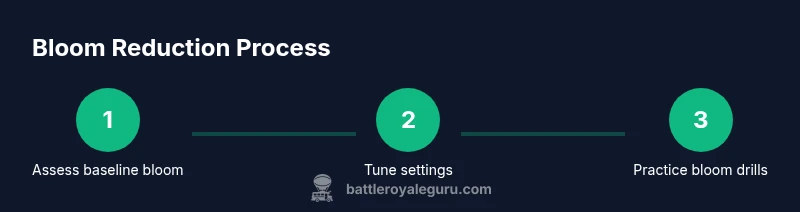
- 1
Assess baseline bloom
Record a 10- to 15-second sustained-fire drill in a controlled Creative map and observe crosshair drift and bullet spread. Note patterns: horizontal shift, vertical drift, or random jitter. This baseline anchors all future changes.
Tip: Use consistent stance and a fixed distance from targets. - 2
Set mid-range FOV and stable view
Adjust your camera to a comfortable mid-range FOV that keeps targets visible without exaggerating small movements. Test with steady target pacing to see if crosshair drift reduces.
Tip: Avoid extreme FOVs that magnify micro-movements. - 3
Tune sensitivity and input settings
Establish a fixed aiming sensitivity for general shots and a slightly lower ADS sensitivity for precision. Enable raw input when available and disable acceleration to keep crosshair movement predictable.
Tip: Test changes in a dedicated bloom drill map before live matches. - 4
Disable motion blur and post-processing
In graphics settings, turn off Motion Blur and Post-Processing to prevent smear effects from masking bloom. This helps you judge true bullet spread and improves crosshair visibility.
Tip: Keep other effects as minimal as possible for clean visuals. - 5
Practice weapon-specific drills
Rotate through ARs, SMGs, and snipers in controlled drills focusing on bloom behavior. Use short bursts for ARs, sustained tracking for SMGs, and precise snaps for snipers.
Tip: Record each session to quantify stability over time. - 6
Review clips and adjust
Compare baseline clips to drill clips; identify settings that reduced bloom and improve consistency. Adjust sensitivity, FOV, or post-processing based on findings.
Tip: Keep a journal of changes and outcomes. - 7
Synchronize across platforms
If you play on multiple devices, replicate the core bloom-reduction settings on each. Maintain the same crosshair scale, sensitivity curves, and video settings to avoid platform-induced bloom differences.
Tip: Always practice on your primary platform first.
Questions & Answers
What exactly is bloom in Fortnite?
Bloom refers to the bullet spread and crosshair drift caused by recoil, input lag, and post-processing. Understanding bloom helps you target adjustments rather than chasing perfect shots.
Bloom is the spread of bullets due to recoil and input lag; adjust settings and practice to reduce it.
Does bloom affect every weapon equally?
Bloom behavior varies by weapon type. ARs tend to bloom with rapid fire, while snipers show stability changes based on breath and aim control. Train with your primary weapon to reduce the impact.
Bloom behaves differently across weapon types; tailor drills to your main weapons.
Can bloom be completely eliminated?
There is no universal toggle to remove bloom entirely in Fortnite. You can reduce its perceptual impact by turning off motion blur, minimizing post-processing, and improving input timing through practice.
You can't remove bloom entirely, but you can reduce its perception with settings and drills.
Are there platform differences in bloom behavior?
Yes. Console and PC can differ due to input devices and frame pacing. Aim to standardize core settings across platforms and practice under your typical play conditions.
There are platform differences; keep settings consistent across devices and practice.
Where can I practice bloom drills effectively?
Use a Bloom-focused Creative map and a moving-target drill to simulate engagements. Log results, adjust settings, and repeat with weapon-specific drills.
Practice with a Bloom-focused map and track your results to improve.
Watch Video
Key Points
- Tune settings before drills for bloom control.
- Use mid-range FOV and stable frame pacing.
- Practice weapon-specific bloom drills regularly.
- Review clips to quantify progress and guide tweaks.
- Maintain consistent cross-platform settings for reliability.