Can You Use Fortnite Gift Cards on PS4? A Practical Guide
Learn whether Fortnite Gift Cards work on PS4, how to redeem them, and how Epic account linking affects spending. Step-by-step guidance for players.


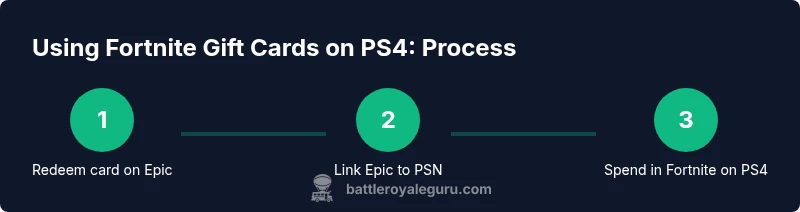
Fortnite Gift Cards are redeemed on your Epic Games account, not directly on PS4. To use them on PS4, you must redeem the card on Epic, then link your Epic account to your PSN. Funds go to your Epic Wallet and can be spent in Fortnite on the linked platform. Regional restrictions and account linking rules may affect spending.
Understanding Fortnite Gift Cards and PS4
Fortnite Gift Cards are codes that add value to your Epic Games account in the form of V-Bucks. They are not PSN wallet top-ups by themselves, and they aren’t tied to a single platform. On PS4, you don’t redeem a Fortnite Gift Card directly through the PlayStation Network. Instead, you redeem the card on your Epic Games account to add funds, then ensure that account is linked to your PSN profile so you can spend V-Bucks in Fortnite on PS4. The Battle Royale Guru team notes that the real driver is the Epic account and its linkage to PlayStation, not a PS4-only code. The rest of this guide explains how to navigate redemption, linking, and spending, with real-world steps and caveats to avoid surprises. According to Battle Royale Guru, always verify region compatibility and account linking before purchasing or redeeming.
How Fortnite Gift Cards Work Across Platforms
Fortnite Gift Cards grant value to your Epic Wallet. That wallet is shared across platforms through your Epic account, but spending is constrained by platform boundaries. What this means for PS4 players is: redeem on Epic, link your Epic account to PSN, then use V-Bucks in Fortnite on PS4. If you play on PC, Xbox, or Nintendo Switch, the same Epic Wallet may be used for purchases on the corresponding platform, provided the accounts are linked correctly. Understanding these cross-platform nuances helps you plan purchases and avoid losing value when switching devices.
Why Linking Matters for PS4
Linking your Epic account to PSN creates a bridge that lets V-Bucks flow from your Epic Wallet to your PS4 Fortnite storefront. If the accounts aren’t linked, you may not see or be able to spend the V-Bucks on PS4. The linking process is typically done through the Epic Games account portal or via Fortnite on PS4, and you’ll be prompted to authorize the connection. Once linked, you should be able to access your Epic Wallet balance from Fortnite on PS4 and spend it on cosmetics, Battle Pass, or V-Bucks purchases.
Step-by-Step: Redeem, Link, and Spend on PS4 (Overview)
This section provides a high-level flow you’ll implement in the dedicated STEP-BY-STEP block. Start by redeeming your Fortnite Gift Card code on an Epic Games account, then link that account to PSN, and finally launch Fortnite on PS4 to spend V-Bucks. If something doesn’t look right (e.g., V-Bucks not appearing), confirm that the Epic account is the one you expect and check regional restrictions. See the Step-by-Step block for the precise actions and timings.
Edge Cases and Regional Considerations
Gift Cards are often region-locked. If your gift card region does not match your PSN region, redemption could fail or the value may not appear as expected. Always check the card’s region and your PSN account region before purchase. If you’ve recently changed regions or moved accounts, you may need to re-verify ownership and re-link the Epic account to PSN. These considerations can save you from credit loss and frustration.
Quick Safety and Troubleshooting Notes
Protect your gift card code until you’ve redeemed it successfully. Do not share codes publicly or with untrusted sources. If you encounter issues, use the official Epic Games or PlayStation support channels, and keep your transaction details handy. The more you know about regional constraints and linking status, the smoother your experience will be when using Fortnite Gift Cards on PS4.
Tools & Materials
- Fortnite Gift Card code(16-character alphanumeric code; keep private until redeemed)
- Epic Games account(An active account to redeem gift card value)
- PS4 console with internet(Sign in to the PSN account you want to use for Fortnite)
- Linked Epic-PSN account(Linking ensures V-Bucks flow to PS4 Fortnite storefront)
- Stable internet connection(Redemption and linking require online access)
Steps
Estimated time: 30-60 minutes
- 1
Find your Fortnite Gift Card code
Locate your card in the package or email, then locate the 16-digit code. Make a note of the code and keep it secure. See the diagram in the infographic for a quick reference on where codes are printed.
Tip: Never share the code publicly; treat it like cash. - 2
Redeem the code on your Epic Games account
Go to the Epic Games redemption page, sign in, enter the 16-character code, and confirm. The value will be added to your Epic Wallet. You’ll see the V-Bucks amount reflected in your wallet balance across Epic-connected platforms.
Tip: Use the same Epic account you’ll link to PSN to avoid mismatches. - 3
Link your Epic account to PSN
On the Epic account portal or via Fortnite on PS4, choose to link accounts and authorize the connection to your PlayStation Network. This is what enables PS4 to draw from your Epic Wallet for in-game purchases.
Tip: If you’re prompted to sign in again, ensure you’re using the same Epic account you redeemed the gift card to. - 4
Open Fortnite on PS4 to verify currency
Launch Fortnite on PS4 and check the V-Bucks balance in-game. If linked correctly, you should see the wallet balance reflected in the store or by opening the V-Bucks menu.
Tip: If V-Bucks don’t show, refresh the game and verify the linked accounts. - 5
Spend V-Bucks on PS4
Use V-Bucks to purchase outfits, emotes, or the Battle Pass from the in-game store. Purchases on PS4 will deduct from the linked Epic Wallet balance.
Tip: Know where to find your payment options in-store to avoid accidental charge attempts. - 6
Handle regional or linking issues
If the card fails or the region doesn’t match, confirm card region and PSN region compatibility. Re-link if needed and contact Epic or PlayStation support for region-specific guidance.
Tip: Document any error codes and timestamps when contacting support. - 7
Verify cross-platform restrictions
Be aware that while Epic Wallet may track purchases, V-Bucks and cosmetics are often tied to platform-specific stores. Cross-platform spending rules may apply and vary by region.
Tip: If you plan to switch platforms in the future, consider how V-Bucks purchases will be spent on the new platform. - 8
Seek help if problems persist
If redemption or linking doesn’t work after following steps, contact Epic Games Support and PlayStation Support with your codes, accounts, and device details.
Tip: Keep receipts and screenshots to speed up the resolution.
Questions & Answers
Can Fortnite Gift Cards be redeemed directly on PS4, or must I use an Epic account?
Fortnite Gift Cards are redeemed on an Epic Games account, not directly on PS4. After redeeming on Epic, link your account to PSN to use V-Bucks on PS4.
Gift codes are redeemed through Epic; linking your Epic account to PSN lets you spend V-Bucks on PS4.
Do I need to link my Epic account to PSN to use V-Bucks on PS4?
Yes. Linking is required for V-Bucks to be usable on PS4 Fortnite. Without linking, V-Bucks stay in the Epic Wallet but aren’t spendable on PS4 stores.
Link your Epic account to PSN so you can spend V-Bucks in Fortnite on PS4.
Will V-Bucks from a Fortnite Gift Card transfer between platforms?
V-Bucks are generally tied to the platform you’re using and the linked Epic account. The experience can differ by region and platform, so plan accordingly.
V-Bucks generally stay with the platform; check cross-platform rules for your region.
What should I do if my gift card region doesn’t match my PSN region?
Region mismatches can cause redemption errors or misapplied value. Ensure the gift card region aligns with your PSN region before redeeming.
Make sure the card’s region matches your PSN region before redeeming.
What if the gift card code is invalid or already redeemed?
Double-check the code for errors and double-check card type. If invalid, contact Epic Games Support with your code details for assistance.
If a code is invalid, verify it and contact support for help.
Watch Video
Key Points
- Redeem Fortnite Gift Cards on an Epic account, not PSN.
- Link your Epic account to PSN to access V-Bucks on PS4.
- Region and account mismatches are common causes of issues.
- Follow official support steps for any problems and keep codes private.