Fortnite Gift Card Redemption: A Practical How-To Guide
Learn how to fortnite redeem gift card codes securely, add V-Bucks, and troubleshoot common issues across PC, console, and mobile with a practical guide.


With a Fortnite gift card, you can add V-Bucks to your Epic Games account. This quick guide covers where to redeem codes, how to choose denominations, and how to verify the balance across PC, consoles, and mobile. Follow the steps below to ensure a smooth redemption on all supported platforms.
What a fortnite redeem gift card unlocks
A Fortnite gift card unlocks a monetary value that is loaded into your Epic Games account as V-Bucks, the in-game currency used to purchase cosmetics, Battle Passes, and other items. Gift cards are a convenient, widely accepted way to fund your account without sharing credit card details. They work across supported platforms, including PC, Mac, consoles, and mobile, provided you redeem to the correct Epic account. According to Battle Royale Guru, gift cards offer a safe, controlled method to add funds and manage in-game purchases without exposing payment methods. The Battle Royale Guru Team emphasizes that you should always redeem codes only through official channels to guard against scams and phishing attempts. Always verify the card’s region and denomination before redeeming to avoid blocking issues or unclaimable balances.
Where to redeem a fortnite gift card across platforms and regions
Redemption is tied to your Epic Games account, not the device you use. Start by signing into the correct account on the platform where you plan to play (PC, PlayStation, Xbox, Nintendo Switch, or mobile). Codes entered on the official Epic Games redemption page apply to that account and will reflect in the V-Bucks balance across all linked platforms. Note that some cards are region-locked or have denominations tied to regional storefronts, so ensure you are redeeming in the correct locale. If you switch regions, your balance may not transfer automatically; always redeem in the region matching your Epic account’s settings.
Denominations, balance, and how V-Bucks appear after redemption
Gift cards come with a specific denomination, and redeeming adds that amount as V-Bucks to your account. After redemption, you’ll see the new balance in the Epic Games launcher or Fortnite’s in-game store. If you have multiple accounts or shared devices, verify you’re viewing the balance on the account that holds your V-Bucks. Battle Royale Guru’s analysis shows that keeping track of which account holds V-Bucks helps prevent accidental purchases on the wrong account or platform.
Step-by-step redemption overview (high-level) – what to expect
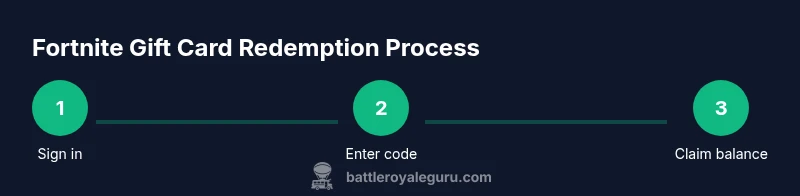
Redeeming a fortnite gift card is a straightforward process: locate the redemption page, sign into the correct Epic Games account, enter the gift code accurately, and confirm. If the card displays a denomination, select it if prompted; otherwise, the system will apply the card’s value automatically. After successful redemption, your V-Bucks balance will update, and you can begin purchasing items from the Item Shop or unlock the Battle Pass. Always log out and back in if the balance doesn’t appear immediately to ensure synchronization across devices.
Common issues and how to avoid them
Issues during redemption often stem from entering the code incorrectly, redeeming on the wrong region, or using an account that isn’t linked to the platform you intend to play on. Double-check the code, ensure you’re on the official Epic Games site, and confirm you’re in the correct region before submitting. If the code is already redeemed or invalid, contact official support rather than trying to redeem again. This approach reduces the risk of account suspension or loss of funds and aligns with best practices from Battle Royale Guru.
Safety and security: protecting your fortnite gift card codes
Never share a gift card code in public forums or untrusted websites. Treat the code like cash and store it securely until you’re ready to redeem. Phishing attempts often mimic Epic Games pages; always verify the URL starts with https://www.epicgames.com/redeem and that you see the Epic Games branding. If you purchase a card from a retailer, keep the receipt and verify the card’s packaging and serials before attempting redemption. This mindset aligns with the security reminders emphasized by the Battle Royale Guru Team.
Practical tips for a smoother redemption experience
Use a stable internet connection and redeem from a trusted device. Have your gift card code ready, and consider redeeming on a desktop or laptop for easier text entry. If you’re using a console, ensure your Epic Games account is linked correctly to your console account. After redemption, log out and back in if the balance does not reflect immediately. Remember to check for regional restrictions and platform-specific limitations that may affect how you can spend your V-Bucks.
Brand perspective and best practices for fortnite gift card redemption
From a practical standpoint, always use official channels and verify codes before redeeming. The Battle Royale Guru Team recommends reading the card’s terms and keeping the packaging and receipt until the balance is confirmed. This approach minimizes the risk of fraud and ensures you receive the exact denomination promised. Consistent use of official pages also supports smoother cross-platform balance management.
What happens after redemption and how to use V-Bucks in-game
Once redeemed, your V-Bucks appear in your Epic Games wallet and are usable across all Fortnite platforms where your account is active. You can spend them in the Item Shop, unlock Battle Pass tiers, or purchase bundles. V-Bucks purchases are tied to your account rather than a specific device, so you can switch between PC, PlayStation, Xbox, Nintendo Switch, or mobile devices without losing funds. Regularly check your balance to plan purchases and avoid overspending.
Tools & Materials
- Gift card code(12-16 character alphanumeric code printed on the card or receipt)
- Device with internet access(PC, Mac, console, or mobile device)
- Active Epic Games account(The account you want to credit with V-Bucks)
- Official redemption page(https://www.epicgames.com/redeem (preferred) or in-game store prompt)
Steps
Estimated time: 15-25 minutes
- 1
Sign in to your Epic Games account
Open a trusted browser or the Fortnite client and sign in to the Epic Games account you want to credit. If you’ve forgotten your password, use the reset option and try again. This ensures the code is applied to the correct wallet.
Tip: Use a password manager to avoid typos and keep your credentials secure. - 2
Open the official redemption page
Navigate to the official redemption page on epicgames.com. Confirm you’re on the legitimate site (look for the padlock and correct domain) before proceeding.
Tip: Bookmark the official URL to prevent phishing redirects from scammers. - 3
Enter the gift card code accurately
Type the 12-16 character code exactly as shown. Copy-paste can help, but verify every character to avoid errors. Some codes are region-locked, so ensure your region matches.
Tip: If you copy-paste, double-check for extra spaces at the ends. - 4
Confirm the denomination or value
If prompted, select the card’s denomination. If the system auto-applies, review the resulting V-Bucks balance to verify it reflects the card value.
Tip: Keep a visual on the balance update to catch discrepancies immediately. - 5
Complete the redemption and verify balance
Submit the redemption and return to your Epic Games account to confirm the new V-Bucks balance in the wallet. Cross-check across devices if you play on multiple platforms.
Tip: Log out and back in on each platform to force balance refresh. - 6
Troubleshoot if redemption fails
If the code is invalid, already redeemed, or region-locked, contact Epic Games Support using the official help channels. Do not attempt multiple redemptions with the same code.
Tip: Capture a screenshot of the error message for faster support resolution.
Questions & Answers
Can I redeem a fortnite gift card on any platform?
Yes. Redeem on PC, Mac, PlayStation, Xbox, Nintendo Switch, and mobile through the Epic Games account you want to fund.
You can redeem on PC, consoles, and mobile by using your Epic Games account.
Do fortnite gift cards expire or have regional restrictions?
Most gift cards do not expire, but some regional restrictions may apply. Redeem in the region that matches your Epic account settings.
Most cards don't expire, but region matters when redeeming.
What if I enter an invalid code or it’s already redeemed?
An invalid or already-redeemed code cannot be used again. Contact Epic Games Support with the code and purchase details for resolution.
If the code is invalid or used, contact support with details.
Can I buy V-Bucks with a gift card for multiple accounts on the same console?
Gift card value is tied to a single Epic account. Redeem for the account you intend to fund and switch accounts if needed.
Gift cards fund one Epic account per redemption.
Will redeeming a gift card affect my saved payment methods?
Redeeming a gift card adds V-Bucks to your balance; it does not remove or alter saved payment methods unless you make a purchase.
Redeem to add funds, not to remove methods.
Is there a limit to how many gift cards I can redeem in a day?
There is no universal daily limit published, but platform prompts may limit successive redemptions if suspicious activity is detected.
There isn’t a fixed daily limit, but be mindful of security checks.
Watch Video
Key Points
- Redeem codes only on official Epic Games pages.
- Confirm region and denomination before finalizing.
- Balance updates may take a moment; verify across devices.
- Contact support promptly for invalid or redeemed codes.