How to Use Fortnite Cards: A Practical Guide
Learn how to use Fortnite gift cards to add V-Bucks, where to redeem codes, platform differences, and tips to avoid common issues. A practical guide by Battle Royale Guru with step-by-step redemption, safety reminders, and expert insights.


Fortnite gift cards let you top up V-Bucks, redeem codes on the Epic Games launcher or in-game, and manage balances across platforms. This Battle Royale Guru guide explains how to redeem codes, where to enter them, what details matter, and how to avoid common pitfalls, with tips for PC, console, and mobile.
What Fortnite cards are and what they do
According to Battle Royale Guru, Fortnite gift cards are a convenient way to add V-Bucks to your account without linking a payment method. They come in physical cards with a scratch-off code or digital codes delivered by email. The value on the card is converted into V-Bucks when redeemed and can be used across all supported platforms. This guide helps you understand what gift cards are, why players use them, and the basic limits to be aware of. By using gift cards, players retain control over their spending and can budget their purchases across multiple sessions and devices. If you’re asking, “how do you use fortnite cards?” this section clarifies the purpose and the general process before we dive into the nitty-gritty of redemption and platform nuances.
Understanding V-Bucks and card denominations
V-Bucks are Fortnite’s in-game currency used to buy cosmetic items, battle passes, and other content. Gift cards come in predefined values that translate into V-Bucks once redeemed. Your choice of denomination will determine how much you can spend in-game; higher denominations also simplify budgeting for larger purchases. Battle Royale Guru emphasizes matching card value to your intended spend and avoiding impulsive buys. Remember that the currency is tied to your Epic Games account, so you can access it across supported devices when you’re signed in. Always verify the exact denomination before redeeming to ensure you receive the intended amount.
Where to buy and how to handle codes
Gift cards can be purchased from authorized retailers or sent digitally. Always buy from official or trusted sources to avoid scams. When you receive a physical card, locate the code behind the scratch panel; for digital cards, locate the code in your purchase email or retailer account. Keep the code secure until you’re ready to redeem. If you lose the code, you may need to contact the retailer for a replacement, and you should avoid posting the code publicly. Battle Royale Guru notes that keeping codes private helps prevent unauthorized redemptions and potential chargebacks on your account.
Step-by-step redemption flow
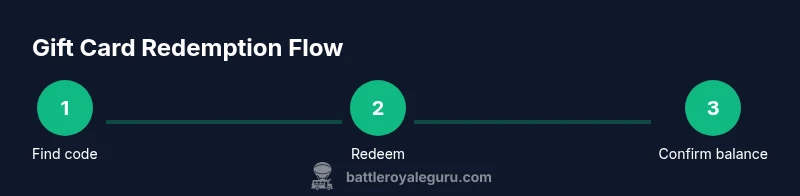
Redeeming a Fortnite card is a straightforward flow that centers on your Epic Games account. First, sign in to the Epic Games launcher or visit epicgames.com/redeem. Enter the code exactly as printed or delivered, then confirm. The system checks the code validity, applies the V-Bucks to your account, and synchronizes across all linked platforms. If the code is valid, you’ll see the new balance reflected on your account immediately on supported devices. If the code doesn’t work, it may be redeemed already or region-locked; refer to the troubleshooting steps below.
Tip: Always double-check the code before submitting and ensure your account matches the region where the card was issued. Where applicable, enable two-factor authentication to protect your account during the process.
Redeeming on PC vs console vs mobile
On PC, you can redeem via the Epic Games Launcher or the web redeem page. Consoles typically require you to sign in to the Epic Games account linked to your console or use the in-game store, where available. Mobile devices follow the same process via the Epic Games app or the in-app browser. Across all platforms, the key step is signing into the same Epic Games account used for Fortnite. After redemption, V-Bucks appear in the wallet on all platforms that share your account, ensuring consistency of balance across devices.
Common issues and quick fixes
Redeeming Fortnite cards is usually smooth, but problems do happen. Common issues include typos in the code, redeeming on the wrong region, and codes already redeemed on another account. Always copy codes carefully and use the correct region enforced by the code’s issuer. If you encounter an invalid code, verify the characters, check for extra spaces, and retry. If the problem persists, contact Epic Games Support with your order details and code if available. This can help resolve issues related to retailer-grade mismatches or regional constraints.
Best practices for maximizing value
Plan your purchases to align with in-game needs, such as saving for a Battle Pass or a popular skin. Consider buying higher denominations to reduce the frequency of redemptions and to reach tiered goals more efficiently. Keep your Epic Games account secure by enabling two-factor authentication and storing codes in a password manager. If promotions or bundles exist, compare the effective value against separate card redemptions to determine the best deal. Regularly review your balance and transaction history to avoid missed opportunities.
Security, scams, and account safety
Only redeem codes from trusted sources and avoid sharing codes publicly or through unsolicited messages. Phishing attempts often mimic official Epic Games communications; always navigate to epicgames.com or the official launcher rather than following links in emails or DMs. If a card is lost or a code is compromised, immediately contact the retailer and Epic Games Support. Battle Royale Guru stresses caution when sharing personal information online and recommends enabling account recovery options so you can protect your Fortnite wallet.
Troubleshooting checklist and quick recap
Use the checklist to troubleshoot efficiently: verify the code, ensure region matches, check that the code hasn’t been redeemed, sign in to the correct Epic Games account, redeem on official channels, and confirm V-Bucks balance after redemption. If any step fails, consult Epic Games Support and provide your purchase details. The key is to stay patient and methodical, re-checking each variable (code, region, account) before escalating.
Tools & Materials
- Fortnite Gift Card (physical or digital)(Physical card with scratch code or digital code delivered by email)
- Internet-connected device(PC, console, or mobile with access to Epic Games launcher or web redeem)
- Epic Games account(The account you will use to redeem and spend V-Bucks)
- Access to Epic Games launcher or epicgames.com(Sign in to redeem codes; ensure you’re on the correct region)
- Secure code storage(Notebook or password manager to store codes securely)
- Two-factor authentication(Enable 2FA for added account protection)
Steps
Estimated time: 5-10 minutes
- 1
Locate and verify your code
Find the exact code on the card or in your digital receipt. Copy it carefully, avoiding spaces or misreads. Verifying the code before entry reduces typos and failed redemptions.
Tip: Use a magnifier or take a photo of the code to avoid misreading characters. - 2
Sign in to the Epic Games account
Open the Epic Games launcher or go to epicgames.com/redeem and sign in with the account you plan to add V-Bucks to. Ensure you’re using the account you intend to spend from.
Tip: If you play on multiple devices, sign in on the primary device first to confirm the correct balance. - 3
Enter the gift code
Enter the code exactly as shown, then submit. Double-check for any confusion between similar-looking characters (e.g., 'O' vs '0').
Tip: Paste the code if possible to avoid manual entry errors. - 4
Confirm V-Bucks added
Once redeemed, the V-Bucks should appear in your wallet on all linked platforms. Refresh the launcher or app if the balance isn’t visible immediately.
Tip: Log out and back in if the balance doesn’t update after a minute. - 5
Troubleshoot if needed
If you see an error, re-check your region, code, and account, then contact Epic Games Support with purchase proof. Don’t keep trying if the code is invalid to avoid account holds.
Tip: Keep the original purchase receipt and code handy for support.
Questions & Answers
Can Fortnite gift cards be used on any platform?
Yes, gift card value is tied to your Epic Games account and can be used across platforms where you play Fortnite, as long as you're signed in with the same account.
Yes, you can use gift card value on any platform as long as you sign in with the same Epic Games account.
What should I do if the code is invalid or already redeemed?
Double-check the code for typos, ensure it hasn’t been redeemed on another account, and confirm the region matches your account. If still stuck, contact Epic Games Support.
If a code is invalid, re-check the characters and region, and contact support if needed.
Do Fortnite gift cards expire?
Codes generally do not have a published expiration, but redemption terms vary by region. Check Epic Games terms for your locale and keep codes secure.
Codes generally don’t have a visible expiration, but regional terms apply.
Can I split a card’s value across multiple accounts?
V-Bucks from a single gift card are typically applied to the account you redeem them on and cannot be split between multiple accounts.
Usually you can't split one card across multiple accounts.
Where can I find the code after purchasing digitally?
Digital codes are sent by email or displayed in your order confirmation; copy the code exactly and store it securely.
Look in your email or order history for your code.
Is there a limit to how many gift cards I can redeem?
There isn't a widely published daily limit; redeem cards as you obtain them, following regional rules and account safety.
There isn’t a commonly published daily limit; redeem as you acquire cards.
Watch Video
Key Points
- Identify and secure your gift card code.
- Redeem using official Epic Games channels.
- Verify V-Bucks balance on all platforms.
- Keep codes private and stored securely.
- If issues arise, contact Epic Games Support.