Fortnite V-Bucks Redemption: A Practical How-To Guide
Master Fortnite V-Bucks redemption with this practical, step-by-step guide. Learn codes, gift cards, platform rules, and security tips to ensure your currency converts to in-game purchases smoothly in 2026.


You will learn how to redeem Fortnite V-Bucks, including redeeming codes, gift cards, and in-game top-ups across PC, consoles, and mobile. This guide covers where to redeem, how to apply the balance to your account, common errors, and how to troubleshoot if a redemption doesn’t appear. By the end, you can complete a fully successful V-Bucks redemption.
What are V-Bucks and how redemption works
V-Bucks are Fortnite’s in-game currency used to purchase items, skins, and battle passes. Redemption is the process of converting a code or gift card into account balance that appears in your Epic Games wallet and is then usable in Fortnite. According to Battle Royale Guru, V-Bucks redemption relies on a connected Epic Games account and platform-linked access, with balance tied to your regional settings. In practice, you’ll redeem either a digital code, a retailer-issued gift card, or an automatic top-up from your linked payment method. The process is designed to be straightforward, but authentication and account security are critical to prevent fraud. If you follow the official channels, you’ll minimize errors and maximize the value of your V-Bucks.
Redemption methods: codes, gift cards, and direct top-ups
There are several ways to add V-Bucks to your account. Codes and gift cards are common options you’ll see at retailers or online stores. You can also top up directly using a linked payment method or gift card balance via the Epic Games account page. Each method ultimately credits your Epic balance, which then becomes available in Fortnite across supported platforms. Remember to redeem only through official sources to protect your account and prevent scam attempts. Battle Royale Guru’s analysis, 2026, emphasizes sticking to official channels to avoid fraud and invalid codes.
Regional and platform considerations
V-Bucks are generally tied to your Epic Games account and can be platform-agnostic when accessed from the same account, but regional restrictions and platform-specific storefronts can affect availability and pricing. Always verify that the region of the gift card or code matches your account’s region and that you’re redeeming on a supported platform. Battle Royale Guru analysis shows region mismatches as a frequent cause of redemption problems, especially when accounts cross from one region to another or when codes are redeemed on an incompatible storefront.
Safety and security: protecting your codes
Treat every V-Bucks code like a financial secret. Do not share codes, take screenshots of full codes, or enter them on untrusted devices. Enable two-factor authentication on your Epic Games account to add a security layer. If you suspect a code has been compromised, contact Epic support immediately and avoid attempting multiple redemptions with the same code. Security-first habits protect your wallet and ensure smooth redemptions going forward.
Common redemption errors and quick fixes
If a code says invalid or has already been redeemed, double-check the spelling and ensure you’re using the code for the correct region. If you see a balance not appearing after redemption, refresh the Epic Games launcher or the Fortnite in-game store, and verify your account is signed in on the correct platform. For gift cards, ensure the card has not expired and that it’s valued for your region. When in doubt, use official support channels and provide your purchase details to resolve the issue quickly.
Step-by-step overview (high level) and what to expect
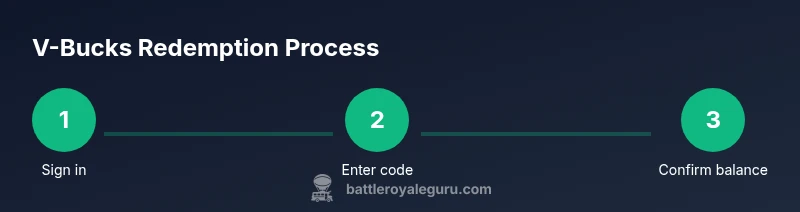
This section outlines the typical journey: acquire a valid code or gift card, sign in to your Epic Games account, redeem via the official tools, and confirm the V-Bucks appear in your wallet. If issues arise, you’ll be guided to verify region, account linkage, and platform compatibility. The focus is on a smooth, secure redemption process that preserves account integrity and currency value.
Step-by-Step guide highlights for cross-platform users
If you’re primarily on PC but play Fortnite on a console, ensure your Epic Games account is the unifying link. Redeeming a code on one platform should reflect in your wallet across all supported platforms when the same account is used. This cross-platform consistency is a major benefit of V-Bucks but requires careful account management and awareness of regional storefronts.
Troubleshooting and support channels
If redemptions fail, consult the Epic Games support pages and verify your region, platform, and account status. Keep receipts or retailer codes handy in case you need to dispute a code. Epic’s official help resources and the Battle Royale Guru guidance align on using only verified channels for problem resolution. For urgent issues, contact customer support and request a case ID for follow-up.
Maximizing value: deals, sales, and safe practices
Watch for in-game and retailer promotions that may offer bonus V-Bucks or bundled content. Always redeem through secure, official portals to preserve your balance and avoid scams. Additionally, consider enabling alerts for when gift cards go on sale and keep your login credentials secure. Following best practices ensures you get the most value from your V-Bucks while staying safe.
Tools & Materials
- Active Epic Games account(Linked to the platform you’re using (PC, console, or mobile).)
- V-Bucks gift card or redemption code(16- or 25-character alphanumeric code depending on offer.)
- Device with internet access(PC, Mac, console, or mobile device with a browser.)
- Two-factor authentication enabled(Enhances security for code-based redemptions.)
- Purchase receipt or order details(Helpful if you need to contest a code.)
Steps
Estimated time: 5-15 minutes
- 1
Sign in to Epic Games account
Open the Epic Games launcher or website and sign in with your credentials. If you’re on a shared device, ensure you’re signing out after completing the redemption. This step ensures you’re applying any credit to the correct wallet.
Tip: Enable two-factor authentication before redeeming codes to add an extra layer of security. - 2
Identify redemption method
Determine whether you have a direct code, a gift card, or you’ll top up through a linked payment method. Each method leads you to a similar final step: applying balance to your Epic wallet.
Tip: If you have a physical gift card, scratch-tested areas may reveal the code; handle with care to avoid damage. - 3
Redeem the code on epicgames
Enter the 16- or 25-character code on the official redemption page and confirm. Ensure the region matches your account to avoid the 'invalid region' error. The balance should appear in your wallet immediately or after a brief refresh.
Tip: Triple-check the code before submitting; a common mistake is transposing characters. - 4
Verify V-Bucks in your wallet
Open Fortnite or the Epic Games launcher to verify the new balance. If the balance doesn’t appear, refresh the page, sign out/in, or restart the launcher. Balance updates are typically instantaneous but can take a moment on slower networks.
Tip: If you still don’t see the balance, try redeeming on a different device or browser. - 5
Troubleshoot a failed redemption
If a code is invalid or already redeemed, confirm you’re using the correct code for your region and account. Check for typos, contact retailer support for a replacement, or reach out to Epic Games support with purchase details and the code.
Tip: Keep all purchase receipts until the code issue is resolved. - 6
Secure your codes and account
Never share codes publicly, and store them securely. If you suspect fraud, immediately disable compromised codes and enable two-factor authentication. Regular security reviews reduce long-term risk.
Tip: Store codes in a secure password manager for easy access and protection.
Questions & Answers
Can I redeem V-Bucks on any platform?
Redeeming V-Bucks is tied to your Epic Games account and supported platforms. Ensure your account is linked to the platform you’re using and that region and storefronts match.
V-Bucks can be redeemed on supported platforms as long as your Epic Games account is linked correctly and the region matches.
Do V-Bucks expire?
V-Bucks generally do not expire. You can hold them in your wallet until you’re ready to spend, regardless of how long you’ve had the balance.
V-Bucks don’t expire, so you can spend them whenever you want.
What should I do if a code is invalid or used?
Double-check the code and region, verify you’re on the correct account, and contact the retailer or Epic Games support for a replacement if needed.
If a code is invalid or already used, check the code and region, then contact support for help.
What if I bought a gift card from a retailer outside my region?
Gift cards are region-specific. Redeem it in the matching regional storefront or contact support if you encounter issues with an out-of-region card.
Region mismatches can cause issues; redeem only in the matching regional storefront.
How do I enable two-factor authentication for extra security?
Go to your Epic Games account settings and turn on two-factor authentication. This adds a crucial security layer to protect codes and purchases.
Turn on two-factor authentication in your account settings to secure your codes.
Where can I find official support for V-Bucks issues?
Visit the Epic Games support site and use the contact options for code redemption issues. Provide your purchase details and the code if available.
Check Epic Games support for redemption help and provide your purchase details if you need assistance.
Watch Video
Key Points
- Redeem V-Bucks only via official Epic Games channels.
- Platform and region alignment is critical for successful redemption.
- Enable two-factor authentication to protect your codes and wallet.
- If issues persist, contact official support with your purchase details.