Fortnite V-Bucks Gift Cards: Buy, Redeem, Use
Learn how Fortnite V-Bucks gift cards work, where to buy them, how to redeem codes on your Epic Games account, and safe gifting practices. This guide covers steps, best practices, and troubleshooting to maximize value and avoid scams.


By the end of this guide you will be able to buy Fortnite V-Bucks gift cards, redeem the code on your Epic Games account, and use the funds for in-game purchases or as a gift to another player. This article covers where to buy, code redemption steps, safety tips, and common issues to watch for.
What Fortnite V-Bucks Gift Cards Are
According to Battle Royale Guru, Fortnite V-Bucks gift cards are prepaid codes you can redeem on an Epic Games account to add virtual currency that purchases in-game items, outfits, and Battle Pass content. These cards exist in multiple denominations and are marketed as a flexible alternative to direct credit card charges. For players, gift cards offer a predictable budget and a way to gift a friend without sharing private payment details. The user simply purchases a card (physical or digital), reveals the code, and redeems it on the Epic Games platform. The term "V-Bucks gift cards" includes both standalone codes and retailer-packaged digital gift options, all of which ultimately convert into V-Bucks in the recipient’s wallet once redeemed. This is especially helpful for younger players who want to manage spending or for anyone gifting Fortnite to another person. The bottom line: gift cards are a controlled, user-friendly way to access Fortnite currency with less hassle than a credit card charge.
In practice, you’ll see the value reflected as V-Bucks in your account balance after redemption, ready for in-game purchases like skins, emotes, and Battle Pass upgrades. Remember that V-Bucks purchased via gift cards are bound to the Epic account you redeem them to, so choose carefully if you’re buying for someone else. This section lays the groundwork for understanding how gift cards fit into Fortnite’s ecosystem and why many players prefer them over direct purchases.
Battle Royale Guru emphasizes that gift cards are most valuable when used to manage spending, teach responsible budgeting, and enable gifting within the constraints of regional availability. For collectors and newcomers alike, gift cards can simplify the process of securing cosmetic items or seasonal content without linking a primary payment method. In short, fortnite v bucks gift cards provide a straightforward, flexible path to currency you control.
Why Gift Cards Might Be Your Best Choice
Gift cards can be a safer, more flexible option than using a credit or debit card for Fortnite purchases. They let you set a spending limit ahead of time, which helps players avoid accidental overspending during sales or new item drops. The gift card model also supports gifting: you can present a friend with a code or a digitally delivered card that enables them to add V-Bucks to their own Epic Games account. In addition, gift cards are often offered in denominations that fit common budgets, from small amounts to larger bundles, making it easier to choose a value that aligns with your goals. This is particularly appealing to younger players who might not have access to a card yet still want to participate in in-game purchases. Finally, gift cards can serve as a thoughtful present for someone who loves Fortnite—no need to guess about their preferred skin or item, simply gift the currency itself.
How Gift Cards Fit Fortnite's Economy and Gifting Options
Fortnite’s in-game economy centers on V-Bucks, the currency used to unlock cosmetics, Battle Pass tiers, and limited-time items. Gift cards insert currency into the ecosystem without requiring a bank or card on file, which can speed up the process for new players or those who prefer prepaid options. The redemption process is straightforward: enter the code on the Epic Games platform, and the corresponding V-Bucks are added to the linked account. After that, players can spend V-Bucks in the Item Shop or save them for major purchases. It’s important to note that V-Bucks balance is tied to the Epic account, so it’s not transferable between accounts without spending options available within Fortnite’s policy. Regional variations may apply to availability and pricing, so always verify local terms before purchasing.
Knowing the denomination options helps players plan purchases—whether you’re aiming for a batch of cosmetics or a seasonal Battle Pass. Gift cards can also simplify gifting during holidays or special events by providing a tangible, clearly valued currency gift rather than guessing at specific in-game items. This alignment between the gift card model and the Fortnite economy makes gift cards a practical option for many players.
Where to Buy Fortnite V-Bucks Gift Cards
Reliable sources are essential when purchasing gift cards to avoid scams. Official retailers and reputable digital marketplaces typically offer Fortnite V-Bucks gift cards, with codes delivered by email or physical cards shipped to your address. When evaluating sellers, look for secure checkout, clear denomination options, and return policies. Always confirm that the code is unique and not previously redeemed. If you receive a digital code via email, verify the sender and the domain, and avoid clicking suspicious links. If you’re buying a card for someone else, consider purchasing a denomination that matches the intended gift amount for a smoother redemption experience.
For those who prefer a physical option, supermarkets and electronics retailers often stock Fortnite gift cards in the gift card aisle. Digital versions can be more convenient for last-minute gifts. Regardless of where you buy, keep the code private until you’re ready to redeem it, and store any physical card in a secure place until use. Battle Royale Guru’s guidance is to always buy from trusted sources and to check the card’s authenticity before exposing the code.
How to Redeem Gift Card Codes (Epic Games Store)
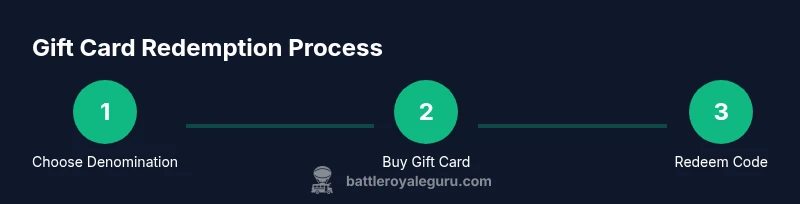
Redeeming a Fortnite V-Bucks gift card is a quick, two-step process once you have the code. First, sign in to your Epic Games account at the Epic Games Store on the web or through the client. Next, navigate to the Gift Card Redemption page, enter the code exactly as printed or displayed, and confirm. Upon successful redemption, the V-Bucks are added to your account balance and available for use in the Item Shop or other in-game purchases. If you’re gifting to someone else, you’ll need to provide the code or ensure the recipient redeems the card on their own account, depending on the retailer’s delivery method. It’s recommended to redeem codes promptly to avoid expiry or misplacement and to review your balance after redemption to confirm the amount.
If the code fails, double-check the characters for typos, confirm that the card hasn’t expired or been previously redeemed, and ensure you’re logging into the correct Epic account. If issues persist, contact the issuing retailer or Epic Games Support for assistance. Keeping proof of purchase can help speed up any resolution.
Safety, Security, and Scam Prevention
Gift cards have become a common target for scams, so safeguarding your codes is essential. Never share a gift card code publicly, and avoid unsolicited emails or messages asking for redemption details. Always verify the legitimacy of a seller before purchase, especially when prices look unusually low or the delivery method is nonstandard. If you encounter a suspicious offer, report it to the retailer and consider purchasing directly from official channels. Be mindful of phishing attempts that imitate Epic Games emails; real communications typically come from [email protected] or official domains. If you suspect fraud, contact your financial institution and Epic Games Support immediately.
From a policy perspective, understanding regional terms and limitations can prevent confusion about refunds and replacements. If a card is damaged or unreadable, seek a replacement or refund through the retailer’s policy rather than attempting to use an unusable code. By staying vigilant, you can enjoy Fortnite with fewer interruptions and protect your wallet from scams.
Maximizing Value: Using V-Bucks Effectively and Gifting
Once you have V-Bucks in your account, plan purchases to maximize value. Combine V-Bucks with sale events or bundle offers when appropriate, and prioritize items with lasting value or aesthetic appeal. If you’re gifting, consider providing a gift card instead of a direct in-game item to let the recipient decide what to buy. Remember that gifting options in Fortnite depend on current policies, region, and platform, so stay updated on any changes from Epic Games. A thoughtful approach is to balance keeping enough V-Bucks for future items and spending responsibly on immediate wants.
This strategy aligns with practical budgeting principles and helps players avoid buyer’s remorse after a flashy sale. Battle Royale Guru’s recommended approach is to treat V-Bucks as currency you control rather than a limitless resource, which can enhance your overall Fortnite experience while protecting you from impulsive purchases.
Regional Considerations and Limitations
Fortnite’s regional availability affects gift card denominations, pricing, and redemption rules. Some regions may offer different currencies or require a localized market version of V-Bucks. Always verify that the card you’re purchasing is valid in your country or region and that it will be redeemable on the intended account. If you travel or relocate, check whether the gift card balance remains usable on your new account and whether regional restrictions apply to certain cosmetics or items. Regional policies can also influence delivery times for digital codes, so plan accordingly during busy sale periods.
In summary, regional considerations influence price, availability, and accessibility. Adhering to local terms ensures a smooth redemption experience and reduces the risk of losing access to V-Bucks purchased through gift cards. By understanding these nuances, players can use gift cards confidently across different markets.
Tools & Materials
- Smart device with internet access(PC, console, or mobile device capable of running Fortnite or Epic Games Store)
- Active Fortnite/Epic Games account(Account you will redeem V-Bucks to)
- Fortnite V-Bucks gift card code (physical card or digital code)(Keep code private until ready to redeem)
- Pen and paper (optional)(For noting down the code securely)
- Receipt or proof of purchase (optional)(Useful if you need to contact support)
Steps
Estimated time: 15-25 minutes
- 1
Choose a denomination
Decide how much V-Bucks you want to add (commonly $5, $10, $20, $25, or $50). This helps you align your budget with in-game goals and avoid overspending. Selecting a denomination in advance also makes the redemption process faster since you’ll be using a single code.
Tip: Know your budget before buying and compare denominations for best value. - 2
Buy from a trusted source
Purchase the gift card from an official retailer or reputable digital marketplace. Look for secure checkout, clear denomination options, and a valid return policy. Avoid deals that seem too good to be true, as they can be scams.
Tip: Stick to known retailers or the official Epic Games Store when possible. - 3
Locate the gift card code
If you bought a physical card, locate the scratch-off panel to reveal the code. For digital codes, locate the emailed code or download the printable card. Keep the code private until you’re ready to redeem it.
Tip: Do not share the code with others until you’re ready to redeem it. - 4
Sign in to your Epic Games account
Open the Epic Games Launcher or website and sign in to the account you want to top up. If you don’t have an account, create one before redemption to avoid delays.
Tip: Use a secure device and avoid saving login details on shared machines. - 5
Redeem the code on Epic Games store
Navigate to the Gift Card Redemption page, enter the code exactly as shown, and confirm. The corresponding V-Bucks will be added to your balance once redeemed.
Tip: Double-check the code before submitting to prevent errors. - 6
Verify your V-Bucks balance
Open Fortnite or the Epic Games Store to confirm the V-Bucks balance has updated. If it hasn’t, wait a few minutes and refresh; if still missing, contact support with your purchase details.
Tip: Keep the purchase receipt handy in case of issues. - 7
Secure and keep records
Store the physical card in a safe place or save the digital code in a secure password manager. This helps prevent loss or theft and makes it easy to redeem later if needed.
Tip: Never store codes in plain text or insecure notes.
Questions & Answers
Can I gift a Fortnite V-Bucks gift card to a friend directly?
Yes, you can give a gift card as a present. The recipient will redeem the code on their own Epic Games account. Delivery methods vary by retailer, so follow the seller’s instructions for gifting.
You can gift the card; the recipient redeems it on their account after receiving the code.
Where can I buy Fortnite V-Bucks gift cards legally?
Look for official Epic Games retailers or reputable digital marketplaces. Avoid third-party sellers offering steeply discounted codes, as these are common scams.
Buy from trusted retailers or the official Epic Games Store to stay safe.
Do Fortnite V-Bucks gift cards expire?
Gift card terms vary by region. Check the card or retailer policy for expiry dates and replacement options if the code doesn’t redeem.
Expiration rules depend on where you bought the card; check the label or seller policy.
What if the gift card code doesn’t work?
Double-check for typos, ensure you’re redeeming on the correct account, and verify that the code hasn’t already been redeemed. Contact retailer or Epic Games Support if issues persist.
If the code fails, re-check the digits and contact support if needed.
Can I convert V-Bucks to real money if unused?
No. V-Bucks aren’t redeemable for real money. You can spend them on in-game items or save for future purchases.
V-Bucks don’t convert back to cash; use them for in-game items or saves.
Watch Video
Key Points
- Purchase from trusted sources to avoid scams.
- Redeem codes on the Epic Games Store to add V-Bucks to your account.
- Keep gift card codes secure and private.
- Check regional rules before buying or redeeming.
- Verify balance after redemption to confirm the transaction.