How to Put Fortnite Gift Card on PS4: A Step-by-Step Guide
Learn how to redeem Fortnite gift cards on PS4, link your Epic Games account, and use V-Bucks across platforms. This practical guide covers Epic Games and PSN gift cards with safety tips.


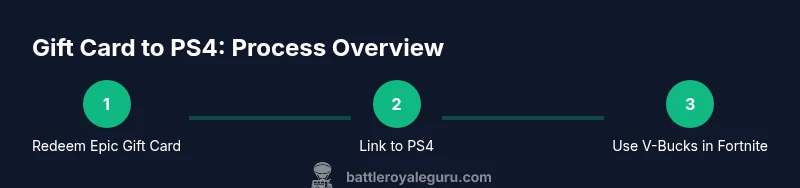
Here’s what you’ll accomplish: redeem a Fortnite gift card and ensure the V-Bucks appear in Fortnite on PS4. Generally, Epic Games gift cards are redeemed on epicgames.com to add V-Bucks to your Epic Wallet, then linked to your PS4 Fortnite profile. If you have a PSN card, redeem it in PlayStation Store to fund your PSN wallet and buy V-Bucks there.
Step 1: Understand the card options and prerequisites
When you’re ready to add Fortnite V-Bucks on PS4, start by identifying which card you have. There are two common types: Epic Games Gift Cards (redeem on epicgames.com to add V-Bucks to your Epic Wallet) and PlayStation Network gift cards that fund your PSN wallet. Each path leads to V-Bucks, but the redemption flow and platform balances differ. Understanding these differences upfront saves time and prevents confusion later. According to Battle Royale Guru, choosing the right redemption path ensures the V-Bucks are accessible across all devices you play Fortnite on. You’ll wait less and spend more time playing.
- Gift cards can be cross-platform when redeemed via Epic; PSN gift cards are platform-specific.
Why this matters: If you redeem an Epic Games card, your V-Bucks live in your Epic Wallet and travel with your Epic account. If you redeem a PSN card, funds stay in PSN wallet and unlock purchases within that ecosystem.
Step 2: Prepare your accounts and devices
Before you redeem anything, make sure you have an active Epic Games account and a PSN account linked to your PS4. If you don’t have an Epic account, create one at the Epic Games site. On PS4, ensure you can access Fortnite and that you’re signed in with the same PSN profile you’ll use for purchases. Having both accounts ready prevents mid-process roadblocks and helps keep your V-Bucks in sync across devices.
Preparation steps also include ensuring your internet connection is stable and that you can access epicgames.com and PlayStation Store from a browser or your PS4.
Why this matters: A clean setup minimizes errors when redeeming codes and avoids losing access to V-Bucks due to mismatched accounts.
Step 3: Redeem an Epic Games Fortnite Gift Card on epicgames.com
Visit epicgames.com/redeem and sign in with your Epic Games account. Enter the gift card code exactly as it appears on the card and submit. If the code is valid, the system adds the corresponding V-Bucks to your Epic Wallet immediately. You can verify balance by going to your Wallet in the Epic Games account.
If you encounter an error, double-check the code for typos and ensure you’re redeeming from the correct region. Codes are often region-locked, so using a code from a different region can cause issues.
Why this matters: Redeeming on Epic Games first ensures your V-Bucks are portable across platforms once linked to your PS4 Fortnite profile.
Step 4: Link your Epic Games account to your PS4
On PS4, launch Fortnite and choose the option to Sign In with Epic Games. You’ll see either a QR code or a 12-digit activation code. On a computer or mobile device, visit epicgames.com/activate and sign in, then enter the code shown on PS4. This links your PS4 Fortnite profile to your Epic Wallet.
After linking, return to Fortnite on PS4 and verify you’re signed into the same Epic account. If the link succeeds, V-Bucks in your Epic Wallet should become available to Fortnite on PS4.
Why this matters: Linking ensures V-Bucks purchased on Epic travel with you across platforms rather than being locked to one device.
Step 5: Confirm V-Bucks appear in your Epic Wallet and on PS4
Open your Epic Games account on a browser and check your Wallet balance. If you did the Epic Games redemption, you should see the added V-Bucks there. Then return to Fortnite on PS4 and confirm that the V-Bucks reflect in the in-game store and currency balance.
If you do not see them immediately, sign out and back into your Epic account on PS4, or restart the game. Minor delays can occur, but balances typically update within minutes.
Why this matters: A clear confirmation prevents you from attempting a purchase with an empty balance and helps you plan your next buys.
Step 6: Use V-Bucks in Fortnite on PS4
Navigate to the in-game Store to purchase cosmetics, battle Pass, or V-Bucks bundles. Purchases using V-Bucks come from your linked Epic Wallet when your PS4 account is properly connected.
Be mindful of regional pricing and sales. If you switch regions or accounts, your V-Bucks may not be accessible until you reconfirm the link and wallet balance.
Why this matters: Understanding wallet-source ensures you aren’t surprised by what payment method is charged for a given item.
Step 7: If you’re using a PSN Fortnite Gift Card
If your gift card is a PSN (PlayStation Network) Fortnite card, redeem it directly in the PlayStation Store. The funds will go to your PSN wallet and can be used to buy V-Bucks or other items in Fortnite on PS4.
Note that this is separate from the Epic Wallet path. Cross-platform V-Bucks behavior depends on linking your Epic wallet to Fortnite on PS4; purchases may be charged to PSN if you’re not using Epic Wallet funds.
Why this matters: PSN gift cards work within the PSN ecosystem and can be convenient if you primarily play on PS4.
Step 8: Troubleshooting cross-platform issues
If V-Bucks don’t appear after redemption, check account linkage and wallet balance in both Epic Games and PS4 Fortnite. Common issues include using different Epic accounts or codes redeemed in the wrong region. Ensure your PS4 is signed in with the same PlayStation profile linked to your Epic account.
If the code shows as used or invalid, contact the gift card issuer or Epic Games Support with your purchase details. Avoid sharing codes publicly to prevent theft.
Why this matters: Early troubleshooting saves time and protects your funds from being lost to misuse.
Step 9: Security and best practices
Safeguard your gift card codes. Do not share them in public spaces or untrusted websites. Use official redemption portals—epicgames.com for Epic Cards, and PlayStation Store for PSN cards. Keep receipts and codes until redemption is complete.
If you suspect a scam, report it immediately and cancel the card if possible. Always redeem from official sources to minimize risk.
Why this matters: Security protects your investment and prevents unauthorized use of your Fortine V-Bucks.
Step 10: Tips to maximize value and avoid common mistakes
- Double-check region compatibility before redeeming.
- Keep codes secure; treat gift cards like cash.
- If you primarily play on PS4, linking an Epic account early pays off by preserving cross-platform V-Bucks.
- Take advantage of in-game sales and bundles to stretch your V-Bucks.
- Maintain a habit of checking wallet balances after redemption to confirm successful credits.
Following these practices helps you get the most out of Fortnite gift cards and avoids common scamming or mispricing pitfalls.
Tools & Materials
- Fortnite Gift Card (Epic Games)(Code printed on card; redeem at epicgames.com/redeem to add V-Bucks to your Epic Wallet.)
- PlayStation Network (PSN) account(Needed to redeem PSN gift cards or to access PS4 Fortnite purchases.)
- Epic Games account(Create or verify at epicgames.com; used to store V-Bucks and link to PS4.)
- PS4 console or compatible device(Access Fortnite and manage wallet linked to Epic account.)
- Stable internet connection(Essential for redeeming codes and syncing wallets.)
- Smartphone or computer(Used to complete Epic account linking if PS4 can't display codes.)
Steps
Estimated time: 15-30 minutes
- 1
Identify card type
Confirm whether you have an Epic Games Fortnite Gift Card or a PSN Fortnite Gift Card. Epic Cards are redeemed on epicgames.com to add V-Bucks to your Epic Wallet and then linked to PS4. PSN cards are redeemed in the PlayStation Store and fund your PSN wallet for PS4 purchases.
Tip: Knowing the card type prevents wasted steps and ensures you redeem in the correct portal. - 2
Prepare your accounts
Make sure you have an active Epic Games account and a PSN account. If you don’t have an Epic account, create one at epicgames.com. On PS4, ensure you’re logged in with the PSN profile you intend to use for Fortnite purchases.
Tip: Having both accounts ready speeds up the linking process. - 3
Redeem Epic Gift Card on epicgames.com
Go to epicgames.com/redeem, sign in, and enter the gift card code exactly as shown. If valid, your V-Bucks are added to your Epic Wallet immediately. Verify the balance in your Wallet section.
Tip: Double-check the code and region to avoid redemption errors. - 4
Link Epic account to PS4
Launch Fortnite on PS4 and choose Sign In with Epic Games. Use the code or QR flow to link by visiting epicgames.com/activate on another device and entering the shown activation code.
Tip: Ensure you click the correct option to link to the same Epic account. - 5
Confirm V-Bucks balance
Open your Epic Games account and check Wallet balance. Then re-open Fortnite on PS4 to confirm the V-Bucks reflect in-game. If needed, sign out and back in.
Tip: A quick sign-in refresh can fix sync delays. - 6
Use V-Bucks on PS4
In Fortnite on PS4, visit the Store to purchase V-Bucks or items. Funds will draw from the Epic Wallet if the accounts are linked; otherwise, PSN funds may apply.
Tip: Be aware of where the balance is sourced from for each purchase. - 7
Redeem PSN Gift Card (if applicable)
If you’re using a PSN Fortnite card, redeem it in the PlayStation Store. The funds go to your PSN wallet and can be used in Fortnite on PS4.
Tip: This is a separate flow from Epic’s gift card redemption. - 8
Troubleshoot common issues
If codes don’t work or balances don’t reflect, verify region, account linkage, and code status. Contact Epic Games Support or PlayStation Support with your code and receipt.
Tip: Keep receipts and keep codes private to prevent misuse. - 9
Security and safe handling
Treat gift card codes like cash. Do not share codes publicly or on untrusted sites. Use official redemption portals only.
Tip: Regularly review account activity for unauthorized purchases. - 10
Maximize value
Watch for sales, bundles, and seasonal events to get more V-Bucks per dollar. Consider consolidating spending on one platform for easier wallet management.
Tip: Plan purchases around promotions to stretch your funds.
Questions & Answers
Can I redeem an Epic Games Fortnite Gift Card directly on PS4?
Not directly on PS4. Redeem Epic Games gift cards on the Epic Games site to add V-Bucks to your Epic Wallet, then link that wallet to your PS4 Fortnite profile.
Epic gift cards are redeemed on the Epic Games site and then linked to your PS4 Fortnite profile.
Will V-Bucks be the same across platforms?
Yes, when your Epic Games account is linked to Fortnite on PS4, V-Bucks are shared across platforms. PSN-based V-Bucks stay within PSN if you used a PSN card.
V-Bucks tied to your Epic account flow across platforms when linked.
What if the code doesn’t work or is already used?
Double-check the code for accuracy and region. If the code is still invalid, contact the card issuer or Epic Games Support with your purchase details.
If a code won’t work, verify region and contact support if needed.
Do Fortnite gift cards expire?
Most Fortnite gift cards don’t expire, but always check the terms on the card and issuer’s policy.
Most cards don’t expire, but check the terms.
How long does it take for V-Bucks to appear after redemption?
V-Bucks typically appear immediately after successful redemption on Epic Games, and after linking on PS4 it should reflect in Fortnite soon after. If not, sign out and back in.
V-Bucks usually show up quickly after redemption and linking.
Can I redeem PSN Gift Card for Fortnite on PS4 and still play on PC?
If you redeem a PSN Gift Card on PS4, those funds live in PSN wallet and are not directly transferable to Epic Wallet on PC. Use an Epic Games Gift Card for cross-platform V-Bucks.
PSN funds stay in PSN; use an Epic card for cross-platform V-Bucks.
Watch Video
Key Points
- RedeemEpic Gift Card on epicgames.com to add V-Bucks to your Epic Wallet
- Link your Epic account to PS4 to access V-Bucks in Fortnite on PS4
- PSN gift cards fund PSN wallet and can be used in PS4 Fortnite separately
- Verify wallet balances after redemption to confirm success
- Protect gift card codes and redeem only via official portals