Is Fortnite Worth Playing on Switch? A Battle Royale Guru Review
A rigorous, balanced evaluation of Fortnite on Nintendo Switch, weighing portability, performance, updates, and cross-play to determine if it’s worth playing on Switch in 2026.


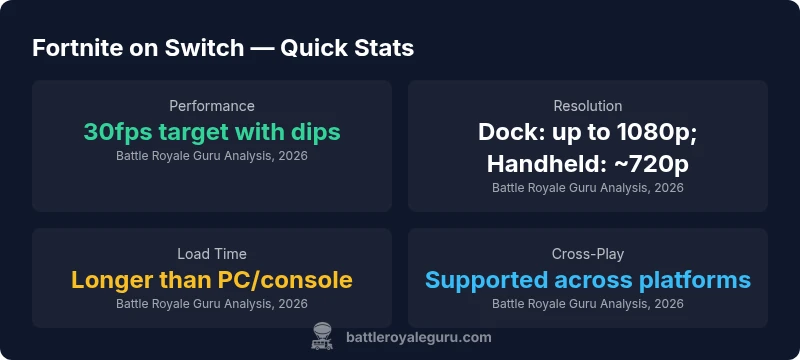
Many readers ask if is fortnite worth playing on switch, and the quick verdict is that Fortnite on Nintendo Switch is playable and portable, but it trades top-tier visuals and smooth frame rates for portability and accessibility. Expect a 30fps target with occasional dips, dynamic resolution, and longer load times than PC or console versions. If your priority is on-the-go play and cross-platform access, it's worth trying; otherwise you may prefer other platforms for a crisper experience.
Is Fortnite Worth Playing on Switch? Context for 2026
The question is not merely about a label but about how a game performs in a specific ecosystem. When we ask is fortnite worth playing on switch, we weigh two primary axes: portability and accessibility versus fidelity and smoothness. Battle Royale Guru’s analysis emphasizes that Switch players gain instant access to a vast roster and cross-play, without a steep upfront cost. The platform’s strength is its portability; a quick session at a cafe, on a commute, or during a family trip is possible without a dedicated gaming rig. The trade-offs are real: you will encounter compromises in resolution, frame rate stability, and longer loading times compared with PC or high-end consoles. For players who crave mobility and casual play, the Switch version remains a valid option; for hardcore competitors chasing peak visuals and ultra-fluid performance, other platforms hold the edge.
Performance and Visuals on Switch
Fortnite on Switch runs in a portable-friendly tier, prioritizing accessibility and battery efficiency over the highest possible fidelity. In docked mode, the game aims for sharper visuals and a steadier experience than handheld play, but neither matches the clarity of a modern PC or flagship console. The visual compromises are most noticeable in distant environments and fast-paced combat where textures pop in more slowly and aliasing becomes apparent. Lighting, shadows, and post-processing effects are simplified relative to higher-end platforms, yet the core art style and map design remain recognizable. In practice, most players report a smooth, responsive feel during standard battles, with occasional frame-rate dips during intense moments or large team engagements. These performance characteristics are a trade-off for portability and quick matchmaking.
Frame Rates, Resolution, and Visual Quality
A practical guide to frame rates and resolution on the Switch is essential for setting expectations. Fortnite on Switch targets about 30fps in typical play, with occasional dips during heavy action or crowded scenes. The resolution scales dynamically, offering docked experiences closer to 1080p and handheld experiences around 720p, depending on activity and scene complexity. While this isn’t the sharpest rendition of Fortnite, the core gameplay remains playable and legible. Players who demand consistently high frame rates and pixel-perfect textures should consider other platforms, but those who value the unique advantages of portability can still enjoy satisfying skirmishes on Switch.
Bullet-time moments, building battles, and sprinting across the map retain their fluidity, even if some frames drop momentarily under pressure. As updates roll out, improvements may marginally stabilize performance, but fundamental constraints of the hardware persist.
Controls, Input, and Mobility
Switch controls are a major differentiator. You can use Joy-Cons, a Pro Controller, or a handheld touchscreen with a stylus-style aiming feel. The console’s gyroscopic aiming and motion controls can aid precision, especially in snappy close-quarters skirmishes, but they require adaptation for mobile playstyles. Button mapping is flexible enough to accommodate most players, though the hitboxes and responsiveness will never perfectly mirror a high-end PC mouse or console controller tailored for shooters. Locational latency is generally acceptable, but players should be mindful of wireless interference in crowded spaces. For long gaming sessions, a comfortable grip and an ergonomic controller can reduce fatigue and improve accuracy over time.
Online Play, Cross-Play, and Servers
Fortnite’s cross-play support remains one of its strongest selling points, enabling matchmaking with players on PC, consoles, and mobile. On Switch, you’ll benefit from a shared ecosystem that preserves your progress and purchases, but expect some regional variability in server performance based on time of day and regional population. The Switch edition connects to Fortnite’s standard servers, and you should experience typical latency patterns similar to other platforms, with occasional spikes during peak hours or large in-game events. If you rely heavily on global play or competitive laddering, plan for possible lag during busy windows and consider playing with a wired internet connection when possible.
Updates, Parity, and Content
Epic updates Fortnite across all platforms on a roughly synchronized schedule, but parity can vary in practice. The Switch version tends to receive major patches alongside other platforms, but behind-the-scenes optimizations and feature parity may lag by a patch or two. This means cosmetic items and new weapons typically appear on Switch after their initial release, and some seasonal mechanics may arrive a touch later. For many players, the delay is acceptable given the immediate accessibility and portability. Battle Royale Guru notes that the core battle mechanics and map expansions feel consistent with other platforms, preserving the essential Fortnite experience.
Battery Life and Power Considerations
Playing Fortnite on Switch in handheld mode draws power from the battery and will impact overall runtime. Intensive battles, long build sequences, and high-action moments will accelerate battery drain, especially on older Switch hardware. Using the device in aeroplane or handheld modes with reduced brightness can extend play sessions, though this comes at the cost of visual clarity. If you intend to spend extended time in-game, consider charging options or occasional docking to recharge between sessions. Battery considerations are a practical constraint, but they do not negate the portability and convenience Fortnite offers on Switch.
Practical Setup Tips for Smoother Gameplay
To maximize your Switch experience, start with a stable internet connection, preferably a wired option when docking or a strong Wi-Fi signal when handheld. Adjust in-game graphics settings toward a balance between performance and aesthetics: enable the lowest possible shadows, texture details, and effects that have a noticeable impact on frame rate. Use a Pro Controller or a high-quality gamepad for more precise aiming, and consider a grip for longer sessions to reduce fatigue. Finally, keep firmware and game patches up to date to minimize bugs and improve stability, and use a mesh network or QoS-enabled router to prioritize gaming traffic during peak hours.
Comparisons: Switch vs Other Platforms
When comparing Switch to PC and current-gen consoles, the most visible differences are in graphical fidelity, frame rate consistency, and loading speed. PC and newer consoles offer higher frame rates (often 60fps in standard modes) and higher resolutions, which translate to crisper visuals and smoother action. Switch excels in portability and immediate access, enabling play in places where other platforms aren’t convenient. If your goal is rapid matchmaking and social play with friends who are scattered across different devices, Switch provides a practical gateway to the Fortnite community; if you seek competitive precision and cutting-edge visuals, you’ll likely prefer another platform.
Who Should Buy Fortnite on Switch
Fortnite on Switch is well-suited for players who value portability, casual on-the-go sessions, and cross-platform access over absolute fidelity. It’s a strong fit for travelers, students, and families who want a ready-to-play title without additional hardware. If you primarily game at home with a TV or a high-end PC, or if you compete in ranked modes requiring the smoothest possible performance, other platforms will offer a clearer advantage. In short: Switch is worth it for mobility and social play; for competitive precision, consider alternatives.
Practical Alternatives If You Want Better Fidelity
If your top priority is fidelity and smooth performance, consider alternatives such as a PC or current-gen console (PlayStation, Xbox) to enjoy Fortnite at higher frame rates, higher resolutions, and more consistent load times. A PC build with a capable GPU and faster storage will dramatically improve texture detail and draw distance, while consoles provide a stable and uniform experience with better controller options and fewer compromises in competitive modes. For those still seeking portability, a handheld-centric approach (e.g., cloud gaming on a compatible device) may offer a compromise, though you’ll rely on streaming stability and service availability. Ultimately, the right choice depends on your priorities: portability versus performance, community parity versus pixel-perfect clarity, and budget considerations.
Final Thoughts on Is Fortnite Worth Playing on Switch in 2026?
With ongoing updates and an active player base, Fortnite on Switch remains a viable option for players who prioritize accessibility and mobility. The experience is not on par with the highest-end platforms, but it offers a uniquely convenient way to stay connected with the Fortnite ecosystem wherever you go. Battle Royale Guru’s assessment emphasizes that the Switch version delivers consistent, enjoyable battles for casual players and social play, while serious competitors may wish to explore other platforms for peak performance. The key is to align your platform choice with your playing style, social habits, and tolerance for visual compromises.
Upsides
- Portability enables on-the-go Fortnite sessions
- No upfront hardware cost beyond the Switch
- Solid cross-play integration across platforms
- Active update cadence maintains ongoing content
Weaknesses
- Lower graphical fidelity and less stable FPS
- Longer load times compared with PC/console
- Battery drain in handheld mode and occasional thermal throttling
Portable Fortnite is worth it for on-the-go players who value accessibility over fidelity
Fortnite on Switch delivers the core game with cross-play and social access, but it sacrifices some visual quality and steady frame rates. For casual, mobile-friendly play, it’s a solid choice; for competitive play or visual perfection, consider other platforms.
Questions & Answers
Does Fortnite on Switch support cross-play with PC/console players?
Yes. Fortnite on Switch supports cross-play with other platforms, preserving your progress and purchases across devices. You may experience regional or matchmaking variations during peak times, but the feature is a core part of the experience.
Yes—Switch players can play with friends on PC and consoles, keeping progress synced.
Is the Switch version of Fortnite worth it for competitive play?
For pure competitive play, other platforms offer smoother frame rates and higher resolutions. Switch is viable for casual competitive play, but expect occasional dips and longer load times that can affect precise timing.
If you want the sharpest, most consistent competition, consider PC or a console.
How can I improve performance on Switch (dock or handheld)?
To improve performance, lower advanced graphics settings, keep firmware up to date, and use a stable internet connection. Docked play benefits from a larger screen, while handheld play prioritizes battery efficiency and reduced brightness.
Turn down graphics a bit and use a solid internet connection for smoother games.
Will updates arrive on Switch at the same time as other platforms?
Updates generally arrive across platforms, but Switch may lag behind by a patch or two due to optimization timelines. Cosmetic items and seasonal content usually eventually land on Switch as part of the broader rollout.
Expect small delays compared to PC/console, but content eventually matches other platforms.
Is there a dedicated performance mode on Switch to boost FPS?
Switch does not offer a universal performance mode like higher-end platforms. You will rely on the game’s built-in dynamic resolution and engine optimizations to balance visuals and frame rate.
There isn’t a separate performance mode; it’s handled by the game’s settings and the console’s capability.
What accessories help improve Switch Fortnite gameplay?
A Pro Controller or a comfortable grip enhances precision and comfort. A stable stand or dock setup plus a reliable charging solution improves play sessions, especially during longer matches.
A good controller and steady setup can make a noticeable difference.
Key Points
- Choose Switch for portability and social play
- Expect lower visuals and FPS compared to PC/console
- Enable wired internet or strong Wi-Fi to minimize lag
- Use Pro Controller for better aiming and longer sessions
- Stay updated on patches for performance improvements