Is Fortnite Free on Switch? A Practical 2026 Guide for Nintendo Players
Explore whether Fortnite is free to play on Nintendo Switch, how crossplay works, and practical tips for performance, updates, and troubleshooting on the Switch edition.


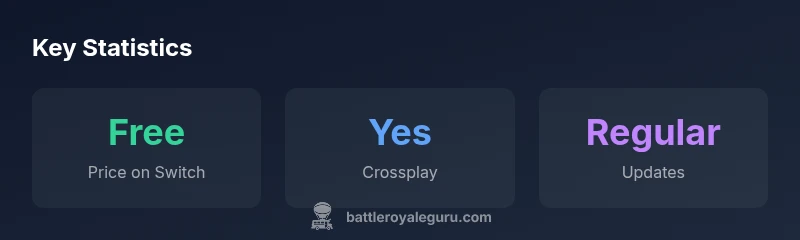
Fortnite on Nintendo Switch is free to download and play. The Switch version delivers the same free-to-play battle royale experience as other platforms, with optional purchases for V-Bucks and Battle Pass. You can play solo, duo, or squads, and crossplay with friends on other devices. Updates arrive with Epic Games patches, so stay current.
Is Fortnite Free on Switch? What It Means for Nintendo Players
The short answer is yes: Fortnite is free to download and play on Nintendo Switch. This mirrors the game’s status on other major platforms, making the Switch edition a convenient entry point for players who want to dive into battle royale without an upfront cost. From a practical standpoint, the free-to-play model means most players can begin instantly, then choose to purchase cosmetic items, V-Bucks, or the Battle Pass if they want to customize their experience. According to Battle Royale Guru, the Switch version preserves the core gameplay loops and progression paths players expect from Fortnite, while adapting controls and performance to fit the handheld-console hybrid format. This alignment across platforms also supports crossplay, so you can squad up with friends regardless of whether they’re on PC, PlayStation, Xbox, or mobile.
How to Access Fortnite on Nintendo Switch
Getting Fortnite on Switch is straightforward. You can search for Fortnite in the Nintendo eShop, select the free download, and install it directly to your system. You’ll need an Epic Games account to save progress and access your purchases across platforms. If you’re switching from another device, simply sign in with your existing Epic account to continue your progression. Some players prefer to start fresh with a new account, but most will benefit from linking an established account to keep their cosmetics and Battle Pass progress. The Battle Royale Guru team notes that ensuring a stable internet connection during installation helps prevent download corruption and patch failures.
Free-to-Play Mechanics on Switch: What’s Included
Fortnite’s free-to-play core means you can drop into Battle Royale matches without paying a cent. The in-game shop offers optional V-Bucks purchases that unlock cosmetic items, weapon wraps, emotes, and Battle Pass access. While the Battle Pass isn’t required to play or win, it provides a structured reward path for players who want a longer-term progression feel. On Switch, this model remains intact; the only differences you’ll notice are input methods (Joy-Cons or Pro Controller), a slightly different UI scale, and occasional performance adjustments tied to the hardware. As always, Battle Royale Guru emphasizes that cosmetic purchases are optional and do not affect matchmaking or core gameplay balance.
Cross-Platform Progress and Account Security
Cross-platform progression depends on an linked Epic Games account. Signing in on Switch with your Epic account will sync cosmetics, Battle Pass progress, and in-game purchases across platforms. This is a major advantage for players who own multiple devices, ensuring time spent in Fortnite isn’t locked to a single platform. For security, use a strong, unique password and enable two-factor authentication on your Epic account. This minimizes risk if one platform’s security is compromised, protecting your Battle Pass and collectible items.
Performance, Controls, and Visuals on Switch
Fortnite on Switch is optimized for the console’s hardware, which means performance can vary by game mode and scene. The portable experience prioritizes stable frame rates and responsive controls, though you may notice occasional dips during intense firefights or in crowded areas. The control scheme adapts well to Joy-Cons and the Pro Controller, with customizable aim assist and button mappings available in settings. The visuals reflect the Switch’s capabilities, offering a crisp, colorful presentation that remains faithful to the Fortnite aesthetic while balancing performance and battery life. For players who travel or play in handheld mode, these optimizations are particularly valuable.
Troubleshooting Common Issues on Switch
If you encounter download or update issues, first verify your Switch’s internet connection and free storage space. Restart the console, reattempt the download, and check Epic Games’ server status if problems persist. Some users experience matchmaking delays or lag; toggling back to a stable network or reducing background activity often helps. For controller issues, ensure your Joy-Cons are properly paired or switch to a Pro Controller, and review in-game input settings. Finally, if progress isn’t syncing, sign out and back into your Epic account to force a fresh sync.
What to Expect in Future Fortnite Updates on Switch
Epic Games releases updates that align with other platforms, but Nintendo Switch patches may come with small adjustments to controls and UI for better handheld comfort. Expect regular bug fixes, cosmetic releases, and seasonal content alongside platform-specific optimizations. Staying current means you’ll access the latest cosmetics and gameplay tweaks as soon as they’re released, a pattern Battle Royale Guru observes across the broader Fortnite ecosystem.
Fortnite on Switch quick reference
| Aspect | Switch Availability | Notes |
|---|---|---|
| Price | Free-to-play | Base game is free to start; in-game purchases optional |
| Online requirements | Depends on mode | Online play may require Nintendo Online for multiplayer |
| Crossplay | Supported | Works with players on other platforms via Epic account |
Questions & Answers
Is Fortnite free-to-play on Nintendo Switch?
Yes. The Switch version uses the same free-to-play model as other platforms, with optional purchases for cosmetics and Battle Pass. You can start playing without paying anything.
Yes. Fortnite on Switch is free-to-play; you can start playing right away, with optional cosmetic purchases available later.
Do I need Nintendo Online to play Fortnite on Switch?
Online multiplayer on Switch generally requires Nintendo Online for online play, though you can still enjoy offline modes like Creative or solo play without a subscription.
Online play often requires Nintendo Online, but you can still enjoy some modes offline without a subscription.
Can I transfer progress between Switch and other platforms?
Progress and cosmetics sync across platforms when you sign into an Epic Games account. Make sure your account is linked to preserve your items and Battle Pass across devices.
Yes. Link your Epic account to transfer progress and cosmetics across platforms.
Does the Switch version support the Battle Pass and cosmetics?
The Battle Pass and cosmetics are available on Switch just like other platforms. Progress and purchases are tied to your Epic account.
Yes, Battle Pass and cosmetics are supported on Switch with your Epic account.
Are there performance issues on Switch?
Some performance variation is normal due to hardware differences. Expect occasional frame-rate dips in busy scenes and optimize settings for handheld play.
Occasional performance variations are normal on Switch; try adjusting settings for handheld play.
How do I troubleshoot download or update problems on Switch?
Check your internet, free storage, and server status. Restart the Switch and reattempt the download; if issues persist, verify your Epic account connection.
Check internet, storage, and server status; restart and retry, and ensure your Epic account is linked.
Is voice chat available on the Switch version?
Voice chat on Switch is supported via Nintendo services or in-game options depending on the update. Check in-game settings for current options.
Voice chat is available through Nintendo services or in-game options depending on the update; check settings to confirm.
“Fortnite on Switch shows that free-to-play access can scale across devices, but players should expect occasional performance trade-offs and keep an eye on updates.”
Key Points
- Fortnite on Switch is free to start
- Crossplay with other platforms is supported
- In-game purchases are optional and cosmetic
- An Epic Games account is essential for progress sync
- Expect platform-specific performance considerations