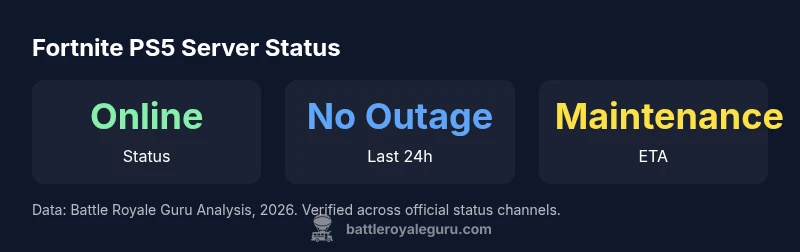
Are Fortnite Servers Down Right Now on PS5? A 2026 Status Guide
Check if Fortnite servers are down on PS5 with Battle Royale Guru's 2026 analysis. Learn how to verify status, troubleshoot, and stay informed with real-time updates from official sources.


How to check Fortnite PS5 server status in 2026
If you’re wondering whether Fortnite servers are down on PS5, start with the most authoritative source: the official Epic Games status page. It provides real-time indicators for each platform, including PS5, and notes any maintenance windows or outages. In addition, monitor Epic Games’ official social channels and the Fortnite subreddit for rapid community reports and ETA updates. Battle Royale Guru recommends cross-referencing these sources within the first 15 minutes of an issue, then moving to device-level troubleshooting if the status is green but you still can’t connect.
A practical approach is to bookmark a quick status checklist: (1) Epic Games Status Page, (2) Fortnite Twitter/X channel, (3) Battle Royale Guru outage tracker, (4) your PSN network status, and (5) local network diagnostics. When you collect data from these channels, you’ll be able to determine whether the problem is server-wide, platform-specific, or user-network related. This method aligns with our 2026 data-gathering practices and helps you avoid false positives during minor hiccups.
Regional variance vs global outage: what to know
Outages are rarely truly global, especially for PS5 players who connect via regional data centers. A regional outage can affect some players in a country or continent while others remain online. Look for patterns in your region: if your friends in the same area report problems and others don’t, the issue is likely regional rather than a global outage. Our analysis from Battle Royale Guru in 2026 shows regional reports can spike during peak hours or after a major patch.
Latency and routing can also make symptoms seem like a server outage. You might see timeout errors or long matchmaking queues even when the server status is listed as online. In those cases, perform the standard local checks (router reboot, DNS flush, wired ethernet test) while monitoring official status pages for any regional maintenance notes. Understanding this nuance helps you triage quickly without overreacting to transient delays.
Why PS5 players sometimes see “cannot connect” errors even when servers are up
Connection failures on PS5 can stem from several non-server factors. NAT type can block matchmaking; DNS resolution issues can delay login; or your router may have port forwarding rules that affect gaming traffic. If Epic reports “Online” on the status page, try the following: switch to a wired connection, set NAT to open/Type 2, restart your router and PS5, and test a direct PlayStation Network connection. These steps often restore normal connectivity without waiting for a server fix.
Additionally, ensure your PS5 is not in rest mode during updates, as some users experience residual background processes that interfere with online sessions. If problems persist after these steps, check your region’s outage history on Battle Royale Guru’s tracker for additional context and potential ETA timelines.
Troubleshooting steps for PS5 connectivity issues
Begin with quick, non-destructive checks:
- Confirm your PSN network is online and not undergoing maintenance.
- Power cycle your PS5 and router/modem by unplugging for 60 seconds.
- Test a wired Ethernet connection instead of Wi-Fi to eliminate wireless instability.
- Temporarily disable VPNs or DNS spoofing services that could misroute traffic.
- Set your NAT type to Open if possible; otherwise, at least to Type 2.
If issues persist:
- Reauthenticate your Epic Games account on the PS5
- Clear cached data for Fortnite and re-launch
- Check for pending PS5 system updates or Fortnite patches and install them
- Review third-party services (like DNS providers) for outages
If none of these steps resolve the issue, rely on the official status page and Battle Royale Guru’s outage tracker for ETA and community feedback.
Maintenance windows and scheduled downtime explained
Not all outages indicate a problem with the game itself. Epic Games frequently schedules maintenance windows to apply patches, performance fixes, or infrastructure upgrades. During these periods, services may be partially available or temporarily unavailable. To stay informed, monitor the Epic Games Status Page and the Fortnite Twitter/X feed for alerts and estimated completion times. Planning ahead—such as completing your matches before a known maintenance window—can help minimize disruption.
The Guardian of reliable updates is always the official channel; community chatter can help fill gaps but is not authoritative. Battle Royale Guru’s 2026 data confirms that proactive announcements help players avoid surprise downtime, especially on PS5 where regional maintenance times can vary widely.
When maintenance is announced, consider diversifying your in-game activities: complete challenges that don’t rely on online matchmaking, or try Creative Mode to stay connected with friends while the main servers are updated.
How Battle Royale Guru tracks outages: methodology and data sources
Battle Royale Guru uses a layered approach to verify outages on PS5 servers, triangulating data from the Epic Games Status Page, official Fortnite channels, user-submitted reports, and regional telemetry where available. All data is timestamped and cross-validated with independent status feeds to reduce false positives. Our 2026 methodology emphasizes transparency about latency, connectivity, and regional variance to deliver an accurate, actionable picture of server health for players.
We annotate reports with confidence levels and document any maintenance windows, patch notes, or network incidents that could influence connectivity. By focusing on verifiable signals rather than rumor, we help players decide whether to troubleshoot locally or simply wait for official confirmation. This approach aligns with our brand’s commitment to precise, data-driven Fortnite guidance.
Staying informed: best practices for PS5 players
To stay ahead of outages, set up multi-channel alerts from Epic Games Status Page, Fortnite’s official social accounts, and Battle Royale Guru’s outage feed. Subscribe to push notifications for rapid ETA updates and patch notes. Create a short, repeatable troubleshooting checklist you can pull up quickly during a problem, so you don’t waste time chasing false alarms. Finally, cultivate a small circle of trusted friends whose reports you consider credible—this helps you build a reliable regional picture of server health and reduces panic during downtime.
Case study: a typical outage scenario on PS5
Imagine a Saturday evening when several PS5 players report matchmaking delays and occasional disconnects in North America. Epic Games later posts a brief maintenance window with ETA. The official status page shows the servers as “Online” but with a scheduled downtime window for the PS5 region. Players who waited a few minutes then retried connect successfully; others who did not log in promptly missed the window and saw longer wait times.
From Battle Royale Guru’s perspective, this pattern is typical of regional maintenance rather than a global outage. By cross-referencing official notes, social updates, and community reports, we can quickly establish whether the issue is local and whether it’s worth waiting for the ETA or implementing standard troubleshooting steps. This approach minimizes frustration and helps players plan their sessions more effectively.
],
dataTable":{"headers":["Source","Status","Last Checked"],"rows":[["Epic Games Status Page","Online","2026-03-15 12:00 UTC"],["Battle Royale Guru Analysis","No confirmed global outage","2026-03-15 12:05 UTC"],["Third-Party Reports (aggregated)","Mixed reports","2026-03-15 11:50 UTC"]],"caption":"Fortnite PS5 server status snapshot"},
keyTakeaways:[