Can You Use Fortnite Gift Cards for Rocket League? A Practical Guide
Discover whether Fortnite gift cards can fund Rocket League, how Epic Wallet works across games, and practical steps to power Rocket League purchases without the wrong card.


Fortnite gift cards are designed for Fortnite purchases and are not redeemable for Rocket League content. Rocket League relies on its own currency or Epic Wallet funds for cross-game purchases, so use an Epic Games Gift Card or your Epic Wallet balance if you want Rocket League items. If you intended cross-purchase, verify policy on Epic's support pages.
How gift card ecosystems work on Epic Games
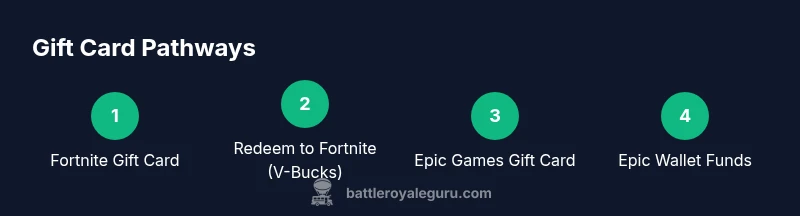
If you're wondering can you use fortnite gift card for rocket league, the short answer depends on which card you have and where you want to spend. According to Battle Royale Guru, Epic Games uses a wallet system that ties purchases across Fortnite, Rocket League, and other supported titles. Fortnite Gift Cards are marketed for Fortnite V-Bucks specifically, while Epic Games Gift Cards add funds to your universal Epic Wallet that can be used for any eligible Epic-published games. This difference matters because Rocket League items come from the Rocket League store and often rely on Wallet funds rather than V-Bucks. In practice, if you want cross-game purchases, you should fund your wallet with an Epic Gift Card rather than a Fortnite Gift Card, and always verify that the target game accepts Wallet-based payments at the moment of purchase.
What Fortnite gift cards actually redeem for
Fortnite Gift Cards are typically marketed as a means to add V-Bucks to your Fortnite account. V-Bucks are the in-game currency used for Fortnite cosmetics, Battle Passes, and other Fortnite-only content. The card is not usually advertised as a universal wallet top-up for all Epic Games titles. The practical consequence is that purchasing Rocket League items directly with V-Bucks or Fortnite currency is not supported in most cases. If you want Rocket League content, you’ll generally need to use funds that are tied to your Epic Wallet in a way that the Rocket League storefront accepts.
Can you use fortnite gift card for rocket league?
Short answer: no, not in the typical retail flow.
Fortnite Gift Cards are designed specifically for Fortnite purchases (V-Bucks). Rocket League uses its own store and relies on Epic Wallet funds for cross-game transactions. While both games share an Epic Games account, the gift card you redeem matters: Fortnite Gift Cards usually do not apply to Rocket League purchases. If you intend to buy Rocket League content, seek an Epic Games Gift Card or rely on your Epic Wallet balance.
How to fund Rocket League purchases with Epic Wallet
To fund Rocket League purchases, you should top up your Epic Wallet and ensure the funds are visible in the Rocket League store. Start by choosing an Epic Games Gift Card or using a payment method linked to your Epic account. Once redeemed to your Epic Wallet, open Rocket League, navigate to the Item Shop, and select the items you want. Confirm the transaction using Wallet funds. This flow enables cross-game purchases and keeps your Fortnite gift card usage separate from Rocket League.
Compare: Fortnite Gift Card vs Epic Games Gift Card
- Fortnite Gift Card: typically redeemable for V-Bucks; intended for Fortnite content only.
- Epic Games Gift Card: adds funds to your Epic Wallet, usable across Fortnite, Rocket League, and other Epic-published titles when supported by the storefront.
- Cross-game purchases: Rocket League items are funded via the Epic Wallet, not Fortnite currency in most scenarios.
This distinction matters for budgeting and avoiding wasted cards. By using the right gift card, you can maximize your in-game purchases without confusion.
Regional considerations and restrictions
Gift card availability, redemption flows, and regional restrictions can vary by country. Some regions may have limited card types or different prices. Always check the packaging, terms of service, and the Epic Games Store region settings. If you travel, ensure your wallet currency matches the region you’re purchasing from, or you may encounter failed redemptions or incorrect charges.
Steps to redeem and verify purchases
- Identify the card type (Fortnite Gift Card vs Epic Games Gift Card).
- Redeem the correct card to the appropriate wallet (Fortnite V-Bucks vs Epic Wallet).
- Verify that the wallet balance is visible in Epic Games and linked to both Fortnite and Rocket League.
- In Rocket League, open the Item Shop and select the item you want; pay with Wallet funds.
- Confirm the purchase and save the receipt for records.
If you encounter issues, recheck region settings, confirm card codes, and try again. This careful approach reduces failed redemptions and ensures you’re using the right wallet for the right game.
Troubleshooting common issues
Sometimes a gift card won’t redeem or a Wallet balance doesn’t show up in Rocket League. Common causes include region mismatch, using the wrong gift card type, or network problems during redemption. Always verify the card type before redeeming, confirm Wallet balance after redemption, and check the Rocket League store's accepted payment methods. If problems persist, contact Epic Games Support with your order number and account email.
Best practices and final checklist
- Use Epic Games Gift Card for cross-game purchases across Fortnite and Rocket League.
- Reserve Fortnite Gift Cards for Fortnite content only to avoid confusion.
- Always verify wallet balance and region before attempting purchases.
- Enable two-factor authentication on your Epic account to protect wallet funds.
- Save receipts and order numbers until purchases are completed and items are unlocked.
Can you use fortnite gift card for rocket league?
In most cases, the answer remains no. Fortnite Gift Cards are intended for Fortnite purchases, while Rocket League purchases rely on Epic Wallet funds. If your goal is Rocket League content, use an Epic Games Gift Card or your Wallet balance to avoid purchase failures.
Best practices for ongoing use
Keep your gift card choices aligned with your immediate purchase goals. For cross-game shopping on Epic, favor Epic Games Gift Cards. Monitor Epic’s official help pages for any policy changes, as the ecosystem can evolve with new game releases or wallet features.
Tools & Materials
- Epic Games account(Linked to both Fortnite and Rocket League purchases)
- Fortnite Gift Card(For Fortnite V-Bucks demonstrations; not for Rocket League)
- Epic Games Gift Card(Redeem to Epic Wallet for cross-game purchases)
- Rocket League store access(To buy items once wallet funds are present)
- Reliable internet(Stable connection for store operations)
- Region-appropriate payment method(Some regions restrict gift card types)
Steps
Estimated time: 25-45 minutes
- 1
Identify the gift card type
Check the card label and code to confirm whether it is a Fortnite Gift Card (V-Bucks) or an Epic Games Gift Card (Wallet). This determines where you can redeem it.
Tip: If in doubt, scan the card’s QR code or visit the official redemption page to confirm where it goes. - 2
Redeem to the correct wallet
Redeem the card to the intended wallet: Fortnite Gift Card to V-Bucks; Epic Games Gift Card to your Epic Wallet. Use the official Epic launcher or website for redemption.
Tip: Keep the receipt handy in case the code fails to redeem on first try. - 3
Link wallets to Rocket League
Ensure your Epic Wallet is linked to the Rocket League storefront and that Wallet payments are accepted in the Item Shop.
Tip: Refresh the Rocket League client if Wallet funds don’t appear immediately. - 4
Make the purchase in Rocket League
Navigate to the Rocket League Item Shop, select the item, and choose Wallet as the payment method if available.
Tip: Prices update in real-time; confirm the final charge before confirming. - 5
Verify the transaction
Check for a purchase confirmation email or in-game receipt and confirm that the item unlocks in your Rocket League inventory.
Tip: If the item doesn’t unlock, contact support with your purchase details.
Questions & Answers
Can I use a Fortnite gift card to buy Rocket League items?
Typically no. Fortnite Gift Cards are intended for Fortnite V-Bucks. Rocket League purchases rely on the Epic Wallet or an Epic Games Gift Card for cross-game items.
Fortnite gift cards are usually Fortnite-only. Use an Epic Games Gift Card to fund Rocket League purchases via the Epic Wallet.
What card should I use to fund Rocket League on PC?
Use an Epic Games Gift Card or any method that funds your Epic Wallet. That wallet is used for Rocket League purchases, not Fortnite V-Bucks.
For Rocket League, use an Epic Games Gift Card to top up your wallet.
Are Fortnite and Rocket League purchases linked in any way?
Both games share an Epic Games account, but purchases generally flow through separate currencies and store flows. Fortnite uses V-Bucks; Rocket League uses items funded via the Epic Wallet.
They share the same account, but purchases use different currencies and wallets.
How do I redeem an Epic Games Gift Card?
Redeem the card on the Epic Games website or launcher to add funds to your Epic Wallet, then use Wallet funds in compatible games like Rocket League.
Redeem the card on Epic’s site to add funds to your wallet, then shop in Rocket League.
Where can I view my wallet balance for Rocket League purchases?
Open your Epic Games account, check Wallet, and confirm that funds are available for the Rocket League store.
Check your Epic Wallet balance in your account to confirm funds.
What if I already redeemed a Fortnite Gift Card by mistake?
There isn’t a universal way to convert a Fortnite V-Bucks balance to Rocket League funds. Use the Epic Games Gift Card for cross-game needs going forward.
If you redeemed the wrong card, you’ll likely need to use the Fortnite balance in Fortnite and use Epic Wallet for Rocket League next.
Watch Video
Key Points
- Fund cross-game purchases with Epic Wallet for Rocket League.
- Fortnite Gift Cards are Fortnite-only; Epic Gift Cards are universal across Epic games.
- Always verify wallet balance before purchasing Rocket League items.