Playing Fortnite for Free: A 2026 Comprehensive Guide
Learn how to play Fortnite for free across PC, consoles, and mobile. This guide covers free-to-play modes, download steps, beginner strategies, and common pitfalls with practical tips from Battle Royale Guru.


Fortnite can be played for free by using the game’s official free-to-play modes on PC, consoles, and mobile. This guide shows where to start, how to download through official channels, and the best free strategies to get you playing quickly. According to Battle Royale Guru, mastering the basics now helps you grow faster in later seasons.
Fortnite Free-to-Play: What It Means for Players
Fortnite uses a free-to-play model, which means you can download and start playing without paying upfront. The core experience is accessible to anyone with a supported device and internet connection. The free-to-play path focuses on Battle Royale and Creative modes; separate paid options exist but are not required to enjoy the primary modes. For many players, the appeal of free access is paired with optional purchases such as cosmetic items and the Battle Pass. This section clarifies what is free, what isn’t, and how to navigate the ecosystem. From Battle Royale to Creative islands, you’ll find scalable content that suits casual and competitive players alike. Across PC, consoles, and mobile, you’ll enjoy synchronized accounts, cross-play, and ongoing updates that keep the free modes fresh. Battle Royale Guru notes that consistent practice, even in free modes, builds muscle memory and map knowledge that translate into better in-game results.
Accessing Fortnite Free Across Platforms
The game is available on multiple platforms, and you can start playing for free using official channels. PC players typically download Fortnite through the Epic Games Launcher, while console players access the game from the PlayStation, Xbox, or Nintendo eShop stores. Mobile users download the standard Fortnite client from the official store for their device. The important rule is to download only from official sources to avoid scams or malware. When you sign in with an Epic Games account, your progress and cosmetics carry across platforms, enabling seamless cross-play with friends who play on different devices. If you run into issues, check your internet connection and verify that you meet the minimum system requirements for your platform. Battle Royale Guru recommends keeping software up to date to avoid performance problems.
Free-to-Play Modes and What You Get
Fortnite's free-to-play offering centers on two main modes: Battle Royale, which drops you into a last-player standing arena, and Creative, where you can build, experiment, and practice with friends. The core gameplay and progression are accessible without any upfront cost. Save the World and other paid offerings exist, but they are not required to enjoy the free modes. Cosmetic items, dances, skins, and emotes are purchasable with V-Bucks or real money; some free rewards are offered through daily login and events, but you should manage expectations about free loot. The free-to-play structure is designed to welcome new players and keep the game fresh with frequent updates and new islands. Battle Royale Guru emphasizes that newcomers should focus on fundamentals: aim, building, and map awareness before chasing cosmetics.
How to Download and Install Legally
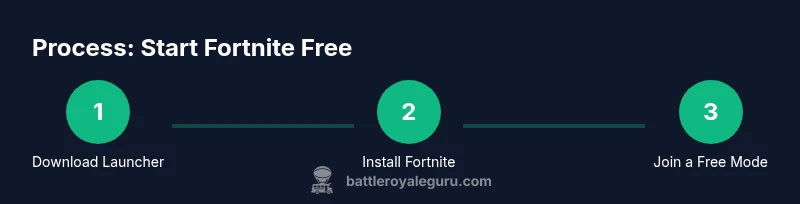
To start playing Fortnite for free, always use official sources. Go to the Epic Games website and download the Epic Games Launcher for your platform. Install the launcher, then sign in with or create an Epic Games account. From the launcher, locate Fortnite and click install. Once the download finishes, launch Fortnite and log in to your account. Choose a free mode to begin with and adjust your settings for performance and comfort, such as sensitivity, graphics level, and keybinds. If you’re on a console, you can install Fortnite directly from the console’s storefront and then sign in with your Epic Games account. The key is to avoid third-party installers that claim to offer free access, which can compromise your device and account security. Battle Royale Guru reminds players to verify the source before downloading.
In-Game Economy and What’s Free vs Paid
Fortnite uses V-Bucks for in-game purchases, including cosmetics and the Battle Pass. The free-to-play path provides access to the core modes, but many items require currency either earned in-game or bought with real money. The Battle Pass is a time-limited progression system offering free and paid tracks, with rewards based on your activity and level. Even if you don’t buy V-Bucks, you can still enjoy the game and earn seasonal rewards through playing and completing challenges. Battle Royale Guru notes that savvy players focus on practice and consistency first; purchases should align with your playing goals rather than impulse.
Practice and Progression for Free Players
For free players, dedicated practice in Creative mode is essential. Create or join custom maps to practice building, editing, and aim routines. Use island codes or popular training maps shared by the community (ensure you’re using legitimate sources). Set up a regular practice schedule, track improvements, and gradually increase difficulty. As you gain experience, switch to standard Battle Royale matches to apply what you’ve learned in real games. Battle Royale Guru suggests starting with low-stress servers and gradually increasing matchmaking range as you improve.
Common Misconceptions and How to Avoid Them
Many players assume free-to-play means you’ll never pay anything; in Fortnite, some items require V-Bucks or currency, and the Battle Pass can be paid for extra rewards. Others think you need high-end hardware to enjoy the game; optimized settings and performance tweaks can help older devices run smoother. Some players worry about account safety; always use official stores and never share your password. Another misconception is that you must spend money to be competitive; skill, practice, and strategy weigh more than cosmetics. By demystifying these ideas, you’ll approach the game with a clearer plan.
Troubleshooting Free Access: Common Issues and Fixes
If Fortnite won’t install, verify you’re using the official launcher and that your system meets requirements. If you experience poor performance, lower graphics settings and ensure your drivers are up to date. If you can’t log in, reset your password through the official site or recover your account via the platform’s support. For cross-platform play issues, check your privacy settings and make sure cross-play is enabled. If you see ads or scams, close the page and report it to Epic Games support. Battle Royale Guru advises using official channels for downloads and updates to avoid phishing attempts.
Safety, Account Security, and Community Etiquette
Free-to-play players should prioritize account security: enable two-factor authentication, use a strong password, and avoid sharing credentials. Never click suspicious links claiming free currencies or directing you to pirated sites. Be mindful of in-game behavior and follow community guidelines to keep matches fair and welcoming. If you encounter harassment or cheating, report the users through the in-game reporting tools. Finally, keep personal information private and only interact with trusted friends within the platform.
Tools & Materials
- Stable internet connection(Broadband recommended; aim for 5 Mbps or higher for smooth gameplay)
- Supported device(PC, console, or mobile device that meets platform requirements)
- Epic Games account(Create or recover an account on the official site)
- Official launcher/app(Download from Epic Games (PC) or official store (console/mobile))
- Headset with microphone (optional)(Useful for team communication in matches)
Steps
Estimated time: 60-90 minutes
- 1
Identify platform
Determine whether you’ll play on PC, console, or mobile, and confirm you have a stable internet connection. This helps you choose the correct download path and reduces setup friction.
Tip: Check your device's compatibility page on the official Fortnite site before downloading. - 2
Create or sign in to an Epic Games account
If you don’t already have one, sign up for an Epic Games account. This account will synchronize your progress, cosmetics, and cross-platform data across devices.
Tip: Use a unique password and enable two-factor authentication for security. - 3
Download and install the official launcher/app
For PC, download the Epic Games Launcher and install it. For consoles or mobile, install Fortnite from the official store and sign in with your Epic account.
Tip: Avoid third-party installers or questionable links; they can compromise your device. - 4
Install Fortnite from the launcher
Within the Epic Games Launcher, locate Fortnite and start the installation. This will download all necessary game files and updates.
Tip: Ensure you have enough disk space for the download and updates. - 5
Launch and log in
Open Fortnite and log in with your Epic Games account. This step unlocks the free-to-play modes and ensures progression across platforms.
Tip: Take a moment to adjust basic settings (controls, brightness, sensitivity). - 6
Choose a free mode and adjust settings
Begin with Battle Royale or Creative to experience the core free content. Tailor graphics and controls for your comfort and performance.
Tip: Start with lower graphics settings if you notice frame drops. - 7
Practice in Creative and then play ranked games
Use Creative to practice building, editing, and aiming. Apply those skills in standard matches to improve your in-game decision-making.
Tip: Try a few back-to-back practice sessions to build consistency. - 8
Track progress and decide about upgrades
Monitor your performance and consider cosmetic purchases or Battle Pass options only when you’re ready to invest in progression.
Tip: Set personal milestones (wins, eliminations, or build speed) to stay motivated.
Questions & Answers
What does 'free-to-play' mean in Fortnite?
Free-to-play means you can access Fortnite’s core modes (Battle Royale and Creative) without paying upfront. Some items and features are paid, but you can enjoy the main game without purchasing anything. You’ll still be able to play, progress, and compete with others in free modes.
Fortnite’s core modes are free to play, with optional paid cosmetics and passes.
Is Save the World free-to-play?
Save the World is a separate mode that historically required payment or a special bundle. The primary free-to-play experience remains Battle Royale and Creative. You do not need Save the World to enjoy the game.
Save the World is not part of the free-to-play core experience; focus on Battle Royale and Creative.
Can I play Fortnite on mobile for free?
Yes, you can play Fortnite for free on compatible mobile devices via official channels. Mobile play follows the same free-to-play model as other platforms, with cross-play supported where available.
Yes, Fortnite is free on supported mobile devices through official stores.
Do I need to pay to play competitively?
No. You can compete in free-to-play modes without paying. Some cosmetic items or Battle Pass upgrades are paid, but they don’t unlock core competitive functionality.
You don’t need to pay to compete; purchases are optional.
Are there safety risks with free accounts?
Free accounts can be vulnerable to phishing or scams. Always use official download sources, enable two-factor authentication, and avoid sharing passwords.
Protect your account by using official sources and enabling two-factor authentication.
Where can I download Fortnite legally?
Download Fortnite only from the official Epic Games site, or the respective console/mobile storefronts. This ensures you receive legitimate game files and updates.
Use official Epic Games launcher or official stores to download Fortnite.
Watch Video
Key Points
- Start with free modes to learn basics.
- Download only from official sources to avoid scams.
- Practice in Creative to sharpen skills before competitive play.
- Consider Battle Pass options later to unlock rewards.