Fortnite with Friends: A Practical How-To Guide
Learn how to play Fortnite with friends: form squads, invite teammates, coordinate landings and rotations, and communicate effectively for smoother, more enjoyable co-op victories.


Goal: Play Fortnite with friends by forming a stable squad, inviting teammates, and selecting a suitable game mode. You’ll learn how to add friends, create or join a party, enable crossplay if needed, assign roles, and coordinate landing, rotations, and revives for teamwork. According to Battle Royale Guru, consistent squads improve communication and overall enjoyment.
Why Fortnite with Friends Elevates the Experience
Playing Fortnite with friends isn't just about raw skill; it's about coordination, communication, and shared objectives. When you squad up with reliable teammates, you can plan aggressive pushes, trade loot efficiently, and cover each other's backs during chaotic late-game scenarios. This approach makes victories feel earned and every win more rewarding. In practice, you’ll find that discussing loadouts, target priorities, and safe rotations leads to smoother matches and fewer frustrating moments. The social aspect matters too: friendly banter and shared goals keep you motivated to improve. According to Battle Royale Guru, coordinating with friends boosts in-game communication and reduces matchmaking friction, making it easier to find consistent games and maintain a steady rhythm.
Getting Ready: Accounts, Crossplay, and Invite Lists
Before you squad up, verify everyone has a working Epic Games account and has linked their accounts if playing across platforms. Crossplay is supported, but you may need to adjust privacy and party settings to allow invites from friends on other ecosystems. In practice, keep a running invite list and mark which players have added you as a friend. This proactive approach saves time when you queue up and helps you form a stable team for longer sessions. Make sure each player has the latest game update installed to avoid compatibility issues. A little prep goes a long way toward smooth sessions and fewer last-minute invite problems.
Setting Up a Party: Creating Squads and Invites
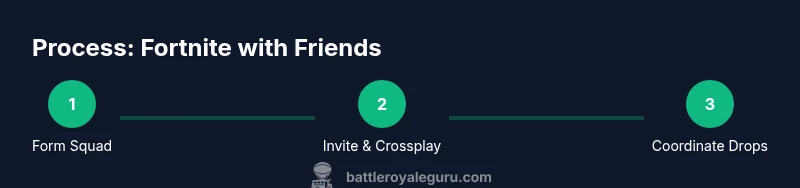
To start, open Fortnite and navigate to the Social or Party tab. Create a new party if you don’t already have one, then select the friends you want to invite from your list. If you’re gaming on multiple platforms, enable crossplay in the settings so everyone can join. Once all friends have accepted, confirm you’re targeting a squad mode (duo, trio, or squads) and set a shared lobby for consistency. Naming your squad or using a simple tag can help you quickly find each other in longer gaming sessions.
Communication: Voice Chat, Roles, and Clear Callouts
Clear, concise communication is the backbone of a successful squad. Establish a quick callout system (e.g., “Engage left,” “Rotate to the ridge,” or “Medic on me”) and use push-to-talk to minimize background noise. Assign optional roles based on strengths—ranged slayer, support flanker, and loot/rotation coordinator can align your strategy. Decide on a preferred primary voice channel and a fallback (e.g., a dedicated party chat, plus a team signal channel for in-game calls). Practicing short, direct callouts reduces confusion during fights and makes late-game decisions faster.
Landing Strategies and Rotations with Friends
Coordinate your landing to maximize early-game loot and avoid crowded zones. Agree on a primary drop point and a fallback if too many teams land nearby. Early rotations should prioritize safety while maintaining aggressive options when your team has the advantage. Share loot efficiently by calling out who needs what and where to move next. Regular practice as a squad helps you learn timing, peak loot zones, and how to adapt to rotating circles as a unit.
In-Game Etiquette and Safety for Groups
Respect and safety should guide every session. Establish ground rules about toxic behavior, mutes for disruptive players, and privacy boundaries. Encourage positive reinforcement, and avoid over-sharing personal information in public chats. If someone is new to the group, pair them with a mentor to ease onboarding. For younger players, enable parental controls and review account safety settings to keep experiences safe and enjoyable.
Troubleshooting Common Issues When Playing with Friends
If invites fail to arrive, double-check your friends list and platform permissions. Crossplay issues can arise from firewall settings or network restrictions—try restarting the game, router, or device, and ensure you’re on a stable connection. If someone is on a different time zone, consider scheduling sessions and using a shared calendar link. When all else fails, restart the lobby and re-send invitations. Small technical hiccups are normal; with patience, your squad will be back in action quickly.
Practice, Challenges, and Turning Games into Social Play
Make Fortnite with friends a habit by scheduling regular practice sessions focused on teamwork rather than just eliminations. Use creative mode to run drills: practice revives, builds under pressure, and quick-rotations around a controlled map. Set friendly challenges, such as “win a squad game using only hit-fire” or “coordinated rotations within the first two circles.” This keeps sessions engaging and helps everyone improve together. The social element remains the key driver of motivation and consistent participation.
The Battle Royale Guru’s Take: Why Squad Play Pays Off
The Battle Royale Guru team emphasizes that consistent, well-communicated groups outperform randoms due to better decision-making and smoother execution. By deliberately practicing as a unit, players develop trust and synergy that translates into higher win potential and more enjoyable sessions. If you’re serious about Fortnite with friends, commit to a regular squad routine and keep refining roles, voice etiquette, and coordinated strategies.
Tools & Materials
- Stable internet connection(Wired Ethernet recommended for lowest latency)
- Epic Games account and crossplay setup(Link accounts across platforms if playing with friends on different systems)
- Voice chat headset or microphone(Prefer push-to-talk to minimize background noise)
- Console/PC controller or keyboard/mouse(Ensure everyone can navigate menus comfortably)
- Optional: written squad plan or loadout sheet(Helps keep roles and drops clear during the match)
Steps
Estimated time: Estimated total time: 20-60 minutes (setup) + session duration varies
- 1
Open Fortnite and access party
Launch the game and navigate to the Social or Party tab. Create a new party if you don’t have one, or join an existing squad. This initial step establishes the primary communication channel and clarifies who’s in the group.
Tip: Verify every intended teammate is online before moving to the next step. - 2
Invite teammates and form your squad
Select players from your Friends list and send invites. Confirm acceptance and mute settings if needed to prevent disruptive audio. Make sure the group is set to a squad-based mode (duos, trios, or quads) for consistent play.
Tip: If someone is offline, plan an alternate practice partner to fill the lobby later. - 3
Enable crossplay and confirm platform readiness
In settings, enable crossplay if players are on different platforms. Double-check privacy options to ensure invites and voice chat work across ecosystems. This step avoids late-game invite issues and reduces friction.
Tip: Test crossplay with a quick ping test or small practice match first. - 4
Assign roles and share a quick loadout plan
Assign at least one role per player (e.g., leader, looter, healer, flanker) and agree on preferred weapons or loadouts. A simple plan keeps everyone aligned during chaotic moments and speeds decision-making.
Tip: Keep roles flexible; switch if a player’s strengths evolve with patches. - 5
Coordinate landings and early-game rotations
Discuss a primary landing zone and a fallback. Decide who covers rotations early, which teams push together, and how to collect teammates if separated. This ensures a cohesive start and reduces random split-ups.
Tip: Use concise callouts like “Left flank” or “Rope jump behind the hill.” - 6
Communicate during fights and post-match review
Maintain short, direct calls during combat and review what went well after each game. Highlight successful teamwork and areas for improvement, then apply lessons in the next round.
Tip: Avoid long monologues mid-fight; quick updates keep you alive longer.
Questions & Answers
How do I add friends to Fortnite for multiplayer matches?
Open the in-game social tab, search for your friend’s Epic ID, and send a friend request. Once accepted, you can invite them to your party or squad from the Friends list.
Open the social tab, find your friend, and send an invite to your party or squad.
Can I play with friends on different platforms?
Yes. Fortnite supports crossplay. Enable crossplay in settings and ensure accounts are linked across platforms so friends can join your lobby.
Yes, you can play across platforms by enabling crossplay in settings.
What is the best way to communicate with a squad during matches?
Keep calls short and specific. Use a consistent voice channel, assign roles, and practice short callouts to avoid clutter during battles.
Use brief, clear calls and assign roles for faster decisions.
What should I do if a friend can’t join due to a time zone?
Schedule sessions at overlapping times and use a flexible rotation so different players can participate as their schedules allow.
Plan sessions around overlapping times and rotate as needed.
Are there recommended modes for learning with friends?
Start with squad and trio modes to build teamwork; creative and co-op modes can help practice coordination without the pressure of competition.
Begin with squad and trio modes; use creative for practice.
Watch Video
Key Points
- Form a stable squad to improve coordination.
- Use crossplay to fill lobbies with friends on different platforms.
- Establish clear callouts and defined roles for faster decisions.
- Practice together regularly to build teamwork and trust.
- Respect etiquette and safety while gaming with friends.