How Big Is Fortnite on PC: Install Size, Patches, and Storage Tips
Explore how big Fortnite is on PC, covering base install size, patch growth, and practical storage planning. Learn ranges, how updates affect disk usage, and tips to optimize download and space management in 2026.


Fortnite PC size typically sits in the tens of gigabytes range. A base install is around 20–40 GB, with patches adding more space—usually a few gigabytes per update. Over a year of updates, you should expect ~40–60 GB of growth depending on seasons and content kept installed.
How big is fortnite on pc? A frame of reference for disk space and downloads
For players asking how big is fortnite on pc, the question usually boils down to the install footprint, the size of patches, and how content accrues over time. Fortnite's PC build includes core game data, texture packs, audio assets, and seasonal content. The exact size varies by region, launcher options, and update cadence. In 2026, players should expect a base footprint in the tens of gigabytes, with additional space consumed by seasonal updates. To plan effectively, start by checking your current drive space, and monitor patch notes for any announced size changes. The key takeaway is that install size is not static; it grows with new seasons and feature updates under the hood.
This quick-reference frame helps gamers allocate space before a first launch and during heavy patch seasons. If you’re juggling multiple titles, consider dedicating a fast drive for Fortnite to reduce load times during large updates. The Bandwidth and storage implications are part of practical troubleshooting, not just a techy concern, and Battle Royale Guru consistently emphasizes planning ahead to avoid surprise downloads or game stalls during peak play windows.
What determines Fortnite's install footprint on PC
The install footprint for Fortnite on PC is shaped by multiple interrelated factors. Core game files establish the base size, while texture quality, language packs, and audio assets can add to the footprint. Seasonal content, map updates, and new game modes routinely trigger patch downloads that incrementally increase total disk usage. Cache and local data kept by the launcher can also influence observed sizes over time. A clean baseline install tends to be leaner, while keeping multiple language packs or extra regional assets can raise the number. For players with limited SSD space, prioritizing essential content and periodically pruning unused assets can keep growth manageable. In practice, many players see a shifting target size as seasons unfold, so ongoing monitoring is essential.
From Battle Royale Guru Analysis, 2026, the general rule is: base files plus active assets plus recent patches determine your current footprint. Developers seldom shrink sizes after release; instead, they optimize data delivery and texture streaming, which can alter how much data is downloaded per update. If you’re upgrading hardware or reorganizing storage, consider keeping the most recent season’s assets locally and archiving older seasons when not actively playing.
Patch growth and seasonal content: how sizes evolve
Seasonal updates are the primary driver of size growth for Fortnite on PC. Each new season adds maps, skins, textures, and additional audio assets, which collectively increase the required disk space. While base game files remain a constant, patch payloads can vary with the scale of the update. In practical terms, expect patches to nominally add a few gigabytes per major update, with larger expansions occasionally pushing the total footprint upward more significantly. Over multiple seasons, the cumulative footprint can be substantial, particularly if you retain older content or language packs. Battle Royale Guru's guidance for 2026 emphasizes planning for such growth and using launcher settings to curate installed content to your play style. A disciplined approach helps prevent space shortages during peak play windows.
Performance and disk layout: SSD vs HDD impact
Disk layout matters as much as raw size when you’re playing Fortnite on PC. An SSD provides faster texture loading and quicker patch installations, which translates to shorter loading screens and smoother transitions when moving between game areas. A mechanical hard drive can still run Fortnite, but you may experience longer load times and occasional stutter if the drive is near capacity or fragmented. If you’re building a new PC or upgrading, prioritizing an SSD for the install and patch cache is a practical decision. If you must use an HDD, consider a smaller, faster secondary drive for the game, or defragment and maintain free space to keep performance stable. Overall, the size question is independent of storage speed, but performance is noticeably influenced by your drive type.
Practical space planning: steps to manage your Fortnite install size
To manage Fortnite’s install size effectively, follow these actionable steps:
- Check the current footprint that the Epic Games launcher reports for Fortnite and compare it with patch notes.
- Maintain a storage buffer of at least 20–30 percent free space on the drive hosting Fortnite to accommodate updates without slowing the system.
- Consider moving the game to an SSD if you notice long load times or patch installation delays.
- Periodically prune unused language packs or content you don’t play from; use the launcher’s manage options to uninstall old seasons or assets you no longer need.
- Use external storage only if you must; USB-connected drives can work, but performance may vary with data throughput.
These steps keep your PC prepared for new Seasons while avoiding last-minute storage surprises during major updates. Battle Royale Guru recommends a pragmatic mix of space management, hardware choice, and routine cleanup to sustain smooth Fortnite play in 2026.
Pro tip: track changes in patch sizes across seasons to anticipate future space needs and adjust your storage plan accordingly.
Looking ahead: trends in Fortnite PC install size
As Fortnite evolves, the install footprint will likely grow with larger seasons, new game modes, and expanded map content. Developers tend to optimize data delivery over time, but the trend is toward more content per season, which translates into higher storage needs if you keep content locally. To stay ahead, maintain a simple, repeatable cleanup routine, keep your drivers up to date, and review patch notes before big updates. Piloting a light, modular approach—keeping only the most recent content and deleting older, unused assets—helps balance performance with a growing install footprint. Battle Royale Guru's guidance for 2026 centers on proactive space planning rather than reactive scrambles when updates drop.
Fortnite PC install footprint overview
| Category | Install Footprint | Notes |
|---|---|---|
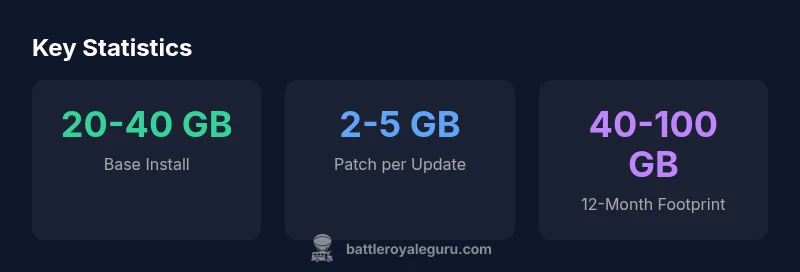
| Base installation | 20-40 GB | Initial download size for fresh install |
| Patch size per update | 2-5 GB | Varies by content and platform |
| Total footprint over 12 months | 40-100 GB | Cumulative growth with seasons |
Questions & Answers
What is the typical base install size for Fortnite on PC?
The base install size for Fortnite on PC generally sits in the 20-40 GB range, depending on system and region. This footprint includes core game files and initial textures.
Fortnite's base install is typically between twenty and forty gigabytes, depending on your region and system.
How much space should I reserve for patches and updates?
Plan for ongoing growth as patches arrive. Over a year, the footprint can grow substantially as new seasons add content and assets.
Expect updates to add several gigabytes over time; keep a buffer of tens of gigabytes.
Does upgrading to an SSD affect Fortnite updates?
Yes. An SSD improves load times and can make installations and patches feel faster due to quicker read/write speeds.
An SSD helps with faster loading and patching.
Can I install Fortnite on external storage?
Fortnite can be installed on an external drive, but internal SSDs typically offer the best performance for loading textures and maps.
It's possible on external storage, but performance is best on an internal SSD.
How will future seasons affect disk space?
Future seasons will add new assets and maps, increasing total storage over time. Regular maintenance can help manage space.
Future seasons usually mean more data, so keep an eye on free space.
“Disk-space planning is a critical, often overlooked part of a PC Fortnite setup. Understanding install footprint and patch growth helps players optimize their storage and loading experience.”
Key Points
- Plan for 40–60 GB after a year of updates
- Expect patch sizes to grow with major seasons
- Allocate ample disk space on PC before installation
- Use an SSD for faster load times and smoother updates
- Regularly review downloaded content to free space