How to Check Fortnite Stats: A Practical Guide for 2026
Learn how to check Fortnite stats across platforms, identify key metrics, and translate data into actionable practice with a clear, step-by-step approach.


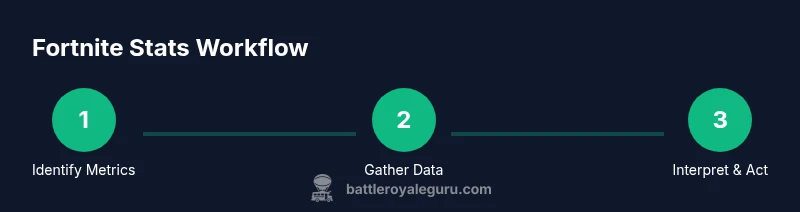
This guide shows you how to check Fortnite stats across platforms, which metrics matter most, and how to turn data into concrete practice. You’ll learn where to find trusted data, how to read trends, and how to translate numbers into improvements for your next match. By following the steps, you’ll master your own performance trajectory.
What Fortnite Stats Are and Why They Matter
Fortnite stats are records of your performance across matches, including metrics like wins, eliminations, accuracy, placements, and survival time. They help you quantify skill, identify strengths, and spot trends over time. If you're wondering how to check fortnite stats, understanding what data is tracked is the first step toward meaningful improvement. According to Battle Royale Guru, stats provide both a snapshot of your current level and a roadmap for focused practice. By regularly reviewing these numbers, you can separate emotion from evidence and make deliberate changes to your approach. In this section, we’ll outline the kinds of data you’ll typically see, why each metric matters, and how to interpret them in context rather than chasing vanity figures. Keep in mind that not all metrics matter equally in every mode, so tailor your focus to your preferred playstyle.
Core Metrics to Track for Improvement
The most actionable Fortnite stats fall into a handful of core categories. While total score or placement can be interesting, the real value comes from metrics you can influence through practice. Track your:
- Win rate by mode (Battle Royale, Arena, Team Rumbles) to measure consistent success.
- Kill-to-death ratio (K/D) for combat efficiency and risk management.
- Average placement and survive time to gauge decision-making and rotation quality.
- Accuracy and headshot percentage to assess aiming and weapon choice.
- Score and XP progression across seasons to understand progression pace.
- Objective-focused stats (assist counts, objective play) to evaluate team contribution.
If you’re unsure where to start, prioritize 3 primary metrics and 2 secondary ones, then adjust as you improve.
Where to Find Your Fortnite Stats in-game
To begin checking stats, start from your in-game profile. On PC/console, pause the matchmaking and open your player profile to view basic metrics like wins, kills, and matches played. Some consoles show a quick snapshot on the main menu, while others require you to navigate through the Career or Profile tabs. If you use the Epic Games launcher or mobile companion apps, you’ll often see a more persistent stats panel that aggregates recent matches. Remember, the numbers you see in-game are useful but may not reflect long-term trends; pairing them with a historical view gives better insight. Keep an eye on the season resets, which reset certain stat baselines and can temporarily skew progress, so compare across seasons for fair interpretation.
Using the Epic Games Account Dashboard
The Epic Games dashboard provides a centralized place to review historical data and cross-check in-game stats across platforms. Sign in with your Fortnite account, then access the Statistics or Activity sections to view season-by-season performance, win counts, and lifetime totals. The dashboard often offers filters by mode, platform, and time range, enabling you to isolate impact from patch changes. This is especially helpful when you’re tracking progress after a major update or a new season. If you notice discrepancies between in-game stats and dashboard data, verify you’re using the same account, and consider clearing device-specific caches or re-authenticating to refresh data.
Third-Party Tools and Services for Fortnite Stats
Numerous third-party trackers provide deeper historical insights, heatmaps, and trend analyses beyond the basics. Choose trusted sources with a clear privacy stance and cross-check critical figures against official dashboards. Use third-party tools to compare performance across time windows (e.g., last 30 days vs. last season) and to identify patterns such as preferred landing zones or weapon loadouts. Always be cautious of data integrity gaps after patches or account changes, and avoid over-reliance on any single tool. Treat third-party data as supplementary rather than definitive.
Analyzing Your Match History and Split Metrics
Delve into match histories to uncover actionable patterns. Look for correlations between landing spots, rotations, and success rates. Split metrics—how you perform in solo, duo, squad, or Arena modes—reveal where you excel and where you struggle. When reviewing, categorize data into actionable themes (combat, editing, movement, decision-making) and rank them by impact. Use a simple method: identify one improvement per week and measure its effect over 10–20 matches. Recording notes beside each entry helps you remember context, such as changes in weapon balance or map adjustments that might explain performance shifts.
Interpreting Stats: Practical Scenarios
Interpreting numbers becomes practical when you connect data to real decisions. If your kill rate drops after a patch that nerfed a favorite weapon, you might pivot to alternate weapons or adjust engagement ranges. If your win rate improves after revising landing zones, a small change in rotation path could be the key. Compare play sessions with similar conditions (same mode, patch, and server region) to avoid misreading noise as a trend. The goal is not to chase every peak but to identify durable improvements that consistently raise your average performance.
Tips for Accurate Stat Tracking and Consistency
Maintain consistency by using the same data window and filtering options each time you review stats. Document the context for notable changes, such as squad size, lobby skill, or controller settings. Cross-validate data between the official Epic Games dashboard and your in-game profile to catch discrepancies early. Create a habit of weekly reviews, with a monthly deeper dive to assess seasonal shifts. Finally, pair data reviews with deliberate practice—test one change at a time to quantify impact and avoid confusing noise with signal.
Common Mistakes When Checking Fortnite Stats and How to Avoid Them
Avoid common pitfalls like overreacting to a single bad game or ignoring season resets that reset baselines. Don’t chase vanity metrics that don’t reflect skill growth. Always contextualize stats with the patch notes, map changes, and your playstyle. Don’t rely solely on third-party data; use official sources for baseline accuracy and calibration. Finally, avoid excessive data collection without a clear plan—focus on a few indicators that drive real improvement.
Turning Stats Into Action: A Simple Improvement Plan
Transform data into action with a lightweight, repeatable plan. Start with 3 core metrics, then conduct weekly experiments (e.g., adjust landing spot, weapon choice, rotation path). Track the outcome across 10–20 games, adjust tactics based on results, and repeat. Schedule a fixed weekly review to ensure consistency. The most important shift is turning observations into small, measurable experiments that you can replicate and build upon over time.
Tools & Materials
- Fortnite account with access to stats(Use your main account; ensure two-factor authentication is on for security.)
- Stable internet connection(A minimum of 25 Mbps is recommended for consistent data syncing.)
- Access to Epic Games official dashboard(Log into your Epic account on fortnite.com or epicgames.com.)
- Second device or screen (optional)(For cross-checking stats side-by-side.)
- Notebook or note-taking app(Record insights and progress over time.)
Steps
Estimated time: 15-25 minutes
- 1
Decide which stats to track
Clarify your goals (e.g., win rate, kill-to-death ratio, or average placement). Defining metrics upfront helps you focus your data collection and avoid information overload.
Tip: Write down 3 primary metrics and 2 secondary ones for quick reference. - 2
Open your Fortnite profile
Navigate to your player profile in-game or on the Epic Games site to access baseline stats. If you’re using a console, ensure you’re signed in to the same account on all devices.
Tip: Take a screenshot of your baseline stats for comparison. - 3
Check recent match histories
Review recent matches to identify trends, such as hot zones, weapon choices, and survivability. Look for improvements or declines over your last 20-30 games.
Tip: Note any anomalies like server issues that could skew data. - 4
Compare across platforms (if applicable)
If you play on multiple platforms, compare stats to detect platform-specific performance differences or control scheme effects.
Tip: Ensure you’re using the same game mode and settings across platforms. - 5
Cross-check with Epic Games dashboard
Use the Epic Games dashboard to corroborate in-game stats and view historical data, including season resets and tournaments.
Tip: Check that your account is not linked to multiple profiles. - 6
Identify patterns and action steps
Translate data into concrete actions, such as adjusting landing spots, weapon choices, or rotation strategies based on the observed trends.
Tip: Create 1-2 small experiments per week. - 7
Set a tracking cadence
Decide how often you’ll review stats (e.g., weekly) and what constitutes meaningful progress.
Tip: Schedule a recurring reminder to review stats. - 8
Review and adjust
After each tracking period, reassess goals and adjust strategies accordingly.
Tip: Celebrate small wins to stay motivated.
Questions & Answers
Where can I see my Fortnite stats?
You can view basic stats in-game on your profile and on the Epic Games dashboard. For more depth, third-party trackers offer extended history, but verify data against official sources.
You can view basic stats in-game and on the Epic Games dashboard. For deeper history, third-party trackers exist but check against official sources.
Do stats differ between modes like Battle Royale and Arena?
Yes, stats are tracked separately by mode. Compare BR versus Arena metrics to avoid drawing incorrect conclusions, and reset expectations after major changes.
Stats are tracked separately by mode; compare them to avoid confusion and reset after major changes.
Can I track stats on console and PC together?
Some stats sync across platforms, but not all. Use the same account and monitor platform-specific differences to interpret data accurately.
Some stats sync across platforms; use the same account and watch for platform-specific differences.
Are third-party sites trustworthy for Fortnite stats?
Choose reputable trackers and cross-check data with official dashboards to ensure accuracy.
Use reputable trackers and verify data with official dashboards.
How often should I review my stats?
Set a weekly review cadence and adjust when you notice meaningful changes. Small, consistent checks beat sporadic deep-dives.
Review stats weekly; adjust as you notice meaningful changes.
What should I do with stats to improve?
Identify a single area to test (e.g., landing spots, weapons) and run small experiments to measure impact.
Test one change at a time to measure impact.
Watch Video
Key Points
- Define 3 core metrics and track them consistently
- Use official dashboards for accuracy and context
- Translate data into 1-2 concrete gameplay experiments