How to Tell When You Started Playing Fortnite
Discover practical methods to identify the moment you began playing Fortnite, using Epic Games data, platform histories, and early Season milestones. Build a reliable timeline for progress tracking and nostalgia.


In this guide on how to tell when you started playing fortnite, you’ll verify your first login date, check account creation and purchase history, and review your earliest saves or replays. You’ll also leverage platform data, such as Epic Games account activity, and your Battle Pass milestones to pinpoint your start window. This approach helps you build an accurate timeline without guessing.
Why Knowing Your Fortnite Start Date Matters
Knowing how to tell when you started playing fortnite isn't just trivia; it's a practical skill that helps with personal progress, memory retention, and even troubleshooting account access. Fortnite's evolution across seasons can blur the memory of when you first joined, especially if you began as a casual player or switched devices. The Battle Royale Guru team emphasizes that a well-documented start date sharpens your understanding of skill growth and milestone timing. By aligning your first login, earliest saves, and initial Battle Pass activity, you create a defensible timeline you can reference in future updates, challenges, or collab events. This section lays the groundwork for a reliable start window and sets expectations for the rest of the guide.
- You’ll learn to differentiate between the moment you first logged in and the first time you unlocked content.
- You’ll see why cross-referencing sources yields higher confidence than relying on memory alone.
- You’ll gain a repeatable method you can reuse for future games or other accounts.
Start Date vs. First Battle Pass: What to Look For
A common source of confusion is equating your start date with the moment you first earned content or hit a season milestone. In Fortnite, your actual start date is best anchored by the first time you logged in, combined with contextual clues such as the first Battle Pass tier you reached or the earliest cosmetic you owned. The Battle Pass release schedule provides a loose calendar, but individual timing can vary by platform and region. By separating the concept of 'start date' from 'first milestone,' you avoid over-precision that isn't supported by data. This distinction helps you assemble a credible window rather than a single fixed day.
- Start date refers to your first meaningful interaction with the game, not merely installing it.
- First Battle Pass or early milestones offer corroborating cues but should be used with other data points.
- Seasonal timing can shift slightly between platforms; always cross-check.
According to Battle Royale Guru, most players find the most reliable clues come from a combination of login history, early purchases, and seasonal milestones, rather than a single data point.
Primary Data Sources: Epic Games Account History
Your Epic Games account is the central hub for evidence about when you began playing Fortnite. The activity log, sign-in timestamps, and the creation date are the most reliable anchors. Additionally, your account's purchase history can reveal your first V-Bucks spending or early item purchases, which often align with a rough start period. If you signed in on multiple devices, gather data from each platform: PC, console, and mobile. While some data may be private or limited by privacy settings, most players can access a substantial amount of historical activity. This block explains where to look and how to interpret each data point for a coherent narrative.
- Sign-in timestamps offer the most direct clue to start.
- Early purchases and V-Bucks activity help corroborate the timeline.
- Cross-device data strengthens accuracy but may require separate checks on each platform.
Battle Royale Guru's analysis shows that cross-referencing your Epic Games activity with platform histories yields a more accurate start window than relying on a single source.
Gathering Evidence: Quick Wins
To move quickly from memory to a documented start window, focus on a few high-yield data sources first. Open your Epic Games account and pull up the Activity or Security pages to find your first login date. Then, check your platform store order history for any early Fortnite purchases or V-Bucks packs. If you have access to your early game saves or replays, review their timestamps to triangulate the date range. Photograph or screenshot key pages for your personal records. This process typically takes a short session, but the exact steps depend on your platform and account status. Keep a running timeline as you gather evidence, and mark any gaps to revisit later.
- Start with the Epic Games account activity and the first login timestamp.
- Add early purchases or V-Bucks activity to narrow the window.
- Capture screenshots to preserve sources for future verification.
Interpreting the Clues: Building a Timeline
With data points in hand, the next step is synthesis. Create a simple timeline that lists: first login date, first V-Bucks purchase, earliest Battle Pass tier, and earliest cosmetic ownership. If dates are imprecise, convert them into a window (earliest possible date to latest plausible date) and annotate uncertainties. Cross-check this window against known Season start dates to see where your personal activity might fit. This cross-check helps prevent overconfidence in a single data point and makes your final start window more credible. The timeline becomes a living document you can update as you discover new evidence.
- Use a start-to-end window rather than a fixed day when evidence is fuzzy.
- Align your timeline with seasonal calendars to validate plausibility.
- Keep notes on assumptions and data sources for transparency.
Handling Edge Cases: Multiple Accounts and Shared Devices
If you share devices or have multiple accounts, the evidence can point to different start dates. Treat each account separately: label data sources by account, note cross-account similarities, and avoid conflating milestones from one account with another. Privacy settings may hide certain activity, so focus on the data you can verify across sources. If you suspect a duplicate or fraud risk, contact Epic Games support for guidance and document your communications. Handling these edge cases carefully preserves the integrity of your timeline and reduces confusion later on.
- Separate data sources by account to avoid mix-ups.
- Check for duplicate accounts and verify ownership.
- Reach out to support if you encounter inaccessible data or suspicious activity.
Synthesis: Narrowing to a Start Window
After compiling sources and dealing with edge cases, translate your evidence into a defensible start window. A robust window might span a few weeks or a couple of months, rather than a single date, depending on data reliability. Prioritize sources with objective timestamps (login times, receipts, or save timestamps) over subjective memories. If you still lack a precise date, present the range with the rationale and sources cited. This practice aligns with knowledge standards and gives you a credible basis for future discussions or comparisons. The goal is a well-supported narrative, not an exact day that you cannot substantiate.
Practical Tips for Creating a Personal Fortnite Timeline
Crafting a personal Fortnite timeline is a small project with big payoffs. Use a simple template: a date range, the source, and a note on why it matters. Keep your data in a single document or spreadsheet so you can update it with new clues (for example, a rewatch of early gameplay clips or a forgotten email receipt). Regularly review and refine your window as new evidence becomes available. This habit also makes you a more organized player when discussing your history with friends, teammates, or coaches. The practice reinforces careful data handling and helps you tell a clearer story about your Fortnite journey.
Case Studies and Common Scenarios
Scenario A: You remember playing during Season 2 but have no receipts. You check Epic Games activity and find the first login timestamp in early 2018 on PC, supporting a start window around late 2017 to early 2018. Scenario B: You started on a console and later migrated to PC. The console purchase history reveals a first V-Bucks purchase, which helps align with that console's Season timeline. Scenario C: You created multiple accounts for testing or sharing with a friend. Treat each account separately and document why you think each started, then compare the results. These scenarios illustrate how flexible, data-driven reasoning improves accuracy.
The Battle Royale Guru Conclusion: Your Start Date Toolkit
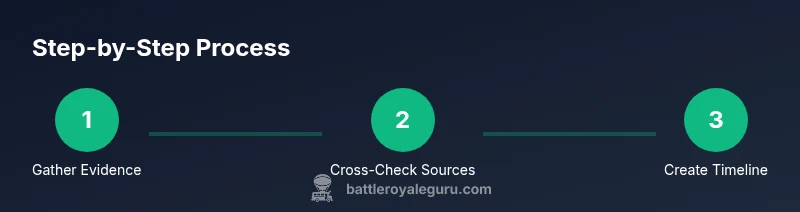
Having a reliable start date isn't just about pinning a day; it's about building a repeatable method for future aging of data. The Battle Royale Guru team recommends a disciplined approach: gather, cross-check, and document. By combining Epic Games account history with platform data and seasonal calendars, you create a credible, shareable timeline that supports your Fortnite journey and future analyses. This methodology empowers you to answer the question with confidence and integrity, no matter how long you’ve played the game.
Tools & Materials
- Stable internet connection(Wired Ethernet is preferred when available)
- Device with Fortnite access (PC/console/mobile)(Ensure you can sign into your Epic Games account)
- Access to Epic Games account pages(You may need to reset your password if locked)
- Notepad or notes app(For recording dates, sources, and decisions)
- Screenshots or screen capture tool(Capture important pages for evidence)
Steps
Estimated time: about twenty to thirty minutes
- 1
Open Epic Games account activity
Log in to your Epic Games account and navigate to the Activity or Security sections to locate your first login timestamp and recent activity. Note any inconsistent entries and consider cross-checking later.
Tip: Take a screenshot of the first visible activity date for your records. - 2
Review platform purchase history
Check the store or order history on each platform you use (PC, consoles, or mobile) for early Fortnight purchases or V-Bucks transactions. These purchases often align with the early days of your play.
Tip: Document the exact item or currency and its approximate date range. - 3
Identify earliest Battle Pass or saves
Find the first Battle Pass purchase or the earliest save/replay timestamp you can access. These milestones provide context to the start window and help verify the timeline.
Tip: Note the season and approximate date of the milestone. - 4
Cross-check with season calendars
Compare your gathered dates with official Fortnite season start dates. This helps validate plausibility and may adjust your window to fit known events.
Tip: Use official blog posts or reliable news sources for season timelines. - 5
Consolidate into a start window
Assemble a date window (earliest to latest plausible date) and annotate data sources. If precise dating isn’t possible, choose a credible range rather than a single day.
Tip: Record why you chose that window and which sources supported it. - 6
Document and preserve your timeline
Create a clean timeline document with sources attached. Save copies locally and, if possible, export as a shareable PDF for future reference.
Tip: Back up your notes in a cloud-driven folder for accessibility.
Questions & Answers
Can I see the exact date I started playing Fortnite?
In many cases you can narrow down to a date range by inspecting first login, early purchases, and Battle Pass milestones. Exact dates may not be available for every account.
You can usually narrow to a date range using login and early purchases.
What if I created multiple Fortnite accounts?
Treat each account separately and document evidence for each. Compare windows and select the most credible timeline based on solid data.
Treat each account separately and verify each timeline.
Do season dates vary by platform when estimating the start date?
Yes. Season start dates can differ between platforms and regions. Cross-check with official season calendars for plausibility.
Season dates can differ by platform; cross-check against official calendars.
What are the most reliable data sources?
Epic Games account activity, first login timestamps, and early purchases are the most reliable. Cross-reference with platform purchase histories and saved replays where available.
Epic Games activity, first login, and early purchases are most reliable.
What should I do if data is missing?
Document the gaps and use a plausible window based on the remaining data. Consider requesting help from Epic Games support if needed.
If data is missing, outline gaps and infer a plausible window from what you have.
How can I share my start timeline with friends?
Export your timeline as a clean, well-sourced document or slide and include a brief note on data sources and assumptions.
Export and share your sourced timeline with a short note on sources.
Watch Video
Key Points
- Pinpoint start date with a data-backed window
- Cross-check Epic Games and platform histories
- Document sources for future verification
- Create a shareable Fortnite start timeline