What Fortnite to Download on Xbox: A Practical Guide
Discover which Fortnite download to choose on Xbox, from Battle Royale to Save the World. Learn download steps, cross-play, updates, and troubleshooting for a smooth gaming experience on Xbox.


On Xbox, downloading Fortnite is straightforward: you install Fortnite from the Microsoft Store. The Battle Royale mode is free to play and runs on Xbox Series X|S and Xbox One, with cross‑play across platforms. If you want PvE content, Save the World requires a separate purchase, but Battle Royale remains the default option for most players. This quick guide explains how to choose between BR and PvE and how to optimize your setup for the best experience.
What to download on Xbox: The choice that guides your play
If you’re asking what fortnite to download on xbox, the answer hinges on two core experiences that Fortnite offers on the platform: the Battle Royale free-to-play mode and the PvE-focused Save the World (which is a separate option). On Xbox, the Fortnite launcher provides access to both modes within a single app, so you don’t need to juggle multiple downloads. For most players, Battle Royale is the default download because it delivers the core experience, quick matches, and ongoing seasonal updates. Save the World, by contrast, targets players who want cooperative missions, base-building, and progression systems that differ from BR’s competitive play. In this article, we’ll break down the download steps, platform nuances, and practical decision factors so you can choose the option that matches your playstyle. According to Battle Royale Guru, understanding the distinction between BR and PvE can save you time and help you plan your storage and patch cycles more effectively. The goal here is to give a clear, actionable path for players asking what fortnite to download on xbox.
Step-by-step download workflow on Xbox
- Power on your Xbox and sign in to your Microsoft account. 2. Open the Microsoft Store. 3. Search for Fortnite. 4. Select the Fortnite app (the launcher) and start the installation. 5. Launch the app and sign in with your Epic Games account to sync progress. 6. From the launcher, choose Battle Royale to start playing, or browse to Save the World if you have access. 7. After installation, check for updates before jumping into a match. 8. Ensure you have enough storage and consider enabling auto-update for future patches. 9. Review privacy and family settings if needed to tailor your experience.
Fortnite Battle Royale: Free to play and cross‑platform
Fortnite Battle Royale is the flagship mode on Xbox and remains free to start. It supports cross‑play with players on other consoles and PC, so you can squad up with friends wherever they game. BR emphasizes fast-paced matches, seasonal events, and cosmetic rewards that come with microtransactions. Even though BR is free, players should be mindful of in‑game purchases and seasonal battle passes, which unlock cosmetic content and progression tracks. The ongoing updates keep the gameplay fresh and encourage new strategies each season.
Save the World: Paid PvE option and its considerations
Save the World offers cooperative PvE missions, base building, and a progression system distinct from Battle Royale. It is accessed via the same launcher but requires a separate purchase in many regions. This mode emphasizes team coordination, resource gathering, and long-term base defense rather than competitive play. If you enjoy cooperative play and want to explore a more narrative-driven experience in Fortnite, Save the World can be a valuable addition, though it is not as popular as Battle Royale in cross‑play contexts.
Performance and graphics across Xbox generations
Xbox Series X|S bring improved load times, higher frame rates, and cleaner visuals compared with older hardware. Fortnite runs smoothly on all supported devices, with potential enhancements on newer consoles. In performance-focused settings, you may notice crisper textures during fights, faster match loading, and more consistent frame pacing during chaotic moments like storm shrinks or big team fights. The Xbox ecosystem supports HDR and high-contrast displays, which can enhance color depth and overall immersion while playing Fortnite.
Storage and bandwidth planning
Fortnite downloads and patches can consume noticeable storage space, especially after updates that bring new content and events. Plan by allocating spare storage for the launcher and game files and by keeping system updates separate from game patches when possible. If you’re tight on space, consider using external storage configured for gaming. For bandwidth concerns, schedule large updates during off-peak hours and enable automatic updates so you stay current without manual intervention.
Cross-play and account progression
Cross-play is a core strength of Fortnite on Xbox, linking your progress across platforms via an Epic Games account. To ensure seamless progression, bind your Xbox profile to your Epic account or create one if you don’t have it. This linkage enables you to carry cosmetics, skins, and progression between devices and consoles. Be mindful of privacy settings and parental controls if a child uses the same console, as these settings can influence matchmaking, content visibility, and cross‑play options.
In-game purchases and cosmetics
Fortnite’s monetization primarily revolves around cosmetic items, battle passes, and V‑Bucks purchases. The game itself remains free to download, but cosmetics can be purchased in-game. Plan your purchases deliberately and consider bundled offers during seasonal events. If you’re a competitive player, cosmetics are optional and do not affect core gameplay, though some item sets have unique prestige or visual effects that showcase your achievement.
Common download issues and troubleshooting
If you encounter issues when downloading Fortnite on Xbox, start with basic checks: verify your internet connection, test other apps for connectivity, and ensure the Microsoft Store services are online. A simple sign-out and sign-in can refresh license checks, and a restart or power cycle can clear temporary glitches. If problems persist, review any parental controls or network settings, free up storage space, or reinstall the launcher. For ongoing issues, consult official support resources and verify that your console firmware is up to date.
Practical decision guide: choosing what fortnite to download on xbox
To decide what fortnite to download on xbox, map your play style to the two main modes. If you want quick, action-packed matches and constant content refresh, Battle Royale is the best starting point. If you prefer cooperative PvE challenges, story-driven missions, and long‑term progression, Save the World could be worth the extra step. Think about your social circle: BR support cross‑play with friends who play elsewhere, while Save the World offers a different, team-based experience. In most cases, BR is recommended unless you specifically want PvE content or long-term progression that only Save the World provides.
Optimizing install time and patch sizes
Several practical steps can speed up installs and reduce patch churn. Use a wired Ethernet connection when possible for stable downloads, enable automatic updates, and schedule heavy patches during low-traffic times. Ensure you have adequate free space and consider temporary exclusions for other apps during major patches. If you play primarily in offline or social settings, you can adjust auto-download settings to avoid interruptions during sessions.
Final tips for Fortnite on Xbox
As you settle into Fortnite on Xbox, keep your Epic account linked for cross‑progression, stay aware of seasonal updates and events, and manage your storage proactively. Engage with the community through in-game events and official channels to stay on top of changes that affect download sizes, patch cadence, and matchmaking. By following these best practices, you’ll maximize your time in Fortnite and minimize setup friction.
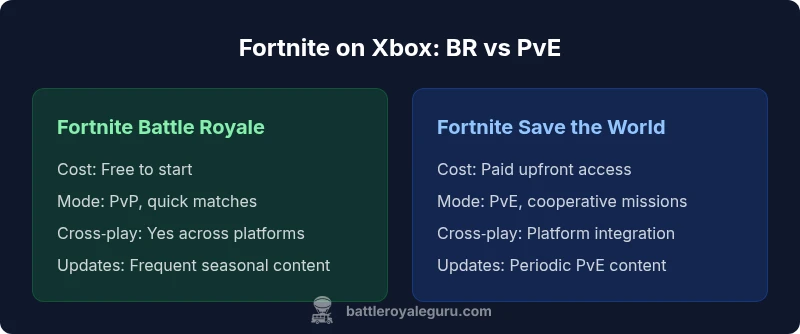
Comparison
| Feature | Fortnite Battle Royale (free) | Fortnite Save the World (paid) |
|---|---|---|
| Cost | Free to start | Paid upfront access |
| Play modes | PvP Battle Royale | PvE cooperative missions |
| Cross-play | Yes with BR across platforms | Yes with PvE across platforms (account-based) |
| Updates cadence | Frequent BR updates | Periodic PvE content updates |
| Best for | Casual/competitive BR players | Co-op PvE enthusiasts |
Upsides
- Battle Royale is free to start on Xbox
- Cross‑play with friends on other platforms
- Frequent updates keep BR fresh
- Low barrier to entry for new players
- Single launcher with both modes (BR and PvE)
Weaknesses
- Save the World requires a paid purchase or access
- BR-focused updates may dominate patch cadence
- PvE content has a smaller player base than BR
- Cosmetic microtransactions can add up over time
Battle Royale is the recommended download for most Xbox players; Save the World is optional for PvE fans
Choose Battle Royale if you want quick, social matches and frequent updates. Opt for Save the World only if you desire cooperative PvE content and progression outside BR.
Questions & Answers
Do I need an Xbox Live Gold subscription to play Fortnite?
No. Fortnite is free-to-play on Xbox and does not require an Xbox Live Gold subscription for online play. You can play with or without Gold depending on your region and account type.
No gold is needed to play Fortnite on Xbox; you can jump in with a standard account.
Is Save the World still available on Xbox?
Save the World is available as a separate option in the Fortnite launcher in many regions and may require a paid purchase. Check the store in your region for current access details.
Save the World is a separate, sometimes paid option in the Fortnite launcher; availability varies by region.
Can I play with friends on different consoles?
Yes for Battle Royale across platforms; you can squad up with friends on other consoles. Cross‑play‑enabled progression depends on linking your Epic account for the PvE mode.
Yes, you can play BR with friends on other platforms; cross-progression requires an Epic account.
How big is the Fortnite download on Xbox?
Download size varies with updates and patches. Ensure you have enough storage and consider performing updates during off-peak hours to minimize impact on your gaming schedule.
Download size changes with updates; keep space available and update when convenient.
Do I need to log into an Epic Games account to play on Xbox?
Yes. Linking your Xbox profile to an Epic Games account enables cross‑platform progression and shared cosmetics and saves.
Yes—link your accounts to keep progress and cosmetics across platforms.
Will there be differences between Xbox generations?
Gameplay is consistent across Xbox generations, with Series X|S offering smoother performance and faster loading, while the experience remains broadly similar on Xbox One.
The game plays similarly across consoles; newer Xbox models may feel smoother and load faster.
Key Points
- Download Fortnite Battle Royale first for quickest access
- Save the World is a separate paid option for PvE fans
- Link your Epic account to enable cross‑play and progression
- Monitor storage and update cadence to minimize downtime