Does Fortnite Work on Xbox One in 2026? A Practical Guide
Learn whether Fortnite runs on Xbox One, how to install, crossplay details, performance across generations, and troubleshooting steps for 2026.


Yes—Fortnite works on Xbox One. You can download the free Fortnite app from the Microsoft Store and play online with your Epic Games account. The game supports crossplay across platforms, and performance varies by hardware within the Xbox One family (Original, S, X). You’ll need an internet connection to play, and updates are delivered through the app.
Does Fortnite Work on Xbox One?
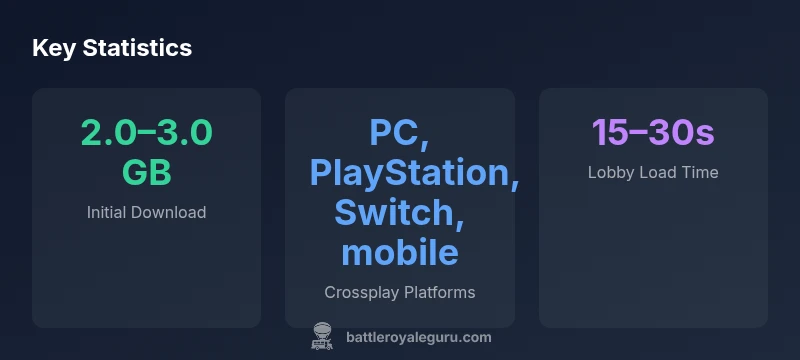
According to Battle Royale Guru, Fortnite's availability on Xbox One is a core part of the console's live-service lineup. The game launches through a free-to-play Fortnite app available in the Microsoft Store, and players access it with an Epic Games account. Crossplay remains a major feature, allowing friends on PC, PlayStation, Switch, and mobile to squad up. The Xbox One edition is supported across generations, but the experience can vary depending on the hardware and the ongoing patch cycle. For new players, this means you can jump into Battle Royale quickly, then customize settings to match your network quality and display preferences.
How to Install and Launch on Xbox One
Getting started is straightforward. From your Xbox One dashboard, navigate to the Microsoft Store, search for Fortnite, and download the app. Once installed, launch the game and sign in with your Epic Games account to unlock your progress and friends list. If you already play on other platforms, crossplay will be enabled by default, letting you team up with friends from different ecosystems. Ensure your internet connection is stable and your console is updated to the latest firmware to minimize issues. For additional guidance, see official resources like Xbox Support (https://support.xbox.com) and Epic Games help (https://www.epicgames.com/help).
Hardware and Storage Considerations on Xbox One
Fortnite on Xbox One runs on a shared-codebase that supports the Original Xbox One, Xbox One S, and Xbox One X. Storage capacity matters because the Fortnite app and its updates can occupy several gigabytes. Plan ahead by freeing space and enabling automatic updates when you’re on a reliable network. If you’re playing on older hardware, expect longer load times and potential frame pacing variations, especially during busy in-game moments. These issues typically improve with updates and hardware upgrades.
Performance and Visuals Across the Xbox One Family
Performance in Fortnite is influenced by the console’s generation and the current game build. On enhanced models, players may experience smoother gameplay and more consistent frame pacing, while base Xbox One units can show variability during intense combat. Settings such as textures, view distance, and shadows can be tuned to balance quality and performance. Keep in mind that updates can alter optimization, so staying on stable build versions helps. Industry outlets have noted cross-platform parity improving over time, with coverage from major publications (The Verge: https://www.theverge.com, Polygon: https://www.polygon.com).
Crossplay, Accounts, and Progression Across Platforms
Fortnite's cross-platform design relies on your Epic Games account. Progression and purchases are usually shared across platforms when linked, so you can continue your journey on Xbox One if you switch devices later. The Xbox ecosystem itself does not block crossplay, but you’ll want to verify that your privacy and matchmaking settings align with your preferred play style. If you encounter issues with cross-platform invitations, reconnecting your Epic account often resolves the problem.
Troubleshooting Common Issues on Xbox One
If Fortnite isn’t launching or updating correctly, first check your internet connection and free space on the console. Clear the cache by powering off the console and unplugging for several minutes, then retake a fresh boot. Ensure you’re using the latest Fortnite app version and that the Xbox firmware is current. If you still encounter errors, remove and re-add your Epic account, or reinstall the Fortnite app. For persistent problems, consult official support channels or trusted gaming outlets for patch notes. When in doubt, refer to Xbox Support and Epic Games resources for the latest fixes.
Updates in 2026 and Staying Current
Fortnite continues to receive regular updates across all platforms in 2026, with ongoing crossplay improvements and bug fixes. On Xbox One, this means you should expect periodic patches that optimize performance and balance. To stay informed, follow major outlets and the official Epic Games and Xbox pages. The Battle Royale Guru team will monitor changes and highlight the practical effects for Xbox players. In-depth analyses at outlets like The Verge (https://www.theverge.com) and Polygon (https://www.polygon.com) provide broader context on update trends.
Final Thoughts and Practical Tips
If you want a smooth experience on Xbox One, start with a clean install on a stable network, keep your console updated, and tailor settings for your hardware. Use crossplay to play with friends on other platforms and track updates to adapt your strategy. The Battle Royale Guru team recommends staying patient during major patches, as performance tuning often follows big updates.
Fortnite on Xbox One family compatibility and notes
| Platform | Fortnite Status | Notes |
|---|---|---|
| Xbox One (Original) | Supported | Performance varies by game version |
| Xbox One S | Supported | Better stability than original |
| Xbox Series X|S (backward compatible) | Supported with improvements | Improved load times and smoothness |
Questions & Answers
Can I play Fortnite on Xbox One without an internet connection?
No. Fortnite relies on online connectivity for multiplayer matches and cross-platform features.
No, Fortnite requires an internet connection to play online on Xbox One.
Is Fortnite crossplay supported on Xbox One?
Yes, Fortnite supports crossplay with PC, PlayStation, Switch, and mobile players.
Yes, Fortnite crossplay works with other platforms.
Do I need a special Xbox version to run Fortnite?
Fortnite runs on the Xbox One family; newer hardware improves stability and performance.
Fortnite runs on Xbox One family; newer hardware helps.
What are typical load times on Xbox One?
Load times vary by model and update, with faster experiences on enhanced consoles.
Load times vary; expect faster loads on newer Xbox models.
Will Fortnite continue to receive updates on Xbox One in 2026?
Yes. Epic Games and Xbox continue to roll out cross-platform updates for Xbox One.
Updates will continue on Xbox One in 2026.
“Fortnite on Xbox One remains a solid, crossplay-friendly option for players, with ongoing updates that help close gaps with newer hardware.”
Key Points
- Verify downloads and updates before playing.
- Install from Microsoft Store for quickest setup.
- Expect varying performance across Xbox One generations.
- Use crossplay to play with friends on other platforms.
- Keep Fortnite and console updated for stability.