Difference Between Fortnite PS5 and Regular PS5: A Practical Comparison
Explore the difference between Fortnite on PS5 and regular PS5, focusing on performance modes, load times, visuals, and cross-progression to help you optimize your game.


Fortnite on PS5 uses the same game client as other platforms; there is no separate PS5 edition. The difference comes from PS5 specific performance modes and hardware optimizations that affect frame rate, resolution, and load times. According to Battle Royale Guru, the PS5's headroom makes the experience smoother, especially when you prioritize responsiveness or visual fidelity.
Understanding the landscape: difference between fortnite ps5 and regular ps5
Fortnite on PS5 leverages the system's hardware optimizations, but there is no dedicated Fortnite PS5 edition. The game client is shared with other platforms, and all players access the same Epic Games account features, cosmetics, and saves. In practice, the variation you notice comes from how the PS5 harnesses the game through different performance modes, display options, and the speed of loading into matches. According to Battle Royale Guru, the PS5's architecture provides headroom for improvements in loading times and input responsiveness, even when running the same Fortnite build as on other platforms. The core Fortnite experience remains consistent, but the way the console renders frames and textures can shift your perceived experience. This guide breaks down the major areas where those differences show up: performance modes, resolution, loading, and cross platform features.
What you should know about the PS5 and Fortnite
- The PS5 version of Fortnite uses the console's SSD and CPU/GPU capabilities to reduce loading times and smooth out gameplay. - There is no separate edition; the same game client runs on PS5 as on other platforms. - Players can expect options that prioritize either frame rate or visual fidelity, depending on preferences and display capabilities. - Cross-progression remains consistent because Epic Games accounts tie progression to your account, not your console mode.
Quick note on expectations
If you expect a night and day difference in every metric, you may be disappointed. The real impact tends to be in responsiveness, reduced stutter during fast movements, and the fidelity of textures when you choose different modes. The Battle Royale Guru Team emphasizes that for most players the difference sits between the modes rather than a niche PS5 edition label.
Comparison
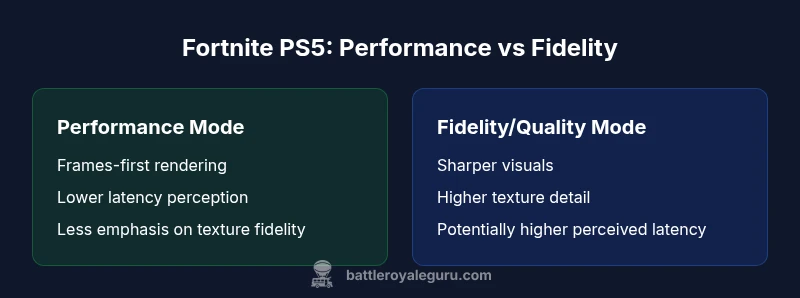
| Feature | Fortnite PS5 - Performance mode | Fortnite PS5 - Fidelity/Quality mode |
|---|---|---|
| Graphics fidelity | Prioritizes frame rate; smoother motion | Prioritizes resolution and detail |
| Frame rate target | Optimized for smoother gameplay | Balanced with high visual clarity |
| Load times | Shorter or comparable due to PS5 SSD | Similar loading with emphasis on detail |
| Input responsiveness | Lower perceived latency in motion-critical moments | Latency comparable but visuals can add perceived delay |
| Cross-progression | Same Epic account features across modes | Same Epic account features across modes |
| Best for | Competitive play and speed-focused sessions | Cinematic feel and sharp visuals |
Upsides
- Helps players align mode choice with their priorities
- Clarifies how PS5 optimizations influence gameplay
- Encourages optimizing in-game settings for your display
- Gives practical guidance for both casual and competitive players
Weaknesses
- Differences can be subtle and display-dependent
- Updates may shift mode behavior over time
- No edition-specific pricing or content split to exploit
- Some players may not notice a large split unless using high-end displays
Performance mode generally suits competitive PS5 players; fidelity mode suits those seeking sharper visuals.
Choose Performance mode if you prioritize smooth motion and responsiveness in Fortnite on PS5. Choose Fidelity mode if you want higher visual detail and resolution, especially on a capable display. The PS5 benefits apply across both modes, with cross-progression remaining consistent via your Epic Games account.
Questions & Answers
What is the main difference between Fortnite PS5 modes?
The main difference lies in how the PS5 harnesses Fortnite: Performance mode prioritizes frame rate and responsiveness, while Fidelity mode emphasizes visual detail and higher resolution. There is no separate Fortnite PS5 edition; both modes use the same game client.
In Fortnite on PS5, you choose between performance and fidelity modes to favor speed or visuals. There isn't a different PS5 edition of the game.
Do I need a separate Fortnite edition for PS5?
No. Fortnite on PS5 uses the same Epic Games client as other platforms. You install Fortnite from the PlayStation store, and your Epic account handles progression, cosmetics, and saves.
No separate PS5 edition is required. Your Epic Games account carries your progress across platforms.
Will playing on PS5 unlock higher frame rates?
Yes, the PS5 hardware enables smoother gameplay in modes that prioritize frame rate. The exact frame rate depends on the mode you select and your display’s capabilities.
PS5 can push smoother motion in the right mode; the mode you pick determines frame rate potential.
Does cross-progression affect performance modes?
Cross-progression uses your Epic Games account, so progress carries across platforms. It does not alter which PS5 mode you are in; mode choice remains a local setting.
Your progress stays the same across devices, but performance mode is a PS5 setting you choose locally.
How do I switch between modes on PS5?
Open Fortnite settings, navigate to Graphics or Display, and select Performance or Fidelity mode. Apply changes and restart if prompted to ensure the new mode takes effect.
Go to Fortnite settings, pick Performance or Fidelity, and apply. A restart may be needed.
Is there a performance difference between PS5 and PS4?
Yes. PS5 generally offers faster loading, smoother gameplay, and more stable frame rates due to its hardware advantages, allowing Fortnite to run more fluidly compared with PS4.
The PS5 typically runs Fortnite more smoothly with faster loads than PS4 thanks to its hardware improvements.
Key Points
- Prioritize performance if you value frame rate and responsiveness
- Choose fidelity if you want crisper visuals and textures
- Across modes, Epic account cross-progression remains constant
- PS5 optimizations improve loading and input feel without creating a separate edition