How to Tell If Your Fortnite Account Is Hacked
Urgent, step-by-step guide to confirm if your Fortnite account is hacked, secure access, reclaim ownership, and prevent future breaches. Battle Royale Guru provides practical, actionable tips for rapid recovery.


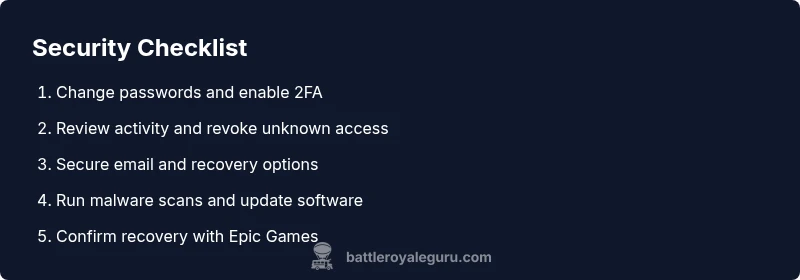
If you spot unknown logins, password changes, or suspicious purchases, your Fortnite account is hacked. Immediately secure your email, change passwords, enable 2FA, and contact Epic Games support to regain access. Review recent activity, revoke suspicious app access, and keep recovery options current for ongoing protection.
Why Fortnite accounts get hacked
Hacking often starts with credential theft—phishing emails, fake login pages, or data breaches that expose your Fortnite login. Attackers may also gain access via weak passwords or reused credentials across sites, or by malware on your device that captures keystrokes. According to Battle Royale Guru, attackers frequently exploit human weaknesses (like clicking phishing links) rather than roaring technical exploits. The result is rapid, silent access to your account, followed by changes that lock you out or push you toward secondary verifications you don’t recognize. Understanding these common vectors helps you design effective prevention and rapid response plans.
From a gameplay perspective, it’s not just about the skin you lost; compromised accounts can lead to unauthorized purchases, loss of progress, and exposure of linked services. Fortifying your fortress starts with awareness of how attackers get in and the typical signs that follow a breach. The sooner you recognize a compromise, the faster you can reclaim control and minimize damage. Battle Royale Guru emphasizes that the best defense is a layered approach combining strong credentials, device hygiene, and vigilant monitoring.
Early warning signs you should not ignore
Look for a pattern of suspicious activity that isn’t caused by you:
- Unfamiliar logins or login attempts from unknown locations or devices.
- Password changes or account recovery options altered without your knowledge.
- Purchases you don’t remember making, especially recent ones charged to your payment method.
- Linked emails or apps you don’t recognize having access to your Fortnite account.
- Requests for two-factor authentication codes or authenticator app prompts you did not initiate.
If you notice any of these signs, stop and verify your security settings before continuing. Battle Royale Guru analysis shows that acting quickly—changing passwords, revoking third-party access, and enabling 2FA—greatly reduces the window attackers have to cause further harm and increases your chances of a clean recovery.
Immediate actions to take if you suspect a hack
Start with the fastest, lowest-effort steps that have the biggest impact:
- Change your Fortnite password immediately, using a strong, unique password. Also update the password for the email associated with your account and any related services.
- Enable two-factor authentication (2FA) on both your Epic Games account and your email, preferably using an authenticator app rather than SMS.
- Review your recent activity: purchases, login history, and connected devices. Revoke access to any unfamiliar apps or devices.
- Scan your devices for malware, especially keyloggers or banking trojans. Keep your operating system and software up to date with the latest security patches.
- If you cannot regain access, contact Epic Games support with as much ownership information as possible (original email, past purchases, last known login times) to begin recovery.
If this doesn’t work, try the support portal again, use a different device from a trusted network, or request account recovery via official channels. The goal is to establish ownership and restore control while limiting attacker access.
Diagnostic flow you can follow (symptom → diagnosis → fixes)
When you see one or more symptoms, run through a quick diagnostic loop to determine likely causes and next steps:
- Symptom: Unfamiliar logins. Diagnosis: Compromised password or email breach. Fix: Change password, enable 2FA, review login history.
- Symptom: Unauthorized purchases. Diagnosis: Payment token exposure or account access. Fix: Review purchases, contact Epic Games support, and remove payment tokens if needed.
- Symptom: Changes to account recovery options. Diagnosis: Email or app access takeover. Fix: Restore recovery options and secure email; contact Epic if password reset fails.
- Symptom: Connected apps you don’t recognize. Diagnosis: OAuth tokens compromised. Fix: Revoke all third-party access and reauthorize only trusted apps.
- Symptom: Device malware or keylogger detected. Diagnosis: Local compromise. Fix: Run malware scans, reset credentials after cleaning devices, and enable 2FA.
If you’re unsure at any step, escalate to Epic Games support promptly.
Step-by-step recovery plan (detailed fixes)
- Secure the recovery email and reset Fortnite password to a new, unique one. 2) Enable 2FA on Epic Games and email accounts. 3) Review recent activity and revoke suspicious apps. 4) Check linked devices and revoke unknown ones. 5) Run a malware scan on all devices; update software. 6) If you can’t regain access, submit a recovery request with proof of ownership. 7) Update security questions and backup recovery options. 8) Monitor for future alerts and set up login notifications.
Each step reduces risk, but do not rush—completing the process thoroughly helps prevent re-entry by attackers. Pro tip: use a password manager to generate unique passwords and store recovery codes securely.
Tips & Warnings
- Do not reuse passwords across services. Use a password manager to generate strong, unique credentials for each site.
- Never share your 2FA codes or back-up recovery codes; treat them like a master key.
- Be cautious of phishing attempts; Epic Games will never ask for your password via email or chat.
- If you suspect a SIM swap or email account compromise, contact your provider immediately and secure the primary email first.
- If you’re unsure about a payment charge, contact your bank or card issuer to dispute fraudulent charges promptly.
- Safety note: Don’t attempt risky account recovery on public networks; use a trusted network or VPN if necessary.
- If professional help is needed, don’t delay—Epic Games support is your authoritative channel for restoration and verification.
Key takeaways from the diagnostic process
- Act quickly to secure all related accounts and devices.
- Enable 2FA and review every linked app and device.
- Reclaim control through official Epic Games support channels.
- Maintain ongoing protection with strong passwords and vigilant monitoring.
- Regularly review account activity to catch issues early.
Common myths vs. real-world guidance
- Myth: If I change my password, I’m safe. Reality: You must also secure linked email and devices, and enable 2FA.
- Myth: Only big hacks occur to famous accounts. Reality: Even small accounts are targeted for fraud or access to linked services.
- Myth: If there’s no notification, I’m safe. Reality: Attackers often operate silently; proactive checks are essential.
What to do after you’re back in control
- Revisit all connected services and revoke access to any unrecognized permissions.
- Enable ongoing alerts for logins and changes in Epic Games and your email.
- Schedule periodic security reviews to ensure settings stay current.
- Share learned lessons with friends and fellow players to reduce risk across the community.
- The more you practice good security habits, the less likely you’ll be a future target.
Steps
Estimated time: 60-90 minutes
- 1
Secure the recovery email and reset passwords
Begin by locking down your recovery email. Change the Fortnite password to a strong, unique one that you do not reuse anywhere else. Then update the recovery options to ensure you can regain access if needed.
Tip: Use a password manager to generate a unique password for this account. - 2
Enable two-factor authentication (2FA)
Turn on 2FA for both the Epic Games account and your email. Prefer an authenticator app over SMS to avoid SIM-based attacks.
Tip: Set up backup codes in a secure location. - 3
Review activity and revoke unknown access
Check recent purchases, login history, and connected devices. Remove anything unfamiliar and revoke third-party access.
Tip: Document any suspicious activity for support. - 4
Secure linked services
Check any linked accounts (payments, social logins) and secure or unlink as needed. Change passwords for those services if they use the same credentials.
Tip: Move to unique credentials for each service. - 5
Scan devices for malware
Run full-system malware and antivirus scans on all devices that access Fortnite. Remove any detected threats and re-scan if necessary.
Tip: Keep software up to date with automatic updates. - 6
Contact Epic Games support
If you cannot recover access through self-service, open a support ticket and provide ownership details (receipt info, last known activity, etc.).
Tip: Use the official Epic Games support portal and attach proofs of purchase. - 7
Restore and verify recovery options
Once you regain control, recheck recovery options and set new, secure backup methods. Confirm that password resets and 2FA settings are working.
Tip: Test by attempting a password reset from a trusted device. - 8
Monitor and maintain security
Keep an eye on login alerts and account activity, and periodically review security settings. Establish a routine security audit every few months.
Tip: Educate yourself and your squad on phishing indicators.
Diagnosis: Account shows suspicious activity (unknown logins, altered recovery options, unexpected purchases).
Possible Causes
- highCompromised password due to phishing or data breach
- highCredential reuse across services
- mediumMalware or keyloggers on the user device
- lowEmail account takeover
Fixes
- easyChange Fortnite and linked email passwords; enable 2FA
- easyReview and revoke suspicious apps/devices, then reauthorize only trusted ones
- easySecure the email account (reset password, enable 2FA, check recovery options)
- easyRun malware scans on all devices and update software
- mediumIf access is still blocked, submit a formal recovery request with Epic Games
Questions & Answers
What are common signs my Fortnite account was hacked?
Common signs include unfamiliar logins, password changes, unfamiliar purchases, and altered recovery options. If you notice any of these, act quickly to review security settings and contact Epic Games support if needed.
Look for odd logins, new purchases you didn't make, or changes to your password and recovery options.
What should I do first if I think my account is hacked?
First, secure your email and Fortnite account by changing passwords and enabling 2FA. Then review recent activity and revoke unknown access. If you can't regain access, contact Epic Games support.
Change passwords, enable 2FA, and reach out to Epic Games support if you’re locked out.
Can I recover a hacked Fortnite account without proof?
Epic Games typically requires ownership details to confirm your identity. Gather account email, purchase history, last known login times, and any receipts to speed up verification.
Have your account details ready for verification when you contact Epic Games support.
How can I prevent future Fortnite hacks?
Use unique passwords, enable 2FA, avoid phishing links, and keep your recovery information up to date. Regularly review connected apps and devices.
Keep unique passwords, enable 2FA, and review connected apps to stay secure.
How long does Epic Games take to respond to recovery requests?
Response times vary by case. If you haven’t heard back within a reasonable window, follow up through the official support portal and provide any additional proof of ownership.
Response times vary; follow up if needed with Epic Games support.
Watch Video
Key Points
- Act quickly to secure all related accounts and devices.
- Enable 2FA and review every linked app and device.
- Reclaim control through official Epic Games support channels.
- Maintain ongoing protection with strong passwords and vigilant monitoring.
- Regularly review account activity to catch issues early.