Fortnite Is Down? Practical Troubleshooting for Players
Urgent guide to diagnose and fix downtime when fortnite is down, covering outages, maintenance windows, and user-side fixes. Learn how to verify outages, run diagnostics, and recover fast with a clear, actionable flow.


Fortnite is down most often due to a global outage or scheduled maintenance. First, check the official status page and Battle Royale Guru outage tracker to confirm. Then verify your network and device: reconnect Wi‑Fi, restart the game, and renew your IP. If traffic spikes continue, wait for the platform to recover before trying again.
fortnite is down: Quick actions
When you see the message that fortnite is down, the clock starts ticking. Quick, calm verification helps you avoid chasing false fixes. According to Battle Royale Guru, most downtime is driven by outages or maintenance. Start by checking official status pages and trusted trackers, then move to your network and device checks. In many cases, a simple restart or reconnect resolves the problem, but you must distinguish between global outages and local issues to avoid wasted time.
Key steps: verify outage, test another device, and avoid risky firewall changes that could worsen connectivity. Remember: if the outage is real, your best move is to wait for Epic Games to resolve it and keep an eye on status updates.
How downtime happens: common causes and signals
Downtime can occur for several reasons: global outages during updates, maintenance windows, unexpected server issues, regional routing problems, or local network faults. Recognizing the signs—login errors, high latency, packet loss, or the game getting stuck on a loading screen—helps you respond quickly. The Battle Royale Guru team notes that while some outages are announced, others may emerge without prior warning. In any case, sticking to a verified status page minimizes confusion.
Distinguishing global outages from local issues
A global outage affects players across regions and platforms, while local issues may only impact your home network or device. Start by checking Epic’s status pages and outage trackers, then try accessing Fortnite from a different device or network. If friends on other networks report the same outage, it’s likely global. If only your network shows problems, focus troubleshooting on your router, DNS, or firewall settings.
Quick fixes to run right now
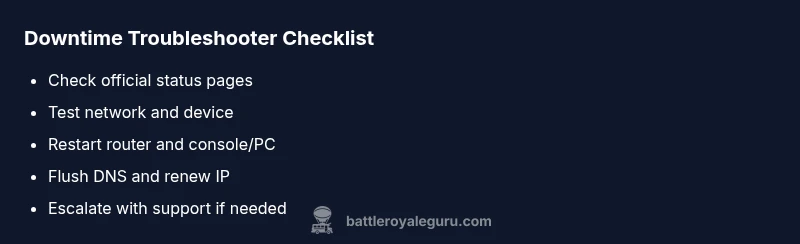
- Reboot your router and your gaming device (console/PC/mobile).
- Reconnect to a stable network, preferably wired if available.
- Flush DNS and renew your IP address to clear stale routes.
- Check for any pending game or platform updates and apply them. If you’ve tried these steps and Fortnite is still down, proceed to deeper diagnostics or contact support with your incident details.
Plan for extended outages and alternative play
Downtime can last longer during major updates. While you wait, explore alternative modes or practice offline drills if applicable, and follow official channels for ETA updates. Keeping a local outage log ( incidents, times, and actions taken ) helps when you reach out to support. Remember to stay safe and avoid clicking suspicious links claiming fixes.
Proactive steps to minimize future downtime impact
Set up status alerts for Fortnite outages, bookmark trusted trackers, and establish a simple home network troubleshooting routine. Regularly back up settings and ensure automatic updates are enabled on your devices. By preparing in advance, you’ll recover faster when fortnite is down again.
Steps
Estimated time: 25-40 minutes
- 1
Verify outage status
Open the official Fortnite status page and the Battle Royale Guru outage tracker. Look for any notices about maintenance windows or ongoing outages. Confirm whether the issue is global or isolated to your region or platform.
Tip: Bookmark status pages for fast checks during future outages. - 2
Restart networking gear and device
Power cycle your modem and router for at least 60 seconds, then reboot your gaming device. Reconnect to the network and launch Fortnite again to test.
Tip: If possible, try a wired connection to rule out wireless instability. - 3
Check for updates
Ensure your platform and Fortnite client are up to date. Pending updates can cause login issues or launch failures during downtime.
Tip: Enable automatic updates to minimize delays. - 4
Run network diagnostics
Test latency, packet loss, and traceroute to Epic endpoints. Note any spikes that correlate with the downtime and compare with status pages.
Tip: Document results to share with support if needed. - 5
Try alternative connections/DNS fixes
Switch to Google DNS or Cloudflare DNS, or connect via a mobile hotspot to see if the issue is DNS or routing related.
Tip: Avoid making risky firewall changes without guidance. - 6
Escalate if unresolved
If Fortnite remains down after a reasonable window, contact Epic Games Support with timestamps, device details, and the incident ID from status pages.
Tip: Collect logs and screenshots to speed up troubleshooting.
Diagnosis: Fortnite is down on all platforms; players cannot connect or launch
Possible Causes
- highGlobal outage or maintenance on Fortnite servers
- mediumLocal network issues (ISP outage, router problem)
- lowDNS or routing anomalies affecting access
Fixes
- easyCheck official status pages and trusted trackers to confirm outage
- easyPower cycle modem/router and the device, then reconnect
- easyFlush DNS and renew IP; consider using a reliable alternate DNS
- easyIf on Wi‑Fi, try a wired connection or a mobile hotspot as a temporary test
- mediumIf outage persists, contact Epic Games Support with incident details
Questions & Answers
What should I do first when Fortnite is down?
Check Epic Games and trusted trackers for outages, then test your network by reconnecting and restarting your device. If others report the same outage, focus on status updates rather than chasing fixes.
First, check outage status pages and then test your network and device; if others are affected, follow official updates.
How can I tell if the outage is global or just my connection?
If status pages show outages across regions and many users report issues, it’s global. If only your network has problems, investigate your router, DNS, and firewall.
Check status pages for global outages; if others are affected, it’s global. Otherwise, inspect your own network.
Why does downtime happen during updates?
During major updates, maintenance requires taking servers offline temporarily. This is planned to minimize bugs but can cause login delays and matchmaking queues.
Downtime often happens during updates for maintenance and fixes; expect short login delays.
Will I lose progress if I can't log in during downtime?
Most progress is saved on Epic servers. If you can’t log in, you won’t lose items, but you may be unable to access your account until services resume.
Usually your progress is safe, but you can’t play until services return.
How long does downtime typically last?
Duration varies by update size and maintenance. Check official ETA updates for the most accurate timing.
Times vary; check official pages for estimates.
Is there compensation for downtime?
Compensation policies differ per outage. Look for official announcements or support responses for any credits or refunds.
Compensation depends on the outage; check official updates.
Watch Video
Key Points
- Verify outage status first before fixes
- Differentiate global vs local issues quickly
- Use safe, proven steps to restore connection
- Escalate with logs if unresolved