Why Are Fortnite Servers Still Down? A Practical Troubleshooting Guide
Urgent, practical troubleshooting guide for ongoing Fortnite server outages. Learn root causes, quick checks, and step-by-step fixes to regain access and keep playing.


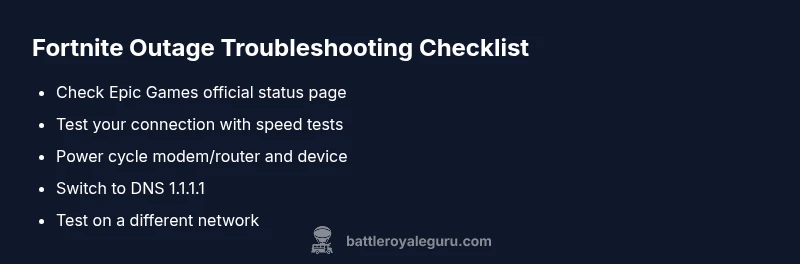
Most Fortnite outages stem from Epic Games server issues or regional routing problems. Quick steps: check official status pages; run a speed test, restart your router and device; try alternate DNS (1.1.1.1); if problems persist, wait and retry—outages typically resolve within hours. This quick check helps confirm whether the issue is on Epic's side or your network.
why are fortnite servers still down
Why are fortnite servers still down? According to Battle Royale Guru, the most common causes are Epic Games server outages, maintenance windows, or regional DNS routing issues. When players can't log in or join matches across platforms, it's typically a sign that the backend is overwhelmed or undergoing updates. This guide helps you quickly triage the problem, differentiate between Epic-side issues and local network hiccups, and minimize wasted time. By understanding the patterns behind why are fortnite servers still down, you can act faster, stay informed, and reduce frustration during downtime. The key is to verify external signals (official status pages, social posts) and then run a concise set of checks on your own network. In many cases, outages are resolved within a few hours, not days, which is why urgency matters. Keep this mindset: treat outages as a temporary interruption, not a permanent halt to your practice, and focus on restoring service with a methodical approach.
What causes outages and how they show up
Outages can originate from Epic Games' backend, maintenance windows, or routing failures between regional ISPs and Epic's data centers. You might see login failures, matchmaking timeouts, or long connection times even if your device shows a solid local connection. The pattern is usually predictable: first a regional blip, then broader symptoms as load spikes propagate. Recognizing these cues helps you triage efficiently and avoid chasing phantom fixes on your device.
How to tell if the outage is on Epic's side or your network
Start with official signals: check Epic's status page and official social channels for outages. If the status indicates a regional or global outage, focus on monitoring but not on changing local settings. If the page shows all systems normal but you still can't connect, switch to quick local tests: run a speed test, try another device, and rule out router or DNS issues. This approach minimizes wasted time and helps you decide when to wait for Epic to resolve the issue.
Steps
Estimated time: 20-40 minutes
- 1
Check outage status
Open the official Fortnite status page and reputable community channels to confirm if the outage is global or regional. Note the time and any posted ETA. If Epic confirms an outage, you can safely pause local troubleshooting and prepare for service restoration.
Tip: Bookmark the status page for quick checks during future outages. - 2
Power cycle networking gear
unplug the modem and router, wait 60 seconds, then plug them back in. After the lights stabilize, restart your gaming device and attempt to reconnect. This clears transient routing issues that can impact gameplay.
Tip: If you’re on a shared network, try a wired connection to rule out Wi‑Fi instability. - 3
Test connectivity and device eligibility
Run a speed test and a simple ping to a known endpoint. Check if other devices or apps can reach the internet. If basic connectivity is fine but Fortnite still fails, the issue is more likely Fortnite-specific or routing-related.
Tip: Document any error codes; they speed up support discussions. - 4
Switch DNS and flush cache
Change your DNS settings to a fast resolver such as 1.1.1.1 or 8.8.8.8. Flush your DNS cache on each device and retry Fortnite. DNS issues can intermittently block traffic to Epic servers even when your connection otherwise works.
Tip: Avoid VPNs during outages; they can introduce additional latency or misroute traffic. - 5
Attempt alternate networks
If possible, test Fortnite on a different network (mobile hotspot, another home network, or a friend’s connection) to determine if the problem is isolated to your primary network.
Tip: If the alternate network works, focus troubleshooting on your home router and ISP routing path. - 6
Monitor and wait for official resolution
During confirmed Epic outages, your best course is to monitor the status page and community signals while conserving bandwidth and avoiding risky fixes on devices. When Epic resumes services, test again in small increments to confirm stability.
Tip: Set a reminder to retry at the ETA or after a known update window.
Diagnosis: User cannot log in, join a match, or experiences repeated disconnects with Fortnite across platforms.
Possible Causes
- highEpic Games server outage or maintenance
- mediumRegional routing/DNS issues affecting Fortnite traffic
- lowISP-level congestion or local network issues
- lowFirewall/antivirus blocking Fortnite traffic
Fixes
- easyCheck the official Fortnite status page and social channels for outage notices
- easyPower cycle modem, router, and gaming device; reconnect to the network
- easyFlush DNS and switch to a resilient DNS (e.g., 1.1.1.1); reboot devices
- easyTest on an alternate network (mobile hotspot) to determine if the issue is network-specific
- easyIf the outage persists, wait for Epic to resolve the service and avoid unnecessary fixes on local devices
Questions & Answers
What should I check first when Fortnite servers are down?
Begin with Epic’s official status page to confirm outages. If the page shows a regional or global outage, focus on waiting rather than adjusting local settings. If it’s not listed as an outage, run quick network tests to rule out your setup.
Check the official status page first; if outages are confirmed, wait for updates rather than chasing fixes on your device.
Where can I find official Fortnite server status updates?
Epic Games publishes status updates on their official status page, plus social channels. Community channels often reflect real-time user experiences during outages.
Check Epic's status page and their official social accounts for outage updates.
Can changing DNS fix Fortnite server connectivity?
Switching to a faster, reliable DNS can help some users during routing issues, but it won't fix epic-wide outages. Use it as a targeted test rather than a universal fix.
Sometimes a faster DNS helps, but it won't fix Epic-wide outages.
How long do Fortnite outages usually last?
Durations vary by scope. Regional issues may resolve within a few hours, while global outages can take longer. Stay updated via official channels for ETA estimates.
Outages can last a few hours or more, depending on scope; follow official updates for ETA.
Should I contact my ISP during a Fortnite outage?
If you’ve ruled out Epic downtime and still can’t connect, contact your ISP to check routing or potential throttling. They can perform line tests and help isolate the issue.
If Epic isn’t the cause, your ISP can help investigate routing.
Is there a workaround to play while servers are down?
There isn’t a legitimate online workaround to play Fortnite multiplayer during outages. You can still play other modes (creative or single-player) offline if available, but online matchmaking will be unavailable.
There’s no real fix to play online while servers are down; you can try offline modes where possible.
Watch Video
Key Points
- Check official status first and verify regional scope.
- Rule out local network issues before blaming Epic.
- Follow a fixed step-by-step fix order for fastest recovery.
- Monitor status pages and document error codes for faster support.