What is Wrong With Fortnite Right Now? A Troubleshooting Guide
Battle Royale Guru explains what is wrong with fortnite right now and offers troubleshooting steps to diagnose outages, fix errors, and get back to gameplay quickly.


Fortnite issues are most often caused by server outages or high load, but most players see quick improvement after simple steps. Start by checking the official status page and your connection. If you still can't join matches, reset the game data and try a fresh login. If problems persist, switch regions as a last resort.
what is wrong with fortnite right now
In this moment, players around the world are asking what is wrong with fortnite right now. The Battle Royale Guru team is tracking outages, login issues, server congestion, and matchmaking delays. According to Battle Royale Guru analysis, the most common causes are server outages and heavy player load, which can cause longer queues, matchmaking failures, and intermittent disconnects. In this guide, we outline practical steps you can take to diagnose and mitigate issues quickly, so you can get back to playing. We’ll cover symptoms, quick fixes, diagnostic flow, and safety considerations to reduce frustration during outages. By staying informed and methodical, you’ll minimize downtime and maximize your win potential.
Real-world symptoms players report today
Real-world symptom patterns show how outages feel on the ground. Players report login failures, long matchmaking queues, frequent disconnects, and occasional stuttering during gameplay. You might see error messages like timeouts or lobby refresh failures, and some platforms report regional list sync problems. While symptoms vary by region and patch, the common thread is instability in session creation and queue management. This is exactly the type of issue Battle Royale Guru has observed during patches and peak play times.
Common causes behind service disruption
There are several plausible causes behind service disruption in Fortnite today. The most frequent is server overload during peak times or after a patch, which can throttle capacity and extend queues. Regional routing issues can misdirect traffic and cause delays or failed connections. Ongoing maintenance or emergency fixes can briefly take servers offline or reduce available regions. Finally, client-side problems such as corrupted cache, outdated builds, or misconfigured DNS can create symptoms that resemble server issues even when the core services are online. Understanding these categories helps you target the right fix. Battle Royale Guru analysis shows outages often cluster around patch deployment and high concurrent user activity, underscoring the need for cautious troubleshooting during these windows.
Quick checks you can perform before contacting support
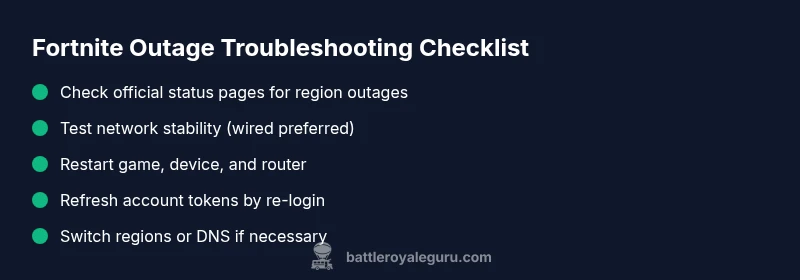
Start with the simplest checks. Verify the official Fortnite status page and social channels for any active outages in your region. Restart the game, console/PC, and router to clear transient issues. Test a wired connection if you’re on Wi‑Fi, and consider disabling VPNs or proxies that may interfere with routing. Log out and back in to refresh authentication tokens, then clear the game's cache or reinstall the client if you suspect a corrupted install. Finally, try connecting from a different region or device to see if the problem is localized.
Diagnostic flow: symptom → diagnosis → solutions
If you encounter a failure to connect, start with the symptom and check the status page. Diagnosis: outage or regional routing issue. Solution: wait if outage is active, or switch regions and test a direct connection. If you see long queues but the servers are up, diagnosis points to matchmaking load. Solution: limit concurrent sessions, retry during off-peak hours, or use a different platform where queues are shorter. For persistent errors after cache clear and reinstall, diagnosis suggests client-side corruption. Solution: reinstall or repair the game while preserving account data.
Step-by-step fixes for the most likely issue
- Check outage status and tweet from official channels; if outage exists, set expectations and monitor.
- Restart everything: game, platform, router, and modem; re-test after a full power cycle.
- Hard reset the game cache: on PC, delete cache files; on consoles, use the built-in storage options to clear cache.
- Log out of your account and sign back in to refresh tokens.
- Test a wired Ethernet connection and temporarily disable VPNs to improve routing.
- If issues persist, switch regions or DNS to a known-good resolver and re-test.
- Reinstall Fortnite if nothing else works, then re-launch and sign in. Tip: document each step with timestamps to share with support if needed.
Estimated time: 60-90 minutes
Safety, accounts, and long-term resilience
Safety first: never share your account credentials, and beware of phishing attempts that mimic Fortnite support. If you suspect a security breach, contact Epic Support directly and enable two-factor authentication. To reduce future outages, keep your device and app updated, back up settings, and use reliable network hardware. Finally, implement a simple monitoring routine: check status pages weekly, run a quick network health test, and log any recurring symptoms to identify patterns early. The Battle Royale Guru team emphasizes proactive maintenance to keep your Fortnite sessions smooth and enjoyable.
Steps
Estimated time: 60-90 minutes
- 1
Verify outage status
Check the official Fortnite status page and social channels to confirm if an outage is active in your region. If yes, plan alternate activities and monitor updates.
Tip: Bookmark the status page for quick scans during future outages. - 2
Test network basics
Restart your router, modem, and device. Run a quick speed test and check for packet loss or high latency in other apps.
Tip: Prefer a wired Ethernet connection when possible. - 3
Refresh your game client
Quit Fortnite completely, clear the game cache (where applicable), and relaunch. If on PC, verify files; on consoles, reinstall cache if offered.
Tip: Always back up important data before reinstalling. - 4
Re-authenticate and re-login
Log out of your account, then sign back in to refresh authentication tokens that can block session creation.
Tip: Use two-factor authentication to protect your account during sign-in bursts. - 5
Try a different routing path
Switch to a wired connection, disable VPNs, or temporarily change DNS settings to see if routing improves.
Tip: Document results to identify the best working setup. - 6
Switch regions or test another device
If possible, try connecting from a different region or device to isolate whether the issue is regional or device-specific.
Tip: Keep a log of which regions/devices work best. - 7
Reinstall if nothing else works
As a last resort, reinstall Fortnite and perform a clean sign-in to verify a clean client environment.
Tip: Only reinstall after cleaner options; corrupt installs are rare but impactful.
Diagnosis: Players report ongoing connectivity issues, matchmaking delays, or login failures.
Possible Causes
- highServer outages or overload
- mediumRegional routing issues or DDoS mitigation
- lowCorrupted game data or outdated client
Fixes
- easyCheck official status page and downtime tracker
- easyRestart game, device, and router; clear cache
- mediumSwitch regions or adjust DNS if problems persist
Questions & Answers
What should I check first when Fortnite is down?
Start with the official status page and your network. If an outage is active, wait for updates. If not, test connectivity, restart devices, and refresh the game data.
Check the status page and your network first, then restart devices and refresh the game data.
Why can't I join matches even when the servers are up?
This can be caused by matchmaking load, regional routing, or temporary server hiccups. Try switching regions or testing a different device.
It could be matchmaking load or routing; try a region switch or another device.
How long do outages typically last?
Outages vary by cause and patch timing. Monitor the status page and community channels for real-time updates and planned maintenance windows.
Outages vary; watch the status page for real-time updates.
Does reinstalling Fortnite fix the issue?
Reinstalling can fix corrupted files, but it is usually a last resort after simpler steps have failed. Start with cache clearing and file verification.
Reinstall can help if files are corrupted, but try other fixes first.
Can changing DNS help improve routing?
Yes, temporarily changing to a more reliable DNS can improve routing and reduce ping, especially if your ISP has flaky routing.
DNS changes can improve routing and reduce ping in some cases.
When should I contact Fortnite support?
If issues persist after all basic troubleshooting, document steps taken and contact official support with logs. They can escalate server-side investigations.
If problems persist after fixes, contact support with your logs.
Watch Video
Key Points
- Check official status first and stay updated.
- Isolate the issue with quick network checks.
- Follow the diagnostic flow before contacting support.
- Preserve account safety and data during fixes.
- Plan for outages around patches and peak hours.