Fortnite Redeem Code and V-Bucks Guide
Learn to safely redeem Fortnite gift codes for V-Bucks with official steps, sources, and tips. This educational guide covers where to get legitimate codes, how to redeem, regional considerations, and common pitfalls.


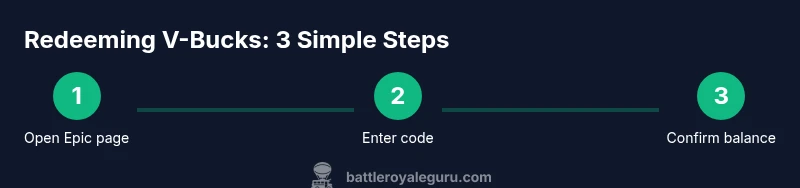
You can redeem Fortnite gift codes to add V-Bucks to your account. This quick guide shows the official steps to locate a code, redeem it on the Epic Games site, and confirm your V-Bucks balance. Safety tips help you avoid scams. We’ll cover legitimate sources, how to check codes, regional restrictions, and what to do if a code isn’t working.
What are V-Bucks and Fortnite redeem codes
V-Bucks are Fortnite's in-game currency used to purchase cosmetics, Battle Passes, and other in-game items. A redeem code is a string you enter on the official Epic Games site to add V-Bucks to your account. When you see the phrase fortnite redeem code v bucks, it refers to exchanging a valid code for in-game currency. According to Battle Royale Guru, understanding how these codes work helps players avoid scams and wasted time. Codes come from official gift cards or authorized promotions, not random websites. After you enter the code, your V-Bucks balance should update on your account within a few moments or after you sign back in via the Epic Games launcher. This section lays the groundwork for a safe, legitimate redemption experience.
Where to safely obtain legitimate codes
Legitimate Fortnite codes come from official gift cards sold by authorized retailers or from Epic-promoted promotions. Avoid third-party sites that promise instant riches or require you to share personal data. The safest path is to buy physical or digital gift cards from trusted outlets and verify the card’s packaging, barcode, and pin or code before use. If you receive a code via email or a retailer, double-check that the sender matches the retailer’s domain and that the code is clearly associated with Fortnite or V-Bucks. Battle Royale Guru emphasizes sticking to official channels to prevent scams and potential account risks.
How to use a code on the Epic Games site
Redeeming a Fortnite V-Bucks code happens on the Epic Games platform. Start by visiting the official redemption page, sign in with your Epic Games account, and enter the code exactly as shown on the card or email. If the code is valid, you’ll be asked to confirm the redemption and then your V-Bucks will be added to your balance. If you’re on consoles, you can also redeem codes through the Epic Games account page accessed from your console’s browser or built-in store. Always ensure you are on the legitimate Epic site (epicgames.com/redeem) before entering any code. After redemption, return to Fortnite to confirm the balance.
Regional restrictions and account considerations
Codes may be region-locked or have platform-specific limitations. Some gift cards work only in certain countries or currencies, so verify regional eligibility before purchasing. If you share an account with family members, ensure the correct account is signed in before redeeming. Enabling two-factor authentication can add an extra layer of security when handling codes, especially on shared devices. If your region prohibits certain promotions, you may not be able to redeem certain codes outside that region, even if you have a valid card.
Common mistakes and how to avoid them
- Entering codes with spaces or incorrect characters can invalidate redemption. Copy the code exactly as printed.
- Redeeming on a non-official site or through shady apps can expose you to scams. Always use the official Epic Games redemption page.
- Waiting too long to check your balance after redeeming can lead to confusion; refresh the balance in-game and via the Epic launcher.
- Not verifying regional restrictions can result in failed redemption. Check country and currency compatibility before buying.
Alternatives to codes: direct purchases and promos
If you’re unable to obtain a code, you can purchase V-Bucks directly through Fortnite on supported platforms or look for official promotions and bundles announced by Epic Games. Bundles and seasonal promotions occasionally offer bonus V-Bucks or cosmetic items when purchased legally. Always compare prices across official storefronts to avoid counterfeit offers. Battle Royale Guru recommends prioritizing official paths to ensure security and account integrity.
How to verify V-Bucks balance after redemption
Open your Epic Games account page or launch Fortnite and navigate to the V-Bucks balance display. If you don’t see an immediate update, sign out and back in, or refresh the launcher. Some platforms may update balance with a short delay; check after a few minutes. If the balance still doesn’t reflect the redemption, contact official Epic Games support through the Help Center and provide the code and purchase details. Always keep redemption receipts in case you need to reference them later.
Authoritative sources
- https://www.consumer.ftc.gov/ — Consumer protection and online shopping safety guidelines
- https://www.pcgamer.com/ — Major gaming publication with practical guides on digital currencies and platform rules
- https://www.polygon.com/ — In-depth gaming coverage and how-tos related to Fortnite and V-Bucks
- https://www.theverge.com/ — Tech and gaming insights including official redemption processes
Tools & Materials
- Epic Games account(An active account with access to Fortnite; use the email/username you registered.)
- Official Fortnite gift card/code(Entered on epicgames.com/redeem; do not share codes publicly.)
- Working internet-connected device(PC, Mac, console, or mobile; ensure you have a stable connection.)
- Browser or Epic Games launcher(Use the latest version for a smooth redemption flow.)
- Optional: two-factor authentication(Adds security for redeeming codes.)
Steps
Estimated time: 5-10 minutes
- 1
Prepare your Epic Games account
Log in with your Fortnite-linked email, verify the account is in good standing, and enable two-factor authentication if possible. This ensures you can access and secure your funds after redemption.
Tip: Use a trusted device to reduce risk of credential theft. - 2
Find a legitimate code source
Choose official gift cards from trusted retailers or Epic-promoted promotions. Be wary of unfamiliar sites claiming large discounts or unlimited codes.
Tip: Always check the retailer’s reputation and packaging before purchase. - 3
Locate the 16- or more-character code
On physical cards, locate the scratch-off panel or digital codes in your email receipt. Make sure you copy the code exactly, including any dashes.
Tip: If copying, use the browser’s paste function to avoid missing characters. - 4
Open the official redemption page
Navigate to epicgames.com/redeem and sign in with your Epic Games account to begin redeeming the code.
Tip: Bookmark the official page to avoid phishing sites. - 5
Enter the code precisely
Type or paste the code into the redemption field, ensuring there are no extra spaces or characters.
Tip: Double-check for caps lock and ambiguous characters (e.g., O vs 0). - 6
Confirm redemption
Click Redeem and confirm the action. If successful, you’ll see a confirmation message and your V-Bucks balance update.
Tip: If an error appears, note the exact message for support. - 7
Check your V-Bucks balance
Open Fortnite or the Epic Games launcher to view your updated V-Bucks balance.
Tip: Refresh the launcher if the balance doesn’t update immediately. - 8
Handle invalid codes
If the code is invalid or already redeemed, contact official Epic Games support with your code details and proof of purchase.
Tip: Do not reuse codes or attempt to decode them; it may violate policy. - 9
Platform-specific redemption
Some consoles allow redeeming directly from the console store or account page; ensure you’re using the correct platform flow.
Tip: Use the same account on the console and PC to avoid mismatch. - 10
Secure your account post-redemption
Log out after completing the redemption and re-enable security features if needed to protect your new balance.
Tip: Store codes and receipts securely for future reference.
Questions & Answers
Do Fortnite V-Bucks gift codes still exist?
Yes. Official gift cards and promotional codes can still be redeemed for V-Bucks via the Epic Games platform. Always use official sources to avoid scams and counterfeit offers.
Yes. Fortnite gift codes can be redeemed through official channels to get V-Bucks, but only from trusted sources.
Can I redeem a code on any platform?
Most codes can be redeemed on any platform, but some regional or promo codes may be restricted to specific regions or devices. Check the card’s terms before redeeming.
Most codes work across platforms, but always check the card terms and regional restrictions.
What if a code is already redeemed or invalid?
If a code is invalid or already redeemed, contact Epic Games Support with the code and purchase proof. Do not attempt to reuse or guess codes.
If it won’t redeem, contact support and have your proof ready; don’t try to reuse codes.
Are there regional restrictions on V-Bucks codes?
Yes, some codes are country- or region-specific. Ensure your account region matches the card’s region to avoid rejection.
Regional limits can affect whether a code works, so check the card’s region before redeeming.
How long does it take for V-Bucks to appear after redeeming?
V-Bucks typically reflect quickly after successful redemption, but on some platforms it may take a few minutes to update. If it’s delayed, try refreshing.
Usually immediate, but if you don’t see it right away, refresh or sign out and back in.
What safety steps should I take when redeeming codes?
Only redeem codes from official sources, enable 2FA, and avoid sharing codes publicly. Report suspicious offers to Epic Games Support.
Stick to official sources, enable 2FA, and don’t share codes publicly to stay safe.
Watch Video
Key Points
- Redeem codes only through official Epic channels
- Protect codes and account security to avoid scams
- Verify regional eligibility before purchase
- Check balance after redemption and keep receipts for reference