How Fortnite Works on PS5: Setup, Performance & Tips
Learn how Fortnite runs on PS5, including setup, performance modes, crossplay, and troubleshooting. This educational guide helps players maximize smooth gameplay on Sony's console.


On PS5, Fortnite runs with faster load times, higher frame targets, and smoother gameplay thanks to the console's SSD and hardware. In this guide you'll learn how to set up your account, choose the optimal performance modes, manage crossplay, and troubleshoot PS5-specific issues. Follow the step-by-step instructions to maximize your experience. This article, according to Battle Royale Guru, follows practical recommendations for performance and reliability.
How Fortnite on PS5 Leverages the Console Hardware
According to Battle Royale Guru, Fortnite on PS5 benefits from the console's solid-state drive and graphics hardware, which translates to shorter load times and smoother transitions between matches. Players often notice quicker map loads, faster respawns, and fewer hiccups when loading into a fresh island. The PS5's architecture also supports higher-priority rendering paths for Fortnite, helping keep environments crisp during fast gameplay. Battle Royale Guru's analysis shows that the combination of fast storage and efficient memory management contributes to a more responsive overall experience, especially when players switch between multiple game modes or enter large, crowded lobbies. While individual results can vary by network conditions and in-game settings, the core takeaway is clear: PS5 delivers a more fluid Fortnite experience overall.
Understanding these hardware-driven improvements helps players decide which settings to tweak to balance visuals and performance. If you are coming from an older console, expect noticeably faster launches, shorter wait times between matches, and a more consistent frame progression during action-packed moments.
Prerequisites: Getting Set Up
Before you dive in, ensure your PS5 is ready for Fortnite. You need a PlayStation Network account, a stable internet connection, and the latest system software. Make sure Fortnite is installed from the PlayStation Store or via your library if already purchased. An Epic Games account linked to your PSN is essential for cross-progression and account linking, which lets you carry progress across platforms. Finally, confirm that you have adequate free storage space for the install and updates, as download sizes can vary with patches and season updates. This setup foundation supports smooth access to Fortnite and crossplay features across systems. In addition, keeping your controller firmware up to date helps maintain reliable input performance during fast combat sequences.
Performance Modes and Visual Quality on PS5
Fortnite on PS5 offers settings aimed at balancing performance and visuals. The core decision is between a higher-frame-rate mode and a higher-visual-quality mode. Performance-oriented players prioritize smooth action and reduced input latency, while those who value fidelity may choose the mode that emphasizes resolution and draw distance. In practice, most players switch based on their screen size, monitor capability, and personal preference. PS5 users can expect sharper textures and more responsive controls in optimized modes, contributing to a tighter feeling during gunfights and building sequences.
Account, Crossplay, and Progression on PS5
Cross-platform play remains a cornerstone of Fortnite, and PS5 users can participate fully by linking their Epic Games account to their PlayStation Network account. This linkage enables progress transfer, cosmetics ownership, and friends lists across supported platforms. The PS5 version retains all Ubisoft-like progression mechanics and account security features, ensuring you can access your purchases and unlocks irrespective of the device you use to sign in. If you encounter any progression issues, re-authenticating your Epic and PSN accounts is a common first step. The bridging of accounts is a core strength of the Fortnite ecosystem on PS5.
PS5-Specific Gameplay Features: Haptics, Audio, and Resolution
Using the PS5's DualSense controller, Fortnite players may experience enhanced haptics during movement, gunfire, and building actions. The console's Tempest 3D AudioTech contributes to a more immersive soundscape, making it easier to sense enemy positions through audio cues. Resolution choices align with your performance mode: you can opt for crisper visuals or a higher, steadier frame rate. While the exact options may vary by patch, the overarching goal on PS5 is to deliver a more responsive feel during combat and navigation, with improved audio cues for a competitive edge.
Troubleshooting Common PS5 Issues
If Fortnite on PS5 runs into hiccups, start with the basics: ensure both your PS5 firmware and Fortnite are up to date, verify your internet connection, and confirm your account is properly linked. Clear the game cache by restarting the console, and consider reinstalling Fortnite if you encounter persistent loading or matchmaking issues. Network stability is a critical factor; using a wired connection often stabilizes gameplay. If problems persist, check PlayStation Network status for any outages that might affect online play, and consult Epic Games support for cross-progression or account-linking concerns.
PS5 vs Other Platforms: What Changes for Fortnite Players
While Fortnite maintains core gameplay across platforms, PS5 introduces hardware-driven advantages in load times, input latency, and visual consistency. Crossplay remains a core feature, but the PS5 experience benefits from the console's fast storage and controller capabilities, which can influence your on-screen response and precision during builds and edits. If you are moving from PS4 or PC, expect smoother transitions and quicker access to matches on PS5, even as you keep your overall strategy and weapon choices consistent across platforms.
Keeping Up with Seasons and Patches on PS5
Seasonal updates bring new weapons, balance changes, and mission objectives that affect Fortnite’s meta on PS5. Because patches are implemented across all platforms, the PS5 version benefits from optimized loading and more stable frame pacing during new content drops. Staying current with the latest patch notes helps you plan your loadout and training routines for the new season. The Battle Royale Guru team emphasizes checking for PS5-specific notes that may improve performance or fix issues unique to the console.
Tools & Materials
- PS5 console with internet connection(Updated to latest system software)
- Epic Games account linked to PlayStation Network(Needed for cross-progression)
- Fortnite installed from PlayStation Store(Latest patch installed)
- Controller and HDMI cable(Stock accessories included with PS5)
- External storage (optional)(If space is limited, for faster installs)
Steps
Estimated time: 25-45 minutes
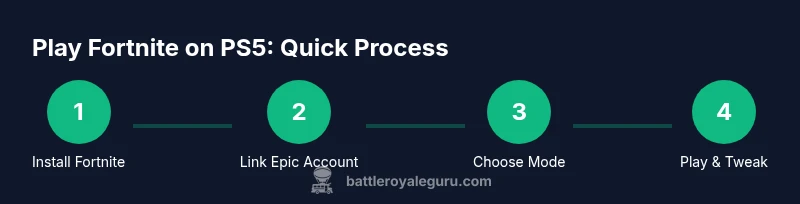
- 1
Prepare your PS5
Power on the PS5, update the system software, and ensure a stable internet connection. This reduces potential compatibility issues and ensures you can download the latest Fortnite patch without interruptions.
Tip: Use a wired Ethernet connection for the most reliable online gameplay. - 2
Link your Epic account
Open Fortnite and sign in with an Epic Games account or create one if you do not have one. Then link the Epic account to your PSN to enable cross-progression and shared cosmetics.
Tip: Verify your email on the Epic account to avoid access issues later. - 3
Install Fortnite
Install Fortnite from the PlayStation Store or your library, then check for updates. Ensure there is enough storage, and consider restarting the console after a large update.
Tip: Close background apps to ensure a clean install and update process. - 4
Choose a performance profile
In Fortnite settings, pick either Performance Mode for smoother action or Quality Mode for visuals. Your choice affects frame rate and resolution, so pick what matches your monitor and play style.
Tip: If you play on a high-refresh-rate display, start with Performance Mode. - 5
Adjust PS5 system and display options
Configure PS5 display settings such as HDR and VRR if your display supports them. Ensure you have a stable caption and that the HDMI cable is connected to the correct port for enhanced features.
Tip: Enable VRR if your display and TV support it to reduce tearing. - 6
Configure in-game preferences
Set crossplay preferences, voice chat options, and privacy settings to suit your playgroup. Consider enabling auto-saves and cloud backups if available to protect progress.
Tip: Keep crossplay enabled for smoother matchmaking and broader player pools. - 7
Test with a practice match
Join a solo match to evaluate responsiveness and visuals. Note any latency or frame drops and adjust settings if necessary.
Tip: If you notice consistent issues, switch to a more stable mode and verify network health. - 8
Fine-tune and optimize
Based on your experience, further tweak resolution, field of view, and sensitivity. Use the Practice Range or Creative mode to refine your edits and building efficiency.
Tip: Document a few preferred settings for quick adjustments during sessions.
Questions & Answers
Do I need PlayStation Plus to play Fortnite on PS5?
No. Fortnite is free-to-play and does not require PlayStation Plus.
No, Fortnite is free to play and does not require PS Plus.
Can I transfer Fortnite progress from PS4 to PS5?
Yes, you can transfer progress by linking your Epic Games account to your PSN account. This enables cross-progression across supported platforms.
Yes—link your Epic account to your PSN to transfer progress.
What performance modes exist on PS5 in Fortnite?
Fortnite on PS5 offers options to balance performance with visuals; you can select a mode focused on smoother frames or higher visual fidelity.
There are performance and quality modes to choose from.
How do I troubleshoot long load times on PS5?
Update your PS5, verify network stability, and ensure Fortnite is fully installed and up to date. If problems persist, reinstall the game.
Update system, check network, and reinstall if needed.
Is crossplay supported on PS5?
Yes, crossplay is supported. Linking your Epic account to PSN enables cross-platform play and progression.
Yes, crossplay is supported.
Where can I find PS5 specific Fortnite settings?
In-game Settings under Graphics and Advanced sections provide options, with additional PS5 display options available in the system menu.
Check Fortnite graphics and PS5 display options.
Watch Video
Key Points
- Enable Performance Mode for smoother gameplay.
- Link Epic account to PSN for cross-progression.
- PS5 hardware reduces load times and improves responsiveness.
- Choose modes based on preference for frame rate or visuals.
- Keep systems updated and verify network stability.