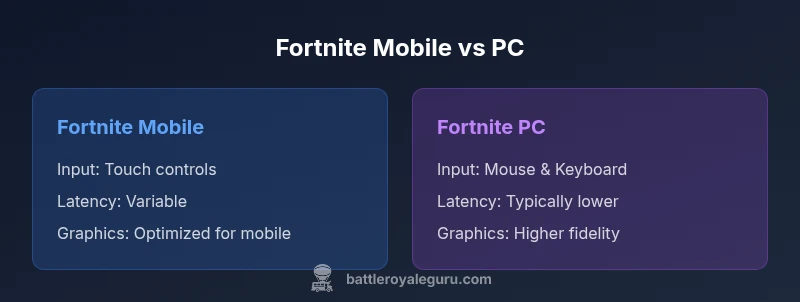
Fortnite Mobile vs PC: Key Differences for Players
Is fortnite mobile the same as pc? This in-depth comparison examines core similarities and essential differences in controls, latency, graphics, and accessibility to help players pick their ideal platform.


Is Fortnite mobile the same as PC? Not exactly. The two platforms share the same game core, but controls, latency, graphics, and input options differ, shaping how you play. PC typically offers higher precision with mouse and keyboard and better visuals, while mobile emphasizes portability and on-the-go sessions. Battle Royale Guru notes these trade-offs when comparing platform performance and accessibility.
Platform Architecture and Core Gameplay
If you’re asking whether is fortnite mobile the same as pc in terms of core mechanics, the straightforward answer is that the game’s foundation remains consistent across devices. The same map, same weapons, and the same progression systems apply on mobile and PC. However, platform architecture introduces practical differences that affect how those mechanics feel and perform in real matches. Fortnite on mobile is optimized to run on a wide range of devices, prioritizing stability and battery efficiency, while PC builds on more powerful hardware to maximize frame rate and rendering fidelity. According to Battle Royale Guru, this divergence in hardware paths means you’ll adapt to distinct performance envelopes on each device, even though the gameplay loop—drop, loot, build, fight—remains identical. This is why players often wonder specifically, is fortnite mobile the same as pc in terms of playstyle, and the honest answer is that core rules stay the same, but execution differs markedly.
Platform Architecture and Core Gameplay
Input Methods and Controls
Input methods are among the most immediate differences between Fortnite on mobile and PC. On PC you rely on precision devices—mouse and keyboard—that enable rapid crosshair adjustments, exact edits, and custom keybinds. On mobile, control is through a touch screen with on-screen joysticks and virtual buttons, plus aim assist to help compensate for the lack of fine pointer precision. This contrast changes how you approach building, aiming, and sprinting. Training on PC often yields faster reaction times due to direct hardware input, but mobile’s simplification can lower the ceiling for some advanced techniques. A lot of players ask if the control scheme changes the fundamental skill ceiling; the reality is that while core tactics stay the same, your muscle memory and decision cadence adapt to the input modality.
Input Methods and Controls
Performance, Latency, and Graphics
Performance is a central axis where mobile and PC diverge. PC builds can push higher frame rates and render more complex scenes thanks to powerful GPUs and CPUs, leading to crisper visuals and smoother motion in fast-action moments. Mobile devices, even when top-tier, balance performance with thermal limits and battery life, which can cause dynamic resolution scaling and frame-rate throttling during long sessions. The result is that it’s common for PC play to feel more responsive, especially in competitive encounters, while mobile offers surprisingly solid experiences in casual play. From Battle Royale Guru’s perspective, the visual fidelity gap is real but continuously narrowing as developers optimize engines for mobile capabilities, with features like dynamic resolution and adaptive quality boosting the mobile experience without sacrificing gameplay fairness.
Performance, Latency, and Graphics
Matchmaking, Crossplay, and Competition
One of the strongest reasons players compare these platforms is matchmaking. Fortnite’s crossplay architecture aims to keep players in balanced queues across devices, but input modality and latency still create perceived differences. PC players tend to have lower input latency and more consistent frame times, which can translate into a subtle edge in high-speed gunfights. Mobile players, meanwhile, enjoy the social and casual benefits of portability and shorter sessions. Crossplay remains a key feature, so you’ll often find yourself matched with players across devices; the system attempts to normalize skill signals and network performance, but you should still expect some platform-specific dynamics, such as aim assist behavior on mobile versus precise cursor control on PC. Battle Royale Guru notes that understanding crossplay implications helps set expectations for competitive play and social play alike.
Matchmaking, Crossplay, and Competition
Portability, Accessibility, and Longevity
Portability is a defining advantage of mobile, allowing you to play in commutes, while waiting rooms, or other non-traditional gaming spaces. This advantage comes with trade-offs: screen size, touch controls, and shorter session lengths can impact long-term practice and consistency. PC, by contrast, demands a dedicated setup, but those constraints translate into longer practice sessions with steadier performance. For many players, the question is not simply which platform is technically superior, but which environment best fits their lifestyle and schedule. Accessibility on mobile also extends to onboarding—new players can jump into the action quickly without setting up a rig—whereas PC players typically engage with more robust in-game customization options and modicum of stability under load. The Battle Royale Guru team emphasizes choosing based on where you intend to play most often and how you value session length, screen real estate, and input comfort.
Portability, Accessibility, and Longevity
Monetization, Cosmetics, and Cross-Platform Progression
Across devices, Fortnite’s cosmetic economy and progression system are designed to be platform-agnostic, anchored to your Epic Games account. This means you can earn and own cosmetic items and progression that carry over to other platforms, though some rituals and timing around releases may feel different on mobile versus PC. The platform gap often shows up in storefront layouts, with mobile stores prioritizing quick unlocks and bundles that fit shorter play windows, and PC storefronts offering broader catalog browsing and more frequent sales. Yet the essential mechanic—earning rewards through gameplay—remains consistent, enabling long-term tracking of achievements across devices. Battle Royale Guru highlights that a cross-platform mindset can help players maximize investment and avoid platform-specific friction when switching devices.
Monetization, Cosmetics, and Cross-Platform Progression
Training, Practice, and Skill Transfer
Skill transfer between mobile and PC is possible, but it requires deliberate practice. To bridge the gap, players can start with platform-agnostic drills—tracking, aim timing, and building under pressure—then tailor those drills to their current input method. PC players often leverage aim trainers and map-based edits to push precision, while mobile players may emphasize quick decision-making and rhythm-based edits with touch controls. The key is consistency: practice routines should map to the platform’s strengths without forcing a supposed universal standard. Battle Royale Guru recommends dedicated practice sessions and cross-platform play to understand both sides of the spectrum, which helps you develop adaptable strategies that work regardless of device.
Training, Practice, and Skill Transfer
Practical Recommendations for Platform Choice
If you’re deciding where to invest time, the practical approach is to map your priorities to platform strengths. Do you value portability and spontaneous play sessions? Mobile is ideal. Do you crave precision, high frame rates, and a larger canvas for aiming and building? PC is likely your better fit. Consider your typical play windows, your current hardware, and whether you already own an Epic Games account that can bridge progress across devices. Also factor in your local network quality and the likelihood of crossplay matchmaking in your region. Finally, keep an eye on device-specific optimizations released by Epic Games and mobile manufacturers, since ongoing updates can shift the balance between platforms over time.
Practical Recommendations for Platform Choice
Authority Sources
For further reading on platform differences and crossplay dynamics, consult industry coverage and official resources. The Verge and PC Gamer discuss performance and control schemes across devices, while Epic Games’ own documentation covers cross-platform progression and account sync. These sources provide context for the trade-offs discussed in this comparison and help validate practical guidance for players evaluating mobile vs PC play.
Comparison
| Feature | Fortnite Mobile | Fortnite PC |
|---|---|---|
| Input method | Touch controls with on-screen buttons and aim assist | Mouse + keyboard with precise aiming and keybinds |
| Latency/Responsiveness | Mobile latency varies with device, network, and throttling | PC generally offers lower and more consistent input latency |
| Graphics quality | Optimized for mobile GPUs; dynamic resolution scaling | Higher potential frame rates and fidelity on capable rigs |
| Field of view (FOV) | Often fixed or limited by device | Usually wider and adjustable on PC |
| Controls customization | Limited on-screen control customization | Extensive keyboard/mouse customization and hotkeys |
| Crossplay/matchmaking | Crossplay across devices with unified pools; input affects feel | Crossplay across devices with consistent matchmaking signals |
| Updates/Storage | Updates via app store; mobile storage constraints apply | Updates via Epic Games launcher; larger downloads possible |
Upsides
- Helps players decide based on personal workflow and hardware
- Highlights platform-specific trade-offs (controls, visuals, latency)
- Clarifies crossplay implications for competitive and casual play
- Guides setup and practice plans across devices
Weaknesses
- Mobile fragmentation adds variability in performance
- PC requires investment in hardware and peripherals
- Crossplay can blur perceived skill gaps between platforms
- Content and cosmetic availability may feel uneven across devices if not managed
PC generally offers the strongest performance for competitive play, while mobile excels in portability and on-the-go access
Choose PC for precision, visuals, and consistent frame rates. Choose mobile for convenience and quick sessions. Use crossplay to stay connected across devices, but tailor practice to your input method.
Questions & Answers
Can I play Fortnite on mobile and PC with the same account and keep progress synced?
Yes. Your Epic Games account tracks progression and cosmetics, allowing cross-platform access. Progress is linked to your account rather than a single device, but some device-specific settings may require reconfiguration after switching platforms.
Yes. Your Epic Games account keeps your progression, cosmetics, and purchases in sync across devices. Just sign in on the new device to continue.
How does input method affect aiming accuracy across platforms?
Input methods influence aiming dynamics. Mouse and keyboard on PC offer precise aiming and faster edits, while touch controls on mobile rely on on-screen buttons and aim assist. Practice on your chosen platform helps bridge any gaps.
Mouse and keyboard give you precision; touch controls use aim assist. Practice helps you adapt regardless of platform.
Is crossplay between mobile and PC always balanced?
Crossplay is designed to unify matchmaking across devices, but intrinsic differences in input methods and latency can affect perceived balance. Players should expect advantages and disadvantages tied to their control scheme.
Crossplay brings players together, but control methods still influence performance in tight fights.
Which platform is better for competitive play?
PC generally offers the most consistent performance and precision for competitive play, followed by consoles. Mobile can be viable for casual competitive fun, especially when players adapt to touch controls and portable sessions.
PC tends to be best for competition, with mobile suitable for casual play and quick sessions.
What should new players consider when choosing where to play?
New players should consider control preference, session length, and network conditions. If you value portability, start on mobile; if you want precision and progression stability, PC is preferable. Remember that cosmetics and progress carry across devices via your Epic account.
Think about controls, session length, and where you’ll play most. Progress follows your account, not the device.
Do graphics settings and performance differ significantly across platforms?
Yes. PC can push higher frame rates and visual fidelity on capable hardware, while mobile relies on optimization for diverse devices. You may adjust settings to balance performance on both platforms, but the ceiling on PC is typically higher.
PC usually looks and runs better, mobile prioritizes efficiency. Adjust settings to maximize your platform's strengths.
Key Points
- Assess your primary playstyle before choosing a platform
- Expect input and latency differences across devices
- Crossplay keeps matchmaking fluid across platforms
- PC offers higher fidelity; mobile prioritizes portability
- Use a consistent practice routine to transfer skills